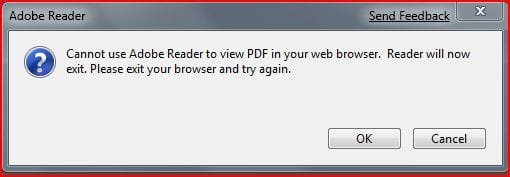
Strange Adobe Reader Window

Saltgrass

New member
Guru
Local time
3:06 AM
Messages
1,031
Today for the first time I noticed a small window titled "Adobe Reader" show up on my desktop when I go to my bank's website. The window only has a Question Mark and an OK button with no close option.

At the same time, I cannot seem to see my statements, which are adobe pdf files, even though the protected mode is off.

Perhaps it is a coincidence I installed Photoshop CS4 last night, but probably not.

I will wait until tomorrow to do a restore to see if anyone has any other suggestions. Or anything to check out for the beta.
 

My Computer My Computer

Computer Manufacturer/Model Number
Homebuilt
OS
Windows 7 x64
CPU
i7-2600K
Motherboard
Asus P8Z77-v Pro
Memory
8 G
Graphics Card(s)
GTX 480
Sound Card
Onboard
Monitor(s) Displays
LG W2753V
Screen Resolution
1920x1080
Hard Drives
Crucial M4 128 G SSD
Try to disable de adobe plugin on the browser to open the pdf with the adobe program and not inside de browser.
I had the same problem in firefox and solved this way, maybe an adobe compatibility issue with windows 7, but nothing relative to CS4 install.

Saludos.
 

My Computer My Computer

OS
Windows 7 x64
CPU
Intel [email protected]
Motherboard
Gigabyte EP35-DS3
Memory
2x2GB@1066Mhz DDR2 Kingston Hyperx
Graphics Card(s)
Asus Nvidia 9400GT 512MB
Monitor(s) Displays
Benq 24" G2400WD
Screen Resolution
1920x1200
Hard Drives
250GB WDC WD2500AAJS SATA
250GB MAXTOR STM3250820AS SATA
Case
TACENS SAGITTA II LUX
Keyboard
Logitech Wave Pro
Mouse
Logitech MX 1100
Internet Speed
12mbs/1mbs @ R
Good idea, but did not help. The window only shows up when I go to an https: page, like a bank. No .pdf files are being opened at the time.

Since the first time I saw it was today, which was also the first time I have gone to a secure site since I installed CS4, I do believe it is related to that. Maybe just something installed along with the Photoshop install. Of course, there was a warning during the install about needing XP or greater ;)

-----------------------
Well, maybe you are right. I checked the add ons again and there was a second add on. One was an Adobe Link Helper and one Adobe PDF Reader. The Reader seems to have stopped it. I believe the program is AcroBroker.exe, but not sure.
 
Last edited:

My Computer My Computer

Computer Manufacturer/Model Number
Homebuilt
OS
Windows 7 x64
CPU
i7-2600K
Motherboard
Asus P8Z77-v Pro
Memory
8 G
Graphics Card(s)
GTX 480
Sound Card
Onboard
Monitor(s) Displays
LG W2753V
Screen Resolution
1920x1080
Hard Drives
Crucial M4 128 G SSD
Just some additional information that might be related. I mentioned I was having problems seeing or downloading my bank statements in .pdf form. It turns out the statements were being stored in a folder on my computer, but when I did get to where I could see them, clicking on the save button did not seem to work. I found the files in the folder below but was unable to save them to a folder of my choosing from within IE/Adobe Reader 9.

The strange Adobe pop-up window might be some type of indication of the problem, but since it contained no information, it wasn't very helpful :shock:

I got this window after I changed from Adobe Reader 9 to 8.13. I guess I now know what the blank one was trying to tell me.

I started another thread to see if other folks are having such a problem.

C:\Users\YourUser\AppData\Local\Microsoft\Windows\Temporary Internet Files\Low\Content.IE5\
 

Attachments

  • Capture.JPG
    Capture.JPG
    19 KB · Views: 146
Last edited:

My Computer My Computer

Computer Manufacturer/Model Number
Homebuilt
OS
Windows 7 x64
CPU
i7-2600K
Motherboard
Asus P8Z77-v Pro
Memory
8 G
Graphics Card(s)
GTX 480
Sound Card
Onboard
Monitor(s) Displays
LG W2753V
Screen Resolution
1920x1080
Hard Drives
Crucial M4 128 G SSD
Today for the first time I noticed a small window titled "Adobe Reader" show up on my desktop when I go to my bank's website. The window only has a Question Mark and an OK button with no close option.

At the same time, I cannot seem to see my statements, which are adobe pdf files, even though the protected mode is off.

Perhaps it is a coincidence I installed Photoshop CS4 last night, but probably not.

I will wait until tomorrow to do a restore to see if anyone has any other suggestions. Or anything to check out for the beta.

I was having the same problem on Windows 7 RC, 7100 x64 (small window titled Adobe Reader with only question mark, OK button, and red Close button) when I tried to view PDF files in the browser. I went to the Adobe website and started a 9.1 download again and was offered the option to repair the existing install which I allowed and this corrected the problem.
 
Last edited:

My Computer My Computer

Computer type
PC/Desktop
Computer Manufacturer/Model Number
Custom by Charbroil57
OS
Windows 7 Home Premium x64 (clean install 8/05/2015)
CPU
AMD Phenom II X2 550 Black Edition 3.1GHz
Motherboard
Gigabyte GA-MA790X-UD4P AM3/AM2+/AM2 AMD 790X ATX AMD
Memory
8 GB (4 x 2 GB) Corsair 6400C5 800 MHz
Graphics Card(s)
BFG 512MB GDDR3 9600GT OC
Sound Card
Realtec HD Audio 5.1
Monitor(s) Displays
DVI Viewsonic VA2231
Screen Resolution
1920 x 1080 (1080p)
Hard Drives
1 TB SATA 6G Seagate Barracuda (Boot drive, limited to 3G due to Mobo)
500 GB SATA 3G Seagate Barracuda
500 GB USB Seagate Desktop Drive
PSU
Ultra X4 750w Modular(upgraded)
Case
Antec Sonata
Cooling
Stock (80w CPU)
Keyboard
Microsoft Wireless Desktop Elite
Mouse
Wirless Intellimouse Explorer 2.0
Internet Speed
Xfinity Broadband (Home 75 MB Download)
Antivirus
Norton Internet Security
Browser
Firefox 39 (default) and IE 11
Other Info
SATA HP Lightscribe DVD RW
SATA Samsung Lightscribe DVD RW
I to getting blank box with question mark when i try to open http: tried repairing adobe reader without success, anyone have some clues as to what I should try
 

My Computer My Computer

OS
windows 7 rc
did the 'HTML' or some other web-based extension somehow get tied to adobe?
think i had an error like that a few builds back. check your default file associations.

good luck :thumbsup: (there's no thumbs up emoticon :( )
 

My Computer My Computer

Computer Manufacturer/Model Number
eMachines W3502
OS
Windows 7 Ultimate x32
CPU
Intel Celeron D 3.2 Ghz 533 fsb (LGA 775)
Motherboard
Intel D101GGC
Memory
1 GB (2x512MB) PC-3200 DDR @ 200Mhz
Graphics Card(s)
Nvidia GeForce 9400GT- 1GB
Sound Card
Sound Blaster X-Fi Xtreame Gamer
Monitor(s) Displays
19" LCD HDtv
Screen Resolution
1360x768 @ 60Htz
Hard Drives
SeaGate Barracuda 750GB
SeaGate Barracuda 100GB
Toshiba CD/DVDW/ TS-H552D [DVD+R, DL]
PSU
stock (idk)
Case
The busted remains of the stock case
Cooling
Dust cooled, waitwut?
Keyboard
Stock. Missing a few keys.
Mouse
Logitech LX8 5-btn mouse (wireless)
Internet Speed
TWC 10Mb
Other Info
Keeps going, and going, and going.......

My Computer My Computer

Computer type
PC/Desktop
Computer Manufacturer/Model Number
Custom by Charbroil57
OS
Windows 7 Home Premium x64 (clean install 8/05/2015)
CPU
AMD Phenom II X2 550 Black Edition 3.1GHz
Motherboard
Gigabyte GA-MA790X-UD4P AM3/AM2+/AM2 AMD 790X ATX AMD
Memory
8 GB (4 x 2 GB) Corsair 6400C5 800 MHz
Graphics Card(s)
BFG 512MB GDDR3 9600GT OC
Sound Card
Realtec HD Audio 5.1
Monitor(s) Displays
DVI Viewsonic VA2231
Screen Resolution
1920 x 1080 (1080p)
Hard Drives
1 TB SATA 6G Seagate Barracuda (Boot drive, limited to 3G due to Mobo)
500 GB SATA 3G Seagate Barracuda
500 GB USB Seagate Desktop Drive
PSU
Ultra X4 750w Modular(upgraded)
Case
Antec Sonata
Cooling
Stock (80w CPU)
Keyboard
Microsoft Wireless Desktop Elite
Mouse
Wirless Intellimouse Explorer 2.0
Internet Speed
Xfinity Broadband (Home 75 MB Download)
Antivirus
Norton Internet Security
Browser
Firefox 39 (default) and IE 11
Other Info
SATA HP Lightscribe DVD RW
SATA Samsung Lightscribe DVD RW
I have fixed the problem by opening adobe going into accessibility setup assisstant and Set Adobe to not display in the browser under Adobe's internet settings. seems to working fine now.
 

My Computer My Computer

OS
windows 7 rc
Back
Top