
Strange color at the default windows picture viewer

RenatoP

New member
Local time
9:19 AM
Messages
19
Hey guys,

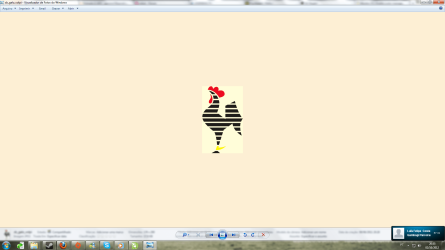
When I open a picture in my computer using the default picture manager it has a strange color as background, it should be white... and the pictures kinda doesn't have the true color.

Using softwares like Photoshop or Corel Draw I can notice a slightly difference between them.

How can I fix that?

Thank you for your help...
 

Attachments
  • st.png
    st.png
    75.5 KB · Views: 14

My Computer My Computer

At a glance

Microsoft Windows 7 Ultimate 64-bit 7601 Mult...Intel(R) Core(TM)2 Quad CPU Q8400 @ 2.66GHz4,00 GBNVIDIA GeForce GTX 460
OS
Microsoft Windows 7 Ultimate 64-bit 7601 Multiprocessor Free Service Pack 1
CPU
Intel(R) Core(TM)2 Quad CPU Q8400 @ 2.66GHz
Motherboard
ASUSTeK Computer INC. P5QPL-AM
Memory
4,00 GB
Graphics Card(s)
NVIDIA GeForce GTX 460
Sound Card
(1) NVIDIA High Definition Audio (2) NVIDIA High Definitio
Monitor(s) Displays
AOC 511Vwb
Screen Resolution
1920 x 1080 x 32 bits (4294967296 colors) @ 60 Hz
Hard Drives
(1) SAMSUNG HD250HJ ATA Device (2) ST1000DM003-9YN162 ATA Device
Hello there Renato,

Do you have a Samsung LCD monitor?
There is a known problem with an updated driver that was conflicting with Windows' Color Management System.
It has to do with the color management system.
Heres how to correct it:

open control panel

type color in the search bar and click on the green color management link

in the dialog that appears tick the box under your monitor name which says "use my settings for this device"

click on the add button

There will appear a list of color profiles. You want to select sRGBIEC611966-2.1 and click ok

click on the set as default profile button and then close button

Repeat this procedure for each monitor you may have.
 

My Computer My Computer

At a glance

Windows 8 Pro 64-BitIntel Core i7 (2nd Gen) 2600 / 3.4 GHz16 GBNvidia GeForce GTX 580
Computer Manufacturer/Model Number
HP Pavilion Phoenix H9-1060sc
OS
Windows 8 Pro 64-Bit
CPU
Intel Core i7 (2nd Gen) 2600 / 3.4 GHz
Motherboard
IPISB-CH2 (Chicago)
Memory
16 GB
Graphics Card(s)
Nvidia GeForce GTX 580
Sound Card
Integrated IDT 92HD89E Audio
Monitor(s) Displays
Samsung 23" SyncMaster SA750D
Screen Resolution
1920 x 1080
Hard Drives
120 GB Solid State & 2 TB 7200 RPM 3.0 Gb/sec
PSU
Internal 600 Watt (100V-240V)
Case
HP Tower: Height: 41.3 cm Width: 17.3 cm
Keyboard
HP Wireless, Shipped with Computer
Mouse
Came with Keyboard as bundle
Internet Speed
Never Enough aka 8 mb/s
Hey DanRex,

Thank you man.. it is working perfect now!
 

My Computer My Computer

At a glance

Microsoft Windows 7 Ultimate 64-bit 7601 Mult...Intel(R) Core(TM)2 Quad CPU Q8400 @ 2.66GHz4,00 GBNVIDIA GeForce GTX 460
OS
Microsoft Windows 7 Ultimate 64-bit 7601 Multiprocessor Free Service Pack 1
CPU
Intel(R) Core(TM)2 Quad CPU Q8400 @ 2.66GHz
Motherboard
ASUSTeK Computer INC. P5QPL-AM
Memory
4,00 GB
Graphics Card(s)
NVIDIA GeForce GTX 460
Sound Card
(1) NVIDIA High Definition Audio (2) NVIDIA High Definitio
Monitor(s) Displays
AOC 511Vwb
Screen Resolution
1920 x 1080 x 32 bits (4294967296 colors) @ 60 Hz
Hard Drives
(1) SAMSUNG HD250HJ ATA Device (2) ST1000DM003-9YN162 ATA Device
Np! :) Happy to help!
 

My Computer My Computer

At a glance

Windows 8 Pro 64-BitIntel Core i7 (2nd Gen) 2600 / 3.4 GHz16 GBNvidia GeForce GTX 580
Computer Manufacturer/Model Number
HP Pavilion Phoenix H9-1060sc
OS
Windows 8 Pro 64-Bit
CPU
Intel Core i7 (2nd Gen) 2600 / 3.4 GHz
Motherboard
IPISB-CH2 (Chicago)
Memory
16 GB
Graphics Card(s)
Nvidia GeForce GTX 580
Sound Card
Integrated IDT 92HD89E Audio
Monitor(s) Displays
Samsung 23" SyncMaster SA750D
Screen Resolution
1920 x 1080
Hard Drives
120 GB Solid State & 2 TB 7200 RPM 3.0 Gb/sec
PSU
Internal 600 Watt (100V-240V)
Case
HP Tower: Height: 41.3 cm Width: 17.3 cm
Keyboard
HP Wireless, Shipped with Computer
Mouse
Came with Keyboard as bundle
Internet Speed
Never Enough aka 8 mb/s
Back
Top