
[SOLVED] Windows Photo Viewer tries to open PDF
Recently, I noticed the built-in Windows Photo Viewer tries to open PDF files. This was not always the case.
When I double-click on a jpeg on the desktop, it opens the WPV, as it should. If I use the next and previous arrows to scroll through the images on my desktop, the WPV will open any and all images as it should but it also tries to open the PDF's that are on the desktop as if they were images.

I have checked the file associations and default apps and everything seems correct. Adobe Acrobat is the default app for PDF's and if I double-click a PDF, it opens in Acrobat.
I may have missed something but I searched the entire registry and cannot find any entries that tie the WPV to PDF's.
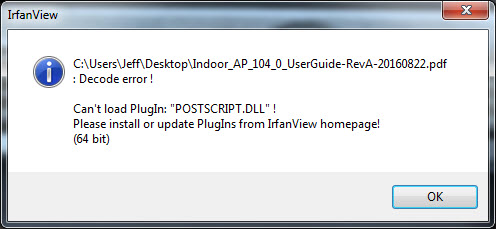
Since I couldn't find the cause of the issue, I installed IrfanView to see what would happen with it. I double-clicked a jpeg on the desktop and used the next and previous arrows and it did the same thing as WPV. It too tries to open PDF's. IrfanView throws the following error:
Is there a way to reset or reinstall the WPV? I already uninstalled Acrobat and reinstalled but that did not help.
UPDATE (2019-10-27):
I fixed it. I uninstalled the FastPictureViewer Codec Pack. I don't remember why I installed it in the first place.
Recently, I noticed the built-in Windows Photo Viewer tries to open PDF files. This was not always the case.
When I double-click on a jpeg on the desktop, it opens the WPV, as it should. If I use the next and previous arrows to scroll through the images on my desktop, the WPV will open any and all images as it should but it also tries to open the PDF's that are on the desktop as if they were images.
I have checked the file associations and default apps and everything seems correct. Adobe Acrobat is the default app for PDF's and if I double-click a PDF, it opens in Acrobat.
I may have missed something but I searched the entire registry and cannot find any entries that tie the WPV to PDF's.
Since I couldn't find the cause of the issue, I installed IrfanView to see what would happen with it. I double-clicked a jpeg on the desktop and used the next and previous arrows and it did the same thing as WPV. It too tries to open PDF's. IrfanView throws the following error:
Is there a way to reset or reinstall the WPV? I already uninstalled Acrobat and reinstalled but that did not help.
UPDATE (2019-10-27):
I fixed it. I uninstalled the FastPictureViewer Codec Pack. I don't remember why I installed it in the first place.
Last edited:
My Computer
At a glance
Windows 7 Ultimate x64
- OS
- Windows 7 Ultimate x64


