Strange Concentric Circles on Desktop

boweasel

New member
Power User
Local time
10:32 PM
Messages
678
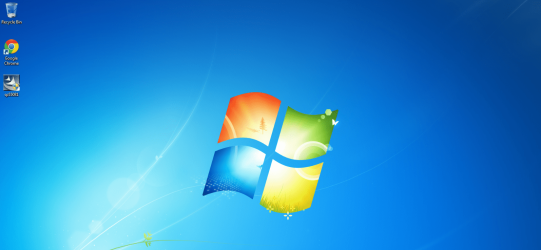
I have no idea if this is a graphics problem or not, but the desktop display has broken concentric red circles on it.

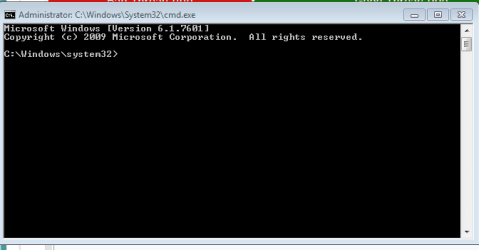
This is an HP Pavilion g7-1158nr running W7HP SP1 64. I just updated the graphics driver in a vain attempt to correct it. It doesn't seem to interfere with the normal working of the laptop, but I am concerned. Additionally, and weirdly, the DOS command screen id no longer black with white lettering - it's red with white lettering. I've gone into the cmd screen and used the color command to try to get it back to white on black, but it won't take. I can change it to other color combinations, but as soon as I exit the DOS screen it reverts back to white on red.
 

Attachments
  • Capture.PNG
    Capture.PNG
    313.4 KB · Views: 4
  • Capture1.PNG
    Capture1.PNG
    4.1 KB · Views: 16

My Computer My Computer

Computer type
Laptop
OS
Windows 7 home premium 64 bit
CPU
AMD K10
Motherboard
Hewlett-Packard 1444 (Socket S1G4)
Memory
3.00GB Dual-Channel DDR3 @ 532MHz
Graphics Card(s)
ATI AMD M880G with ATI Mobility Radeon HD 4250 (HP)
Sound Card
Realtek
Screen Resolution
1366 x 768
Hard Drives
465GB Western Digital
Antivirus
MSE
Hi i don't see what you talking about from your screen shots. can you hook it up to an external monitor to see if it shows the same thing?
 

My Computer My Computer

Computer type
PC/Desktop
Computer Manufacturer/Model Number
dell xps 9000
OS
win 10
I think I hear the music from The Twilight Zone in the background....

I hooked the laptop up to an external monitor - same red concentric circles on the desktop, and same red color for the DOS screen.

I then turned on another laptop and navigated to this forum - the picture of the desktop looks normal (no circles), and the picture of the DOS screen is white lettering on a black background. Going back to the Pavilion, the pictures I submitted to the thread both display, the desktop with the rings and the DOS screen in red.

???
 

My Computer My Computer

Computer type
Laptop
OS
Windows 7 home premium 64 bit
CPU
AMD K10
Motherboard
Hewlett-Packard 1444 (Socket S1G4)
Memory
3.00GB Dual-Channel DDR3 @ 532MHz
Graphics Card(s)
ATI AMD M880G with ATI Mobility Radeon HD 4250 (HP)
Sound Card
Realtek
Screen Resolution
1366 x 768
Hard Drives
465GB Western Digital
Antivirus
MSE
I think what you might be getting is Artifacts

If you are getting Artifacts on a non overclocked card it could mean it's on the way out

Typically that is what happens when hardware starts to die
 

My Computer My Computer

Computer type
PC/Desktop
Computer Manufacturer/Model Number
CoreI7-6700K MrFingerIII Special Builds
OS
Windows 10 Home Premium 64bit sp1
CPU
Intel I7-6700K @ 4.6 Ghz 1.344 volts everyday OC
Motherboard
Asrock Fatality K6 Z170 Socket 1151
Memory
32GB G-Skill TridentZ 3200mhz 16-18-18-38 DDR4
Graphics Card(s)
Sli Gigabyte Windforce GTX 980 G1
Sound Card
AC97 Creative Rage Tactic 3D Headphones Bluetooth
Monitor(s) Displays
27" Asus ROG Swift PG278Q G-Sync 48" Vizio Smart HD TV
Screen Resolution
2560x1440p 27"- 48" Currently Gaming at 2560x1440p Res 2K
Hard Drives
250GB Samsung Evo840SSD Seagate baracuda 500 GB WD Mybook 500Gb 1TB Seagate Barracuda
PSU
HX1050w Corsair Silver 80plus certified crosfire/sli
Case
Enthod Pro Full Tower
Cooling
Corsair H110i GT 280 mm High Performance WaterBlock
Keyboard
Logitech wireless keyboard
Mouse
Logitech wireless mouse
Internet Speed
Cox Cable 100+ mb
Antivirus
WebRoot Spysweeper with Antivirus
Browser
IE-10, Chrome, Opera
Other Info
My Other Rig is a AMD FX8320E @4.6Ghz 16GB Ballistic Sport Ram
Mobo Asrock Fatality 990FX 120GB OCZ SSD 1TB Seagate Barracuda Corsair H75 Cooling PSU Corsair CX750
GPU GTX Gigabyte 970G1
i believe you video memory is faulty if it showing the same on an external monitor. the chip on the motherboard going bad is my thought. which probably will require a new motherboard. but can see if others have any thoughts on it.
 

My Computer My Computer

Computer type
PC/Desktop
Computer Manufacturer/Model Number
dell xps 9000
OS
win 10
i believe you video memory is faulty if it showing the same on an external monitor. the chip on the motherboard going bad is my thought. which probably will require a new motherboard. but can see if others have any thoughts on it.


Without specs can't give good advice
 

My Computer My Computer

Computer type
PC/Desktop
Computer Manufacturer/Model Number
CoreI7-6700K MrFingerIII Special Builds
OS
Windows 10 Home Premium 64bit sp1
CPU
Intel I7-6700K @ 4.6 Ghz 1.344 volts everyday OC
Motherboard
Asrock Fatality K6 Z170 Socket 1151
Memory
32GB G-Skill TridentZ 3200mhz 16-18-18-38 DDR4
Graphics Card(s)
Sli Gigabyte Windforce GTX 980 G1
Sound Card
AC97 Creative Rage Tactic 3D Headphones Bluetooth
Monitor(s) Displays
27" Asus ROG Swift PG278Q G-Sync 48" Vizio Smart HD TV
Screen Resolution
2560x1440p 27"- 48" Currently Gaming at 2560x1440p Res 2K
Hard Drives
250GB Samsung Evo840SSD Seagate baracuda 500 GB WD Mybook 500Gb 1TB Seagate Barracuda
PSU
HX1050w Corsair Silver 80plus certified crosfire/sli
Case
Enthod Pro Full Tower
Cooling
Corsair H110i GT 280 mm High Performance WaterBlock
Keyboard
Logitech wireless keyboard
Mouse
Logitech wireless mouse
Internet Speed
Cox Cable 100+ mb
Antivirus
WebRoot Spysweeper with Antivirus
Browser
IE-10, Chrome, Opera
Other Info
My Other Rig is a AMD FX8320E @4.6Ghz 16GB Ballistic Sport Ram
Mobo Asrock Fatality 990FX 120GB OCZ SSD 1TB Seagate Barracuda Corsair H75 Cooling PSU Corsair CX750
GPU GTX Gigabyte 970G1
op gave the model number in opening post which i believe it only has onboard graphics chip.
 

My Computer My Computer

Computer type
PC/Desktop
Computer Manufacturer/Model Number
dell xps 9000
OS
win 10
Back
Top