Strange HDD behaviour

tech291083

New member
Member
Local time
9:56 AM
Messages
46
Hi Friends,

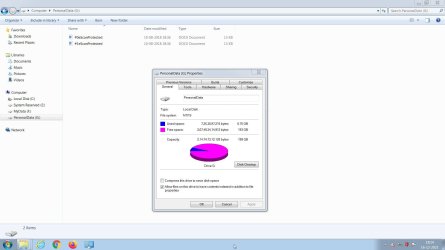
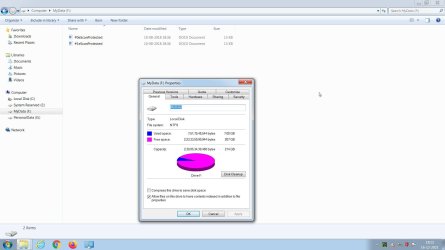
I have Windows 7 Home Basic 64 bit PC. Fully updated as long as the occasional updates come by and a local paid security solution call eScan Internet Security Suite, which I have been happily using for a number of years now. Few days back, when I created two partitions namely MyData and PersonalData. I restarted the system and I noticed that both newly created partitions were showing some used space, which made no sense to me at all as I never had put any data there myself. Both these partitions have only two files on them namely #0eScanProtected and #1eScanProtected with each of them worth 13KB only. How can one understand this strange behavior? My HDD is perfectly alright with no bad sectors at all as of now. Thanks.
 

Attachments
  • 2021-12-16 18_13_53-Greenshot.jpg
    2021-12-16 18_13_53-Greenshot.jpg
    147.1 KB · Views: 2
  • 2021-12-16 18_14_06-Greenshot.jpg
    2021-12-16 18_14_06-Greenshot.jpg
    144.9 KB · Views: 2

My Computer

Computer type
PC/Desktop
OS
Windows 7 Home Basic 64 bit
Thats normal as a bin will be put on there and other hd stuff
 

My Computer

Computer type
PC/Desktop
OS
win 8 32 bit
Two things are strange:
- Both files were created on 10-08-2018
- With only two files (~26KB) the disk usage is almost 7GB. There MUST be hidden data on the partition?

Is Explorer set to show hidden files an to show known extensions?
 

My Computers

System One System Two

  • Computer type
    PC/Desktop
    Computer Manufacturer/Model Number
    custom build
    OS
    Windows 7 HP 64
    CPU
    i5 6600K - 800MHz to 4200MHz
    Motherboard
    GA-Z170-HD3P
    Memory
    4+4G GSkill DDR4 3000
    Graphics Card(s)
    IG - Intel 530
    Monitor(s) Displays
    Samsung 226BW
    Screen Resolution
    1680x1050
    Hard Drives
    (1) -1 SM951 – 128GB M.2 AHCI PCIe SSD drive for Windows 7 and Lubuntu
    (2) -1 WD SATA 3 - 1T for Data
    (3) -1 WD SATA 3 - 1T for backup
    PSU
    Thermaltake 450W TR2 gold
    Keyboard
    Old and good Chicony mechanical keyboard
    Mouse
    Logitech mX performance - 9 buttons (had to disable some)
    Internet Speed
    500Mb/s
    Browser
    Firefox 64
    Other Info
    TinyWall firewall
  • Computer type
    Laptop
    System Manufacturer/Model Number
    Asus Q550LF
    OS
    Windows 7 Pro
    CPU
    i7-4500U 800MHz to 3.0GHz
    Motherboard
    Asus Q550LF
    Memory
    (4+4)G DDR3 1600
    Graphics Card(s)
    IG intel 4400 + NVIDIA GeForce GT 745M
    Sound Card
    Realtek
    Monitor(s) Displays
    LG Display LP156WF4-SPH1
    Screen Resolution
    1920 x 1080
    Hard Drives
    BX500 120G SSD for Windows and programs +
    1T HDD for data
    Internet Speed
    500 Mb/s
    Browser
    Firefox
    Other Info
    TinyWall firewall
Two things are strange:
- Both files were created on 10-08-2018
- With only two files (~26KB) the disk usage is almost 7GB. There MUST be hidden data on the partition?

Is Explorer set to show hidden files an to show known extensions?


Sure, I will try to find hidden files, if any, many thanks.
 

My Computer

Computer type
PC/Desktop
OS
Windows 7 Home Basic 64 bit
hi
suspect the 7gb are the system generated profile requirements
PerfLogs
Program Files
Program Files x86
Windows
ProgramData,
Users.
the date is likely the original install date of the AV
 

My Computer

Computer type
PC/Desktop
Computer Manufacturer/Model Number
medionl/Aspire 6930G/acer x55a
OS
W7 home premium 32bit/W7HP 64bit/w10 tp insider ring
CPU
E5300 dual core
Motherboard
medion MS7366
Memory
3gb
Graphics Card(s)
Nvidia Geforce 7100 Nforce 630i
Monitor(s) Displays
avixc
Internet Speed
n (isp resticted to 72)
Antivirus
mse/pands
Browser
palemoon
Other Info
Belkin Fd7050 n USB using Railink RT2870 drivers, more upto date
Go to Folder Options, second tab and uncheck "Hide protected system files (not recommended)". It will ask you to confirm that you want to show those files. Confirm then click OK/Apply Probably it's not those antivirus files, but you have a large hidden pagefile.sys
 

My Computer

Computer type
PC/Desktop
OS
Windows 7 Ultimate x64 (single boot)
Antivirus
Cryptoprevent
Browser
Pale Moon
Back
Top