
Strange heat problem with CPU and MB

harleynut97

New member
Member
VIP
Local time
9:39 PM
Messages
121
This is a concerning issue to me, because it has now happened a few times. The problem is there does not seem to be any consistency to when it occurs.

Usually my computer is on most of the entire day. The last few months I did put a lot of stress by rendering 3d animations with CPU. Some of these renders lasted as long as 5-6 hrs at a time.

But what seems strange is that this problem is occuring now, very infrequently 2 or 3 times in the last couple of weeks without really putting much stress on the CPU. I'll just kind of notice, what I think is the fans are running loud and constant... I'll check my temps using speccy, and they are running very hot

BOTH the CPU and Motherboard are indicating these high temps

I did vacuum out any dust, I still need to get some compressed air and really get into the cpu area a little closer.

But what I don't understand, is I can power off the computer for a few minutes, turn it back on, and then not have any issues for days with it.

Here are my specs

CPU Intel core I7 2600 @ 3.4 ghz sandy bridge 32 mm
motherboard MSI67A-c43

I'd appreciate any thoughts on this.
 

My Computer My Computer

Computer type
PC/Desktop
Computer Manufacturer/Model Number
SYX SG-103
OS
Windows 7 home premium 64 bit sp1
CPU
Intel Core I7-2600 3.4 Ghz 1155 8M 95W CPU
Motherboard
MSI P67A-C43 (B3) ATX
Memory
16 gb DD3 1333MHZ
Graphics Card(s)
Nvidea Gforce GTX 550Ti
Sound Card
Realtek ALC892 integrated
Monitor(s) Displays
acer 23"
Screen Resolution
1920 x 1080
Hard Drives
Hitachi 1 TB 3.5" SATA 3G 7200rpm
Seagate ST32000641AS baracuda XT , 2 TB 3.5" 7200 rpm
Western digital My Book 1 tb USB2 external
Western digital My Book 3 tb USB3 external
PSU
500 Watt 80 plus
Case
Cooler Master Elite 310 RC-310-BWN1-GP
Keyboard
Logitech MK 200 Keybard
Mouse
Logitech MK200 mouse
Other Info
24x DVDRW Dual Layer SATA optical drive
Two things that could be happening come to mind:

  1. Your fan(s) might be going bad and fail to run intermittently. When they do turn back on, they're playing catch up. Check your fans occasionally to ensure they're running.
  2. The thermal paste may have failed and your CPU gets spotty cooling. Pull your machine apart and reapply the paste after cleaning off the old stuff. Ensure that you get a nice, thin, even coat and wipe off any excess.

Good luck!
 

My Computer My Computer

Computer type
Laptop
Computer Manufacturer/Model Number
Acer Aspire 5552
OS
Windows 7 Home Premium, x64
Memory
8GB DDR3
Screen Resolution
1366x768
Hard Drives
External Toshiba Canvio 2TB
Antivirus
Avast! Pro
Browser
Chrome, Firefox
harleynut97 lets start with basics.
You are doing some high stress things on your computer.
When the motherboard and cpu are both getting to hot that is a good indication the the case has poor air flow.
I reviewed the case in your specs and must say it was not designed in my opinion for such work.
You don't mention what cpu cooler you are using. Please let us know what your system has.

Cooler Master: Elite 310


Rear: 120 x 25mm fan x 1 / 1200 RPM / 17 dBA (installed), or 80/90mm fan x 1 (optional)
Front: 120 x 25 mm fan x 1 (optional)
Side: 80/ 90/120 mm fan x 1 (optional)

Is their any improvement you have made to the air flow in your case.
Their are not many options.
 

My Computer My Computer

Computer type
PC/Desktop
Computer Manufacturer/Model Number
Home made Desktop
OS
Windows 10 Pro. 64/ version 1709 Windows 7 Pro/64
CPU
Intel i7-6800K @ 4.3
Motherboard
ASUS X-99 Deluxe II
Memory
Corsair Platinum 16 gig @2400
Graphics Card(s)
EVGA GTX 1070 OC
Monitor(s) Displays
Asus 27" LED LCD/VE278Q
Screen Resolution
1920-1080 or 1280-720 HDMI
Hard Drives
INTEL SSD 730-240 Gb Sata 3.0/
PSU
EVGA Platium 1200W
Case
Phanteks Luxe Tempered Glass 8 fans/ one radiator
Cooling
XSPC/ Water Cooled CPU
Keyboard
Das 4 Professional
Mouse
Logitech M705/MX Anywhere 2-S
Internet Speed
100 mbits
Antivirus
Microsoft Security Essentials/ Malwarebytes Premium 3.0/ SAS
Browser
I.E. 11 default/Firefox/ ISP Time Warner Cable/Spectrum
Other Info
LG BluRay Burner/
Sound system-KLipsch-THX/
Icy Dock ssd Hot Swap bays.
@layback Bear and Enoctis

Thanks for replying back... I guess the thing that continues to perplex me is why this would occur so randomly, and when I'm not doing heavyweight processing like 3d rendering. Last time it happened I think I was just browsing on the internet when I noticed it.

And upon shutting down the thing down, waiting 5 minutes, turning on...the problem doesn't occur again for quite awhile.

Layback, I am just running the stock system, so I definitely need to add more fans. It's strange they talk about this optional front fan... because I don't see anywhere on the front of this thing where a fan would go. There definitely is a large fan mount area on the side of the unit. I think I will start there and at least add one there.

EDIT... Actually after posting this I looked a little closer and there already is a fan mounted in the front of the computer. The thing I hate about this case is there is these ultra tiny air openings in the front of the computer... So I can't imagine this front fan is able to draw much air from the front of the computer.

There is a fan that cools the CPU, attached is a picture.... I watched a YT video on removing the cooler, cleaning it, and reapplying the thermal paste... truthfully it makes me a bit nervous to mess around with that... especially if I would have to remove the whole motherboard.

One question you may be able to answer... you'll notice that there is a plastic fan, and behind that the metal grill looking thing. If I remove the 4 screws that hold that fan to the grill, it would give me better access to the outside of that grill, where I can definitely see a good amount of dust building up.

My question is can I remove that black plastic fan, without having to reapply thermal paste? I'd like to at least clean the exposed side of the grill. Also, what is the best method for cleaning that grill...compressed air?
 

Attachments

  • cpu_fan_web.jpg
    cpu_fan_web.jpg
    219.4 KB · Views: 0
Last edited:

My Computer My Computer

Computer type
PC/Desktop
Computer Manufacturer/Model Number
SYX SG-103
OS
Windows 7 home premium 64 bit sp1
CPU
Intel Core I7-2600 3.4 Ghz 1155 8M 95W CPU
Motherboard
MSI P67A-C43 (B3) ATX
Memory
16 gb DD3 1333MHZ
Graphics Card(s)
Nvidea Gforce GTX 550Ti
Sound Card
Realtek ALC892 integrated
Monitor(s) Displays
acer 23"
Screen Resolution
1920 x 1080
Hard Drives
Hitachi 1 TB 3.5" SATA 3G 7200rpm
Seagate ST32000641AS baracuda XT , 2 TB 3.5" 7200 rpm
Western digital My Book 1 tb USB2 external
Western digital My Book 3 tb USB3 external
PSU
500 Watt 80 plus
Case
Cooler Master Elite 310 RC-310-BWN1-GP
Keyboard
Logitech MK 200 Keybard
Mouse
Logitech MK200 mouse
Other Info
24x DVDRW Dual Layer SATA optical drive
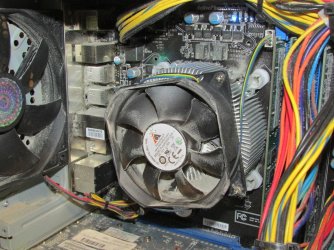
It looks like it has (or had) massive dust, which can cause air flow problems.

Compressed air may take care of all the dust and not have to remove the fan. But it looks like the CPU cooling fan can be removed without removing the entire CPU heatsink assembly.

I don't know where you have the PC sitting, but a computer desk compartment is bad for air flow. Sitting it on the floor or carpet is bad for collecting dust. It needs to be located where there is adequate air flow (and not hot air).
 

My Computer My Computer

Computer type
PC/Desktop
Computer Manufacturer/Model Number
My Own Build
OS
Windows 10 64 bit
CPU
Intel i7 6700K
Motherboard
ASUS ROG Maximus VIII Hero
Memory
16GB Corsair Dominator
Graphics Card(s)
Intel CPU Graphics
Sound Card
RealTek
Monitor(s) Displays
27" Dell S2719dgf
Screen Resolution
2560X1440
Hard Drives
1 TB Samsung 850 EVO SSD for Win 10 Pro
500GB Samsung 850 EVO SSD for Win 10 Insider
2 TB drive for backup
PSU
EVGA Supernova 750G2
Case
BeQuiet Silent Base 600
Cooling
Deepcool Captain 120EX
Keyboard
Microsoft Wireless 2000
Mouse
Microsoft wireless
Internet Speed
100 MB/sec (Cable)
Antivirus
Microsoft Defender and Malwarebytes
Browser
Edge/Firefox
Other Info
Cakewalk (Sonar) by BandLab and Studio One 4.1 Pro recording studio software. MOTU 896Mk3 Hybrid recording interface, Frontier Tranzport wireless control unit, Behringer X-Touch Control Surface.
Five USB connected optical drives for CD Audio production using Nero BurningROM
The fan should be removeable on its own. That being said you might want to take the case outdoors to use compressed air to clean. That is going to make one big cloud when you clean.
As a side note do NOT let a fan spin with the air pressure, hold the blade with a stir stick or some other if you can't use a finger. It may sound really neat to let it spin but more than likely destroy the fan.
Art.
 

My Computer My Computer

Computer type
PC/Desktop
Computer Manufacturer/Model Number
Home built
OS
Win7 sp1 Pro 64bit / XP sp2 Pro (games only)
CPU
Intel Core 2 Duo E8400 @ 3.00GHz
Motherboard
Intel Corporation DP35DP (CPU1)
Memory
8.00 GB Dual-Channel DDR2 @ 400MHz (5-5-5-18)
Graphics Card(s)
1024MB GeForce GTX 560
Sound Card
NVIDIA High Definition Audio
Monitor(s) Displays
SyncMaster (2048x1152@60Hz)
Hard Drives
240GB Sandisc Extreme Pro SSD
244GB Seagate ST3250410AS
488GB Seagate ST500DM002-1BD142
931GB Western Digital WDC WD1003FZEX
PSU
Corsair 720
Case
ATX
Keyboard
HID Keyboard Device Logitech
Mouse
HID-compliant mouse Microsoft
Other Info
TSSTcorp CDDVDW SH-S223L

HL-DT-ST BD-RE BH12LS35
@wandering one Thanks for the tip, I'll be sure to stop the fan from spinning when using the compressed air

@firebird I built a wooden stand that the desktop sits on top of. It is raised about 12" off of the ground. It sits next to my desk, but not in anykind of desk compartment.

I'm going to give it a good cleaning with the compressed air tonight.
 

My Computer My Computer

Computer type
PC/Desktop
Computer Manufacturer/Model Number
SYX SG-103
OS
Windows 7 home premium 64 bit sp1
CPU
Intel Core I7-2600 3.4 Ghz 1155 8M 95W CPU
Motherboard
MSI P67A-C43 (B3) ATX
Memory
16 gb DD3 1333MHZ
Graphics Card(s)
Nvidea Gforce GTX 550Ti
Sound Card
Realtek ALC892 integrated
Monitor(s) Displays
acer 23"
Screen Resolution
1920 x 1080
Hard Drives
Hitachi 1 TB 3.5" SATA 3G 7200rpm
Seagate ST32000641AS baracuda XT , 2 TB 3.5" 7200 rpm
Western digital My Book 1 tb USB2 external
Western digital My Book 3 tb USB3 external
PSU
500 Watt 80 plus
Case
Cooler Master Elite 310 RC-310-BWN1-GP
Keyboard
Logitech MK 200 Keybard
Mouse
Logitech MK200 mouse
Other Info
24x DVDRW Dual Layer SATA optical drive
Yep... I'd say there was some dust buildup. Not sure what is on the other side the cooler. Can anyone confirm, if you have to remove the motherboard to replace the thermal paste?
 

Attachments

  • cpu_dust.jpg
    cpu_dust.jpg
    185.4 KB · Views: 1

My Computer My Computer

Computer type
PC/Desktop
Computer Manufacturer/Model Number
SYX SG-103
OS
Windows 7 home premium 64 bit sp1
CPU
Intel Core I7-2600 3.4 Ghz 1155 8M 95W CPU
Motherboard
MSI P67A-C43 (B3) ATX
Memory
16 gb DD3 1333MHZ
Graphics Card(s)
Nvidea Gforce GTX 550Ti
Sound Card
Realtek ALC892 integrated
Monitor(s) Displays
acer 23"
Screen Resolution
1920 x 1080
Hard Drives
Hitachi 1 TB 3.5" SATA 3G 7200rpm
Seagate ST32000641AS baracuda XT , 2 TB 3.5" 7200 rpm
Western digital My Book 1 tb USB2 external
Western digital My Book 3 tb USB3 external
PSU
500 Watt 80 plus
Case
Cooler Master Elite 310 RC-310-BWN1-GP
Keyboard
Logitech MK 200 Keybard
Mouse
Logitech MK200 mouse
Other Info
24x DVDRW Dual Layer SATA optical drive
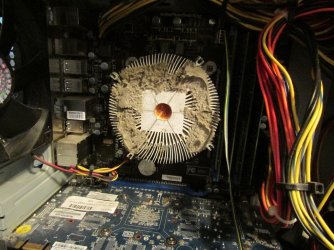
Like I posted. Start with the basics. The basics here is cleaning up that mess.
The cpu cooler fan can be removed all by itself.
You can remove the cpu cooler at a later date if need be.
You can only do so much with that case but no case will work properly when very dirty.
You must clean everything in that case. I can't remember the last time I saw that much gunk stuck to a motherboard. I can't ever imagine what is stuck to the intake fan.

See if their is a way you can install a filter for the intake fan. They do make magnetic fan filters. I just saw the picture in post #8. You have 75% blockage of air flow through the cpu cooler.
 

My Computer My Computer

Computer type
PC/Desktop
Computer Manufacturer/Model Number
Home made Desktop
OS
Windows 10 Pro. 64/ version 1709 Windows 7 Pro/64
CPU
Intel i7-6800K @ 4.3
Motherboard
ASUS X-99 Deluxe II
Memory
Corsair Platinum 16 gig @2400
Graphics Card(s)
EVGA GTX 1070 OC
Monitor(s) Displays
Asus 27" LED LCD/VE278Q
Screen Resolution
1920-1080 or 1280-720 HDMI
Hard Drives
INTEL SSD 730-240 Gb Sata 3.0/
PSU
EVGA Platium 1200W
Case
Phanteks Luxe Tempered Glass 8 fans/ one radiator
Cooling
XSPC/ Water Cooled CPU
Keyboard
Das 4 Professional
Mouse
Logitech M705/MX Anywhere 2-S
Internet Speed
100 mbits
Antivirus
Microsoft Security Essentials/ Malwarebytes Premium 3.0/ SAS
Browser
I.E. 11 default/Firefox/ ISP Time Warner Cable/Spectrum
Other Info
LG BluRay Burner/
Sound system-KLipsch-THX/
Icy Dock ssd Hot Swap bays.
when I took these pics, I had used a vacume on the CPU and compressed air... that's clean now (at least the exposed side and the fan has been re-installed.

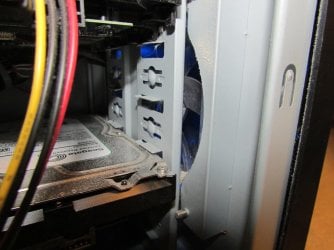
But you can see I still have to try and remove what the compressed air kicked around. But I wanted to show you these stinking little front air vents and what the front fan looks like. The same little vents are on the other side of the computer, identical to what you see.

I haven't heard of the magnetic fan filters your refering to. But maybe I can try googling it, but based on what you see on these pics... do you think it would even be possible to use it in someway?
 

Attachments

  • cpu_frontair_intake.jpg
    cpu_frontair_intake.jpg
    148.6 KB · Views: 0
  • cpu_frontfan.jpg
    cpu_frontfan.jpg
    114.6 KB · Views: 0

My Computer My Computer

Computer type
PC/Desktop
Computer Manufacturer/Model Number
SYX SG-103
OS
Windows 7 home premium 64 bit sp1
CPU
Intel Core I7-2600 3.4 Ghz 1155 8M 95W CPU
Motherboard
MSI P67A-C43 (B3) ATX
Memory
16 gb DD3 1333MHZ
Graphics Card(s)
Nvidea Gforce GTX 550Ti
Sound Card
Realtek ALC892 integrated
Monitor(s) Displays
acer 23"
Screen Resolution
1920 x 1080
Hard Drives
Hitachi 1 TB 3.5" SATA 3G 7200rpm
Seagate ST32000641AS baracuda XT , 2 TB 3.5" 7200 rpm
Western digital My Book 1 tb USB2 external
Western digital My Book 3 tb USB3 external
PSU
500 Watt 80 plus
Case
Cooler Master Elite 310 RC-310-BWN1-GP
Keyboard
Logitech MK 200 Keybard
Mouse
Logitech MK200 mouse
Other Info
24x DVDRW Dual Layer SATA optical drive
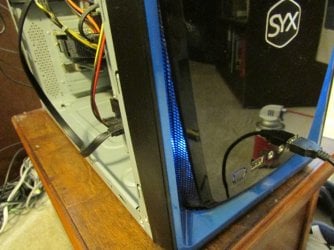
You would have to remove the front cover on the case and take a look. I can't tell you from here.
Your drive bays are blocking most of the front intake.
Like I posted before their isn't much you can do with that case. Clean it and see what the temps are.
 

My Computer My Computer

Computer type
PC/Desktop
Computer Manufacturer/Model Number
Home made Desktop
OS
Windows 10 Pro. 64/ version 1709 Windows 7 Pro/64
CPU
Intel i7-6800K @ 4.3
Motherboard
ASUS X-99 Deluxe II
Memory
Corsair Platinum 16 gig @2400
Graphics Card(s)
EVGA GTX 1070 OC
Monitor(s) Displays
Asus 27" LED LCD/VE278Q
Screen Resolution
1920-1080 or 1280-720 HDMI
Hard Drives
INTEL SSD 730-240 Gb Sata 3.0/
PSU
EVGA Platium 1200W
Case
Phanteks Luxe Tempered Glass 8 fans/ one radiator
Cooling
XSPC/ Water Cooled CPU
Keyboard
Das 4 Professional
Mouse
Logitech M705/MX Anywhere 2-S
Internet Speed
100 mbits
Antivirus
Microsoft Security Essentials/ Malwarebytes Premium 3.0/ SAS
Browser
I.E. 11 default/Firefox/ ISP Time Warner Cable/Spectrum
Other Info
LG BluRay Burner/
Sound system-KLipsch-THX/
Icy Dock ssd Hot Swap bays.
Well it's about as clean as I can get it now,

When the computer was NOT experiencing the constant running and heat problems it was running about 42 c now it is down to about 34c .

I appreciate everyones help. For right now I am going to monitor the temps much closer. I'm going to hold off pulling off the cpu cooler for now. This would probably be something I would take in have done at the local computer shop.

Maybe it will serve as a reminder to others to take the time to really check the dust in your computer.
 

My Computer My Computer

Computer type
PC/Desktop
Computer Manufacturer/Model Number
SYX SG-103
OS
Windows 7 home premium 64 bit sp1
CPU
Intel Core I7-2600 3.4 Ghz 1155 8M 95W CPU
Motherboard
MSI P67A-C43 (B3) ATX
Memory
16 gb DD3 1333MHZ
Graphics Card(s)
Nvidea Gforce GTX 550Ti
Sound Card
Realtek ALC892 integrated
Monitor(s) Displays
acer 23"
Screen Resolution
1920 x 1080
Hard Drives
Hitachi 1 TB 3.5" SATA 3G 7200rpm
Seagate ST32000641AS baracuda XT , 2 TB 3.5" 7200 rpm
Western digital My Book 1 tb USB2 external
Western digital My Book 3 tb USB3 external
PSU
500 Watt 80 plus
Case
Cooler Master Elite 310 RC-310-BWN1-GP
Keyboard
Logitech MK 200 Keybard
Mouse
Logitech MK200 mouse
Other Info
24x DVDRW Dual Layer SATA optical drive
EDIT: Didn't notice a second page. Apparently, you've already decided to go this route. Will leave comment for reference.

harley,

That is quite a bit of dust that was built up. At this point, I would not attempt to remove the heatsink. If you feel competent, you can remove the motherboard from the case to clean all around it without having to reapply any thermal paste. The paste only goes between processing units (GPUs/CPUs) and heatsinks. Just be sure to neutralize any electrostatic differences between you and the machine by touching part of the metal frame within before you touch any circuitry.

As for that front fan, I can't see it doing much. There's not enough clearance in the frame between the fan and internal components. The outside grill, however, appears to be sufficient for air intake. That enormous amount of dust buildup that you've removed will make quite a difference alone. Since the case is already open, I would clean all the fans if you haven't. The dust seen on the CPU fan itself in the first picture isn't a significant amount of buildup, and wouldn't much effect the cooling power; much unlike the buildup underneath. However, dense accumulations of dust on a fan will effect the aerodynamics of the blades enough to render the fan useless. It's best to keep them clean.

Were it my system, I would just give it a thorough dusting, which I believe you already have, and put it back together and see how she does.
 

My Computer My Computer

Computer type
Laptop
Computer Manufacturer/Model Number
Acer Aspire 5552
OS
Windows 7 Home Premium, x64
Memory
8GB DDR3
Screen Resolution
1366x768
Hard Drives
External Toshiba Canvio 2TB
Antivirus
Avast! Pro
Browser
Chrome, Firefox
Back
Top