I have a WD myBook that I have been using to store files on. It is connected via a USB to my wireless router. In explorer I can see it in my network section as well as map a drive to it. However, intermittently, it does not allow me to write or delete files on it. I know computers aren't suppose to do intermittently, but that is what it is.
There are brief times when I can add and delete items. I just added one file about 20 minutes ago. For several hours before that, it was locked, and it is now again locked. I can go for days without any issues, and then I get a night like tonight where I can't get anywhere.
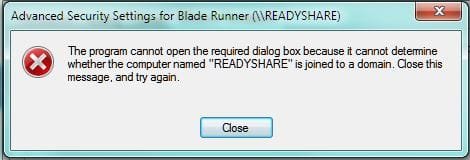
I have spent hours perusing possible solutions, mostly suggesting I need to "Take Ownership" or "Grant Permissions". When I try to take ownership, I am told I do not have permissions to do that. Nor can I change the permissions - my admin account isn't listed, and if I try to add an account I get an error message saying that it can't open the required dialog box because it cannot determine whether the computer named "READYSHARE" is joined to a domain.
When I look at the properties of my computer and the external drive, they are both listed as being part of WORKGROUP, but when I look at the Network Map, the READYSHARE is displayed at the bottom and says it can't be attached to the map.
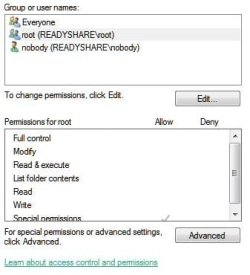
The only usernames listed in the permissions and owner area are:
root (unix user\root)
root (unix Group\rooot)
Everyone
All have "Special" permissions.
Owner is root (unix user\root)
Please help me. This is sooo frustrating!!!!!
Thanks!
There are brief times when I can add and delete items. I just added one file about 20 minutes ago. For several hours before that, it was locked, and it is now again locked. I can go for days without any issues, and then I get a night like tonight where I can't get anywhere.
I have spent hours perusing possible solutions, mostly suggesting I need to "Take Ownership" or "Grant Permissions". When I try to take ownership, I am told I do not have permissions to do that. Nor can I change the permissions - my admin account isn't listed, and if I try to add an account I get an error message saying that it can't open the required dialog box because it cannot determine whether the computer named "READYSHARE" is joined to a domain.
When I look at the properties of my computer and the external drive, they are both listed as being part of WORKGROUP, but when I look at the Network Map, the READYSHARE is displayed at the bottom and says it can't be attached to the map.
The only usernames listed in the permissions and owner area are:
root (unix user\root)
root (unix Group\rooot)
Everyone
All have "Special" permissions.
Owner is root (unix user\root)
Please help me. This is sooo frustrating!!!!!
Thanks!
My Computer
- Computer Manufacturer/Model Number
- Dell
- OS
- Windows 7 Professional 32 bit
- CPU
- Intel Core2 6420 @ 2.13 GHz
- Memory
- 2GB
- Monitor(s) Displays
- HP w22
- Case
- Tower