
Strange Problem : USB devices going to Sleep

antz123

New member
Local time
9:24 PM
Messages
7
I am facing a problem that my USB keyboard and mouse at times dont wake up.

What i mean is if I leave my PC idle then they dont respond at all. I have to switch of the PC and wait for couple of seconds, when I restart they start working again.

When this situation happens replugging, replugging on different USB slots etc just does not help.

Have been trying to google for solution but no luck. Then I was tinkering and found one error today and wondering if the error and my problem is co-related.

The error message is there attached as pic. . I am on Windows 7 64bit edition. My Config
Intel Core I7 920, Gigabyte X 58 UD5, Gskill F3-12800CL7T-6GB, GTX 580 , Xonar Essence ST, Klipsch GM X Pro 2.1, Prolimatech Megahalems Mega Shadow, OCZ Vertex 2 50GB SSD & 2x1TB & 2x1tbExt, Corsair HX 850, Samsung PX2370 LED , Silverstone FT02, Microsoft Sidewinder X6, Razer Mamba, 2 Silverstone FM121B, Steelseries 7H Headset

Do let me know what you guys think.

Thanks

Anant

Error Photo : Made out of two photos, dont have good camera presently
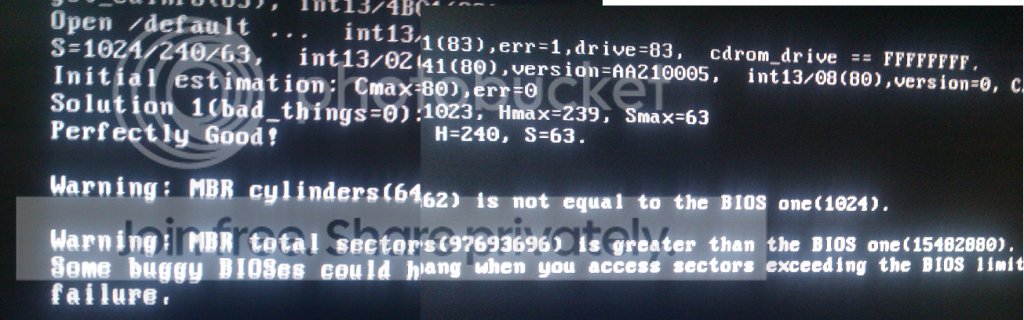
error.png
 

My Computer My Computer

OS
Windows 7 Ultimate x64
ok another update

yes bios are updated, power settings tweaked, in bios usb kb/mouse is on etc is done

I have a backlit keyboard and now while i was working n googling for solutions, suddenly mouse pointer started stuttering and then keyboards back lit lights started blinking n suddenly they all gone. and unplugging/replugging didnt help at all. :(

is it now mobo or ram or power supply issue ? any clues? i just opened my case removed rams , power mobo connector and cpu connector n started again lets see how long this lasts?
 

My Computer My Computer

OS
Windows 7 Ultimate x64
Are you one a laptop? Most likely thing I can think of is that your computer is having trouble getting enough power through the usb ports. If you're on a normal computer (not laptop) make sure they're plugged into the USB ports that connect directly to the motherboard, usually the ones in the very back of the computer that are hardest to get to :) Can you try these out on another computer and see if they have the same problem there?

As for your error message, it looks to me like your BIOS thinks your hard drive sector size is something it isn't. That's probably not good, but I don't think it'd be causing these problems. If anything, it would just make your computer crash a lot and similar big problems like that.

Another possibility is that you have some sort of virus/malware. Download Malwarebytes : Free anti-malware, anti-virus and spyware removal download and run a full scan after letting it update.

Let me know if any of this helps!
 

My Computer My Computer

Computer Manufacturer/Model Number
Dell Inspiron 1545
OS
MS Windows 7 Ultimate 64-bit SP1
CPU
Intel Mobile Core 2 Duo T6400 @ 2.00GHz, Penryn 45nm
Motherboard
Dell Inc. 0G848F (Microprocessor)
Memory
4.00 GB Dual-Channel DDR2 @ 399MHz (6-6-6-18)
Graphics Card(s)
Mobile Intel(R) 4 Series Express Chipset Family (Integrated)
Sound Card
IDT High Definition Audio CODEC
Monitor(s) Displays
Generic PnP Monitor (DPMS) (1366x768@60Hz)
Screen Resolution
1366x768 (16:9)
Hard Drives
2TB External, with ~1TB partition booting OS
PSU
Laptop
Case
Laptop
Cooling
Laptop vent
Keyboard
Laptop
Mouse
Touchpad, and Logitech wireless USB mouse.
Internet Speed
~150 kb/s
Other Info
I'm running Windows COMPLETELY off a 2TB portable hard drive (since my 300GB internal drive just isn't big enough). It works exactly the same as it would normally, only it has to be constantly connected to my USB port. Obviously. I'll show you how to do it, if you ask! It's pretty cool.

Specs via Speccy
Slammer, malwarebytes already on and checkec so that isnt problem

my PC case is Silverstone FT02, and the slots of this case are on top, it has vertical mobo installation so all ports are very accessible and no the connections is not issue.


Ok just an update, this time when things go stuck, i realized my phone and ipod which were sharing same back side slots of motherboard, were still getting charged. so means power still goes in
 

My Computer My Computer

OS
Windows 7 Ultimate x64
Ok, looks that best thing to do is to try out the mouse and keyboard on a different computer. It's possible they both have hardware problems that are causing you all this trouble, especially if other USB devices are functioning normally. Do you have another computer you can test them out on?
 

My Computer My Computer

Computer Manufacturer/Model Number
Dell Inspiron 1545
OS
MS Windows 7 Ultimate 64-bit SP1
CPU
Intel Mobile Core 2 Duo T6400 @ 2.00GHz, Penryn 45nm
Motherboard
Dell Inc. 0G848F (Microprocessor)
Memory
4.00 GB Dual-Channel DDR2 @ 399MHz (6-6-6-18)
Graphics Card(s)
Mobile Intel(R) 4 Series Express Chipset Family (Integrated)
Sound Card
IDT High Definition Audio CODEC
Monitor(s) Displays
Generic PnP Monitor (DPMS) (1366x768@60Hz)
Screen Resolution
1366x768 (16:9)
Hard Drives
2TB External, with ~1TB partition booting OS
PSU
Laptop
Case
Laptop
Cooling
Laptop vent
Keyboard
Laptop
Mouse
Touchpad, and Logitech wireless USB mouse.
Internet Speed
~150 kb/s
Other Info
I'm running Windows COMPLETELY off a 2TB portable hard drive (since my 300GB internal drive just isn't big enough). It works exactly the same as it would normally, only it has to be constantly connected to my USB port. Obviously. I'll show you how to do it, if you ask! It's pretty cool.

Specs via Speccy
Back
Top