
Strange problem with "Games" folder...

Naylor

New member
Local time
11:38 PM
Messages
3
Hi there
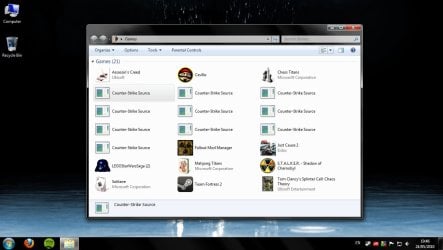
Please see attached picture...
I was wondering if anyone could help me out with this. I dragged a desktop shortcut of the game "Counterstrike" to my "Games" folder and it made a blank tile, so I tried a few more times and it seems to have messed up the folder... The icons can be highlighted but not right-clicked on or executed. This is incredibly frustrating! I've tried restarting many times and now I've even uninstalled Counterstrike, but no joy! Could somebody maybe offer any advice on what to do here? It's pretty much a clean install. Specs:
E8500 @ 3.8 ghz
4 GB ddr2 Ram
ATI 5870
 

Attachments
  • WTF.jpg
    WTF.jpg
    82.3 KB · Views: 45

My Computer My Computer

At a glance

Windows 7 64
OS
Windows 7 64
Hi Naylor,

Have you read the SevenForums tutorial on adding games to Games Explorer? Check it out first: http://www.sevenforums.com/tutorials/25787-games-explorer-folder-add-games.html

Here's how to delete a game from it: http://www.sevenforums.com/tutorials/42496-games-explorer-folder-delete-game.html

And here's how to spiff up the right-click options (Context Menu) in Games Explorer: http://www.sevenforums.com/tutorials/64159-games-explorer-folder-customize-context-menu.html

Let me know if any of that helps!

Cheers,

Walker
Windows Outreach Team
 

My Computer My Computer

At a glance

Windows 7 Home Premium (64-bit) *** Windows X...AMD Athlon Neo X2 1.6GHz *** Intel Core i7 Qu...4.00 GB *** 4.00 GBATI Radeon HD 3200, 384MB *** ATI Radeon HD 4...
Computer Manufacturer/Model Number
HP Pavilion dm3 (netbook) *** 27" iMac (Dual-Boot)
OS
Windows 7 Home Premium (64-bit) *** Windows XP SP3 (32-bit), OSX 10.6
CPU
AMD Athlon Neo X2 1.6GHz *** Intel Core i7 Quad Core 2.8GHz
Memory
4.00 GB *** 4.00 GB
Graphics Card(s)
ATI Radeon HD 3200, 384MB *** ATI Radeon HD 4850, 1GB
Sound Card
ATI High Definition Audio *** ATI High Definition Audio
Monitor(s) Displays
LG Flatron W2053TX
Screen Resolution
1600 x 900 (monitor), 1266 x 768 (laptop) *** 2560 x 1440
Hard Drives
300 GB SATA (internal), 500 GB HP SimpleSave (external) *** 1 TB SATA (internal), 160 GB LaCie (external)
Mouse
Logitech Cordless Optical Mouse for Notebooks
Internet Speed
Broadband
Hi there!
Many thanks for your quick reply.
I've tried the three steps you detailed, but to no avail. The game doesn't show up in the registry at all - it's almost like there is no record of it anywhere apart from in the Games folder. I've taken on board the advice about adding games to the folder - i'll do it the proper way next time! Thing is, the other games were added by me dragging the shortcut over and they all work just fine.
...Are there any other options available? I don't even really like Counterstrike! Haha
 

My Computer My Computer

At a glance

Windows 7 64
OS
Windows 7 64
OK - Just solved it. There were some registry entries in the GamesUX folder that weren't under "Games".
Many thanks for your help on this!
Richard
 

My Computer My Computer

At a glance

Windows 7 64
OS
Windows 7 64
Sure thing Richard, glad you were able to find a solution! Thank you for returning to post it. Please let me know if you need anything else. I'll flag this thread to be marked 'Solved'.

Cheers,

Walker
Windows Outreach Team
 

My Computer My Computer

At a glance

Windows 7 Home Premium (64-bit) *** Windows X...AMD Athlon Neo X2 1.6GHz *** Intel Core i7 Qu...4.00 GB *** 4.00 GBATI Radeon HD 3200, 384MB *** ATI Radeon HD 4...
Computer Manufacturer/Model Number
HP Pavilion dm3 (netbook) *** 27" iMac (Dual-Boot)
OS
Windows 7 Home Premium (64-bit) *** Windows XP SP3 (32-bit), OSX 10.6
CPU
AMD Athlon Neo X2 1.6GHz *** Intel Core i7 Quad Core 2.8GHz
Memory
4.00 GB *** 4.00 GB
Graphics Card(s)
ATI Radeon HD 3200, 384MB *** ATI Radeon HD 4850, 1GB
Sound Card
ATI High Definition Audio *** ATI High Definition Audio
Monitor(s) Displays
LG Flatron W2053TX
Screen Resolution
1600 x 900 (monitor), 1266 x 768 (laptop) *** 2560 x 1440
Hard Drives
300 GB SATA (internal), 500 GB HP SimpleSave (external) *** 1 TB SATA (internal), 160 GB LaCie (external)
Mouse
Logitech Cordless Optical Mouse for Notebooks
Internet Speed
Broadband
Back
Top