strange problem

padyboy

Banned
Local time
7:01 AM
Messages
61
I have an Apple Airport Extreme router. I am running win 7 home edition. The Apple router is PC compatible.

The Mac router seems to be incapable of handling downloads of large files.:(

I must find a way to split the ethernet signal from my ISP modem between the Apple router (WiFi only) and my HP Pavillion a4310f computer (download of large files). I do not know if it is possible to split an ethernet signal: I doubt that there is any answer to my problem. My brother uses iMac computer, therefore wants this Airport router. :confused:

Can I purchase a PC router which is MAC compatible and will handle downloads of large files??? :o

This is probably not a solvable problem, but any comments would be appreciated. Even negative ones.

Thank you.

:)
 

My Computer

Computer Manufacturer/Model Number
HP Pavilion a4310f, 3.0GHz dual core processor,4GB ram, dual core
OS
win 7 home premium 64 bit
CPU
processor AMD Athlon(tm) II x2 250 processor 3.00GHz
Motherboard
M2N68-LA (Narra6)
Memory
4.00GB RAM
Graphics Card(s)
Integrated graphics using nVidea GeForce615SE
Sound Card
Integrated RealtekALC888S
Monitor(s) Displays
Dell 17" LCD
Hard Drives
-640GB SATA, 3.0GB/s, 7200rpm
-Lacie Rugged XL backup drive, 1TB
-SuperMulti DVD burner
Keyboard
HP USB heyboard
Mouse
USB optical mouse
I'm not sure I understand your problem, but let me take a shot anyway:

To answer your question, sure they make splitters:
Amazon.com: RJ45 CAT 5 6 LAN Ethernet Splitter Connector Adapter PC: Electronics

But if your problem is just that the system drops the transfer when downloading large files from the internet then the problem could just as well be external:

  • The modem
  • The ISP
  • The originating website (or server)
Or local:

  • Faulty router
  • Poor wireless signal (distance too large, too many obstacles)
  • EMI (cordless phones, cell phones, fluorescent lights, etc)
But keep in mind that a router is a router, and with very few exceptions operates entirely independent of any computer operating system. Routers run on very strict protocols. It's not a case of needing a Mac router or a Windows router. They both must comply to the protocols.

A good test would be to connect your PC to the router with an Ethernet cable and then attempt a large download. If the download works fine on the cable then you know the problem is local.
 

My Computer

Computer type
PC/Desktop
Computer Manufacturer/Model Number
Home Built - Jan 2013
OS
Windows 7 64 Bit Home Premium SP1
CPU
i7-3820
Motherboard
Asus P9X79-PRO - Bios 4608
Memory
GSkill F3-14900CL9Q - 16GB
Graphics Card(s)
EVGA GeForce GTX660 - Driver 352.86
Sound Card
On board Realtek ALC898
Monitor(s) Displays
Acer S271HL
Screen Resolution
1920 x 1080
Hard Drives
#1- Samsung 840 Pro Series
#2- Western Digital WD1002FAEX Sata3 Black
#3- Western Digital WD1002FAEX Sata3 Black
PSU
Corsair CMPSU-850TX-V2 - 850 watt (by Seasonic)
Case
Corsair Obsidian 550D
Cooling
Standard 3 120mm case fans, Cooler Master Hyper 212 EVO
Keyboard
MS KC-0405
Mouse
Intellimouse 5-button
Internet Speed
56 Mbits/Sec (on a good day)
Antivirus
Avast & Malwarebytes
Browser
Firefox
Other Info
Asus DVD - DRW-24B1ST 24X
reply

Dear TVEblen,

Thank you for your interest and prompt reply.

Previously I had ISP modem>airport router>computer CPU. Problems with downloads occurred only after several months.

Router was (according to ISP) interfering with internet access; instructed to power off router, then power on again. This procedure was carried out several times; surprisingly, the wifi service in my house was apparently unaffected (????). Would have thought that router settings would have been deleted upon power loss. :confused:

Anyway, when Airport Extreme router was removed from system, file downloads returned to usual. :D It appears that this Apple router interferes with downloads of large files. Surprisingly, the transfer capabilities of this router are not mentioned on the appropriate Apple webpage, unlike PC routers.

Anyway, I will try splitting the ethernet output from my ISP modem between my computer CPU and this Airport router. Do you think the signal to either of these will suffer signal degradation due to this connection? Unlikely since it is a passive device. :)

I now must locate a local retailer who sells this ethernet splitter. :(

Thanx again for your input! :D
 

My Computer

Computer Manufacturer/Model Number
HP Pavilion a4310f, 3.0GHz dual core processor,4GB ram, dual core
OS
win 7 home premium 64 bit
CPU
processor AMD Athlon(tm) II x2 250 processor 3.00GHz
Motherboard
M2N68-LA (Narra6)
Memory
4.00GB RAM
Graphics Card(s)
Integrated graphics using nVidea GeForce615SE
Sound Card
Integrated RealtekALC888S
Monitor(s) Displays
Dell 17" LCD
Hard Drives
-640GB SATA, 3.0GB/s, 7200rpm
-Lacie Rugged XL backup drive, 1TB
-SuperMulti DVD burner
Keyboard
HP USB heyboard
Mouse
USB optical mouse
Powering off the router only resets the table of connected devices. All of the user settings (SSID, and key, etc.) are saved on the equivalent of a flash memory chip. There is a special switch on the routers for clearing this memory and truly reset the router.

The signal will be cut in half, but that is the signal - the amplitude of the data stream. Your router will be able to tune a signal within a certain range. Your signal would need to be very low for it to not be picked up. Rarely a problem.

Try the splitter if you find one, but in the meantime I suggest again trying the Ethernet cable from router to PC. It might yield clues.
 

My Computer

Computer type
PC/Desktop
Computer Manufacturer/Model Number
Home Built - Jan 2013
OS
Windows 7 64 Bit Home Premium SP1
CPU
i7-3820
Motherboard
Asus P9X79-PRO - Bios 4608
Memory
GSkill F3-14900CL9Q - 16GB
Graphics Card(s)
EVGA GeForce GTX660 - Driver 352.86
Sound Card
On board Realtek ALC898
Monitor(s) Displays
Acer S271HL
Screen Resolution
1920 x 1080
Hard Drives
#1- Samsung 840 Pro Series
#2- Western Digital WD1002FAEX Sata3 Black
#3- Western Digital WD1002FAEX Sata3 Black
PSU
Corsair CMPSU-850TX-V2 - 850 watt (by Seasonic)
Case
Corsair Obsidian 550D
Cooling
Standard 3 120mm case fans, Cooler Master Hyper 212 EVO
Keyboard
MS KC-0405
Mouse
Intellimouse 5-button
Internet Speed
56 Mbits/Sec (on a good day)
Antivirus
Avast & Malwarebytes
Browser
Firefox
Other Info
Asus DVD - DRW-24B1ST 24X
"A good test would be to connect your PC to the router with an Ethernet cable and then attempt a large download. If the download works fine on the cable then you know the problem is local."

--I am uncertain of your suggestion.
I had router connected to PC before, when problem occurred.

I have ordered a splitter to split the modem output to my router and CPU.
You mentioned the signal strength. Can I operate the computer and router simultaneously with acceptable results, or will the signal strength be too low?? Is there any method to amplify the modem output through the ethernet cable?

Thanx.
 
Last edited:

My Computer

Computer Manufacturer/Model Number
HP Pavilion a4310f, 3.0GHz dual core processor,4GB ram, dual core
OS
win 7 home premium 64 bit
CPU
processor AMD Athlon(tm) II x2 250 processor 3.00GHz
Motherboard
M2N68-LA (Narra6)
Memory
4.00GB RAM
Graphics Card(s)
Integrated graphics using nVidea GeForce615SE
Sound Card
Integrated RealtekALC888S
Monitor(s) Displays
Dell 17" LCD
Hard Drives
-640GB SATA, 3.0GB/s, 7200rpm
-Lacie Rugged XL backup drive, 1TB
-SuperMulti DVD burner
Keyboard
HP USB heyboard
Mouse
USB optical mouse
You may have misunderstood. Sounds to me that TVeblen was simply implying that you would probably not have a problem with splitting the signal (in other words, the signal will be cut in half, but the connected devices will likely still be able to use the half-strength signal).

As far as the suggested test, I think TVeblen may have misunderstood the fact that your router does not have ethernet ports and is only wireless. What you could do, is connect (via ethernet) your CPU directly to the modem to test (but before you do, make sure your firewall, AV, and MS updates are in good shape). That would help you to determine if the router could've been the cause of your trouble.

So when that spltter arrives you're going to split the modem output to your router and CPU? Meaning your CPU will essentially connect directly to the modem? That would mean you lose the security protection afforded by the router. If it was me, I would insist on placing a router between the modem and CPU.
 

My Computer

OS
Windows 7 Ultimate x64
Why don't you directly attach to the modem. And also, routers are so cheap. I would get another one for PC.
 

My Computer

Computer Manufacturer/Model Number
HP, Dell, Gateway, Toshiba - 4 laptops and 2 desktops
OS
Vista, Windows7, Mint Mate, Zorin, Windows 8
CPU
from 1.6GHz Duo to i7
Monitor(s) Displays
2x HP w2207
Hard Drives
5x HDD, 7x SSD, 12x Externals
Keyboard
with trackball - no mices
Mouse
Trackball mice
Internet Speed
DSL 6000
Routers aren't typically Mac or PC compatible. They both use the same protocols to talk to each other and use the internet. I have heard of many people having issues with the Apple line. That being said, I'd go get a Linksys or Netgear and be done with it.
 

My Computer

OS
Windows 7 Ultimate x64 SP1
CPU
Intel Core i7-2600
Motherboard
Gigabyte GA-P67A-UD3P-B3
Memory
12 GB Patriot Extreme DDR3-1333
Graphics Card(s)
Nvidia GTX 470
Monitor(s) Displays
Dell UltraSharp 2209WA
Hard Drives
OCZ Agility3 240 GB, WD5001AALS, WD7501AALS
PSU
OCZ ModStream 700W
Case
CoolerMaster HAF 912 Advanced
Cooling
CoolerMaster Hyper 212 Plus
Dear TVEblen,

instructed to power off router, then power on again. This procedure was carried out several times; surprisingly, the wifi service in my house was apparently unaffected (????).

I cannot help but wonder after this statement whose wifi router you are connected to. Clearly not yours if you can unplug it and there's no signal loss !
 

My Computer

Computer Manufacturer/Model Number
DIY
OS
Windows 7 home premium x64
CPU
AMD FX-4100 AM3+ 3.6GHz 12MB Black Edition
Motherboard
Asus M5A97 Pro
Memory
Crsair vengeance 12Gb DDR3 1600MHz CL9
Graphics Card(s)
Asus GTX 560 1GB
Sound Card
Realtek onboard
Monitor(s) Displays
Hanns G 1680x1050 native
Hard Drives
OCZ 128Gb Petrol ssd
2x500 Gb Samsung
PSU
OCZ StealthXstream II 500W
Internet Speed
8Mb or better
Apple router continuing problems

You may have misunderstood. Sounds to me that TVeblen was simply implying that you would probably not have a problem with splitting the signal (in other words, the signal will be cut in half, but the connected devices will likely still be able to use the half-strength signal).

As far as the suggested test, I think TVeblen may have misunderstood the fact that your router does not have ethernet ports and is only wireless. What you could do, is connect (via ethernet) your CPU directly to the modem to test (but before you do, make sure your firewall, AV, and MS updates are in good shape). That would help you to determine if the router could've been the cause of your trouble.

So when that spltter arrives you're going to split the modem output to your router and CPU? Meaning your CPU will essentially connect directly to the modem? That would mean you lose the security protection afforded by the router. If it was me, I would insist on placing a router between the modem and CPU.
-------------------------------------------------------------------------------------
As it was previously. This does not work. Router screwed up file downloads. I have never depended on this router for firewall protection.

:)
I currently have the router completely disconnected from my system. I have NIS firewall protection. The modem output is directly to the CPU, the way it was before this router appeared and began causing these problems.
I did not know routers had coax cable inputs; I thought they handled modem signals only, by ethernet. My brother, who installed this device, was also convinced that this Apple Airport Extreme router had cable inputs.
router. My brother is also a Mac user.
I am now uncertain if this hassle is worth the ability to use my netbook in the kitchen or backyard; screen dims on battery power so unlikely to use outdoors. However, I greatly appreciate your input on this problem.

It is apparent from your info that I can only use the splitter and see if it works. I hope I have not wasted $22 (incl shipping) on the internet purchase.

My doubts about actual compatibility of Apple products continue. It would be useful to have wifi in the house, but not at the expense of losing file downloads.

I will inform you of the results when the splitter is installed. System may work at times, malfunction at others. As mentioned previously: ISP service, adjacent electronics devices (we have a large university building on one corner and a hospital 2 blocks away), and the other factors mentioned can interfere. But not befoer this Apple router was installed.

It seems all observations indicate my Apple Airport Extreme router is the source of my woes.

Bye the Bye, where is the best place to locate understandable instructions on how to set up this router, assuming this problem can be solved???


Once again, I value your output and am counting on your continued support.:D
 

My Computer

Computer Manufacturer/Model Number
HP Pavilion a4310f, 3.0GHz dual core processor,4GB ram, dual core
OS
win 7 home premium 64 bit
CPU
processor AMD Athlon(tm) II x2 250 processor 3.00GHz
Motherboard
M2N68-LA (Narra6)
Memory
4.00GB RAM
Graphics Card(s)
Integrated graphics using nVidea GeForce615SE
Sound Card
Integrated RealtekALC888S
Monitor(s) Displays
Dell 17" LCD
Hard Drives
-640GB SATA, 3.0GB/s, 7200rpm
-Lacie Rugged XL backup drive, 1TB
-SuperMulti DVD burner
Keyboard
HP USB heyboard
Mouse
USB optical mouse
forgot

Sorry.

I forgot to mention that the ethernet splitter manufacturer mentioned, in the very small print AFTER the purchase, that only one device connected to the splitter can be used at a time.

Any truth to this? Is an ethernet amplifier necessary?

:confused:

:shock:
 

My Computer

Computer Manufacturer/Model Number
HP Pavilion a4310f, 3.0GHz dual core processor,4GB ram, dual core
OS
win 7 home premium 64 bit
CPU
processor AMD Athlon(tm) II x2 250 processor 3.00GHz
Motherboard
M2N68-LA (Narra6)
Memory
4.00GB RAM
Graphics Card(s)
Integrated graphics using nVidea GeForce615SE
Sound Card
Integrated RealtekALC888S
Monitor(s) Displays
Dell 17" LCD
Hard Drives
-640GB SATA, 3.0GB/s, 7200rpm
-Lacie Rugged XL backup drive, 1TB
-SuperMulti DVD burner
Keyboard
HP USB heyboard
Mouse
USB optical mouse
As far as the suggested test, I think TVeblen may have misunderstood the fact that your router does not have ethernet ports and is only wireless.

You are correct. It actually never occurred to me that anyone would make a router without ethernet ports. WTF?!? Really?

But then again, it is an Apple!
Thanks for the correction sibbil.
 

My Computer

Computer type
PC/Desktop
Computer Manufacturer/Model Number
Home Built - Jan 2013
OS
Windows 7 64 Bit Home Premium SP1
CPU
i7-3820
Motherboard
Asus P9X79-PRO - Bios 4608
Memory
GSkill F3-14900CL9Q - 16GB
Graphics Card(s)
EVGA GeForce GTX660 - Driver 352.86
Sound Card
On board Realtek ALC898
Monitor(s) Displays
Acer S271HL
Screen Resolution
1920 x 1080
Hard Drives
#1- Samsung 840 Pro Series
#2- Western Digital WD1002FAEX Sata3 Black
#3- Western Digital WD1002FAEX Sata3 Black
PSU
Corsair CMPSU-850TX-V2 - 850 watt (by Seasonic)
Case
Corsair Obsidian 550D
Cooling
Standard 3 120mm case fans, Cooler Master Hyper 212 EVO
Keyboard
MS KC-0405
Mouse
Intellimouse 5-button
Internet Speed
56 Mbits/Sec (on a good day)
Antivirus
Avast & Malwarebytes
Browser
Firefox
Other Info
Asus DVD - DRW-24B1ST 24X
Dear TVEblen, instructed to power off router, then power on again. This procedure was carried out several times; surprisingly, the wifi service in my house was apparently unaffected (????).
I cannot help but wonder after this statement whose wifi router you are connected to. Clearly not yours if you can unplug it and there's no signal loss !
There could be something to this... maybe you're really connected to someone else's network, at some distance, and therefore downloads are a problem?

I did not know routers had coax cable inputs; I thought they handled modem signals only, by ethernet.
Bye the Bye, where is the best place to locate understandable instructions on how to set up this router, assuming this problem can be solved???
A router with a cable connection sounds more like a router/modem combo device.

Manuals for Airport Extreme: Apple - Support - Manuals Airport Extreme router
...in the very small print AFTER the purchase, that only one device connected to the splitter can be used at a time.

Any truth to this? Is an ethernet amplifier necessary?

Possibly just a CYA statement to cover themselves if your devices have problems using the lowered signal strength.
But then again, it is an Apple!
Thanks for the correction sibbil.
And there you go; simplicity over flexibility! Oh, and you're welcome.
 

My Computer

OS
Windows 7 Ultimate x64
Here is the setup guide for the Airport Extreme:
http://manuals.info.apple.com/en_US/airport_extreme_5th_gen_setup.pdf

In that guide it shows that it is a typical router, and it does have ethernet ports.
There is no coax connector on the unit.

Also padyboy: we need a clarification. When you unplugged the AE router where you surprised that:

  • All of the settings were retained and it worked when you plugged it back in?, or
  • You were still getting an internet connection while it was unplugged?
 

Attachments

  • Capture1.PNG
    Capture1.PNG
    21.5 KB · Views: 6

My Computer

Computer type
PC/Desktop
Computer Manufacturer/Model Number
Home Built - Jan 2013
OS
Windows 7 64 Bit Home Premium SP1
CPU
i7-3820
Motherboard
Asus P9X79-PRO - Bios 4608
Memory
GSkill F3-14900CL9Q - 16GB
Graphics Card(s)
EVGA GeForce GTX660 - Driver 352.86
Sound Card
On board Realtek ALC898
Monitor(s) Displays
Acer S271HL
Screen Resolution
1920 x 1080
Hard Drives
#1- Samsung 840 Pro Series
#2- Western Digital WD1002FAEX Sata3 Black
#3- Western Digital WD1002FAEX Sata3 Black
PSU
Corsair CMPSU-850TX-V2 - 850 watt (by Seasonic)
Case
Corsair Obsidian 550D
Cooling
Standard 3 120mm case fans, Cooler Master Hyper 212 EVO
Keyboard
MS KC-0405
Mouse
Intellimouse 5-button
Internet Speed
56 Mbits/Sec (on a good day)
Antivirus
Avast & Malwarebytes
Browser
Firefox
Other Info
Asus DVD - DRW-24B1ST 24X
reply

When unable to access internet, AE was powered off, then on again as instructed by ISP.

Then internet access returned to normal.

Wifi continued as normal after power off/on several times. This is what I found surprising; I was still able to use netbook to acess internet from remote location.

Eventually, file download times deteriorated to 0. Thus modem was disconnected. Downloads returned to normal.

I hope I have answered your question satisfactorily. There has been considerable confusion arising from my attempts to discuss my problem with this Apple router.
 

My Computer

Computer Manufacturer/Model Number
HP Pavilion a4310f, 3.0GHz dual core processor,4GB ram, dual core
OS
win 7 home premium 64 bit
CPU
processor AMD Athlon(tm) II x2 250 processor 3.00GHz
Motherboard
M2N68-LA (Narra6)
Memory
4.00GB RAM
Graphics Card(s)
Integrated graphics using nVidea GeForce615SE
Sound Card
Integrated RealtekALC888S
Monitor(s) Displays
Dell 17" LCD
Hard Drives
-640GB SATA, 3.0GB/s, 7200rpm
-Lacie Rugged XL backup drive, 1TB
-SuperMulti DVD burner
Keyboard
HP USB heyboard
Mouse
USB optical mouse
Wifi continued as normal after power off/on several times. This is what I found surprising; I was still able to use netbook to acess internet from remote location.

Eventually, file download times deteriorated to 0. Thus modem was disconnected. Downloads returned to normal.

This is still making no sense (to me anyway). Do you say "unable to access internet" because you can view/access websites but cannot download files?

If you power down the AE, and it's the AE you're truly connected to, you should have no access whatsoever. No browsing, no download, nothing.

With the AE down, either your browser is displaying locally saved copies of webpages (making you think you're connected) or you're actually connected to someone else's wireless router.
 

My Computer

OS
Windows 7 Ultimate x64
Yes, I think there may be a language problem and a matter of poor technical semantics.

padyboy:
#1: please confirm that you have the following setup:

  • A cable internet connection, using coax cable from a wall outlet.
  • The coax cable is connected to your MODEM
  • The MODEM is connected to the AE ROUTER using an ethernet cable.
  • The PC is not connected to the MODEM or ROUTER with any type of wire or cable.
If your setup is different than above, please describe it in detail.


#2:

  • Switch the ROUTER off (or disconnect the power). Leave it off.
  • Can you access the internet on the PC?
#3: Your AE ROUTER has ethernet ports in the back. Do you have another ethernet cable?
If so, can you connect the PC to the AE ROUTER using the cable to test to see if the download problem disappears?
 

My Computer

Computer type
PC/Desktop
Computer Manufacturer/Model Number
Home Built - Jan 2013
OS
Windows 7 64 Bit Home Premium SP1
CPU
i7-3820
Motherboard
Asus P9X79-PRO - Bios 4608
Memory
GSkill F3-14900CL9Q - 16GB
Graphics Card(s)
EVGA GeForce GTX660 - Driver 352.86
Sound Card
On board Realtek ALC898
Monitor(s) Displays
Acer S271HL
Screen Resolution
1920 x 1080
Hard Drives
#1- Samsung 840 Pro Series
#2- Western Digital WD1002FAEX Sata3 Black
#3- Western Digital WD1002FAEX Sata3 Black
PSU
Corsair CMPSU-850TX-V2 - 850 watt (by Seasonic)
Case
Corsair Obsidian 550D
Cooling
Standard 3 120mm case fans, Cooler Master Hyper 212 EVO
Keyboard
MS KC-0405
Mouse
Intellimouse 5-button
Internet Speed
56 Mbits/Sec (on a good day)
Antivirus
Avast & Malwarebytes
Browser
Firefox
Other Info
Asus DVD - DRW-24B1ST 24X
Yes, I think there may be a language problem and a matter of poor technical semantics.

padyboy:
#1: please confirm that you have the following setup:

  • A cable internet connection, using coax cable from a wall outlet.
  • The coax cable is connected to your MODEM
  • The MODEM is connected to the AE ROUTER using an ethernet cable.
  • The PC is not connected to the MODEM or ROUTER with any type of wire or cable.
If your setup is different than above, please describe it in detail.


#2:

  • Switch the ROUTER off (or disconnect the power). Leave it off.
  • Can you access the internet on the PC?
#3: Your AE ROUTER has ethernet ports in the back. Do you have another ethernet cable?
If so, can you connect the PC to the AE ROUTER using the cable to test to see if the download problem disappears?


REPLY


If your setup is different than above, please describe it in detail.


A cable internet connection, using coax cable from a wall outlet.

Yes, high speed internet using 300 ohm coax cable.

The coax cable is connected to your MODEM

No, not at the present time. I disconnected modem due to interference. Can reconnect easily if necessary.

The MODEM is connected to the AE ROUTER using an ethernet cable.

No, not at the present time. I disconnected modem due to interference. Can reconnect easily if necessary.

The PC is not connected to the MODEM or ROUTER with any type of wire or cable.

Yes. The PC is connected to the modem at this time. There is no interference. System works normally. File downloads normal.


This describes my system in its present state.
I will try #2 and #3.

#3: Your AE ROUTER has ethernet ports in the back. Do you have another ethernet cable?

If so, can you connect the PC to the AE ROUTER using the cable to test to see if the download problem disappears?[/QUOTE

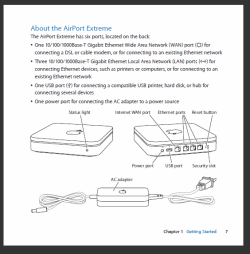
There are 4 ethernet ports on the router. One is labelled differently than the other 3. What is the difference? My Airport seems identical to the one pictured in a previous email in which I requested user's manual. I do have a spare ethernet cable.

Once again, thanx for your greatly valued response.
Hope to be back soon.
 

My Computer

Computer Manufacturer/Model Number
HP Pavilion a4310f, 3.0GHz dual core processor,4GB ram, dual core
OS
win 7 home premium 64 bit
CPU
processor AMD Athlon(tm) II x2 250 processor 3.00GHz
Motherboard
M2N68-LA (Narra6)
Memory
4.00GB RAM
Graphics Card(s)
Integrated graphics using nVidea GeForce615SE
Sound Card
Integrated RealtekALC888S
Monitor(s) Displays
Dell 17" LCD
Hard Drives
-640GB SATA, 3.0GB/s, 7200rpm
-Lacie Rugged XL backup drive, 1TB
-SuperMulti DVD burner
Keyboard
HP USB heyboard
Mouse
USB optical mouse
my blunder, sorry

Yes, I think there may be a language problem and a matter of poor technical semantics.

padyboy:
#1: please confirm that you have the following setup:

  • A cable internet connection, using coax cable from a wall outlet.
  • The coax cable is connected to your MODEM
  • The MODEM is connected to the AE ROUTER using an ethernet cable.
  • The PC is not connected to the MODEM or ROUTER with any type of wire or cable.
If your setup is different than above, please describe it in detail.


#2:

  • Switch the ROUTER off (or disconnect the power). Leave it off.
  • Can you access the internet on the PC?
#3: Your AE ROUTER has ethernet ports in the back. Do you have another ethernet cable?
If so, can you connect the PC to the AE ROUTER using the cable to test to see if the download problem disappears?


REPLY


If your setup is different than above, please describe it in detail.


A cable internet connection, using coax cable from a wall outlet.

Yes, high speed internet using 300 ohm coax cable.

The coax cable is connected to your MODEM

No, not at the present time. I disconnected modem due to interference. Can reconnect easily if necessary.

The MODEM is connected to the AE ROUTER using an ethernet cable.

No, not at the present time. I disconnected modem due to interference. Can reconnect easily if necessary.

The PC is not connected to the MODEM or ROUTER with any type of wire or cable.

Yes. The PC is connected to the modem at this time. There is no interference. System works normally. File downloads normal.


This describes my system in its present state.
I will try #2 and #3.

#3: Your AE ROUTER has ethernet ports in the back. Do you have another ethernet cable?

If so, can you connect the PC to the AE ROUTER using the cable to test to see if the download problem disappears?[/QUOTE

There are 4 ethernet ports on the router. One is labelled differently than the other 3. What is the difference? My Airport seems identical to the one pictured in a previous email in which I requested user's manual. I do have a spare ethernet cable.

Once again, thanx for your greatly valued response.
Hope to be back soon.
----------------------------------------------------------------------------------------------------------------------------------------------------------------------------------------------------------------------------------------------
I continue to make things more difficult with my info blunders:


"The coax cable is connected to your MODEM

No, not at the present time. I disconnected modem due to interference. Can reconnect easily if necessary."

NOT TRUE!!

-Yes. My coax is connected to my modem, of course.

- At present, I have: coax>modem>computer.

I will attempt the solutions you have mentioned.
Clarification of #3: I have no cable input on the AE router; therefore, must use modem.

Thank you so much for your patience.
 

My Computer

Computer Manufacturer/Model Number
HP Pavilion a4310f, 3.0GHz dual core processor,4GB ram, dual core
OS
win 7 home premium 64 bit
CPU
processor AMD Athlon(tm) II x2 250 processor 3.00GHz
Motherboard
M2N68-LA (Narra6)
Memory
4.00GB RAM
Graphics Card(s)
Integrated graphics using nVidea GeForce615SE
Sound Card
Integrated RealtekALC888S
Monitor(s) Displays
Dell 17" LCD
Hard Drives
-640GB SATA, 3.0GB/s, 7200rpm
-Lacie Rugged XL backup drive, 1TB
-SuperMulti DVD burner
Keyboard
HP USB heyboard
Mouse
USB optical mouse
There are 4 ethernet ports on the router. One is labelled differently than the other 3. What is the difference?

The one that is labeled differently, sometimes situated a little apart from the others, is where you must connect the modem output (the WAN port). The other three are for other devices/pc's that you want to be able to give network/internet access.

Clarification of #3: I have no cable input on the AE router; therefore, must use modem.

The round coax cable must always connect to the modem. The ethernet port on the modem gets connected either to your router's WAN port (safest security wise) or whatever other ethernet device (like a PC - not as safe because you have no router protection) you'd like to allow internet access.

It won't work right otherwise.
 

My Computer

OS
Windows 7 Ultimate x64
Back
Top