strange problem

To clarify: you connect the ethernet cable from your modem to the port labled WAN on the router.

The other 3 ports are used to connect PC's directly to the router using an ethernet cable.

Ethernet cables are cheap. Buy one or borrow one. You can then test the router to determine if your original problem is caused by the router or an external source.
 

My Computer

Computer type
PC/Desktop
Computer Manufacturer/Model Number
Home Built - Jan 2013
OS
Windows 7 64 Bit Home Premium SP1
CPU
i7-3820
Motherboard
Asus P9X79-PRO - Bios 4608
Memory
GSkill F3-14900CL9Q - 16GB
Graphics Card(s)
EVGA GeForce GTX660 - Driver 352.86
Sound Card
On board Realtek ALC898
Monitor(s) Displays
Acer S271HL
Screen Resolution
1920 x 1080
Hard Drives
#1- Samsung 840 Pro Series
#2- Western Digital WD1002FAEX Sata3 Black
#3- Western Digital WD1002FAEX Sata3 Black
PSU
Corsair CMPSU-850TX-V2 - 850 watt (by Seasonic)
Case
Corsair Obsidian 550D
Cooling
Standard 3 120mm case fans, Cooler Master Hyper 212 EVO
Keyboard
MS KC-0405
Mouse
Intellimouse 5-button
Internet Speed
56 Mbits/Sec (on a good day)
Antivirus
Avast & Malwarebytes
Browser
Firefox
Other Info
Asus DVD - DRW-24B1ST 24X
Something else occurred to me.

Some ISPs set your internet access to the MAC address of the first device connected to the MODEM. If that first device was your PC then the ISP will not recognize the MAC on the (new) ROUTER.

The solution to the above problem is simple: power OFF the MODEM and all connected devices. Leave the modem off for a minute or so. Then turn on the MODEM and wait for the connection to finalize. Then connect the ROUTER and power it on and wait for it to finalize connections. Then turn on PC.

The ISP should now recognize the ROUTER's MAC address.
 

My Computer

Computer type
PC/Desktop
Computer Manufacturer/Model Number
Home Built - Jan 2013
OS
Windows 7 64 Bit Home Premium SP1
CPU
i7-3820
Motherboard
Asus P9X79-PRO - Bios 4608
Memory
GSkill F3-14900CL9Q - 16GB
Graphics Card(s)
EVGA GeForce GTX660 - Driver 352.86
Sound Card
On board Realtek ALC898
Monitor(s) Displays
Acer S271HL
Screen Resolution
1920 x 1080
Hard Drives
#1- Samsung 840 Pro Series
#2- Western Digital WD1002FAEX Sata3 Black
#3- Western Digital WD1002FAEX Sata3 Black
PSU
Corsair CMPSU-850TX-V2 - 850 watt (by Seasonic)
Case
Corsair Obsidian 550D
Cooling
Standard 3 120mm case fans, Cooler Master Hyper 212 EVO
Keyboard
MS KC-0405
Mouse
Intellimouse 5-button
Internet Speed
56 Mbits/Sec (on a good day)
Antivirus
Avast & Malwarebytes
Browser
Firefox
Other Info
Asus DVD - DRW-24B1ST 24X
airport extreme setup

According to AE manual, I require a mackintosh computer to set up this router.
Since I am using an HP Pavilion, setup is impossible at this time.:( Once setup is completed, router is compatible with PC.

As previously mentioned, my brother uses Apple and set up this modem initially.

Unfortunately, I must wait until he visits this summer. :):(

Alternatively, I could attempt to setup the Linksys router he also left behind. I
believe this is PC only.

The Apple Airport Extreme router issue is not dead, just postponed for now.

Perhaps I can find a local "Macks-on-the-go" outfit in my area, if such an agency exists.

I wish to express my sincere gratitude to all who have contributed assistance to my post; I have learned a great deal from your input.
But I must put aside the Airport Extreme situation for now. I have other computer problems to deal with!!

I will undoubtably be returning to this site for more posts on the router or other problems.
 

My Computer

Computer Manufacturer/Model Number
HP Pavilion a4310f, 3.0GHz dual core processor,4GB ram, dual core
OS
win 7 home premium 64 bit
CPU
processor AMD Athlon(tm) II x2 250 processor 3.00GHz
Motherboard
M2N68-LA (Narra6)
Memory
4.00GB RAM
Graphics Card(s)
Integrated graphics using nVidea GeForce615SE
Sound Card
Integrated RealtekALC888S
Monitor(s) Displays
Dell 17" LCD
Hard Drives
-640GB SATA, 3.0GB/s, 7200rpm
-Lacie Rugged XL backup drive, 1TB
-SuperMulti DVD burner
Keyboard
HP USB heyboard
Mouse
USB optical mouse
According to AE manual, I require a mackintosh computer to set up this router.

Not necessarily true.

While it is certainly convenient to set up a router your first time using the setup software (that in your case is an Apple program that requires a MAC to run) it is not the only way.

I do not ever install the setup software for routers. I set them up manually.

You can access your router's setup by using any standard web browser (Internet Explorer, Firefox, etc).

You need to know the IP address of the router. Your Linksys router will be 192.168.1.1. (You type: " http://192.168.1.1 ") . Some routers use 192.168.10.1. You can google to find what the AE uses for a standard IP address.

Then you need to know the username and password to access the router. Again, a new router has a generic UN&P. And again this will be in your documentation or you can find it online.
Some routers use "admin" as a user name and the password is blank.
IIRC, Linksys uses "Linksys" as the user name and "admin" as the password.

Once you have accessed your routers settings you can change the password, setup your wireless connection and encryption key, and make any other changes to the system you need. No software is required.

If you need more help with the setup I would post a new thread in the "Network & Sharing" forum and see if someone there is familiar with the AE and could walk you through the setup. (I am not familiar!).
 

My Computer

Computer type
PC/Desktop
Computer Manufacturer/Model Number
Home Built - Jan 2013
OS
Windows 7 64 Bit Home Premium SP1
CPU
i7-3820
Motherboard
Asus P9X79-PRO - Bios 4608
Memory
GSkill F3-14900CL9Q - 16GB
Graphics Card(s)
EVGA GeForce GTX660 - Driver 352.86
Sound Card
On board Realtek ALC898
Monitor(s) Displays
Acer S271HL
Screen Resolution
1920 x 1080
Hard Drives
#1- Samsung 840 Pro Series
#2- Western Digital WD1002FAEX Sata3 Black
#3- Western Digital WD1002FAEX Sata3 Black
PSU
Corsair CMPSU-850TX-V2 - 850 watt (by Seasonic)
Case
Corsair Obsidian 550D
Cooling
Standard 3 120mm case fans, Cooler Master Hyper 212 EVO
Keyboard
MS KC-0405
Mouse
Intellimouse 5-button
Internet Speed
56 Mbits/Sec (on a good day)
Antivirus
Avast & Malwarebytes
Browser
Firefox
Other Info
Asus DVD - DRW-24B1ST 24X
wron os

I have accessed linksys webpage for my model and found it is not compatible with Windows 7.

Thus that option is now eliminated.

However, I shall investigate your AE setup information.

Thanx again.
 

My Computer

Computer Manufacturer/Model Number
HP Pavilion a4310f, 3.0GHz dual core processor,4GB ram, dual core
OS
win 7 home premium 64 bit
CPU
processor AMD Athlon(tm) II x2 250 processor 3.00GHz
Motherboard
M2N68-LA (Narra6)
Memory
4.00GB RAM
Graphics Card(s)
Integrated graphics using nVidea GeForce615SE
Sound Card
Integrated RealtekALC888S
Monitor(s) Displays
Dell 17" LCD
Hard Drives
-640GB SATA, 3.0GB/s, 7200rpm
-Lacie Rugged XL backup drive, 1TB
-SuperMulti DVD burner
Keyboard
HP USB heyboard
Mouse
USB optical mouse
Not sure of what you read, or how it was written, but that sure doesn't seem too accurate. I've set up numerous Linksys routers via Win7 machines. But, I never use the standard installation software anyway, as I always set them up manually.

If I were you, I'd just connect the PC to any port on the router except the WAN/Internet port. Then open Internet Explorer or whatever browser, type 192.168.1.1 in the address bar, press enter, and you'll be brought to the router's login screen. See TVeblen's post regarding how to log in: http://www.sevenforums.com/hardware-devices/226874-strange-problem.html#post1909002

What's the model number of the Linksys?
 

My Computer

OS
Windows 7 Ultimate x64
reply

Linksys model # BEFSR41.

Mentions Win XP in specifications. No mention of Win 7 or Vista.
 

My Computer

Computer Manufacturer/Model Number
HP Pavilion a4310f, 3.0GHz dual core processor,4GB ram, dual core
OS
win 7 home premium 64 bit
CPU
processor AMD Athlon(tm) II x2 250 processor 3.00GHz
Motherboard
M2N68-LA (Narra6)
Memory
4.00GB RAM
Graphics Card(s)
Integrated graphics using nVidea GeForce615SE
Sound Card
Integrated RealtekALC888S
Monitor(s) Displays
Dell 17" LCD
Hard Drives
-640GB SATA, 3.0GB/s, 7200rpm
-Lacie Rugged XL backup drive, 1TB
-SuperMulti DVD burner
Keyboard
HP USB heyboard
Mouse
USB optical mouse
It'll work. Only good for wired connection though.

192.168.1.1 will get you there. Default password is admin.

You could connect the AE's WAN port to one of the ports on the Linksys to give wireless capability.
 

My Computer

OS
Windows 7 Ultimate x64
I feel like a fool. Perhaps I am one.:o

I had assumed the Linksys was wireless.:o:o Please forget I ever mentioned this router.:o:o:o

Now back to Apple Airport Extreme.:(

Someone mentioned that iMack is not required to set up this router. This will be investigated next.

Please excuse my incompetence.

Again, extremely appreciate all of your input.
 

My Computer

Computer Manufacturer/Model Number
HP Pavilion a4310f, 3.0GHz dual core processor,4GB ram, dual core
OS
win 7 home premium 64 bit
CPU
processor AMD Athlon(tm) II x2 250 processor 3.00GHz
Motherboard
M2N68-LA (Narra6)
Memory
4.00GB RAM
Graphics Card(s)
Integrated graphics using nVidea GeForce615SE
Sound Card
Integrated RealtekALC888S
Monitor(s) Displays
Dell 17" LCD
Hard Drives
-640GB SATA, 3.0GB/s, 7200rpm
-Lacie Rugged XL backup drive, 1TB
-SuperMulti DVD burner
Keyboard
HP USB heyboard
Mouse
USB optical mouse
The default password for the Airport Extreme is ADMIN also. The username is left blank.

And you must connect your PC to the router with an ethernet cable to set up the router manually, which you will need to do to set up your wireless connection.
 

My Computer

Computer type
PC/Desktop
Computer Manufacturer/Model Number
Home Built - Jan 2013
OS
Windows 7 64 Bit Home Premium SP1
CPU
i7-3820
Motherboard
Asus P9X79-PRO - Bios 4608
Memory
GSkill F3-14900CL9Q - 16GB
Graphics Card(s)
EVGA GeForce GTX660 - Driver 352.86
Sound Card
On board Realtek ALC898
Monitor(s) Displays
Acer S271HL
Screen Resolution
1920 x 1080
Hard Drives
#1- Samsung 840 Pro Series
#2- Western Digital WD1002FAEX Sata3 Black
#3- Western Digital WD1002FAEX Sata3 Black
PSU
Corsair CMPSU-850TX-V2 - 850 watt (by Seasonic)
Case
Corsair Obsidian 550D
Cooling
Standard 3 120mm case fans, Cooler Master Hyper 212 EVO
Keyboard
MS KC-0405
Mouse
Intellimouse 5-button
Internet Speed
56 Mbits/Sec (on a good day)
Antivirus
Avast & Malwarebytes
Browser
Firefox
Other Info
Asus DVD - DRW-24B1ST 24X
I feel like a fool.
Don't fret. We all gotta start somewhere. Just keep learning/trying and you'll make it.
I had assumed the Linksys was wireless. Please forget I ever mentioned this router.

Now back to Apple Airport Extreme.

Someone mentioned that iMack is not required to set up this router. This will be investigated next.
Yeah, forget about the Linksys if you're gonna need wireless.

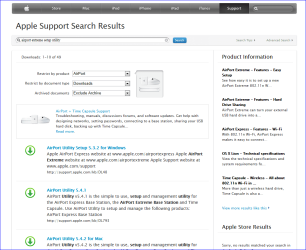
As far as the AE, you're gonna need the software as it apparently doesn't have a web based setup utility (at least on the two models I looked at). No built in web server. So if you don't have the CD for it you're going to have to download it from here: Apple - Support - Search

Refine the search as shown below:
 

Attachments

  • Capture1.PNG
    Capture1.PNG
    47.6 KB · Views: 4

My Computer

OS
Windows 7 Ultimate x64
reply

Thanks, Sibbil.

I finally found the Apple cd which accompanied the Airport Extreme router. Apparently, it can be installed from a PC.

I believe the connection is ISP modem>router>CPU using ethernet cables.

However, describing and actually doing are two different things with computers.
I still believe I will need an ethernet splitter between my router and CPU.
I hope the signal loss is not great enough to cause interference.
Time (and connections) will tell.

Grats, again.
 

My Computer

Computer Manufacturer/Model Number
HP Pavilion a4310f, 3.0GHz dual core processor,4GB ram, dual core
OS
win 7 home premium 64 bit
CPU
processor AMD Athlon(tm) II x2 250 processor 3.00GHz
Motherboard
M2N68-LA (Narra6)
Memory
4.00GB RAM
Graphics Card(s)
Integrated graphics using nVidea GeForce615SE
Sound Card
Integrated RealtekALC888S
Monitor(s) Displays
Dell 17" LCD
Hard Drives
-640GB SATA, 3.0GB/s, 7200rpm
-Lacie Rugged XL backup drive, 1TB
-SuperMulti DVD burner
Keyboard
HP USB heyboard
Mouse
USB optical mouse
You got it:

ISP modem>router>CPU using ethernet cables

The above connection is required for set up. Once you've got the AE properly set up, including the wireless capability, you can leave it connected as above or you can disconnect the ethernet from the CPU and connect via wireless. You can roam from room to room and still have an internet connection via the wireless capability (within about 100' range). You can switch between wired and wireless whenever you want. You can leave the wireless adapter in your PC turned on and connected all the time if you want. If you then plug in the ethernet your PC will have two paths to the internet, and the PC will automatically pick the path to use (either wired or wireless). You can disconnect ethernet cable to roam again and never lose the internet.

A little long winded but hopefully gets the point across.

You should have no need for that splitter. At first it sounded like you might be trying to create some special setup, but it's becoming rather apparent you're just looking for a typical "standard" internet/network setup.

You shouldn't have to worry how the router is hindering your file downloads. The reduction in throughput introduced by the router would be marginable, not detrimental.
 

My Computer

OS
Windows 7 Ultimate x64
possible solution

After all the info from different sources, I am still confused on how to proceed here.

My cable company said they would install a router, compatible with PC and Mac for $2.95 a month, which includes installation and maintnance. The range is 230 feet (less here due to hospitals and computer facility). First 3 months free. Can cancel at any time without penalty. Uses common 802.11n protocall.

I will probably try the Airport Extreme one more time. Modem to router to computer, as before.

However, the cable company offer seems like the way to go, even if I take the 3 month free trial offered while continuing to work on the Apple router problem. I have been given conflicting information from different sources.

I will inform you of my progress.

I am most grateful for your valued input.:D
 

My Computer

Computer Manufacturer/Model Number
HP Pavilion a4310f, 3.0GHz dual core processor,4GB ram, dual core
OS
win 7 home premium 64 bit
CPU
processor AMD Athlon(tm) II x2 250 processor 3.00GHz
Motherboard
M2N68-LA (Narra6)
Memory
4.00GB RAM
Graphics Card(s)
Integrated graphics using nVidea GeForce615SE
Sound Card
Integrated RealtekALC888S
Monitor(s) Displays
Dell 17" LCD
Hard Drives
-640GB SATA, 3.0GB/s, 7200rpm
-Lacie Rugged XL backup drive, 1TB
-SuperMulti DVD burner
Keyboard
HP USB heyboard
Mouse
USB optical mouse
Although that's rather inexpensive, especially the first three months, you need to understand that a router typically doesn't know or care what OS is running on the devices it connects with.

Most routers can be configured for use by simply using your machine (with whatever OS) and opening whatever browser you use and navigating to a known address (found in the manual or internet). Your AE router is apparently different in this regard, as it appears as though it is only configurable by a setup program. So you have to find a version of the setup program that will run on your OS. But once the router has been set up (configured) the OS no longer matters.

So, since you've found the CD that came with the AE, have you loaded it into your PC's CD tray to see if it's got a setup program that can run on your machine? Have you tried running anything that came on that CD?

I kind of doubt that you need anything more from the cable company other than the modem you're likely already renting and paying for each month, along with the service itself.
 

My Computer

OS
Windows 7 Ultimate x64
reply

Thanx for the prompt reply.:D

The Apple cd does indeed play on my Windows 7 computer. Thus I should have no trouble with setup. However, having limited expertise in computer technology, I never take anything for granted. The frequent use of terminology, which I must look up somewhere else, is frustrating and always slows me down. However, I will attempt it.

My concern is the difficulty mentioned some time ago: inability to connect to Internet, ISP tells me it is the router's fault, power off the router, power on again.
This problem with download of large files probably still exists.:confused:
I was told that power down of the router affects only settings of peripheral components, not those of the router itself. Thus power off/on of the router did not affect Wifi function.

Finally, I am considering wifi rental scheme as a way to restore service to my house. Thus I could find out if my new Asus netbook which does not now connect can be set so as to work. I must be assured of a functioning wifi to do this.
I am hoping I only have to adjust some settings; I have already set it to 'search for available networks'.

Next: what is the bandwidth capability of the AE router? If I only download these files when the computer is 'resting', ie powered on but not in use (such as overnight), can the AE handle these downloads?
My brother believes that router detects something 'suspicious' about these files and thus retards downloads. Any truth to this?

If I must give up downloads fo Wifi capability, this would be difficult which to give up. Perhaps I should check some other manufacturer. Tens of millions download these files without difficulty. Why me????

Thanx again.:)
 

My Computer

Computer Manufacturer/Model Number
HP Pavilion a4310f, 3.0GHz dual core processor,4GB ram, dual core
OS
win 7 home premium 64 bit
CPU
processor AMD Athlon(tm) II x2 250 processor 3.00GHz
Motherboard
M2N68-LA (Narra6)
Memory
4.00GB RAM
Graphics Card(s)
Integrated graphics using nVidea GeForce615SE
Sound Card
Integrated RealtekALC888S
Monitor(s) Displays
Dell 17" LCD
Hard Drives
-640GB SATA, 3.0GB/s, 7200rpm
-Lacie Rugged XL backup drive, 1TB
-SuperMulti DVD burner
Keyboard
HP USB heyboard
Mouse
USB optical mouse
Thanx for the prompt reply.
You're welcome!
The Apple cd does indeed play on my Windows 7 computer. Thus I should have no trouble with setup. However, having limited expertise in computer technology, I never take anything for granted. The frequent use of terminology, which I must look up somewhere else, is frustrating and always slows me down. However, I will attempt it.
That's understandable. There's a lot there to have to grasp to get your feet on the ground.
My concern is the difficulty mentioned some time ago: inability to connect to Internet, ISP tells me it is the router's fault, power off the router, power on again. This problem with download of large files probably still exists.
ISP is liable to place blame elsewhere first. First off, they can see the status of your modem. But I'm also sure they would like to start collecting an extra $3/month by supplying a router too.
I was told that power down of the router affects only settings of peripheral components, not those of the router itself. Thus power off/on of the router did not affect Wifi function.
Wrong!

If your modem is connected to the router's WAN/Internet port (as it should be connected), and then power down the router, you lose all service from your ISP. Doesn't matter whether your PC is wired or wireless. If your PC is able to get on the internet at that point, it means it has wirelessly connected to someone else's network/ISP (like a neighbor's). Not a good thing.

Powering down the router also prevents your machines/devices/PC's from communicating with each other, as the router is the link between them all that allows intermachine communication.
Finally, I am considering wifi rental scheme as a way to restore service to my house. Thus I could find out if my new Asus netbook which does not now connect can be set so as to work. I must be assured of a functioning wifi to do this.
Start with using your Asus netbook to properly configure the AE using the software on the CD. The Asus must be connected to the AE via ethernet to do this. Then:
I am hoping I only have to adjust some settings; I have already set it to 'search for available networks'.
Now you can set up the wireless connection, but the only "available network" you want to automatically connect to is yours. You might want to use the wireless connection software built into Windows. Disable any Asus software that is trying to handle network connections. Windows handles it better than most any of the hardware manufacturer's software. Not only that but it's easier to get help since more often than not you'll tend to get help from someone connecting via Windows.

To make sure you are wirelessly connected to your own network, you'll have to use your PC to find the wireless network provided by the AE router. Make sure no wireless networks are set up to connect automatically, and disconnect from any wireless network that it may have already connected to. Search the list of available wireless networks and find the name you gave to the AE when you set it up (SSID is usually the term that is used to represent a network name). When you find it, connect to it, entering the same wireless password you used when setting up the AE. When connected, right click on the SSID name, select properties, and set it up to connect automatically.

If you left the ethernet cable connected, the computer will actually have two network connections to the AE. You could see this if you went to Control Panel > All Control Panel Items > Network and Sharing Center, then clicking on "See full map" in the upper right corner.

Disconnect the ethernet and you'll still have the wireless connection. Should be able to surf the net. Now power down the router. See if you can surf the net. If you can, that means you're connected to someone else's network -- start over. If you can't, you're good to go. Power the router back up. See that the PC wirelessly connects to your router.
Next: what is the bandwidth capability of the AE router? If I only download these files when the computer is 'resting', ie powered on but not in use (such as overnight), can the AE handle these downloads?
Shouldn't have to worry about this, wired or wireless. You would have to time it to notice the difference. Any time day or night. If you pay your ISP for 3 mb/s service, you'll get it.
My brother believes that router detects something 'suspicious' about these files and thus retards downloads. Any truth to this?
Not likely. Standard consumer based routers typically don't inspect the data as closely as more expensive routers. If you clicked on a link to download a file, the router recognizes that you just asked for it and therefore will let it through. That's one way cheap home routers protect you. It blocks anything you didn't ask for. You have to click first, before it'll let it through.

 

My Computer

OS
Windows 7 Ultimate x64
Back
Top