Solved Strange Request: Set Logon Screen After Display Is Turned Off.

Vaughn Whynot

The Bearded Basterd
Member
VIP
Local time
9:09 PM
Messages
106
Location
Nova Scotia
This is a strange question but I don't want a password on my screen but I wouldn't mind a logon screen after my computer display screen is turned off..
It's hard to explain.

But i have my display set to turn off 30 mins of idle and wanted to have a logon welcome page instead of a password page when i move the mouse or come back to my computer.

Is this possible?
 

My Computer My Computer

At a glance

Microsoft Windows 7 Ultimate 64-bit SP1Intel Core i3 2120 @ 3.30GHz6.00GB Dual-Channel DDR3 @ 665MHz (9-9-9-24)1024MB ATI AMD Radeon HD 5700 Series
Computer type
PC/Desktop
Computer Manufacturer/Model Number
Acer Aspire M3970
OS
Microsoft Windows 7 Ultimate 64-bit SP1
CPU
Intel Core i3 2120 @ 3.30GHz
Motherboard
Acer AM3970
Memory
6.00GB Dual-Channel DDR3 @ 665MHz (9-9-9-24)
Graphics Card(s)
1024MB ATI AMD Radeon HD 5700 Series
Sound Card
Realtek High Definition Audio
Monitor(s) Displays
Acer X223W & HP 2511
Screen Resolution
(1920x1080@60Hz) & (1680x1050@60Hz)
Hard Drives
466GB Seagate ST3500320AS ATA Device (SATA)
932GB Seagate ST31000524AS ATA Device (SATA)
PSU
600 Watt ATX Diablotek DA Series
Case
Acer M3970 Default Case
Cooling
CoolerMaster Hyper 101i
Keyboard
Logitech G5
Mouse
Razer Black Widow Ultimate
Internet Speed
20d/2u
Antivirus
Windows Security Essentials & Malwarebytes Anti-Malware
Browser
Firefox
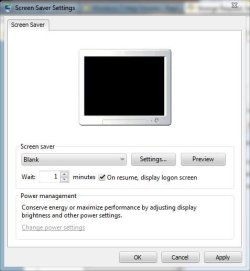
How about enabling the screensaver, you can set it to a blank one,

and then checking the box next to On Resume, Display Logon Screen,

screensaver.JPG

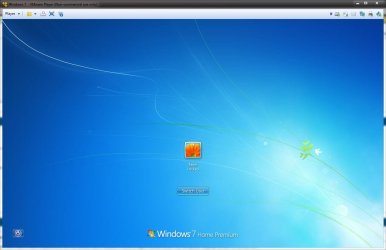
Then when you wake it you get this,

logon screen.JPG

No password, just click the icon.
 

My Computer My Computer

At a glance

Win 10 Pro x64Intel I5-2500K @3.3GHz16GB G.Skill Ripjaws X (4x4GB)EVGA GeForce 750 Ti SC 2GB
Computer type
PC/Desktop
Computer Manufacturer/Model Number
Self Built
OS
Win 10 Pro x64
CPU
Intel I5-2500K @3.3GHz
Motherboard
Asrock P67 Extreme4
Memory
16GB G.Skill Ripjaws X (4x4GB)
Graphics Card(s)
EVGA GeForce 750 Ti SC 2GB
Sound Card
ASUS Xonar DG 5.1 Channels 24-bit 96KHz PCI Interface Sound
Monitor(s) Displays
auria eq2367
Screen Resolution
1920 x 1080
Hard Drives
250GB Samsung 850 EVO SSD
1TB WD Blue
1TB Hitachi
PSU
SeaSonic X 650W 80 Plus Gold
Case
Corsair Obsidian 750D
Cooling
Corsair H60, Three 140mm case fans
Keyboard
Logitech Wireless Keyboard K520
Mouse
Logitech Wireless Mouse M310
Internet Speed
Wave Broadband ~ 100 dn 5 up
Antivirus
Windows Defender, Malwarebytes Premium
Browser
Edge, IE11, Chrome
Other Info
Laptop specs: HP g7-1365dx /
CPU: AMD A6-3420M APU with Radeon(tm) HD Graphics /
RAM: Crucial 8Gb (2x4Gb) /
SSD: Crucial M4-CT128M4SSD2 ATA Device/ FW 000F /
GFX: AMD Radeon HD 6520G /
OS: Windows 10 Pro x64
How about enabling the screensaver, you can set it to a blank one,

and then checking the box next to On Resume, Display Logon Screen,

View attachment 283374

Then when you wake it you get this,

View attachment 283375

No password, just click the icon.

hmm that would work. So that will turn off my screen? like if you was to do it through the power options. thanks for the help aswell. I felt stupid asking this.
 

My Computer My Computer

At a glance

Microsoft Windows 7 Ultimate 64-bit SP1Intel Core i3 2120 @ 3.30GHz6.00GB Dual-Channel DDR3 @ 665MHz (9-9-9-24)1024MB ATI AMD Radeon HD 5700 Series
Computer type
PC/Desktop
Computer Manufacturer/Model Number
Acer Aspire M3970
OS
Microsoft Windows 7 Ultimate 64-bit SP1
CPU
Intel Core i3 2120 @ 3.30GHz
Motherboard
Acer AM3970
Memory
6.00GB Dual-Channel DDR3 @ 665MHz (9-9-9-24)
Graphics Card(s)
1024MB ATI AMD Radeon HD 5700 Series
Sound Card
Realtek High Definition Audio
Monitor(s) Displays
Acer X223W & HP 2511
Screen Resolution
(1920x1080@60Hz) & (1680x1050@60Hz)
Hard Drives
466GB Seagate ST3500320AS ATA Device (SATA)
932GB Seagate ST31000524AS ATA Device (SATA)
PSU
600 Watt ATX Diablotek DA Series
Case
Acer M3970 Default Case
Cooling
CoolerMaster Hyper 101i
Keyboard
Logitech G5
Mouse
Razer Black Widow Ultimate
Internet Speed
20d/2u
Antivirus
Windows Security Essentials & Malwarebytes Anti-Malware
Browser
Firefox
You're welcome. Yes, it will turn off your screen. You can set it to the same 30 min. you have set to turn off your display or less if you want.

Here's a test, I just set the display to turn off at 2 min. and enabled the screensaver to come on at the same 2 min.

At the 2 min. mark you can hear the logoff sound if you haven't disabled that.

display.JPG

BTW, there are no stupid questions. :)
 

My Computer My Computer

At a glance

Win 10 Pro x64Intel I5-2500K @3.3GHz16GB G.Skill Ripjaws X (4x4GB)EVGA GeForce 750 Ti SC 2GB
Computer type
PC/Desktop
Computer Manufacturer/Model Number
Self Built
OS
Win 10 Pro x64
CPU
Intel I5-2500K @3.3GHz
Motherboard
Asrock P67 Extreme4
Memory
16GB G.Skill Ripjaws X (4x4GB)
Graphics Card(s)
EVGA GeForce 750 Ti SC 2GB
Sound Card
ASUS Xonar DG 5.1 Channels 24-bit 96KHz PCI Interface Sound
Monitor(s) Displays
auria eq2367
Screen Resolution
1920 x 1080
Hard Drives
250GB Samsung 850 EVO SSD
1TB WD Blue
1TB Hitachi
PSU
SeaSonic X 650W 80 Plus Gold
Case
Corsair Obsidian 750D
Cooling
Corsair H60, Three 140mm case fans
Keyboard
Logitech Wireless Keyboard K520
Mouse
Logitech Wireless Mouse M310
Internet Speed
Wave Broadband ~ 100 dn 5 up
Antivirus
Windows Defender, Malwarebytes Premium
Browser
Edge, IE11, Chrome
Other Info
Laptop specs: HP g7-1365dx /
CPU: AMD A6-3420M APU with Radeon(tm) HD Graphics /
RAM: Crucial 8Gb (2x4Gb) /
SSD: Crucial M4-CT128M4SSD2 ATA Device/ FW 000F /
GFX: AMD Radeon HD 6520G /
OS: Windows 10 Pro x64
You're welcome. Yes, it will turn off your screen. You can set it to the same 30 min. you have set to turn off your display or less if you want.

Here's a test, I just set the display to turn off at 2 min. and enabled the screensaver to come on at the same 2 min.

At the 2 min. mark you can hear the logoff sound if you haven't disabled that.

View attachment 283442

BTW, there are no stupid questions. :)
it works perfect and is very simple to do... I never thought of doing it this way. Thank you
 

My Computer My Computer

At a glance

Microsoft Windows 7 Ultimate 64-bit SP1Intel Core i3 2120 @ 3.30GHz6.00GB Dual-Channel DDR3 @ 665MHz (9-9-9-24)1024MB ATI AMD Radeon HD 5700 Series
Computer type
PC/Desktop
Computer Manufacturer/Model Number
Acer Aspire M3970
OS
Microsoft Windows 7 Ultimate 64-bit SP1
CPU
Intel Core i3 2120 @ 3.30GHz
Motherboard
Acer AM3970
Memory
6.00GB Dual-Channel DDR3 @ 665MHz (9-9-9-24)
Graphics Card(s)
1024MB ATI AMD Radeon HD 5700 Series
Sound Card
Realtek High Definition Audio
Monitor(s) Displays
Acer X223W & HP 2511
Screen Resolution
(1920x1080@60Hz) & (1680x1050@60Hz)
Hard Drives
466GB Seagate ST3500320AS ATA Device (SATA)
932GB Seagate ST31000524AS ATA Device (SATA)
PSU
600 Watt ATX Diablotek DA Series
Case
Acer M3970 Default Case
Cooling
CoolerMaster Hyper 101i
Keyboard
Logitech G5
Mouse
Razer Black Widow Ultimate
Internet Speed
20d/2u
Antivirus
Windows Security Essentials & Malwarebytes Anti-Malware
Browser
Firefox
You're welcome, glad you got it sorted the way you wanted. :)
 

My Computer My Computer

At a glance

Win 10 Pro x64Intel I5-2500K @3.3GHz16GB G.Skill Ripjaws X (4x4GB)EVGA GeForce 750 Ti SC 2GB
Computer type
PC/Desktop
Computer Manufacturer/Model Number
Self Built
OS
Win 10 Pro x64
CPU
Intel I5-2500K @3.3GHz
Motherboard
Asrock P67 Extreme4
Memory
16GB G.Skill Ripjaws X (4x4GB)
Graphics Card(s)
EVGA GeForce 750 Ti SC 2GB
Sound Card
ASUS Xonar DG 5.1 Channels 24-bit 96KHz PCI Interface Sound
Monitor(s) Displays
auria eq2367
Screen Resolution
1920 x 1080
Hard Drives
250GB Samsung 850 EVO SSD
1TB WD Blue
1TB Hitachi
PSU
SeaSonic X 650W 80 Plus Gold
Case
Corsair Obsidian 750D
Cooling
Corsair H60, Three 140mm case fans
Keyboard
Logitech Wireless Keyboard K520
Mouse
Logitech Wireless Mouse M310
Internet Speed
Wave Broadband ~ 100 dn 5 up
Antivirus
Windows Defender, Malwarebytes Premium
Browser
Edge, IE11, Chrome
Other Info
Laptop specs: HP g7-1365dx /
CPU: AMD A6-3420M APU with Radeon(tm) HD Graphics /
RAM: Crucial 8Gb (2x4Gb) /
SSD: Crucial M4-CT128M4SSD2 ATA Device/ FW 000F /
GFX: AMD Radeon HD 6520G /
OS: Windows 10 Pro x64
Back
Top