
Unimatrix02
New member
- Local time
- 4:35 PM
- Messages
- 1
Hi,
Situation is as follows.
On Windows XP however there is no problem like described above. I can ping remote hosts and open sites hosted on remote servers. So it seems like there is a difference in the routing between XP and Windows 7 (maybe only on x64?).
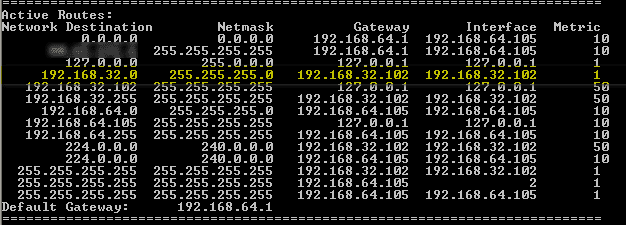
The output of "route print" on Windows XP (32 bit) looks like what you see in routing_xp.png. So here the gateway for the 192.168.32.x subnet is the IP address that the local computer has in the remote network.
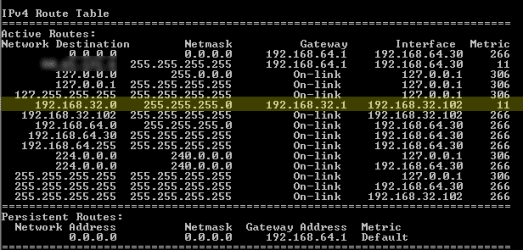
The output of "route print" on Windows 7 looks like what you see in routing_win7.png. Now the gateway for the 192.168.32.x subnet is the IP address of the VPN router (32.1). I don't know if that causes this trouble, but it seems a bit strange.
Enabling "use default gateway on remote network" doesn't make a difference. Using the new option "Disable class based route addition" in Windows 7 only makes the route to the VPN router disappear.
I am really puzzled here. I assume the VPN routing can't be broken Windows 7, and this should just work without manually adding routes.
I also tried using the Draytek SmartVPN client, but that just adds a VPN connection in Windows and gets no further than "unknown error" when connecting .
.
I really hope someone has a solution for this problem .
.
Thanks!
Situation is as follows.
- Home computer running Windows 7 Ultimate x64, sets up VPN connection (LT2P + IPSec, "use remote gateway" disabled) to office. Subnet is 192.168.64.x
- Office has Draytek Vigor 2920 router, subnet is 192.168.32.x
On Windows XP however there is no problem like described above. I can ping remote hosts and open sites hosted on remote servers. So it seems like there is a difference in the routing between XP and Windows 7 (maybe only on x64?).
The output of "route print" on Windows XP (32 bit) looks like what you see in routing_xp.png. So here the gateway for the 192.168.32.x subnet is the IP address that the local computer has in the remote network.
The output of "route print" on Windows 7 looks like what you see in routing_win7.png. Now the gateway for the 192.168.32.x subnet is the IP address of the VPN router (32.1). I don't know if that causes this trouble, but it seems a bit strange.
Enabling "use default gateway on remote network" doesn't make a difference. Using the new option "Disable class based route addition" in Windows 7 only makes the route to the VPN router disappear.
I am really puzzled here. I assume the VPN routing can't be broken Windows 7, and this should just work without manually adding routes.
I also tried using the Draytek SmartVPN client, but that just adds a VPN connection in Windows and gets no further than "unknown error" when connecting
.I really hope someone has a solution for this problem
. Thanks!
Attachments
My Computer
- OS
- Windows 7 Ultimate x64


