
Strange System Restore behavior

MyDog8em

New member
Local time
7:25 PM
Messages
14
System restore is acting really strange on my system to a degree I've never seen before. I 1st noticed it about a week ago. I had roughly 320GB free on my hard drives and all of the sudden over a weeks time it would continually drop. Day 2 it went to about 305GB, then 299 to 285 etc. until it got down to 261GB free. I wasn't downloading anything, making any changes I was merely moving data between 2 NAS's and some simple email, web browsing periodically etc. I could literally just refresh the my computer window and see gigs disappear right before my eyes. I tried several virus scans, win defender, avast, malwarebytes, ccleaner. nothing found. I cleaned all temp files, browser history, recycle bin etc, I may've gained a gig or 2 only to watch it disappear shortly after so I looked at my system restore. It was set to use all available space and all the restore points looked fine so I cleared them all and all my hd space returned. So I set it back to only use 10% and saved and closed. A day later I saw the hard drive space disappearing again and went back to restore. It was back to using 100% with no new restore points but it let me delete again and I turned off system restore. Since I turned it off my free space remains. Other than this my system runs fine, no lag, never slow, nothing odd in the windows task manager and no errors of any kind. Is this a common issue with system restore that any of you have seen before? It has saved me in the past but not for a while, should I just leave it off? Thanks for any info provided. I'm running Win 7 Ultimate x64.
 

My Computer

Computer type
PC/Desktop
Computer Manufacturer/Model Number
Custom build (2007)
OS
Win 7 Ultimate x64 / Zorin OS 9 x64
CPU
AMD Phenom II 940/BE @ 3.9GHz
Motherboard
MSI K9A2 Platinum Rev. 2
Memory
G.Skill 8.00GB DDR2 @ 1066MHz (4x2GB)
Graphics Card(s)
Sapphire Radeon HD 6950/2GB
Sound Card
Onboard/Realtek ALC888
Monitor(s) Displays
HannsG 28" / HannSpree 24"
Screen Resolution
1920x1200 / 1920x1080
Hard Drives
2x 500GB WD Black (SATA 3Gb/s Raid 0)
PSU
OCZ 800W
Case
Aluminum/Air Filtered
Cooling
Air-Cooled, Idle @ 33C / Load @ 45C / 8x fans
Keyboard
Logitec Wireless Solar K750
Mouse
Standard Logitec USB (to PS2 adapter)
Internet Speed
50Mbps/10Mbps
Antivirus
Avast Pro, Malwarebytes Free, CCleaner Pro
Browser
IE 11, FireFox, Chrome
Other Info
WEI: (6.0)
CPU: 7.7
RAM: 7.9
Video: 7.9
Gaming Video: 7.9
HDD: (6.0)
"Shes gettin' old, but I love her, so I think I'll keep her." ~Unknown.
Possible Avast Issue

I notice that you are running Avast.
You may need to completely uninstall it and then reinstall it (or swap to a different AV). :(

Download a new version of the installer and then uninstall the version you are running.
Reinstall it using the new installer.
An additional benefit is that you will be able to select what features you want installed.

I was having a similar System Restore issue, after allowing Avast to do an in-place upgrade to the latest version.
Once I performed a complete clean reinstall the issue stopped.


Check out these threads:
http://www.sevenforums.com/general-...tection-turning-itself-settings-changing.html
http://www.sevenforums.com/system-security/72070-whats-best-anti-virus-102.html#post2946496
 

My Computer

Computer type
PC/Desktop
Computer Manufacturer/Model Number
n/a
OS
W7 Ultimate SP1, LM19.2 MATE, W10 Home 1703, W10 Pro 1703 VM, #All 64 bit
CPU
AMD Phenom II x6 1100T, 3.3 GHz
Motherboard
ASUS M4A88T-M/USB3 (AM3)
Memory
12GB DDR3 1333 G-Skill (4GB x 2), G-Skill (2GB x 2)
Graphics Card(s)
NVIDIA GeForce GTX 660
Sound Card
Realtek?
Monitor(s) Displays
Samsung S23B350
Screen Resolution
1920x1080
Hard Drives
WD Green 2TB (SATA), WD Green 3TB (SATA), WD Blue 4TB (SATA), WD Blue 6TB (SATA)
PSU
Cooler Master
Case
Antec GX300 Tower
Cooling
3x Antec TRICOOL 120mm Fans
Mouse
Wired Optical
Internet Speed
DSL
Antivirus
Avast
Browser
Pale Moon (64 bit)
Other Info
2018-12-27 Upgraded HDDs
2015-12-10 Upgraded case, graphics card, storage
2015-08-15 Upgraded motherboard & RAM
2015-07-15 Upgraded LM17.1 to LM17.2
Thank you for your reply. I completely removed Avast and as much remenance of it as I could with CCleaner and by searching out everything with *Avast* in it then rebooted. Before I could reinstall, the system restore issue resurfaced and within the 1st 10 minutes of a fresh reboot and no active AV, I had already been knocked down from 320GB to 309 free space. Checking system restore, it had reset itself back to using 100% of drive space and was reporting a mere 80MB of space being used, but there were no restore points saved. I then hit delete all points and turned it off again and went back from 309 to 320GB even tho restore said it was using 80MB. This is very strange. As of my writing this, I've reinstalled Avast and have done a full scan. Nothing found. Restore even turned itself back on and is still running amuck :confused:
 

My Computer

Computer type
PC/Desktop
Computer Manufacturer/Model Number
Custom build (2007)
OS
Win 7 Ultimate x64 / Zorin OS 9 x64
CPU
AMD Phenom II 940/BE @ 3.9GHz
Motherboard
MSI K9A2 Platinum Rev. 2
Memory
G.Skill 8.00GB DDR2 @ 1066MHz (4x2GB)
Graphics Card(s)
Sapphire Radeon HD 6950/2GB
Sound Card
Onboard/Realtek ALC888
Monitor(s) Displays
HannsG 28" / HannSpree 24"
Screen Resolution
1920x1200 / 1920x1080
Hard Drives
2x 500GB WD Black (SATA 3Gb/s Raid 0)
PSU
OCZ 800W
Case
Aluminum/Air Filtered
Cooling
Air-Cooled, Idle @ 33C / Load @ 45C / 8x fans
Keyboard
Logitec Wireless Solar K750
Mouse
Standard Logitec USB (to PS2 adapter)
Internet Speed
50Mbps/10Mbps
Antivirus
Avast Pro, Malwarebytes Free, CCleaner Pro
Browser
IE 11, FireFox, Chrome
Other Info
WEI: (6.0)
CPU: 7.7
RAM: 7.9
Video: 7.9
Gaming Video: 7.9
HDD: (6.0)
"Shes gettin' old, but I love her, so I think I'll keep her." ~Unknown.
MSE and Panda Cloud are very good free AV's, Panda a bit more aggressive.

This has only shown up recently that I've seen. Restore space should never be more than 5-10% unless you have the space to spare and reason to want more.
 
I have an Avast Pro license good thru 5/2015. I may bite the bullet until it runs out and try something else. What gets me is that restore was still acting crazy even when I had Avast uninstalled and wasn't running any active AV. Very strange. I did set restore back to 5% from 10% about half an hour ago and its been quiet since then, but I'm sure that's the calm before the storm.
 

My Computer

Computer type
PC/Desktop
Computer Manufacturer/Model Number
Custom build (2007)
OS
Win 7 Ultimate x64 / Zorin OS 9 x64
CPU
AMD Phenom II 940/BE @ 3.9GHz
Motherboard
MSI K9A2 Platinum Rev. 2
Memory
G.Skill 8.00GB DDR2 @ 1066MHz (4x2GB)
Graphics Card(s)
Sapphire Radeon HD 6950/2GB
Sound Card
Onboard/Realtek ALC888
Monitor(s) Displays
HannsG 28" / HannSpree 24"
Screen Resolution
1920x1200 / 1920x1080
Hard Drives
2x 500GB WD Black (SATA 3Gb/s Raid 0)
PSU
OCZ 800W
Case
Aluminum/Air Filtered
Cooling
Air-Cooled, Idle @ 33C / Load @ 45C / 8x fans
Keyboard
Logitec Wireless Solar K750
Mouse
Standard Logitec USB (to PS2 adapter)
Internet Speed
50Mbps/10Mbps
Antivirus
Avast Pro, Malwarebytes Free, CCleaner Pro
Browser
IE 11, FireFox, Chrome
Other Info
WEI: (6.0)
CPU: 7.7
RAM: 7.9
Video: 7.9
Gaming Video: 7.9
HDD: (6.0)
"Shes gettin' old, but I love her, so I think I'll keep her." ~Unknown.
If you did not use Avast removal tool you probably didn't remove all of Avast.

Do you have or use any Cloud storage program of any kind?
Does Avast come with a Cloud program? It might be changing your settings for storage space amount.
A Cloud programs could be saving things in the Cloud and a copy also put on your system at the same time.
A Cloud could be saving things on your computer until the designated time to upload to the Cloud.

Take a look in Task Schedule. It may shine some light on your problem.
 

My Computer

Computer type
PC/Desktop
Computer Manufacturer/Model Number
Home made Desktop
OS
Windows 10 Pro. 64/ version 1709 Windows 7 Pro/64
CPU
Intel i7-6800K @ 4.3
Motherboard
ASUS X-99 Deluxe II
Memory
Corsair Platinum 16 gig @2400
Graphics Card(s)
EVGA GTX 1070 OC
Monitor(s) Displays
Asus 27" LED LCD/VE278Q
Screen Resolution
1920-1080 or 1280-720 HDMI
Hard Drives
INTEL SSD 730-240 Gb Sata 3.0/
PSU
EVGA Platium 1200W
Case
Phanteks Luxe Tempered Glass 8 fans/ one radiator
Cooling
XSPC/ Water Cooled CPU
Keyboard
Das 4 Professional
Mouse
Logitech M705/MX Anywhere 2-S
Internet Speed
100 mbits
Antivirus
Microsoft Security Essentials/ Malwarebytes Premium 3.0/ SAS
Browser
I.E. 11 default/Firefox/ ISP Time Warner Cable/Spectrum
Other Info
LG BluRay Burner/
Sound system-KLipsch-THX/
Icy Dock ssd Hot Swap bays.
I didn't know there was a removal tool, I didn't use that. Is it part of Avast itself or 3rd party?
I do have several cloud accounts, but I don't use any on my PC. I have 2x Synology NAS boxes that I use to handle them and I didn't notice a cloud account with Avast, nor did I sign up for one but I'll check thru the settings and see if there is something there.
 

My Computer

Computer type
PC/Desktop
Computer Manufacturer/Model Number
Custom build (2007)
OS
Win 7 Ultimate x64 / Zorin OS 9 x64
CPU
AMD Phenom II 940/BE @ 3.9GHz
Motherboard
MSI K9A2 Platinum Rev. 2
Memory
G.Skill 8.00GB DDR2 @ 1066MHz (4x2GB)
Graphics Card(s)
Sapphire Radeon HD 6950/2GB
Sound Card
Onboard/Realtek ALC888
Monitor(s) Displays
HannsG 28" / HannSpree 24"
Screen Resolution
1920x1200 / 1920x1080
Hard Drives
2x 500GB WD Black (SATA 3Gb/s Raid 0)
PSU
OCZ 800W
Case
Aluminum/Air Filtered
Cooling
Air-Cooled, Idle @ 33C / Load @ 45C / 8x fans
Keyboard
Logitec Wireless Solar K750
Mouse
Standard Logitec USB (to PS2 adapter)
Internet Speed
50Mbps/10Mbps
Antivirus
Avast Pro, Malwarebytes Free, CCleaner Pro
Browser
IE 11, FireFox, Chrome
Other Info
WEI: (6.0)
CPU: 7.7
RAM: 7.9
Video: 7.9
Gaming Video: 7.9
HDD: (6.0)
"Shes gettin' old, but I love her, so I think I'll keep her." ~Unknown.

My Computer

Computer type
PC/Desktop
Computer Manufacturer/Model Number
Home made Desktop
OS
Windows 10 Pro. 64/ version 1709 Windows 7 Pro/64
CPU
Intel i7-6800K @ 4.3
Motherboard
ASUS X-99 Deluxe II
Memory
Corsair Platinum 16 gig @2400
Graphics Card(s)
EVGA GTX 1070 OC
Monitor(s) Displays
Asus 27" LED LCD/VE278Q
Screen Resolution
1920-1080 or 1280-720 HDMI
Hard Drives
INTEL SSD 730-240 Gb Sata 3.0/
PSU
EVGA Platium 1200W
Case
Phanteks Luxe Tempered Glass 8 fans/ one radiator
Cooling
XSPC/ Water Cooled CPU
Keyboard
Das 4 Professional
Mouse
Logitech M705/MX Anywhere 2-S
Internet Speed
100 mbits
Antivirus
Microsoft Security Essentials/ Malwarebytes Premium 3.0/ SAS
Browser
I.E. 11 default/Firefox/ ISP Time Warner Cable/Spectrum
Other Info
LG BluRay Burner/
Sound system-KLipsch-THX/
Icy Dock ssd Hot Swap bays.
Thank you, I used the tool and it seemed to remove Avast. Additionally, I had both my NAS's shut down and there are no cloud clients installed on my system yet the problem remains. Even prior to my reinstalling Avast again.
 

My Computer

Computer type
PC/Desktop
Computer Manufacturer/Model Number
Custom build (2007)
OS
Win 7 Ultimate x64 / Zorin OS 9 x64
CPU
AMD Phenom II 940/BE @ 3.9GHz
Motherboard
MSI K9A2 Platinum Rev. 2
Memory
G.Skill 8.00GB DDR2 @ 1066MHz (4x2GB)
Graphics Card(s)
Sapphire Radeon HD 6950/2GB
Sound Card
Onboard/Realtek ALC888
Monitor(s) Displays
HannsG 28" / HannSpree 24"
Screen Resolution
1920x1200 / 1920x1080
Hard Drives
2x 500GB WD Black (SATA 3Gb/s Raid 0)
PSU
OCZ 800W
Case
Aluminum/Air Filtered
Cooling
Air-Cooled, Idle @ 33C / Load @ 45C / 8x fans
Keyboard
Logitec Wireless Solar K750
Mouse
Standard Logitec USB (to PS2 adapter)
Internet Speed
50Mbps/10Mbps
Antivirus
Avast Pro, Malwarebytes Free, CCleaner Pro
Browser
IE 11, FireFox, Chrome
Other Info
WEI: (6.0)
CPU: 7.7
RAM: 7.9
Video: 7.9
Gaming Video: 7.9
HDD: (6.0)
"Shes gettin' old, but I love her, so I think I'll keep her." ~Unknown.
From your post #7

I do have several cloud accounts
I didn't know there was a removal tool, I didn't use that. Is it part of Avast itself or 3rd party?
I do have several cloud accounts, but I don't use any on my PC. I have 2x Synology NAS boxes that I use to handle them and I didn't notice a cloud account with Avast, nor did I sign up for one but I'll check thru the settings and see if there is something there.
Is it possible that you have your Cloud accounts synced to the problem computer?

From your post #1

I was merely moving data between 2 NAS's
 

My Computer

Computer type
PC/Desktop
Computer Manufacturer/Model Number
Home made Desktop
OS
Windows 10 Pro. 64/ version 1709 Windows 7 Pro/64
CPU
Intel i7-6800K @ 4.3
Motherboard
ASUS X-99 Deluxe II
Memory
Corsair Platinum 16 gig @2400
Graphics Card(s)
EVGA GTX 1070 OC
Monitor(s) Displays
Asus 27" LED LCD/VE278Q
Screen Resolution
1920-1080 or 1280-720 HDMI
Hard Drives
INTEL SSD 730-240 Gb Sata 3.0/
PSU
EVGA Platium 1200W
Case
Phanteks Luxe Tempered Glass 8 fans/ one radiator
Cooling
XSPC/ Water Cooled CPU
Keyboard
Das 4 Professional
Mouse
Logitech M705/MX Anywhere 2-S
Internet Speed
100 mbits
Antivirus
Microsoft Security Essentials/ Malwarebytes Premium 3.0/ SAS
Browser
I.E. 11 default/Firefox/ ISP Time Warner Cable/Spectrum
Other Info
LG BluRay Burner/
Sound system-KLipsch-THX/
Icy Dock ssd Hot Swap bays.
Yes exactly. But with no clients installed (on any PC I own) and both NAS drives OFF, there is nothing to up/download to/from my cloud accts. and definitely not to/from my (affected) PC.
 

My Computer

Computer type
PC/Desktop
Computer Manufacturer/Model Number
Custom build (2007)
OS
Win 7 Ultimate x64 / Zorin OS 9 x64
CPU
AMD Phenom II 940/BE @ 3.9GHz
Motherboard
MSI K9A2 Platinum Rev. 2
Memory
G.Skill 8.00GB DDR2 @ 1066MHz (4x2GB)
Graphics Card(s)
Sapphire Radeon HD 6950/2GB
Sound Card
Onboard/Realtek ALC888
Monitor(s) Displays
HannsG 28" / HannSpree 24"
Screen Resolution
1920x1200 / 1920x1080
Hard Drives
2x 500GB WD Black (SATA 3Gb/s Raid 0)
PSU
OCZ 800W
Case
Aluminum/Air Filtered
Cooling
Air-Cooled, Idle @ 33C / Load @ 45C / 8x fans
Keyboard
Logitec Wireless Solar K750
Mouse
Standard Logitec USB (to PS2 adapter)
Internet Speed
50Mbps/10Mbps
Antivirus
Avast Pro, Malwarebytes Free, CCleaner Pro
Browser
IE 11, FireFox, Chrome
Other Info
WEI: (6.0)
CPU: 7.7
RAM: 7.9
Video: 7.9
Gaming Video: 7.9
HDD: (6.0)
"Shes gettin' old, but I love her, so I think I'll keep her." ~Unknown.
The only other thing I can think of to isolate the problem.

1. Completely remove Avast and keep it off until the problem is solved.
2. Install MSE for testing your system. You can always install Avast later.
3. Keep the problem computer from any contact in any fashion (wired or wifi) from your NAS and clouds.
4. Check and make sure your Restore Point is set a 5% and stays there.
5. Make sure nothing is scheduled. No auto update of anything.
6.Scan your system with Eset Online Scan.

Free Virus Scan | Online Virus Scanner from ESET

---------------------------
I'm not really sure what to do with your Raid setup.
Never used Raid.
 

My Computer

Computer type
PC/Desktop
Computer Manufacturer/Model Number
Home made Desktop
OS
Windows 10 Pro. 64/ version 1709 Windows 7 Pro/64
CPU
Intel i7-6800K @ 4.3
Motherboard
ASUS X-99 Deluxe II
Memory
Corsair Platinum 16 gig @2400
Graphics Card(s)
EVGA GTX 1070 OC
Monitor(s) Displays
Asus 27" LED LCD/VE278Q
Screen Resolution
1920-1080 or 1280-720 HDMI
Hard Drives
INTEL SSD 730-240 Gb Sata 3.0/
PSU
EVGA Platium 1200W
Case
Phanteks Luxe Tempered Glass 8 fans/ one radiator
Cooling
XSPC/ Water Cooled CPU
Keyboard
Das 4 Professional
Mouse
Logitech M705/MX Anywhere 2-S
Internet Speed
100 mbits
Antivirus
Microsoft Security Essentials/ Malwarebytes Premium 3.0/ SAS
Browser
I.E. 11 default/Firefox/ ISP Time Warner Cable/Spectrum
Other Info
LG BluRay Burner/
Sound system-KLipsch-THX/
Icy Dock ssd Hot Swap bays.
Yep I have not yet re installed Avast. and I will try the other things you said, in the mean time keeping all my NAS's off. thanks a ton for your info and I'll report back my findings...
 

My Computer

Computer type
PC/Desktop
Computer Manufacturer/Model Number
Custom build (2007)
OS
Win 7 Ultimate x64 / Zorin OS 9 x64
CPU
AMD Phenom II 940/BE @ 3.9GHz
Motherboard
MSI K9A2 Platinum Rev. 2
Memory
G.Skill 8.00GB DDR2 @ 1066MHz (4x2GB)
Graphics Card(s)
Sapphire Radeon HD 6950/2GB
Sound Card
Onboard/Realtek ALC888
Monitor(s) Displays
HannsG 28" / HannSpree 24"
Screen Resolution
1920x1200 / 1920x1080
Hard Drives
2x 500GB WD Black (SATA 3Gb/s Raid 0)
PSU
OCZ 800W
Case
Aluminum/Air Filtered
Cooling
Air-Cooled, Idle @ 33C / Load @ 45C / 8x fans
Keyboard
Logitec Wireless Solar K750
Mouse
Standard Logitec USB (to PS2 adapter)
Internet Speed
50Mbps/10Mbps
Antivirus
Avast Pro, Malwarebytes Free, CCleaner Pro
Browser
IE 11, FireFox, Chrome
Other Info
WEI: (6.0)
CPU: 7.7
RAM: 7.9
Video: 7.9
Gaming Video: 7.9
HDD: (6.0)
"Shes gettin' old, but I love her, so I think I'll keep her." ~Unknown.
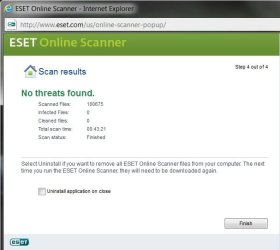
That Avast uninstall tool may've done the trick. Eset found nothing, went most of the day and no further change to restore settings. Reinstalled Avast a few hrs ago and still so far all is still well. By now it would've changed on its own and gigs would be disappearing again. Even no change when I power up my NAS's. I can't thank you enough for your help!
 

Attachments

  • ESET.jpg
    ESET.jpg
    26.6 KB · Views: 14

My Computer

Computer type
PC/Desktop
Computer Manufacturer/Model Number
Custom build (2007)
OS
Win 7 Ultimate x64 / Zorin OS 9 x64
CPU
AMD Phenom II 940/BE @ 3.9GHz
Motherboard
MSI K9A2 Platinum Rev. 2
Memory
G.Skill 8.00GB DDR2 @ 1066MHz (4x2GB)
Graphics Card(s)
Sapphire Radeon HD 6950/2GB
Sound Card
Onboard/Realtek ALC888
Monitor(s) Displays
HannsG 28" / HannSpree 24"
Screen Resolution
1920x1200 / 1920x1080
Hard Drives
2x 500GB WD Black (SATA 3Gb/s Raid 0)
PSU
OCZ 800W
Case
Aluminum/Air Filtered
Cooling
Air-Cooled, Idle @ 33C / Load @ 45C / 8x fans
Keyboard
Logitec Wireless Solar K750
Mouse
Standard Logitec USB (to PS2 adapter)
Internet Speed
50Mbps/10Mbps
Antivirus
Avast Pro, Malwarebytes Free, CCleaner Pro
Browser
IE 11, FireFox, Chrome
Other Info
WEI: (6.0)
CPU: 7.7
RAM: 7.9
Video: 7.9
Gaming Video: 7.9
HDD: (6.0)
"Shes gettin' old, but I love her, so I think I'll keep her." ~Unknown.
Every week it seems that there are more Avast problems reported. They have really fallen in just the few years since they were recommended here almost co-equally with MSE. Today I would class Avast with AVG which was already bloated up and buggy before Win7 was even in beta. For some reason it takes years for the word to filter through, probably because so many still stick with XPired tools and methods, even try to carry them over when they finally migrate to Win7.
 
Last edited:
I agree. I've used Avast for years and it has saved my hump on numerous occasions but now seems so full of bloat I think I am done. I have a pro license with them until may/15 and when its done I think I am too.
 

My Computer

Computer type
PC/Desktop
Computer Manufacturer/Model Number
Custom build (2007)
OS
Win 7 Ultimate x64 / Zorin OS 9 x64
CPU
AMD Phenom II 940/BE @ 3.9GHz
Motherboard
MSI K9A2 Platinum Rev. 2
Memory
G.Skill 8.00GB DDR2 @ 1066MHz (4x2GB)
Graphics Card(s)
Sapphire Radeon HD 6950/2GB
Sound Card
Onboard/Realtek ALC888
Monitor(s) Displays
HannsG 28" / HannSpree 24"
Screen Resolution
1920x1200 / 1920x1080
Hard Drives
2x 500GB WD Black (SATA 3Gb/s Raid 0)
PSU
OCZ 800W
Case
Aluminum/Air Filtered
Cooling
Air-Cooled, Idle @ 33C / Load @ 45C / 8x fans
Keyboard
Logitec Wireless Solar K750
Mouse
Standard Logitec USB (to PS2 adapter)
Internet Speed
50Mbps/10Mbps
Antivirus
Avast Pro, Malwarebytes Free, CCleaner Pro
Browser
IE 11, FireFox, Chrome
Other Info
WEI: (6.0)
CPU: 7.7
RAM: 7.9
Video: 7.9
Gaming Video: 7.9
HDD: (6.0)
"Shes gettin' old, but I love her, so I think I'll keep her." ~Unknown.
Tools

I agree. I've used Avast for years and it has saved my hump on numerous occasions but now seems so full of bloat I think I am done. I have a pro license with them until may/15 and when its done I think I am too.
The "Tools" caused the issue on my PC.

I uninstalled Avast Free and then only reinstalled the 3 Basic Shields (nothing else).
It has been behaving itself since.
 

My Computer

Computer type
PC/Desktop
Computer Manufacturer/Model Number
n/a
OS
W7 Ultimate SP1, LM19.2 MATE, W10 Home 1703, W10 Pro 1703 VM, #All 64 bit
CPU
AMD Phenom II x6 1100T, 3.3 GHz
Motherboard
ASUS M4A88T-M/USB3 (AM3)
Memory
12GB DDR3 1333 G-Skill (4GB x 2), G-Skill (2GB x 2)
Graphics Card(s)
NVIDIA GeForce GTX 660
Sound Card
Realtek?
Monitor(s) Displays
Samsung S23B350
Screen Resolution
1920x1080
Hard Drives
WD Green 2TB (SATA), WD Green 3TB (SATA), WD Blue 4TB (SATA), WD Blue 6TB (SATA)
PSU
Cooler Master
Case
Antec GX300 Tower
Cooling
3x Antec TRICOOL 120mm Fans
Mouse
Wired Optical
Internet Speed
DSL
Antivirus
Avast
Browser
Pale Moon (64 bit)
Other Info
2018-12-27 Upgraded HDDs
2015-12-10 Upgraded case, graphics card, storage
2015-08-15 Upgraded motherboard & RAM
2015-07-15 Upgraded LM17.1 to LM17.2
I think part of the problem with some of these anti virus is they try to do things a anti virus isn't meant for.
They start checking email, tweater, I.M. ebay, Craigs List the coffee pot and my sister stockings. ON and ON until it starts tripping on itself.
They try to take all the user interaction away from the user.

Just be a anti virus program that stops nasties from getting into my system.

I don't want to join a Cloud or have a bunch of shields to select or any other little do dads one can think of to make it look like a better program.

I personally use MSE for a anti virus program. and Marwarebytes Premium. I really don't care how much resources they use because of have lots of resources. I'm not a enterprise person with domains and large networks just a home user.
The reason I use them is because no muss and fuss and for years they have worked.
For years I was buying 2 ,3, 4 different Security Suites a year.
I would look and read reviews and keep changing for what ever they said was the new and greatest one. It was B/S then and I believe still is.
 

My Computer

Computer type
PC/Desktop
Computer Manufacturer/Model Number
Home made Desktop
OS
Windows 10 Pro. 64/ version 1709 Windows 7 Pro/64
CPU
Intel i7-6800K @ 4.3
Motherboard
ASUS X-99 Deluxe II
Memory
Corsair Platinum 16 gig @2400
Graphics Card(s)
EVGA GTX 1070 OC
Monitor(s) Displays
Asus 27" LED LCD/VE278Q
Screen Resolution
1920-1080 or 1280-720 HDMI
Hard Drives
INTEL SSD 730-240 Gb Sata 3.0/
PSU
EVGA Platium 1200W
Case
Phanteks Luxe Tempered Glass 8 fans/ one radiator
Cooling
XSPC/ Water Cooled CPU
Keyboard
Das 4 Professional
Mouse
Logitech M705/MX Anywhere 2-S
Internet Speed
100 mbits
Antivirus
Microsoft Security Essentials/ Malwarebytes Premium 3.0/ SAS
Browser
I.E. 11 default/Firefox/ ISP Time Warner Cable/Spectrum
Other Info
LG BluRay Burner/
Sound system-KLipsch-THX/
Icy Dock ssd Hot Swap bays.
Backups

I think part of the problem with some of these anti virus is they try to do things a anti virus isn't meant for.
They start checking email, tweater, I.M. ebay, Craigs List the coffee pot and my sister stockings. ON and ON until it starts tripping on itself.
They try to take all the user interaction away from the user.

Just be a anti virus program that stops nasties from getting into my system.

I don't want to join a Cloud or have a bunch of shields to select or any other little do dads one can think of to make it look like a better program.
Agreed.

The best protection is to make (multiple) regular backups.
Depending on what your system is used for they may need to be made daily!

I create monthly partition backups on Patch Tuesday (actually Wednesday here) before I install the MS Updates.

I usually also create backups if I'm installer "dodgy" software like drivers, as they are often responsible for "system killing" crashes.
 

My Computer

Computer type
PC/Desktop
Computer Manufacturer/Model Number
n/a
OS
W7 Ultimate SP1, LM19.2 MATE, W10 Home 1703, W10 Pro 1703 VM, #All 64 bit
CPU
AMD Phenom II x6 1100T, 3.3 GHz
Motherboard
ASUS M4A88T-M/USB3 (AM3)
Memory
12GB DDR3 1333 G-Skill (4GB x 2), G-Skill (2GB x 2)
Graphics Card(s)
NVIDIA GeForce GTX 660
Sound Card
Realtek?
Monitor(s) Displays
Samsung S23B350
Screen Resolution
1920x1080
Hard Drives
WD Green 2TB (SATA), WD Green 3TB (SATA), WD Blue 4TB (SATA), WD Blue 6TB (SATA)
PSU
Cooler Master
Case
Antec GX300 Tower
Cooling
3x Antec TRICOOL 120mm Fans
Mouse
Wired Optical
Internet Speed
DSL
Antivirus
Avast
Browser
Pale Moon (64 bit)
Other Info
2018-12-27 Upgraded HDDs
2015-12-10 Upgraded case, graphics card, storage
2015-08-15 Upgraded motherboard & RAM
2015-07-15 Upgraded LM17.1 to LM17.2
Back
Top