Stream movies from computer to TV

cclloyd9785

Master of Technology
Power User
Local time
5:59 AM
Messages
662
Location
Boston, MA
How would I go about doing this. I want to stream movies in 1080p, but will settle for 720p if I have to.

Basically I want my computer to send video AND audio to my TV wirelessly.
 

My Computer My Computer

At a glance

Windows 7 Home Premium x64, Mac OS X 10.6.2 x64AMD Athlon X2 Dual-Core 2.1 GHz4 GB DDR2 800 MHzATI Radeon HD Mobility 3100 Graphics 256MB to...
Computer Manufacturer/Model Number
Toshiba Satellite L505D-S9565
OS
Windows 7 Home Premium x64, Mac OS X 10.6.2 x64
CPU
AMD Athlon X2 Dual-Core 2.1 GHz
Motherboard
Toshiba Built-In with Insyde H20 BIOS 1.40
Memory
4 GB DDR2 800 MHz
Graphics Card(s)
ATI Radeon HD Mobility 3100 Graphics 256MB to 1468 MB Shared
Sound Card
Realtek Mobile ALC272 HD Audio
Monitor(s) Displays
15.6" TFT LCD with TruBrite, Samsung 1080p HDTV
Screen Resolution
1366x768, 1920x1080
Hard Drives
❶:Main: Toshiba 250 GB SATA 5400 RPM
PSU
N/A
Case
N/A
Cooling
Built-in/Open window in winter :P
Keyboard
Built-in
Mouse
Build-in Symantics SmartTouch Pad
Internet Speed
55 MB/sec Down, 9 MB/sec Up
Other Info
❷:Backup: Seagate FreeAgent Desk USB 2.0 5400 RPM
❸:Media: Toshiba 640 GB USB 2.0 5400 RPM Portable Edition
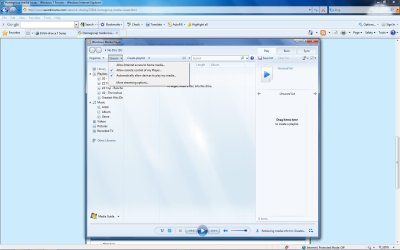
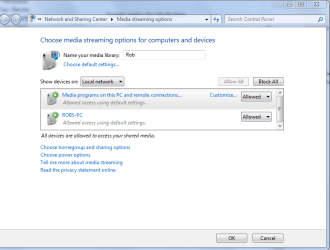
Enable all streaming options in WMP, choose more streaming options then allow everyone to control WMP. Right click the DVD drive you want to share and choose Advanced sharing, put a check mark for sharing this drive then choose Advanced sharing again, allow for full control by everyone. Browse to the target shared DVD drive from the TV, open the DVD and then click on the first IFO file to start the movie.
 

Attachments

  • media sharing.jpg
    media sharing.jpg
    113.7 KB · Views: 4,452
  • media streaming options.PNG
    media streaming options.PNG
    26.7 KB · Views: 3,395
  • Sharing D  drive and permissions.PNG
    Sharing D drive and permissions.PNG
    65.4 KB · Views: 3,570

My Computer My Computer

At a glance

Windows 7 Ult, Windows 8.1 Pro,Q9650-4.275GHz, E8600 4.5GHz, E6750-3.8GHzG.Skill PC2 9600 1200Mhz 5 5 5 15 2TGTX480
Computer type
PC/Desktop
Computer Manufacturer/Model Number
Home built
OS
Windows 7 Ult, Windows 8.1 Pro,
CPU
Q9650-4.275GHz, E8600 4.5GHz, E6750-3.8GHz
Motherboard
Evga 780i FTW
Memory
G.Skill PC2 9600 1200Mhz 5 5 5 15 2T
Graphics Card(s)
GTX480
Sound Card
Asus Xonar D2
Monitor(s) Displays
HannsG
Screen Resolution
1680X1050
Hard Drives
GSkill Phoenix Pro 120GB SSD
PSU
ThermalTake Toughpower 1000Watt modular
Case
ThermalTake XaserV
Cooling
Xigmatek S1283
Keyboard
Logitech G15
Mouse
Logitech G9
Internet Speed
T1
If you want to do all this wirelessly, you might want to look at the choices available here:
Warpia

They have drivers for Windows 7 available now and the system works on my system.

Good luck.

Jim Pickering
 

My Computer My Computer

At a glance

Windows 7 Ultimate RTMAMD Turion2 GBNVIDIA GeForce 6150
Computer Manufacturer/Model Number
HP 6233se
OS
Windows 7 Ultimate RTM
CPU
AMD Turion
Memory
2 GB
Graphics Card(s)
NVIDIA GeForce 6150
Sound Card
Onboard
Monitor(s) Displays
LCD
Screen Resolution
1280x800
Hard Drives
1 250 GB SATA w/3 partitions
For the best quality and easiest set-up within Windows 7, Media Center should be used to stream media to your TV. you'll need a Media Center extender, which come in many forms, from an XBox 360 to little set-top boxes to HP's MediaSmart TV, which has Media Center Extender capabilities. Once you get the required components, you will need to start the media center extender and configure it via PC's Media Center application. Once that's done, you can set Media Center to watch folders for permanent media - all your music perhaps, but more importantly, you can instantly stream any supported files to it from any computer. Given that the extender is visible on your home network, you can right click on any supported file (pics, vids, music) and select "Play To" and select the extender from the pop up list.
I just discovered the instant streaming feature - I previously used watched folders. As this is nice for permanent data, I like that you can instantly stream anything w/o having to copy it over to a watched folder. This works through my laptop even though Media Center is configured on my desktop machine.
Pretty slick, MS - don't give up the eHome project.
 

My Computer My Computer

At a glance

Win 7 Pro/ Win 7 Pro/ Snow Leopard/ Win Serve...2.5GHz QC/ 2.3GHz DC/ 2.26GHz DC/ 2 x Xeon 54...6GB DDR2-8/ 4GB DDR2/ 2GB DDR3-1066/ 4GB DDR2...NV 9800GT/ ATI 3200 onB/ NV 9400 onB/ ATI ES1000
Computer Manufacturer/Model Number
HP m9350f/ HP Tx2z/ Mac Mini/ HP DL360 G5
OS
Win 7 Pro/ Win 7 Pro/ Snow Leopard/ Win Server 2008 R2
CPU
2.5GHz QC/ 2.3GHz DC/ 2.26GHz DC/ 2 x Xeon 5420 QC's
Motherboard
HP/ HP/ Apple/ HP
Memory
6GB DDR2-8/ 4GB DDR2/ 2GB DDR3-1066/ 4GB DDR2-8 FB,ECC
Graphics Card(s)
NV 9800GT/ ATI 3200 onB/ NV 9400 onB/ ATI ES1000
Sound Card
onB/ onB/ onB/ N/A
Monitor(s) Displays
47" LCD/ 12.1"/ 20" LCD/ N/A(RDP)
Hard Drives
2x WD Velociraptor 10K, 2 x 1TB in Raid 1/ 320GB 7.2k WD Scorpio BK/ 160GB 7.2k/ 4 x 36GB 15k SAS// 3 x 1.5TB in NAS
Keyboard
Dinovo Edge
I'm aware that this is an old thread...

...but there's a new device called Wireless Media Stick. You can now watch downloaded movies to your TV without the hassle of cables and burning CDs.

Check them out at Overview « Home Server Technologies Inc.
 

My Computer My Computer

At a glance

Windows Vista
OS
Windows Vista
...oops double post.
 

My Computer My Computer

At a glance

Windows Vista
OS
Windows Vista
And if you want to stream DVD?
 

My Computer My Computer

At a glance

win7
OS
win7
Back
Top