Streamed URLs not playing in VLC

Arcadian

New member
Member
VIP
Local time
3:19 AM
Messages
199
Having problems playing copy/pasted URLs from YouTube etc. after I've entered it into the VLC streaming "Network" box. I click on play but nothing happens which is strange as it's always worked before ?

Appreciate any help as my hearing isn't too good so really need the extra volume....

Thanks
 

My Computer My Computer

Computer type
Laptop
Computer Manufacturer/Model Number
HP Presario CQ 56
OS
Windows 7 Home Premium 64bit
Antivirus
Zone Alarm
Browser
Firefox
I cannot answer your question about why VLC is no longer streaming your Youtube videos, but I have a suggestion which might work for you:

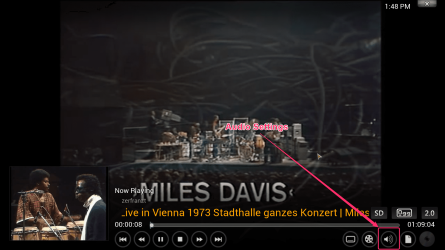
Download and install the free XBMC (XB Media Center), then install the XBMC Youtube add-on. When watching videos or listening music on XBMC you can then adjust Volume Amplification in Audio Settings (click the volume button to open Audio Settings) to increase the volume beyond normal max level:
2013-11-10_192747.jpg

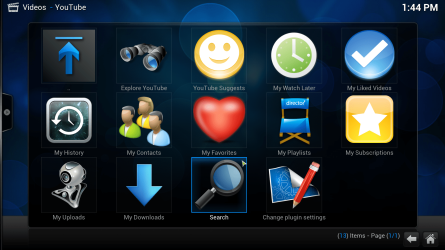
Youtube add-on on XBMC:

2013-12-02_13h44_56.png

Search and browse Youtube:

2013-12-02_13h47_49.jpg

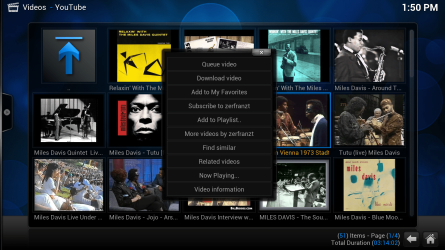
Right click a video to open the context menu, download it instead of playing if you want to:

2013-12-02_13h50_09.png

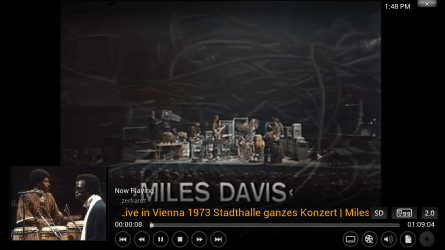
Stream videos:

2013-12-02_13h48_19.png

Kari
 

My Computer My Computer

Computer type
Laptop
Computer Manufacturer/Model Number
HP ENVY 17-1150eg
OS
Windows 10 Pro x64 EN-GB
CPU
1.6 GHz Intel Core i7-720QM Processor
Memory
6 GB
Graphics Card(s)
ATI Mobility Radeon HD 5850 Graphics
Sound Card
Beats sound system with integrated subwoofer
Monitor(s) Displays
17" laptop display, 22" LED and 32" Full HD TV through HDMI
Screen Resolution
1600*900 (1), 1920*1080 (2&3)
Hard Drives
Internal: 2 x 500 GB SATA Hard Disk Drive 7200 rpm
External: 2TB for backups, 3TB USB3 network drive for media
Cooling
As Envy runs a bit warm, I have it on a Cooler Master pad
Keyboard
Logitech diNovo Media Desktop Laser (bluetooth)
Mouse
Logitech Performance Mouse MX
Internet Speed
50/10 Mbps VDSL
Antivirus
Windows Defender 4.3.9431.0
Browser
Maxthon 3.5.2., IE11
Thanks a lot Kari good idea !

Very confusing layout but nearly there, however can't find the volume button to open Audio Settings ?

Also is there any way to open a second browser page as I keep having to log off to get back to your instructions ?
 

My Computer My Computer

Computer type
Laptop
Computer Manufacturer/Model Number
HP Presario CQ 56
OS
Windows 7 Home Premium 64bit
Antivirus
Zone Alarm
Browser
Firefox
Thanks a lot Kari good idea !

Very confusing layout but nearly there, however can't find the volume button to open Audio Settings ?

2013-12-02_13h48_19_2.png

Also is there any way to open a second browser page as I keep having to log off to get back to your instructions ?

Sorry but I do not understand what you mean with this? Every modern browser has the possibility to have several tabs open simultaneously.

If you mean you have to exit XBMC to get back to desktop, you can simply change XBMC settings to show it windowed instead of full screen, or alternatively when full screen press ALT + TAB to switch between desktop, browser and XBMC.

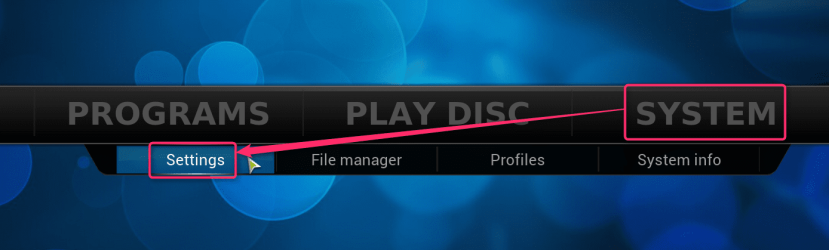
To change display mode:

Select System > Settings on XBMC Home Page:

2013-12-02_16h02_41.png

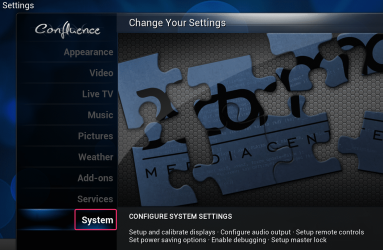
Select System:

2013-12-02_16h03_32.png

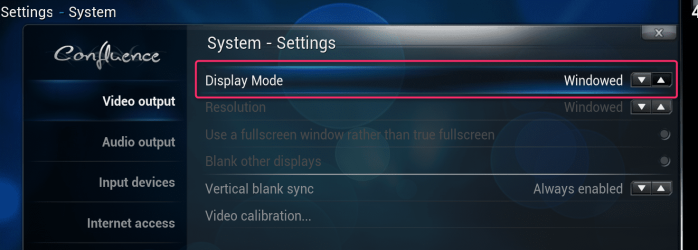
Change display mode to Windowed:

2013-12-02_16h04_34.png
 

My Computer My Computer

Computer type
Laptop
Computer Manufacturer/Model Number
HP ENVY 17-1150eg
OS
Windows 10 Pro x64 EN-GB
CPU
1.6 GHz Intel Core i7-720QM Processor
Memory
6 GB
Graphics Card(s)
ATI Mobility Radeon HD 5850 Graphics
Sound Card
Beats sound system with integrated subwoofer
Monitor(s) Displays
17" laptop display, 22" LED and 32" Full HD TV through HDMI
Screen Resolution
1600*900 (1), 1920*1080 (2&3)
Hard Drives
Internal: 2 x 500 GB SATA Hard Disk Drive 7200 rpm
External: 2TB for backups, 3TB USB3 network drive for media
Cooling
As Envy runs a bit warm, I have it on a Cooler Master pad
Keyboard
Logitech diNovo Media Desktop Laser (bluetooth)
Mouse
Logitech Performance Mouse MX
Internet Speed
50/10 Mbps VDSL
Antivirus
Windows Defender 4.3.9431.0
Browser
Maxthon 3.5.2., IE11
If you mean you have to exit XBMC to get back to desktop, you can simply change XBMC settings to show it windowed instead of full screen, or alternatively when full screen press ALT + TAB to switch between desktop, browser and XBMC.
Got it thanks.

The problem basically is most videos on line have for me much too low sound levels, also I can never seem to find a decent website with sub-titles that even work or can be synchronised properly so why I was trying to stream them into VLC to turn up the volume.

Obviously you can download them (with the risk of a virus) but then have to register for several different websites sometimes being asked for payment details, debit card etc. which is obviously much too risky.

For example I've been trying in particular to watch "The French Connection" with sub-titles for ages which was a great film winning several Oscars, but I can only seem to watch it on-line (link below) which is a waste of time as I can hardly hear it. Would it be possible in XBMC somehow ?

THE FRENCH CONNECTION (1971) - Watch Online For Free on TubePlus

I just wish I could find a formula that will work all the time without all the hassle with each new film....

Thanks
 

My Computer My Computer

Computer type
Laptop
Computer Manufacturer/Model Number
HP Presario CQ 56
OS
Windows 7 Home Premium 64bit
Antivirus
Zone Alarm
Browser
Firefox
Back
Top