Streaming to an Xbox 360 with multiple PC Hard-Drives

SuperRobot

New member
Local time
3:41 AM
Messages
2
Hello fellow members, I'm in a bit of a pickle.

You see, I installed my Windows 7 OS on a 200GB HDD. Recently, I installed a 500GB HDD in my PC. I used to be able to stream media files to my Xbox 360 with no problem with the media files being on the 200GB HDD. However, I've transferred all my Media Files to my 500 GB (secondary) HDD. The Windows Media Centre on the Xbox 360 isn't giving me any sort of option to stream files from the 500 GB HDD. So, what exactly do I do?
 

My Computer My Computer

At a glance

Windows 7
Computer Manufacturer/Model Number
Alienware
OS
Windows 7
Hi SuperRobot & welcome :)

I don't think that folders necessarily have to be shared to be able to stream.
Make sure to 'disconnect' your old computer from the xbox dashboard and run setup again.

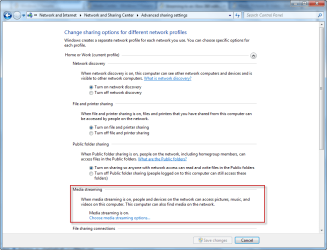
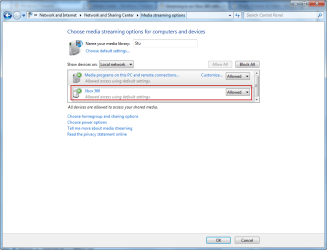
Also make sure that the xbox is allowed to stream in the network 7 sharing center.

1.png

2.png

Hope this helps :)
 

My Computer My Computer

At a glance

Windows 7 Ultimate x64AMD Turion(tm) 64 X2 Mobile Technology TL-563GB Nanya PC2-6400 DDR2-SDRAM SO-DIM (400MHz)NVIDIA GeForce Go 7600 256MB GDDR3 SDRAM
Computer Manufacturer/Model Number
HP Touchsmart IQ771.uk
OS
Windows 7 Ultimate x64
CPU
AMD Turion(tm) 64 X2 Mobile Technology TL-56
Motherboard
ASUS Pheonix
Memory
3GB Nanya PC2-6400 DDR2-SDRAM SO-DIM (400MHz)
Graphics Card(s)
NVIDIA GeForce Go 7600 256MB GDDR3 SDRAM
Sound Card
High Definition Intergrated NVIDIA MCP51
Monitor(s) Displays
46" Sony Bravia HDTV
Screen Resolution
1600x1200
Hard Drives
1.5TB Samsug
320GB Seagate ST3320820AS - SATA 3Gb/s 8MB
500GB Maxtor Basics STM305003EHD301-RK
Internet Speed
↓6.32 Mb/s ↑0.35 Mb/s ↔26ms
Other Info
BIOS - American Megatrends Inc. 5.07
Ethernet Port - NVIDIA nForce 10/100/1000 Mbps
DVD Drive - TSSTcorp DVDR/RW TS-T632L
@rsvr85,

Thank you for your contribution, however, the screenshots provided show steps to allow network access to shared folders. If a folder on a 2nd hard drive has not had sharing setup properly, the files in them will not be avalable to any network devices or computers. All folders on a PC are not shared just by making these settings. I also am sure these settings were already made as the OP noted he was able to stream files from a default shared folder already (Recorded TV) but not the new location. The new folder location should be shared on the network in order to access them from others PC's and devices.
 
Last edited:
@rsvr85,

Thank you for your contribution, however, the screenshots provided show steps to allow network access to shared folders. If a folder on a 2nd hard drive has not had sharing setup properly, the files in them will not be avalable to any network devices or computers. All folders on a PC are not shared just by making these settings. I also am sure these settings were already made as the OP noted he was able to stream files from a default shared folder already (Recorded TV) but not the new location. The new folder location should be shared on the network in order to access them from others PC's and devices.

Hi SP, the screenshots provided depict enabling media streaming and unblocking the xbox to allow streaming.
I have 2 HDD's, all of the content is on one drive in a second partition and streaming through to my xbox doesn't require any manual sharing at all. :confused: I think the xbox does this automatically as in every ACL of my "stream content" i have a rather large entry starting in UUID:xxxxxxxxxxxxxxxxxxxxxxx (PC Name), which i certainly didn't add!
If you setup the Media Center on the xbox then any media that is in your PC's WMC library is auto added.

Also, I can't see any reference to the recorded TV folder you mention.

It may be different for the OP, i'm just sharing my experiences and suggesting solutions to similar problems i faced when setting up my xbox. ;)
 
Last edited:

My Computer My Computer

At a glance

Windows 7 Ultimate x64AMD Turion(tm) 64 X2 Mobile Technology TL-563GB Nanya PC2-6400 DDR2-SDRAM SO-DIM (400MHz)NVIDIA GeForce Go 7600 256MB GDDR3 SDRAM
Computer Manufacturer/Model Number
HP Touchsmart IQ771.uk
OS
Windows 7 Ultimate x64
CPU
AMD Turion(tm) 64 X2 Mobile Technology TL-56
Motherboard
ASUS Pheonix
Memory
3GB Nanya PC2-6400 DDR2-SDRAM SO-DIM (400MHz)
Graphics Card(s)
NVIDIA GeForce Go 7600 256MB GDDR3 SDRAM
Sound Card
High Definition Intergrated NVIDIA MCP51
Monitor(s) Displays
46" Sony Bravia HDTV
Screen Resolution
1600x1200
Hard Drives
1.5TB Samsug
320GB Seagate ST3320820AS - SATA 3Gb/s 8MB
500GB Maxtor Basics STM305003EHD301-RK
Internet Speed
↓6.32 Mb/s ↑0.35 Mb/s ↔26ms
Other Info
BIOS - American Megatrends Inc. 5.07
Ethernet Port - NVIDIA nForce 10/100/1000 Mbps
DVD Drive - TSSTcorp DVDR/RW TS-T632L
You can add media from any folder to WMC and not share it by overriding any default sharing settings. You should note that the XBox user is not associated with all folders on the PC and simply removing the XBox user from any folder stops the XBox from seeing that folder and of course vs. versa. Parent settings may prevail for subfolders of shared folders unless explicity set. I don't believe basic sharing has changed just the user interface has, (which always causes confusion), any shareable folder can still have specific local or network access denied or allowed and even read write permissions set, etc.
 
You can add media from any folder to WMC and not share it by overriding any default sharing settings. You should note that the XBox user is not associated with all folders on the PC and simply removing the XBox user from any folder stops the XBox from seeing that folder and of course vs. versa. Parent settings may prevail for subfolders of shared folders unless explicity set. I don't believe basic sharing has changed just the user interface has, (which always causes confusion), any shareable folder can still have specific local or network access denied or allowed and even read write permissions set, etc.

I understand permissions, ACL's & network sharing etc, i've spent many hours figuring out/reading what's what and fine tuning these exact things. :sleepy:
I use fsmgmt.msc for my sharing needs, it's much simpler than any other method in Windows.

I am simply saying that in order for me to be able to stream my content through my xbox i wasn't required to manually set up the share & assign the permissions (neither did i override any default shares). It was all done automatically (at least for me), once i had gone through the settings shown in my screenshot and setup the xbox MC. The OP, of course, may (and probably will) differ.
Anyhoo, lets wait for him to respond and go from there. :)
 

My Computer My Computer

At a glance

Windows 7 Ultimate x64AMD Turion(tm) 64 X2 Mobile Technology TL-563GB Nanya PC2-6400 DDR2-SDRAM SO-DIM (400MHz)NVIDIA GeForce Go 7600 256MB GDDR3 SDRAM
Computer Manufacturer/Model Number
HP Touchsmart IQ771.uk
OS
Windows 7 Ultimate x64
CPU
AMD Turion(tm) 64 X2 Mobile Technology TL-56
Motherboard
ASUS Pheonix
Memory
3GB Nanya PC2-6400 DDR2-SDRAM SO-DIM (400MHz)
Graphics Card(s)
NVIDIA GeForce Go 7600 256MB GDDR3 SDRAM
Sound Card
High Definition Intergrated NVIDIA MCP51
Monitor(s) Displays
46" Sony Bravia HDTV
Screen Resolution
1600x1200
Hard Drives
1.5TB Samsug
320GB Seagate ST3320820AS - SATA 3Gb/s 8MB
500GB Maxtor Basics STM305003EHD301-RK
Internet Speed
↓6.32 Mb/s ↑0.35 Mb/s ↔26ms
Other Info
BIOS - American Megatrends Inc. 5.07
Ethernet Port - NVIDIA nForce 10/100/1000 Mbps
DVD Drive - TSSTcorp DVDR/RW TS-T632L
rsvr85, I just noticed your tagline, have you tried replacing the '&' with 'and'?

Oh, and again I was simply trying to point out that the OP already has everything working, but moved some files and wanted to know how to see them on his XBox. The simple answer is noted as my first post above.

Also, any information provided is a clarification, not a correction of anyone, and posted for use by all of those who may read this thread.

thanks! :)
 
rsvr85, I just noticed your tagline, have you tried replacing the '&' with 'and'?

Oh, and again I was simply trying to point out that the OP already has everything working, but moved some files and wanted to know how to see them on his XBox. The simple answer is noted as my first post above.

Also, any information provided is a clarification, not a correction of anyone, and posted for use by all of those who may read this thread.

thanks! :)

Thanks for the spelling correction SP. I really should have gone to school more. :p

We could go on reiterating the same thing all day. Lets wait for the OP to return and you can take it from there. ;)
 

My Computer My Computer

At a glance

Windows 7 Ultimate x64AMD Turion(tm) 64 X2 Mobile Technology TL-563GB Nanya PC2-6400 DDR2-SDRAM SO-DIM (400MHz)NVIDIA GeForce Go 7600 256MB GDDR3 SDRAM
Computer Manufacturer/Model Number
HP Touchsmart IQ771.uk
OS
Windows 7 Ultimate x64
CPU
AMD Turion(tm) 64 X2 Mobile Technology TL-56
Motherboard
ASUS Pheonix
Memory
3GB Nanya PC2-6400 DDR2-SDRAM SO-DIM (400MHz)
Graphics Card(s)
NVIDIA GeForce Go 7600 256MB GDDR3 SDRAM
Sound Card
High Definition Intergrated NVIDIA MCP51
Monitor(s) Displays
46" Sony Bravia HDTV
Screen Resolution
1600x1200
Hard Drives
1.5TB Samsug
320GB Seagate ST3320820AS - SATA 3Gb/s 8MB
500GB Maxtor Basics STM305003EHD301-RK
Internet Speed
↓6.32 Mb/s ↑0.35 Mb/s ↔26ms
Other Info
BIOS - American Megatrends Inc. 5.07
Ethernet Port - NVIDIA nForce 10/100/1000 Mbps
DVD Drive - TSSTcorp DVDR/RW TS-T632L
Hi all,

I managed to solve my problem. I simply manually enabled sharing on the media folders and reconnected my PC to my Xbox360 using WMC and selected my new hard drive's shared folders amongst others. Thanks for all the help offered! I hope this thread proves to help some hapless sap like me in the furute with a quick solution :D
 

My Computer My Computer

At a glance

Windows 7
Computer Manufacturer/Model Number
Alienware
OS
Windows 7
Back
Top