Stuck during boot after AHCI change

oxygenthief

New member
Local time
1:52 AM
Messages
17
Hi all,
I recently installed an SSD. I was running it on SATA, and it was pretty slow. I googled around, and discovered I should have had it on AHCI. I made a couple of Regedit changes to ensure I wouldn't have to format, and I changed to AHCI.
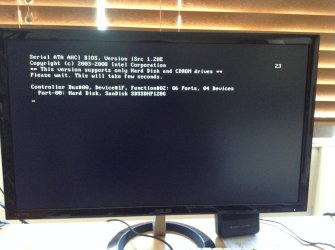
Immediately, it refused to boot, and I'm stuck at:
SERIAL ATA AHCI BIOS
-------
CONTROLLER BUS#00 DEVICE#1F FUNCTION#02: 06 PORTS 05 DEVICES
PORT-00 HARD DISK, SCANDISK ##########

THe cursor is blinking and it's stuck at 23.


I googled and removed the rest of the hard drives and it booted fine, still on AHCI. How can I get the other hdd's to be operational?

I've also adjusted the sata port 0-3 native mode to enabled, and onboard sata/ide ctrl mode to AHCI. No changes.

The mobo is a gigabyte xd58-ud3r

Please help :(
 

My Computer My Computer

OS
Windows 7 Home Premium x64
Could you clarify your post for me please? I think there are some terms used that need to be defined.

SATA is the configuration of the hard drive interface. There are currently 2 configurations in play: SATA and PATA. SATA uses the modern small data cable, PATA uses the older wide ribbon cable. PATA has been obsolete for about 10 years now.

The SATA interface can then be run in 3 modes: legacy IDE, AHCI, or RAID.

When you start a computer, there are two major steps: BOOT - in which the systems BIOS is initiated and tested, followed by STARTUP - in which the operating system is started and loads.
It is very important for us to know whether you mean the system does not BOOT, or if Windows will not STARTUP.

Are you having a BOOT problem or a STARTUP problem?
When you went into the BIOS and changed the SATA controller mode to AHCI, what was it set on before?
Is this a homebuilt PC or a store bought PC?
I am assuming it is a desktop.

Thanks
 

My Computer My Computer

Computer type
PC/Desktop
Computer Manufacturer/Model Number
Home Built - Jan 2013
OS
Windows 7 64 Bit Home Premium SP1
CPU
i7-3820
Motherboard
Asus P9X79-PRO - Bios 4608
Memory
GSkill F3-14900CL9Q - 16GB
Graphics Card(s)
EVGA GeForce GTX660 - Driver 352.86
Sound Card
On board Realtek ALC898
Monitor(s) Displays
Acer S271HL
Screen Resolution
1920 x 1080
Hard Drives
#1- Samsung 840 Pro Series
#2- Western Digital WD1002FAEX Sata3 Black
#3- Western Digital WD1002FAEX Sata3 Black
PSU
Corsair CMPSU-850TX-V2 - 850 watt (by Seasonic)
Case
Corsair Obsidian 550D
Cooling
Standard 3 120mm case fans, Cooler Master Hyper 212 EVO
Keyboard
MS KC-0405
Mouse
Intellimouse 5-button
Internet Speed
56 Mbits/Sec (on a good day)
Antivirus
Avast & Malwarebytes
Browser
Firefox
Other Info
Asus DVD - DRW-24B1ST 24X
Sorry for any confusion. I'm having startup issues.

Before I changed to AHCI, it was set to IDE. It's a home built PC.
 

My Computer My Computer

OS
Windows 7 Home Premium x64
OK. Thanks. This is a very common problem and relatively easy to fix. Hang tight while I gather some info.
 

My Computer My Computer

Computer type
PC/Desktop
Computer Manufacturer/Model Number
Home Built - Jan 2013
OS
Windows 7 64 Bit Home Premium SP1
CPU
i7-3820
Motherboard
Asus P9X79-PRO - Bios 4608
Memory
GSkill F3-14900CL9Q - 16GB
Graphics Card(s)
EVGA GeForce GTX660 - Driver 352.86
Sound Card
On board Realtek ALC898
Monitor(s) Displays
Acer S271HL
Screen Resolution
1920 x 1080
Hard Drives
#1- Samsung 840 Pro Series
#2- Western Digital WD1002FAEX Sata3 Black
#3- Western Digital WD1002FAEX Sata3 Black
PSU
Corsair CMPSU-850TX-V2 - 850 watt (by Seasonic)
Case
Corsair Obsidian 550D
Cooling
Standard 3 120mm case fans, Cooler Master Hyper 212 EVO
Keyboard
MS KC-0405
Mouse
Intellimouse 5-button
Internet Speed
56 Mbits/Sec (on a good day)
Antivirus
Avast & Malwarebytes
Browser
Firefox
Other Info
Asus DVD - DRW-24B1ST 24X
Thank you. Much appreciated
 

My Computer My Computer

OS
Windows 7 Home Premium x64
When you install Windows on a new PC the installer will recognize what mode the SATA controller is in at that moment and it will use the appropriate drivers for that mode. Yours was set on IDE, so Windows installed IDE drivers.

In order to switch to AHCI mode (which is highly recommended for an SSD) you must get Windows to switch to using the AHCI driver instead. Here is how:

http://www.sevenforums.com/tutorials/61869-ahci-enable-windows-7-vista.html

Now, it has been my observation that often people who have problems like this tend to "thrash" about in the system before getting help. I suggest you try and remember any BIOS changes you made in trying to fix this problem and undo those changes. These can complicate things. The only settings change you need to work on is AHCI.

You may have a different problem regarding the startup and multiple drives. Particularly if you installed Windows with more than one hard drive installed. If you did, it might make sense to fix that before AHCI conversion. Let me know.
 

My Computer My Computer

Computer type
PC/Desktop
Computer Manufacturer/Model Number
Home Built - Jan 2013
OS
Windows 7 64 Bit Home Premium SP1
CPU
i7-3820
Motherboard
Asus P9X79-PRO - Bios 4608
Memory
GSkill F3-14900CL9Q - 16GB
Graphics Card(s)
EVGA GeForce GTX660 - Driver 352.86
Sound Card
On board Realtek ALC898
Monitor(s) Displays
Acer S271HL
Screen Resolution
1920 x 1080
Hard Drives
#1- Samsung 840 Pro Series
#2- Western Digital WD1002FAEX Sata3 Black
#3- Western Digital WD1002FAEX Sata3 Black
PSU
Corsair CMPSU-850TX-V2 - 850 watt (by Seasonic)
Case
Corsair Obsidian 550D
Cooling
Standard 3 120mm case fans, Cooler Master Hyper 212 EVO
Keyboard
MS KC-0405
Mouse
Intellimouse 5-button
Internet Speed
56 Mbits/Sec (on a good day)
Antivirus
Avast & Malwarebytes
Browser
Firefox
Other Info
Asus DVD - DRW-24B1ST 24X
Thank you. I installed windows while everything was set to IDE. I amended those values in Regedit before changing to AHCI, and unfortunately the problem still occurred.

I did install windows with 5 hard drives installed, a few days ago. It's not an inconvenience to format and reinstall, this time in AHCI if that will fix the issue.
 

My Computer My Computer

OS
Windows 7 Home Premium x64
Yes, if that is not a problem that is the best way to do it: Install Windows fresh on an AHCI controller.

Always have only one hard drive connected when installing Windows. What happens often if you have more than one drive connected is that Windows will install the Boot Files on one hard drive, and the System files on another. This is why you can get startup problems if a hard drive is disconnected. This is a completely separate problem from the AHCI one. Sounds like you have this problem also.

I suggest checking all your other drives to look for the Microsoft System Reserved partition, or partitions marked ACTIVE. Do this before reinstalling Windows.

The easiest way would be to connect everything the way it was (IDE mode too) and starting into Windows. Then go to Disk Management and look at all the drives to see what is there. If you can post a screen shot of the (expanded) Disk Management window here I can take a look and tell you what I see.

Are the other 4 hard drives new and empty, or do they contain data?
 

My Computer My Computer

Computer type
PC/Desktop
Computer Manufacturer/Model Number
Home Built - Jan 2013
OS
Windows 7 64 Bit Home Premium SP1
CPU
i7-3820
Motherboard
Asus P9X79-PRO - Bios 4608
Memory
GSkill F3-14900CL9Q - 16GB
Graphics Card(s)
EVGA GeForce GTX660 - Driver 352.86
Sound Card
On board Realtek ALC898
Monitor(s) Displays
Acer S271HL
Screen Resolution
1920 x 1080
Hard Drives
#1- Samsung 840 Pro Series
#2- Western Digital WD1002FAEX Sata3 Black
#3- Western Digital WD1002FAEX Sata3 Black
PSU
Corsair CMPSU-850TX-V2 - 850 watt (by Seasonic)
Case
Corsair Obsidian 550D
Cooling
Standard 3 120mm case fans, Cooler Master Hyper 212 EVO
Keyboard
MS KC-0405
Mouse
Intellimouse 5-button
Internet Speed
56 Mbits/Sec (on a good day)
Antivirus
Avast & Malwarebytes
Browser
Firefox
Other Info
Asus DVD - DRW-24B1ST 24X
Two of them had random data on them, one had an old install of windows (now formatted) and one was empty. I didn't notice any partition in the brief time everything was working, but I'll run disk management tomorrow and double check before reinstalling.

Thank you very much for your help. I've been scratching my head for over a day now. Can't thank you enough
 

My Computer My Computer

OS
Windows 7 Home Premium x64
No problem.
If you find a System Reserved partition on one of the other drives you can just delete it, but be aware that Windows will not start up after that. Not a problem if you do it just before reinstalling.

If there is a partition on one of the other drives marked ACTIVE, then you must remove that Active flag before installing Windows (or before installing that other hard drive in the system). Windows will choke if there are 2 partitions marked ACTIVE in a system.
 

My Computer My Computer

Computer type
PC/Desktop
Computer Manufacturer/Model Number
Home Built - Jan 2013
OS
Windows 7 64 Bit Home Premium SP1
CPU
i7-3820
Motherboard
Asus P9X79-PRO - Bios 4608
Memory
GSkill F3-14900CL9Q - 16GB
Graphics Card(s)
EVGA GeForce GTX660 - Driver 352.86
Sound Card
On board Realtek ALC898
Monitor(s) Displays
Acer S271HL
Screen Resolution
1920 x 1080
Hard Drives
#1- Samsung 840 Pro Series
#2- Western Digital WD1002FAEX Sata3 Black
#3- Western Digital WD1002FAEX Sata3 Black
PSU
Corsair CMPSU-850TX-V2 - 850 watt (by Seasonic)
Case
Corsair Obsidian 550D
Cooling
Standard 3 120mm case fans, Cooler Master Hyper 212 EVO
Keyboard
MS KC-0405
Mouse
Intellimouse 5-button
Internet Speed
56 Mbits/Sec (on a good day)
Antivirus
Avast & Malwarebytes
Browser
Firefox
Other Info
Asus DVD - DRW-24B1ST 24X
So I just reinstalled Windows. I had it set to AHCI, and I had some issues with the boot DVD not being recognised.

I connected the DVD drive to the Jmicron SATA port and selected it via the F12 boot menu. Installed fine.
I checked the device manager, and the AHCI drivers are installed and up to date. I shut down, and plugged in the other hard drives.


Same. Goddamn. Problem.


I've attached a screenshot of where it hangs. I'm unable to access the BIOS at this stage.

I've unplugged all the drives except the SSD with windows, and I'm able to start up as normal.

Mega sad face
 

Attachments

  • image.jpg
    image.jpg
    430.4 KB · Views: 2

My Computer My Computer

OS
Windows 7 Home Premium x64
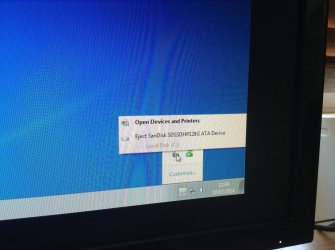
I'm also certain this isn't normal (picture).

I opened Regedit and msahci was already set to 0. Iastorv was at 3, and I set it to 0. Upon reboot, with only the ssd, I didn't get the lovely screen stating my device driver software was updated.


Frustrated!
 

Attachments

  • image.jpg
    image.jpg
    746.2 KB · Views: 0

My Computer My Computer

OS
Windows 7 Home Premium x64
OK, 2 different problems.

Problem 1: Internal hard drive shows up as a removable device.
This problem occurs because the AHCI driver that installs during the Windows installation is a generic one-size-fits-all driver, just to give functionality for installation.
The solution is to install the correct AHCI driver from your motherboard manufacturer's website. This could be a specific AHCI driver, the Intel Matrix Storage System driver, or the Intel Rapid Storage Technology driver, whichever one the manufacturer offers. Once the proper driver is installed the incorrect notice will disappear.
There is no need to change regisry values, and, this could mess up the new AHCI driver install.

Problem 2: The system will not BOOT with additional hard drives connected.
This problem can occur because:

  • One of the hard drives is defective
  • One of the SATA ports is defective
  • One of the hard drives contains an ACTIVE partition or second System Reserved partition
  • One of the hard drives contains a second GPT format System partition.
You did not by any chance take a screenshot of the Disk Management window from the old IDE installation? I could quickly see if #3 or #4 is going on looking at that.


To test for defective drives/ports:
Check to be sure that the SSD is installed in SATA Port#1 on the motherboard, if you need to switch ports check to be sure it boots again.


(Shut down PC between each test)
Take one of the additional hard drives and install it in SATA Port #2, start up and check. If no boot then try SATA Port #3, and so on. If it does boot, on all ports, mark it good and remove it.


Then do the same with the next drive, and so on, checking all 4 drives.


If all drives check good then start adding them one at a time and testing, until all 4 are installed or the system does not boot. Mark the drive that causes the system not to boot, or report any other condition you notice.
 

My Computer My Computer

Computer type
PC/Desktop
Computer Manufacturer/Model Number
Home Built - Jan 2013
OS
Windows 7 64 Bit Home Premium SP1
CPU
i7-3820
Motherboard
Asus P9X79-PRO - Bios 4608
Memory
GSkill F3-14900CL9Q - 16GB
Graphics Card(s)
EVGA GeForce GTX660 - Driver 352.86
Sound Card
On board Realtek ALC898
Monitor(s) Displays
Acer S271HL
Screen Resolution
1920 x 1080
Hard Drives
#1- Samsung 840 Pro Series
#2- Western Digital WD1002FAEX Sata3 Black
#3- Western Digital WD1002FAEX Sata3 Black
PSU
Corsair CMPSU-850TX-V2 - 850 watt (by Seasonic)
Case
Corsair Obsidian 550D
Cooling
Standard 3 120mm case fans, Cooler Master Hyper 212 EVO
Keyboard
MS KC-0405
Mouse
Intellimouse 5-button
Internet Speed
56 Mbits/Sec (on a good day)
Antivirus
Avast & Malwarebytes
Browser
Firefox
Other Info
Asus DVD - DRW-24B1ST 24X
It is also probably a good time to let us know your system specs so we know what hardware we are dealing with here.
 

My Computer My Computer

Computer type
PC/Desktop
Computer Manufacturer/Model Number
Home Built - Jan 2013
OS
Windows 7 64 Bit Home Premium SP1
CPU
i7-3820
Motherboard
Asus P9X79-PRO - Bios 4608
Memory
GSkill F3-14900CL9Q - 16GB
Graphics Card(s)
EVGA GeForce GTX660 - Driver 352.86
Sound Card
On board Realtek ALC898
Monitor(s) Displays
Acer S271HL
Screen Resolution
1920 x 1080
Hard Drives
#1- Samsung 840 Pro Series
#2- Western Digital WD1002FAEX Sata3 Black
#3- Western Digital WD1002FAEX Sata3 Black
PSU
Corsair CMPSU-850TX-V2 - 850 watt (by Seasonic)
Case
Corsair Obsidian 550D
Cooling
Standard 3 120mm case fans, Cooler Master Hyper 212 EVO
Keyboard
MS KC-0405
Mouse
Intellimouse 5-button
Internet Speed
56 Mbits/Sec (on a good day)
Antivirus
Avast & Malwarebytes
Browser
Firefox
Other Info
Asus DVD - DRW-24B1ST 24X
Gigabyte XD58-UD3R, i7-920 on 1366 chipset, 8gb 2-channel Patriot G2 RAM, Windows Home Premium 64bit.

Okay. So, I rebooted into IDE model and it popped up the driver notification. The SSD no longer appears as a removable device.

I changed the SSD from Port 00 to 01, and booted several times with each HDD. None of them have a partition.
There is an unallocated 100mb partition on the SSD. The only option through disk management is to create a new simple volume. This was in IDE.

When I returned to AHCI and attempted to boot with SSD + 1 HDD, I had the same error with one hard drive. The second tried to go into disk check, but rebooted when I stopped it. It was hanging at the windows splash screen but eventually worked. The third HDD went into Disk Check as well. The computer was slow to boot, the reason I'm trying to use AHCI to overcome. I had all three drives in Port 02. I'll try again on 03 shortly.

Port 03 yieled the same result for HDD 1, however the AHCI hang screen only displayed Ports 00-03. It did display that there was two devices. HDD 2 went into Disk Check again, no issues. It rebooted and took about 5 minutes to get past the splash screen so I could enter my password.
The last HDD booted fine, then hung at the splash screen for a couple of minutes. It eventually started.

I booted with HDD 2 & 3 in ports 04 and 05 respectively. This worked fine.
I attempted with the same configuration, and HDD 1 in port 02. That caused the system to hang at the pre-bios AHCI screen. I replaced the cable, still in 02. Same result. I tried again with the new cable in 03, same result. Same result in 00, only the AHCI screen recognised nothing.


So that hard drive is knackered? It's a little older, but it's my main storage drive.
 

My Computer My Computer

OS
Windows 7 Home Premium x64
It is starting to look so. Can you test that hard drive in another PC? If it gums up a different system too then you will have your answer.
 

My Computer My Computer

Computer type
PC/Desktop
Computer Manufacturer/Model Number
Home Built - Jan 2013
OS
Windows 7 64 Bit Home Premium SP1
CPU
i7-3820
Motherboard
Asus P9X79-PRO - Bios 4608
Memory
GSkill F3-14900CL9Q - 16GB
Graphics Card(s)
EVGA GeForce GTX660 - Driver 352.86
Sound Card
On board Realtek ALC898
Monitor(s) Displays
Acer S271HL
Screen Resolution
1920 x 1080
Hard Drives
#1- Samsung 840 Pro Series
#2- Western Digital WD1002FAEX Sata3 Black
#3- Western Digital WD1002FAEX Sata3 Black
PSU
Corsair CMPSU-850TX-V2 - 850 watt (by Seasonic)
Case
Corsair Obsidian 550D
Cooling
Standard 3 120mm case fans, Cooler Master Hyper 212 EVO
Keyboard
MS KC-0405
Mouse
Intellimouse 5-button
Internet Speed
56 Mbits/Sec (on a good day)
Antivirus
Avast & Malwarebytes
Browser
Firefox
Other Info
Asus DVD - DRW-24B1ST 24X
Unfortunately I don't. It worked just fine in IDE however. I was considering attempting to run it through SATA 6 or 7, the Jmicron port. Will that have an effect?
 

My Computer My Computer

OS
Windows 7 Home Premium x64
When I'm dealing with problems I tend to try everything, no matter how effective I think it might be.

Because the JMicron ports are on a separate controller, testing the drive there will tell you whether there may be a problem with the motherboard's Intel controller.
I would set the JMicron controller to AHCI mode in BIOS and then test it.

There is no reason that I can think of (other than those I have already mentioned) why a standard hard drive would have any problem running on a functioning SATA port in AHCI mode. It is bizarre that it will work in IDE mode but not in AHCI.

I just feel there has got to be a missing piece to this puzzle. Some information or condition that has not been mentioned. The clue that breaks the case.

But in any event, you want the Intel SATA controller to be in AHCI mode to run an SSD. Do not compromise on that, and don't play around with the registry settings after a clean reinstall in AHCI mode.
The problem of additional hard drives causing the system to fail to boot in AHCI mode is the problem to focus on.

Note: Port 00 is the first port on your motherboard. I know I said Port 1, but I meant to say: "use the first port". This is just for information. Which port the SSD is in has nothing to do with your problem. But it does make testing the other drives and ports easier.
 

My Computer My Computer

Computer type
PC/Desktop
Computer Manufacturer/Model Number
Home Built - Jan 2013
OS
Windows 7 64 Bit Home Premium SP1
CPU
i7-3820
Motherboard
Asus P9X79-PRO - Bios 4608
Memory
GSkill F3-14900CL9Q - 16GB
Graphics Card(s)
EVGA GeForce GTX660 - Driver 352.86
Sound Card
On board Realtek ALC898
Monitor(s) Displays
Acer S271HL
Screen Resolution
1920 x 1080
Hard Drives
#1- Samsung 840 Pro Series
#2- Western Digital WD1002FAEX Sata3 Black
#3- Western Digital WD1002FAEX Sata3 Black
PSU
Corsair CMPSU-850TX-V2 - 850 watt (by Seasonic)
Case
Corsair Obsidian 550D
Cooling
Standard 3 120mm case fans, Cooler Master Hyper 212 EVO
Keyboard
MS KC-0405
Mouse
Intellimouse 5-button
Internet Speed
56 Mbits/Sec (on a good day)
Antivirus
Avast & Malwarebytes
Browser
Firefox
Other Info
Asus DVD - DRW-24B1ST 24X
It's definitely a confusing problem. Luckily, the hard drive worked in Jmicron. SATA cables all over the place, but it's running well so I'm not going to touch anything anymore.

Thank you so much for your help. Now I just have to work out why my new GTX650OC gives me a lower framerate/performance in BF4 than my previous GTX550ti. Nothing is ever simple with computers, but I'd be lying if I said I didn't enjoy a challenge.
 

My Computer My Computer

OS
Windows 7 Home Premium x64
Solved the same problem by upgrading the bios.

My motherboard is gigabyte ga-ex58-ud5. I was having the exact same problem with hard drives and the bios stopping at the same bios screen.

My old install was getting very slow both in bios startup and windows running so decided to a fresh install with new ssd drive. When attempting to install win 7, it would crash at various stages the eventually after a dozen attempts eventually hanged in bios at posters screen of bios controller. Tried all sata ports but same result. Tried resetting bios via clr cmos button, optimized and failsafe settings but no joy.

Then decided to update the bios as it had never been done. After updating to the latest f13 bios, install went smoothly and no problems! No more bios hangs or lengthy startups.

It looked like something in the bios went corrupt so rewriting (or upgrading in my case) sorted it out.
 

My Computer My Computer

Computer type
PC/Desktop
OS
7 professional 64
Back
Top