Stuck forever on Checking for updates...

alexhob123

New member
Member
VIP
Local time
10:33 PM
Messages
135
Location
Lincoln, England
Whenever I click check for updates for the first time it just gets stuck on checking for updates for ages is there anyway of fixing this thanks
 

My Computer

Computer type
Laptop
Computer Manufacturer/Model Number
Acer
OS
Windows 7 Home Premium 64bit
CPU
Intel Pentium T4400
Motherboard
Acer Aspire 5732Z
Memory
3 GBytes
Graphics Card(s)
ATI Mobility Radeon HD 4500/5100 Series
Sound Card
Realtek High Definition Audio
Monitor(s) Displays
Generic PnP Monitor
Screen Resolution
1366 X 768
Keyboard
Launch Manager
Mouse
USB Optical Mouse
Internet Speed
130.0 MBps
Antivirus
BT Virus Protect, Spybot Search and Destroy
Browser
Firefox
Hi,
Yes
Some preparations if doing a clean install will help a lot if that is what you're doing,
It's a lot easier to clean install these days with the unofficial sp2
There are essentially 3 updates needed for a clean install of windows that will get you updated through April of 2016

KB3020369 & KB3125574 & KB3172605 all can be downloaded from the M$ catalog using internet explorer
Microsoft Update Catalog

http://www.sevenforums.com/news/396236-simplifying-updates-windows-7-8-1-a.html
https://blogs.technet.microsoft.com...17/simplifying-updates-for-windows-7-and-8-1/
When manually installing updates you need to switch your update settings to Never check for updates and restart the machine first.

After restart you will need to ensure the built in windows update service is stopped and set to manual first too or it will conflict with the stand alone installer.
391876d1474320164-win-7-updates-stuck-downloading-three-days-service-stop-windows-update.jpg

Afterwards reset the windows updates service to what it was before and update settings to your preference and check for updates
Should be only 50 or so updates left to install.

I have all three updates needed on my OneDrive too if you can't or don't want to deal with the catalog
https://1drv.ms/f/s!AsjD7o6P3KLKj2TjShn8-SumV1rr
 

My Computer

Computer type
PC/Desktop
Computer Manufacturer/Model Number
Custom assembled by me :}
OS
Win-7-Pro64bit 7-H-Prem-64bit
CPU
i7-5930K 2nd i9-9940x both water blocked VRM's too
Motherboard
ASUS SABERTOOTH X99 2nd ASUS x299 Apex
Memory
Trident-z 3200C14 2nd Trident-z 3600C16
Graphics Card(s)
EVGA 1080ti ftw3 2nd Titan Xp both water blocked
Sound Card
Built-in Realtek
Monitor(s) Displays
1-AOC G2460PG 24"G-Sync 144Hz/ 2nd 1-ASUS VG248QE 24" 144Hz
Screen Resolution
1920 x 1080 144Hz
Hard Drives
2-Samsung M.2 Evo & Evo Plus
2-Samsung 850 EVO 500GB SSD's/ 3-2.5 W.D. Black 1tb-&3-1tb/3-3.5 WD Black 1tb hdd's
PSU
EVGA SuperNOVA 1000-P2 2nd 1200-P2
Case
2-Corsair Obsidian Series 450D Black ATX Mid Tower
Cooling
Custom water loops
Keyboard
Logitech G710+/ 2nd Logitech G910
Mouse
2-RedDragon M901 Perdition 16400 dpi Gaming mouse = wired
Internet Speed
Comcast Ping 19ms 89.31mbps download speed 6.12mbps upload
Antivirus
Malwarebytes Pro/ Superantispyware Pro
Browser
FireFox & Pale moon
Other Info
2nd ASUS X299 Apex/Intel i9-9940x with Custom water loop/7H-Prem-x64/Corsair 450D case/Ram Trident-z 3600C16 4x8gb / Samsung970Evo plus 500gb SSD/Dual ssd EZ swap evo/PSU EVGA SuperNova 1200w-P2 80+Platinum/GPU Titan Xp /8-ML-140 on push-pull on 2-280GTX rads
I did a windows repair all in one to try and fix another problem with my laptop so thats why it is just stuck can give me instructions in number form as I might get stuck doing it this way thanks mate
 

My Computer

Computer type
Laptop
Computer Manufacturer/Model Number
Acer
OS
Windows 7 Home Premium 64bit
CPU
Intel Pentium T4400
Motherboard
Acer Aspire 5732Z
Memory
3 GBytes
Graphics Card(s)
ATI Mobility Radeon HD 4500/5100 Series
Sound Card
Realtek High Definition Audio
Monitor(s) Displays
Generic PnP Monitor
Screen Resolution
1366 X 768
Keyboard
Launch Manager
Mouse
USB Optical Mouse
Internet Speed
130.0 MBps
Antivirus
BT Virus Protect, Spybot Search and Destroy
Browser
Firefox
Hi,
Updates I posted should be manually installed in this order
I would recommend starting over from the windows 7 installation media to undo whatever you've done up till now.
After manually install the three updates in this order
1st KB3020369 & 2nd KB3125574 & 3rd KB3172605.
 

My Computer

Computer type
PC/Desktop
Computer Manufacturer/Model Number
Custom assembled by me :}
OS
Win-7-Pro64bit 7-H-Prem-64bit
CPU
i7-5930K 2nd i9-9940x both water blocked VRM's too
Motherboard
ASUS SABERTOOTH X99 2nd ASUS x299 Apex
Memory
Trident-z 3200C14 2nd Trident-z 3600C16
Graphics Card(s)
EVGA 1080ti ftw3 2nd Titan Xp both water blocked
Sound Card
Built-in Realtek
Monitor(s) Displays
1-AOC G2460PG 24"G-Sync 144Hz/ 2nd 1-ASUS VG248QE 24" 144Hz
Screen Resolution
1920 x 1080 144Hz
Hard Drives
2-Samsung M.2 Evo & Evo Plus
2-Samsung 850 EVO 500GB SSD's/ 3-2.5 W.D. Black 1tb-&3-1tb/3-3.5 WD Black 1tb hdd's
PSU
EVGA SuperNOVA 1000-P2 2nd 1200-P2
Case
2-Corsair Obsidian Series 450D Black ATX Mid Tower
Cooling
Custom water loops
Keyboard
Logitech G710+/ 2nd Logitech G910
Mouse
2-RedDragon M901 Perdition 16400 dpi Gaming mouse = wired
Internet Speed
Comcast Ping 19ms 89.31mbps download speed 6.12mbps upload
Antivirus
Malwarebytes Pro/ Superantispyware Pro
Browser
FireFox & Pale moon
Other Info
2nd ASUS X299 Apex/Intel i9-9940x with Custom water loop/7H-Prem-x64/Corsair 450D case/Ram Trident-z 3600C16 4x8gb / Samsung970Evo plus 500gb SSD/Dual ssd EZ swap evo/PSU EVGA SuperNova 1200w-P2 80+Platinum/GPU Titan Xp /8-ML-140 on push-pull on 2-280GTX rads
I won't lose everything will I because I don't want to lose everything okay
 

My Computer

Computer type
Laptop
Computer Manufacturer/Model Number
Acer
OS
Windows 7 Home Premium 64bit
CPU
Intel Pentium T4400
Motherboard
Acer Aspire 5732Z
Memory
3 GBytes
Graphics Card(s)
ATI Mobility Radeon HD 4500/5100 Series
Sound Card
Realtek High Definition Audio
Monitor(s) Displays
Generic PnP Monitor
Screen Resolution
1366 X 768
Keyboard
Launch Manager
Mouse
USB Optical Mouse
Internet Speed
130.0 MBps
Antivirus
BT Virus Protect, Spybot Search and Destroy
Browser
Firefox
Hi,
As I first stated the first instructions were for a Clean Install of win-7.

If this is a older existing install just manually install 1st KB3020369 & 2nd KB3172605
Disregard KB3125574 it would not apply to a older install.
 

My Computer

Computer type
PC/Desktop
Computer Manufacturer/Model Number
Custom assembled by me :}
OS
Win-7-Pro64bit 7-H-Prem-64bit
CPU
i7-5930K 2nd i9-9940x both water blocked VRM's too
Motherboard
ASUS SABERTOOTH X99 2nd ASUS x299 Apex
Memory
Trident-z 3200C14 2nd Trident-z 3600C16
Graphics Card(s)
EVGA 1080ti ftw3 2nd Titan Xp both water blocked
Sound Card
Built-in Realtek
Monitor(s) Displays
1-AOC G2460PG 24"G-Sync 144Hz/ 2nd 1-ASUS VG248QE 24" 144Hz
Screen Resolution
1920 x 1080 144Hz
Hard Drives
2-Samsung M.2 Evo & Evo Plus
2-Samsung 850 EVO 500GB SSD's/ 3-2.5 W.D. Black 1tb-&3-1tb/3-3.5 WD Black 1tb hdd's
PSU
EVGA SuperNOVA 1000-P2 2nd 1200-P2
Case
2-Corsair Obsidian Series 450D Black ATX Mid Tower
Cooling
Custom water loops
Keyboard
Logitech G710+/ 2nd Logitech G910
Mouse
2-RedDragon M901 Perdition 16400 dpi Gaming mouse = wired
Internet Speed
Comcast Ping 19ms 89.31mbps download speed 6.12mbps upload
Antivirus
Malwarebytes Pro/ Superantispyware Pro
Browser
FireFox & Pale moon
Other Info
2nd ASUS X299 Apex/Intel i9-9940x with Custom water loop/7H-Prem-x64/Corsair 450D case/Ram Trident-z 3600C16 4x8gb / Samsung970Evo plus 500gb SSD/Dual ssd EZ swap evo/PSU EVGA SuperNova 1200w-P2 80+Platinum/GPU Titan Xp /8-ML-140 on push-pull on 2-280GTX rads

My Computer

Computer type
Laptop
Computer Manufacturer/Model Number
ASUS
OS
Microsoft Windows 7 Home Premium 64-bit 7601 Multiprocessor Free Service Pack 1
CPU
AMD C-60 APU with Radeon(tm) HD Graphics
Motherboard
ASUSTeK COMPUTER INC. X501U
Memory
4.00 GB
Graphics Card(s)
AMD Radeon HD 6290 Graphics
Sound Card
(1) AMD High Definition Audio Device (2) Realtek High Defi
Screen Resolution
1366 x 768 x 32 bits (4294967296 colors) @ 60 Hz
Hard Drives
Hitachi HTS545050A7E380 SATA Disk Device
Antivirus
Comodo CIS & FW, SecureAplus App Whitelisting, Threatfire
Browser
Cyberfox 64bit, Opera 64bit, Airfox
Other Info
Spy-The-Spy, HitmanPro.Alert, Norton Connect Safe, MJRegWatcher, BitDefender TrafficLight, Voodoo Shield, Zemana AntiMalware
In another topic, I was instructed to check for KB3020369 & KB3172605. I had KB3020369 installed but no KB3172605. KB3125574 was never mentioned. So as a result, I never installed it nor is it installed. Is this a problem? I seem to be running ok, at least so far as I only installed KB3172605 yesterday. Should I install KB3125574, after the fact or just forget about it?

Oh oh, I think you answered this in post #6
 

My Computer

Computer type
PC/Desktop
Computer Manufacturer/Model Number
HP x4600
OS
Windows 7 Pro 64 Bit, SP1
CPU
Intel Core 2 Duo E6850 (Dual-Core3 3.00-GHz, 1333 MHz FSB)
Motherboard
HP
Memory
HP 8GB (2x4GB) DDR2-800 ECC RAM
Graphics Card(s)
NVIDIA Quadro FX 1700 PCI-Express graphics controller
Sound Card
Integrated high definition audio
Hard Drives
(2) 250 gig sata
PSU
475 W; active Power Factor Correction
Keyboard
USB standard keyboard
Mouse
USB 2-button optical scroll mouse
Antivirus
MSSE
Browser
IE
I can't do this right now I will do this another time okay is there any other way or is this the only way because if so I don't want to do it this way
 

My Computer

Computer type
Laptop
Computer Manufacturer/Model Number
Acer
OS
Windows 7 Home Premium 64bit
CPU
Intel Pentium T4400
Motherboard
Acer Aspire 5732Z
Memory
3 GBytes
Graphics Card(s)
ATI Mobility Radeon HD 4500/5100 Series
Sound Card
Realtek High Definition Audio
Monitor(s) Displays
Generic PnP Monitor
Screen Resolution
1366 X 768
Keyboard
Launch Manager
Mouse
USB Optical Mouse
Internet Speed
130.0 MBps
Antivirus
BT Virus Protect, Spybot Search and Destroy
Browser
Firefox
Hi,
The only others ways is to let a friend do it for you or take it to a local repair shop with the printed instruction :)
Microsoft has no automated fix.
 

My Computer

Computer type
PC/Desktop
Computer Manufacturer/Model Number
Custom assembled by me :}
OS
Win-7-Pro64bit 7-H-Prem-64bit
CPU
i7-5930K 2nd i9-9940x both water blocked VRM's too
Motherboard
ASUS SABERTOOTH X99 2nd ASUS x299 Apex
Memory
Trident-z 3200C14 2nd Trident-z 3600C16
Graphics Card(s)
EVGA 1080ti ftw3 2nd Titan Xp both water blocked
Sound Card
Built-in Realtek
Monitor(s) Displays
1-AOC G2460PG 24"G-Sync 144Hz/ 2nd 1-ASUS VG248QE 24" 144Hz
Screen Resolution
1920 x 1080 144Hz
Hard Drives
2-Samsung M.2 Evo & Evo Plus
2-Samsung 850 EVO 500GB SSD's/ 3-2.5 W.D. Black 1tb-&3-1tb/3-3.5 WD Black 1tb hdd's
PSU
EVGA SuperNOVA 1000-P2 2nd 1200-P2
Case
2-Corsair Obsidian Series 450D Black ATX Mid Tower
Cooling
Custom water loops
Keyboard
Logitech G710+/ 2nd Logitech G910
Mouse
2-RedDragon M901 Perdition 16400 dpi Gaming mouse = wired
Internet Speed
Comcast Ping 19ms 89.31mbps download speed 6.12mbps upload
Antivirus
Malwarebytes Pro/ Superantispyware Pro
Browser
FireFox & Pale moon
Other Info
2nd ASUS X299 Apex/Intel i9-9940x with Custom water loop/7H-Prem-x64/Corsair 450D case/Ram Trident-z 3600C16 4x8gb / Samsung970Evo plus 500gb SSD/Dual ssd EZ swap evo/PSU EVGA SuperNova 1200w-P2 80+Platinum/GPU Titan Xp /8-ML-140 on push-pull on 2-280GTX rads
Don't be afraid. I followed the pic in TZ's post #2 and it worked fine for me.
 

My Computer

Computer type
PC/Desktop
Computer Manufacturer/Model Number
HP x4600
OS
Windows 7 Pro 64 Bit, SP1
CPU
Intel Core 2 Duo E6850 (Dual-Core3 3.00-GHz, 1333 MHz FSB)
Motherboard
HP
Memory
HP 8GB (2x4GB) DDR2-800 ECC RAM
Graphics Card(s)
NVIDIA Quadro FX 1700 PCI-Express graphics controller
Sound Card
Integrated high definition audio
Hard Drives
(2) 250 gig sata
PSU
475 W; active Power Factor Correction
Keyboard
USB standard keyboard
Mouse
USB 2-button optical scroll mouse
Antivirus
MSSE
Browser
IE
When I did twonking.com windows all in one repair it set everything to default settings and I didn't lose my files and data so is it okay to download the updates that you told me to download and do exactly what you said todo on the other thread that I replied to about being stuck thanks mate
 

My Computer

Computer type
Laptop
Computer Manufacturer/Model Number
Acer
OS
Windows 7 Home Premium 64bit
CPU
Intel Pentium T4400
Motherboard
Acer Aspire 5732Z
Memory
3 GBytes
Graphics Card(s)
ATI Mobility Radeon HD 4500/5100 Series
Sound Card
Realtek High Definition Audio
Monitor(s) Displays
Generic PnP Monitor
Screen Resolution
1366 X 768
Keyboard
Launch Manager
Mouse
USB Optical Mouse
Internet Speed
130.0 MBps
Antivirus
BT Virus Protect, Spybot Search and Destroy
Browser
Firefox
Hi,
Instructions for an existing install you will not loose any files :)

1) When manually installing updates you need to switch your update settings to Never check for updates and restart the machine first.
http://www.sevenforums.com/tutorials/2797-windows-update-settings-change.html

2) After restart verify that the windows update service is not running if it is Stop and switch to Manual apply and okay.
See Image for step 2,
391876d1474320164-win-7-updates-stuck-downloading-three-days-service-stop-windows-update.jpg


3) Which version of windows do you have,
http://www.sevenforums.com/tutorials/515-system-type-32-bit-x86-64-bit-x64.html

4) Make sure KB3020369 is installed if not manually install it this is the main article page with all versions,
https://support.microsoft.com/en-us/kb/3020369
These other links do prompt you to download as soon as you click on them just to give you a heads up :)

KB3020369 download links,
Win-7 32 bit
https://download.microsoft.com/down...B0A-35769CBBE6B0/Windows6.1-KB3020369-x86.msu

Win-7 64 bit
https://download.microsoft.com/down...020-EC41D56B074F/Windows6.1-KB3020369-x64.msu

5) Then manually install KB3172605 main article page with all versions,
https://support.microsoft.com/en-us/kb/3172605

KB3172605
Win-7 32 bit
https://download.microsoft.com/down...A9C-6B30C3E1735A/Windows6.1-KB3172605-x86.msu

Win-7 64 bit
https://download.microsoft.com/down...67F-C713F7821374/Windows6.1-KB3172605-x64.msu

6) After switch your windows update and service settings back to what you had prior and manually check for updates and the rest should show up shortly.
 

My Computer

Computer type
PC/Desktop
Computer Manufacturer/Model Number
Custom assembled by me :}
OS
Win-7-Pro64bit 7-H-Prem-64bit
CPU
i7-5930K 2nd i9-9940x both water blocked VRM's too
Motherboard
ASUS SABERTOOTH X99 2nd ASUS x299 Apex
Memory
Trident-z 3200C14 2nd Trident-z 3600C16
Graphics Card(s)
EVGA 1080ti ftw3 2nd Titan Xp both water blocked
Sound Card
Built-in Realtek
Monitor(s) Displays
1-AOC G2460PG 24"G-Sync 144Hz/ 2nd 1-ASUS VG248QE 24" 144Hz
Screen Resolution
1920 x 1080 144Hz
Hard Drives
2-Samsung M.2 Evo & Evo Plus
2-Samsung 850 EVO 500GB SSD's/ 3-2.5 W.D. Black 1tb-&3-1tb/3-3.5 WD Black 1tb hdd's
PSU
EVGA SuperNOVA 1000-P2 2nd 1200-P2
Case
2-Corsair Obsidian Series 450D Black ATX Mid Tower
Cooling
Custom water loops
Keyboard
Logitech G710+/ 2nd Logitech G910
Mouse
2-RedDragon M901 Perdition 16400 dpi Gaming mouse = wired
Internet Speed
Comcast Ping 19ms 89.31mbps download speed 6.12mbps upload
Antivirus
Malwarebytes Pro/ Superantispyware Pro
Browser
FireFox & Pale moon
Other Info
2nd ASUS X299 Apex/Intel i9-9940x with Custom water loop/7H-Prem-x64/Corsair 450D case/Ram Trident-z 3600C16 4x8gb / Samsung970Evo plus 500gb SSD/Dual ssd EZ swap evo/PSU EVGA SuperNova 1200w-P2 80+Platinum/GPU Titan Xp /8-ML-140 on push-pull on 2-280GTX rads
Do I have to restart after installing the updates or just continue as normal
 

My Computer

Computer type
Laptop
Computer Manufacturer/Model Number
Acer
OS
Windows 7 Home Premium 64bit
CPU
Intel Pentium T4400
Motherboard
Acer Aspire 5732Z
Memory
3 GBytes
Graphics Card(s)
ATI Mobility Radeon HD 4500/5100 Series
Sound Card
Realtek High Definition Audio
Monitor(s) Displays
Generic PnP Monitor
Screen Resolution
1366 X 768
Keyboard
Launch Manager
Mouse
USB Optical Mouse
Internet Speed
130.0 MBps
Antivirus
BT Virus Protect, Spybot Search and Destroy
Browser
Firefox
Hi,
After switching your update settings and windows update service back to what they were before yes you can restart the machine.

I would also use Option 3 here to reset the updates components this is an easy thing to do,
http://www.sevenforums.com/tutorials/91738-windows-update-reset.html

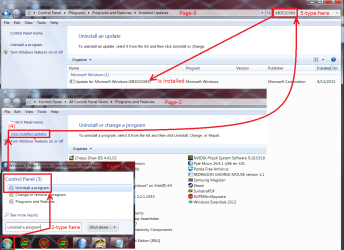
I also made a screen shot for how to see if an update is installed already or not
Start uninstall a program search for a update.png
 

My Computer

Computer type
PC/Desktop
Computer Manufacturer/Model Number
Custom assembled by me :}
OS
Win-7-Pro64bit 7-H-Prem-64bit
CPU
i7-5930K 2nd i9-9940x both water blocked VRM's too
Motherboard
ASUS SABERTOOTH X99 2nd ASUS x299 Apex
Memory
Trident-z 3200C14 2nd Trident-z 3600C16
Graphics Card(s)
EVGA 1080ti ftw3 2nd Titan Xp both water blocked
Sound Card
Built-in Realtek
Monitor(s) Displays
1-AOC G2460PG 24"G-Sync 144Hz/ 2nd 1-ASUS VG248QE 24" 144Hz
Screen Resolution
1920 x 1080 144Hz
Hard Drives
2-Samsung M.2 Evo & Evo Plus
2-Samsung 850 EVO 500GB SSD's/ 3-2.5 W.D. Black 1tb-&3-1tb/3-3.5 WD Black 1tb hdd's
PSU
EVGA SuperNOVA 1000-P2 2nd 1200-P2
Case
2-Corsair Obsidian Series 450D Black ATX Mid Tower
Cooling
Custom water loops
Keyboard
Logitech G710+/ 2nd Logitech G910
Mouse
2-RedDragon M901 Perdition 16400 dpi Gaming mouse = wired
Internet Speed
Comcast Ping 19ms 89.31mbps download speed 6.12mbps upload
Antivirus
Malwarebytes Pro/ Superantispyware Pro
Browser
FireFox & Pale moon
Other Info
2nd ASUS X299 Apex/Intel i9-9940x with Custom water loop/7H-Prem-x64/Corsair 450D case/Ram Trident-z 3600C16 4x8gb / Samsung970Evo plus 500gb SSD/Dual ssd EZ swap evo/PSU EVGA SuperNova 1200w-P2 80+Platinum/GPU Titan Xp /8-ML-140 on push-pull on 2-280GTX rads
I already have KB3020369 so installing KB3172605 now
 

My Computer

Computer type
Laptop
Computer Manufacturer/Model Number
Acer
OS
Windows 7 Home Premium 64bit
CPU
Intel Pentium T4400
Motherboard
Acer Aspire 5732Z
Memory
3 GBytes
Graphics Card(s)
ATI Mobility Radeon HD 4500/5100 Series
Sound Card
Realtek High Definition Audio
Monitor(s) Displays
Generic PnP Monitor
Screen Resolution
1366 X 768
Keyboard
Launch Manager
Mouse
USB Optical Mouse
Internet Speed
130.0 MBps
Antivirus
BT Virus Protect, Spybot Search and Destroy
Browser
Firefox
In this order
Install first
Then change back to what they were before
Then restart computer
Then try check for updates okay mate
 

My Computer

Computer type
Laptop
Computer Manufacturer/Model Number
Acer
OS
Windows 7 Home Premium 64bit
CPU
Intel Pentium T4400
Motherboard
Acer Aspire 5732Z
Memory
3 GBytes
Graphics Card(s)
ATI Mobility Radeon HD 4500/5100 Series
Sound Card
Realtek High Definition Audio
Monitor(s) Displays
Generic PnP Monitor
Screen Resolution
1366 X 768
Keyboard
Launch Manager
Mouse
USB Optical Mouse
Internet Speed
130.0 MBps
Antivirus
BT Virus Protect, Spybot Search and Destroy
Browser
Firefox
it tells me to restart for update KB3172605 should i do this now
 

My Computer

Computer type
Laptop
Computer Manufacturer/Model Number
Acer
OS
Windows 7 Home Premium 64bit
CPU
Intel Pentium T4400
Motherboard
Acer Aspire 5732Z
Memory
3 GBytes
Graphics Card(s)
ATI Mobility Radeon HD 4500/5100 Series
Sound Card
Realtek High Definition Audio
Monitor(s) Displays
Generic PnP Monitor
Screen Resolution
1366 X 768
Keyboard
Launch Manager
Mouse
USB Optical Mouse
Internet Speed
130.0 MBps
Antivirus
BT Virus Protect, Spybot Search and Destroy
Browser
Firefox
Hi,
Great
After a successful install of the other update it will prompt you it needs to restart the machine.
After it does restart yes redo the update settings and service to what it was before all of this.

Then lastly use Option 3 of the tutorial I posted.
Then restart the machine again.

Go to windows updates and on the top left use the Check for updates.
check for updates link.png
 

My Computer

Computer type
PC/Desktop
Computer Manufacturer/Model Number
Custom assembled by me :}
OS
Win-7-Pro64bit 7-H-Prem-64bit
CPU
i7-5930K 2nd i9-9940x both water blocked VRM's too
Motherboard
ASUS SABERTOOTH X99 2nd ASUS x299 Apex
Memory
Trident-z 3200C14 2nd Trident-z 3600C16
Graphics Card(s)
EVGA 1080ti ftw3 2nd Titan Xp both water blocked
Sound Card
Built-in Realtek
Monitor(s) Displays
1-AOC G2460PG 24"G-Sync 144Hz/ 2nd 1-ASUS VG248QE 24" 144Hz
Screen Resolution
1920 x 1080 144Hz
Hard Drives
2-Samsung M.2 Evo & Evo Plus
2-Samsung 850 EVO 500GB SSD's/ 3-2.5 W.D. Black 1tb-&3-1tb/3-3.5 WD Black 1tb hdd's
PSU
EVGA SuperNOVA 1000-P2 2nd 1200-P2
Case
2-Corsair Obsidian Series 450D Black ATX Mid Tower
Cooling
Custom water loops
Keyboard
Logitech G710+/ 2nd Logitech G910
Mouse
2-RedDragon M901 Perdition 16400 dpi Gaming mouse = wired
Internet Speed
Comcast Ping 19ms 89.31mbps download speed 6.12mbps upload
Antivirus
Malwarebytes Pro/ Superantispyware Pro
Browser
FireFox & Pale moon
Other Info
2nd ASUS X299 Apex/Intel i9-9940x with Custom water loop/7H-Prem-x64/Corsair 450D case/Ram Trident-z 3600C16 4x8gb / Samsung970Evo plus 500gb SSD/Dual ssd EZ swap evo/PSU EVGA SuperNova 1200w-P2 80+Platinum/GPU Titan Xp /8-ML-140 on push-pull on 2-280GTX rads
I don't need the other update already on my laptop
 

My Computer

Computer type
Laptop
Computer Manufacturer/Model Number
Acer
OS
Windows 7 Home Premium 64bit
CPU
Intel Pentium T4400
Motherboard
Acer Aspire 5732Z
Memory
3 GBytes
Graphics Card(s)
ATI Mobility Radeon HD 4500/5100 Series
Sound Card
Realtek High Definition Audio
Monitor(s) Displays
Generic PnP Monitor
Screen Resolution
1366 X 768
Keyboard
Launch Manager
Mouse
USB Optical Mouse
Internet Speed
130.0 MBps
Antivirus
BT Virus Protect, Spybot Search and Destroy
Browser
Firefox
Back
Top