It almost sounds as if you're attempting to copy/paste the iso file to the disk, rather than burn the ISO format.
My knowledge of NTI is minimal and out-of-date - I'm going to ask for help.
My Computer
Computer type
Laptop
Computer Manufacturer/Model Number
Asus K52F or Lenovo B51-80
OS
Win 7 x64 Home Premium (and x86 VirtualBox VM)/Win10
CPU
i3 370M/i7 6500U
Motherboard
Asus/Lenovo
Memory
8GB - finally :)/8GB
Graphics Card(s)
it's an i3, dude!/dual Intel&nVidia
Sound Card
onboard
Monitor(s) Displays
15.6" built-in
Screen Resolution
1366x768/1920x1080
Hard Drives
750GB Seagate internal
Sundry external drives attached to other computers on the local network
1TB SSD on the Lenovo
PSU
n/a
Internet Speed
as much as I can get - usually on a dongle/phone, so <1MB/s
During installation, dont install any bundled program if asked for.
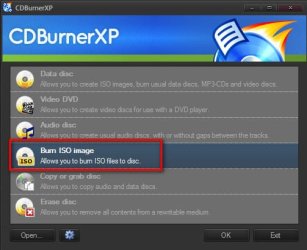
In the first page, select "Burn ISO Image" and OK.
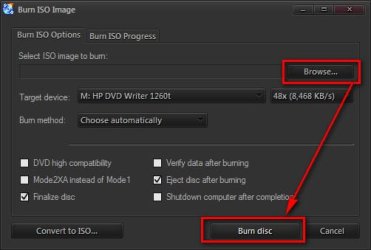
In the resulting page, browse for the ISO file. Set the Optical Disc path and put a blank Disc there, set the burn speed low to have a good burn; and click on "Burn Disc".
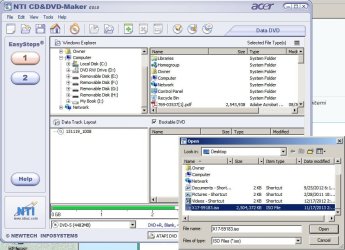
I open NTI check the box create a bootable DVD, then I opened the file column, clicked on the bottom option (Create Disc from ISO image). It opens a window and asks what you want to write I chose The "X17-59183.iso", clicked open, it says insert disc so I do. That opens another window that has the speed options, since the 16x didn't work, I tried reducing it to 8x.
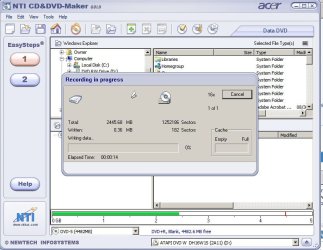
I'm trying again at 16x, thats the write speed on the DVD disc. I mis-spoke before, it gets to 0.36 MB, not .036MB. Failed again. it says the program is not responding. Gonna clean it and see if that changes anything.
Went to the Oral surgeon yesterday and had a couple of bone spurs removed. May not get to this today, face hurts
Attachments
steps.jpg
84.6 KB
· Views: 1
writing.jpg
64.5 KB
· Views: 1
My Computer
Computer type
PC/Desktop
Computer Manufacturer/Model Number
Acer Aspire E700 dsktop
OS
Windows 7 Pro
CPU
Intel 2 quad Q6600
Motherboard
Acer fg965M
Memory
4 GB
Graphics Card(s)
Nvidia GeForce GTS 450 1TB
Sound Card
RealTek
Monitor(s) Displays
Acer 22" X223w
Hard Drives
1TB WD Caviar Black (internal)
1TB WD My Book Essential
It almost sounds as there could be a problem with your DVD writer. When they start going bad, they do things like that. You could try burning it on another computer.
Also, you could try to re download the iso file from here. Windows 7 Direct Download Links just in case the ISO file became corrupted, if you haven't already done so.
THANKS TO ALL OF YOU!!!!
Esp you Arc! Done and Done! should I have clicked verify data on that or can I assume?? I'd rather do another disc if you think I should. Sure won't throw that program away!!!!!
My Computer
Computer type
PC/Desktop
Computer Manufacturer/Model Number
Acer Aspire E700 dsktop
OS
Windows 7 Pro
CPU
Intel 2 quad Q6600
Motherboard
Acer fg965M
Memory
4 GB
Graphics Card(s)
Nvidia GeForce GTS 450 1TB
Sound Card
RealTek
Monitor(s) Displays
Acer 22" X223w
Hard Drives
1TB WD Caviar Black (internal)
1TB WD My Book Essential
Sounds like that burner program worked??
Verify is always a good idea on system disks like this it ensures that at least the disk is legible, and that it agrees with the original data on the hard drive.
My Computer
Computer type
Laptop
Computer Manufacturer/Model Number
Asus K52F or Lenovo B51-80
OS
Win 7 x64 Home Premium (and x86 VirtualBox VM)/Win10
CPU
i3 370M/i7 6500U
Motherboard
Asus/Lenovo
Memory
8GB - finally :)/8GB
Graphics Card(s)
it's an i3, dude!/dual Intel&nVidia
Sound Card
onboard
Monitor(s) Displays
15.6" built-in
Screen Resolution
1366x768/1920x1080
Hard Drives
750GB Seagate internal
Sundry external drives attached to other computers on the local network
1TB SSD on the Lenovo
PSU
n/a
Internet Speed
as much as I can get - usually on a dongle/phone, so <1MB/s
Wish I knew about that program before, it's so easy to navigate too!
I think you are right I'll run a second one and verify this one. Better safer than sorry. I really didn't think it was going to work so I skipped that step. I was about to go get a new burner. Maybe Santa will bring me new one.
If I'm ever on that side of the pond I owe you a trip to the pub!!
My Computer
Computer type
PC/Desktop
Computer Manufacturer/Model Number
Acer Aspire E700 dsktop
OS
Windows 7 Pro
CPU
Intel 2 quad Q6600
Motherboard
Acer fg965M
Memory
4 GB
Graphics Card(s)
Nvidia GeForce GTS 450 1TB
Sound Card
RealTek
Monitor(s) Displays
Acer 22" X223w
Hard Drives
1TB WD Caviar Black (internal)
1TB WD My Book Essential
Archie
Thanks for the help, I'll be saving that program you can be sure. Not looking forward to having to backup a ton of stuff. Don't suppose you know of any real good backup programs? I've already tried Acronis and Macrium, had problems with both. Could never get them to make a verifiable image even after a clean install.
George
My Computer
Computer type
PC/Desktop
Computer Manufacturer/Model Number
Acer Aspire E700 dsktop
OS
Windows 7 Pro
CPU
Intel 2 quad Q6600
Motherboard
Acer fg965M
Memory
4 GB
Graphics Card(s)
Nvidia GeForce GTS 450 1TB
Sound Card
RealTek
Monitor(s) Displays
Acer 22" X223w
Hard Drives
1TB WD Caviar Black (internal)
1TB WD My Book Essential






 Better safer than sorry. I really didn't think it was going to work so I skipped that step. I was about to go get a new burner. Maybe Santa will bring me new one.
 You may check it or not, as you want.