Stuck on "Preparing your computer" while installing Windows 7 SP1

ambiteum

New member
Local time
11:58 PM
Messages
2
Stuck on "Preparing your computer" while installing Windows 7 SP1

Hi everyone,

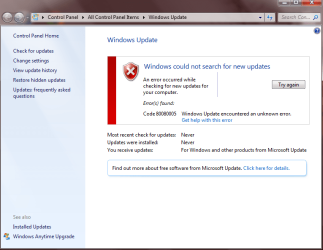
every time I try to install Service Pack 1 for Windows 7, I get this:

Untitled.png


And then it just gets stuck on that 'preparing'.
I tried to install System Update Readiness Tool but it also freezes somewhere in the middle, and nothing happens on the screen for 3 hours. I can move the pointer, etc., but the installer is stuck.

What can I do in this case?
 

My Computer

Computer type
Laptop
Computer Manufacturer/Model Number
Asus
OS
Windows 7 Home Premium 64bit
Antivirus
Avira
Browser
Chrome
Pleasefollow the WindowsUpdate Posting Instructions and postthe requested data


If thefile is too large (8MB compressed), remove the older CBSPersist cab files untilthe final file is below the limit - you can always post them separately afterzipping them. (the forum doesn't allow the upload of bare CAB files, for anumber of reasons)


Pleasealso post the C:\Windows\windowsudpate.log file


My Computer

Computer type
Laptop
Computer Manufacturer/Model Number
Asus K52F or Lenovo B51-80
OS
Win 7 x64 Home Premium (and x86 VirtualBox VM)/Win10
CPU
i3 370M/i7 6500U
Motherboard
Asus/Lenovo
Memory
8GB - finally :)/8GB
Graphics Card(s)
it's an i3, dude!/dual Intel&nVidia
Sound Card
onboard
Monitor(s) Displays
15.6" built-in
Screen Resolution
1366x768/1920x1080
Hard Drives
750GB Seagate internal
Sundry external drives attached to other computers on the local network
1TB SSD on the Lenovo
PSU
n/a
Internet Speed
as much as I can get - usually on a dongle/phone, so <1MB/s
Antivirus
MSE/Defender
Browser
IE11/12/Edge/Chrome/FF(if I must)
From the last errors in the windowsupdate log, you appear to be attempting to install the wrong 'bitness' of the update -
Code:
2015-06-22 18:54:37, Info                  CBS    SPI: Succeeded verifying trust on C:\46f51edf4b3306fcd8e9f05c5db832\fea6a099b6243df863bdcfc0acf1ee\SpError.dll
2015-06-22 18:54:37, Info                  CBS    SPI: Loading SPError.dll contained at C:\46f51edf4b3306fcd8e9f05c5db832\fea6a099b6243df863bdcfc0acf1ee\SpError.dll
2015-06-22 18:54:37, Error                 CBS    SPI: (wmain:983)SP installation cannot proceed.  Cannot run 32 bit installer on 64 bit hr=0x800f0a02
2015-06-22 18:54:45, Info                  CBS    SPI: SPInstall terminating, return code 0x800f0a02
2015-06-22 18:54:45, Error                 CBS    SPI: (SPIRegQueryStringValue:700)Failed to query registry value: MiscString2 er=0x2
2015-06-22 18:54:45, Error                 CBS    SPI: (CSystem::GetMachineName:395)Failed to query machine name from RAC hr=0x80070002
2015-06-22 18:54:45, Error                 CBS    SPI: (CCrimsonLogger::Unregister:50)Crimson logger not registered hr=0x8000ffff
2015-06-22 18:54:46, Info                  CBS    SPI: Deleting directory: C:\46f51edf4b3306fcd8e9f05c5db832\fea6a099b6243df863bdcfc0acf1ee.  ret=2

Let's have a closer look at the system...

I need to see afull copy of the report produced by the MGADiag tool

(download andsave to desktop - http://go.microsoft.com/fwlink/?linkid=52012)

Once saved, run the tool.

Click on theContinue button, which will produce the report.

To copy the report to your response, click onthe Copy button in the tool (ignore any error messages at this point), and thenpaste (using either r-click/Paste, or Ctrl+V ) into your response.x

Please also statethe Version and Edition of Windows quoted on your COA sticker (if you have one)on the case of your machine (or inside the battery compartment), but do NOTquote the Key on the sticker!

http://www.microsoft.com/en-us/howtotell/Hardware.aspx


My Computer

Computer type
Laptop
Computer Manufacturer/Model Number
Asus K52F or Lenovo B51-80
OS
Win 7 x64 Home Premium (and x86 VirtualBox VM)/Win10
CPU
i3 370M/i7 6500U
Motherboard
Asus/Lenovo
Memory
8GB - finally :)/8GB
Graphics Card(s)
it's an i3, dude!/dual Intel&nVidia
Sound Card
onboard
Monitor(s) Displays
15.6" built-in
Screen Resolution
1366x768/1920x1080
Hard Drives
750GB Seagate internal
Sundry external drives attached to other computers on the local network
1TB SSD on the Lenovo
PSU
n/a
Internet Speed
as much as I can get - usually on a dongle/phone, so <1MB/s
Antivirus
MSE/Defender
Browser
IE11/12/Edge/Chrome/FF(if I must)
Back
Top