
Hello,
I recently noticed that my drive C: decreased in around 5GB.
I have my HDD partitioned in 2 (100GB for C: and 350GB for D , and I store everything in drive D:.
I have kept my drive C: with around 30.5GB of free space for several months now, but since last week that suddenly dropped to 24.8GB.
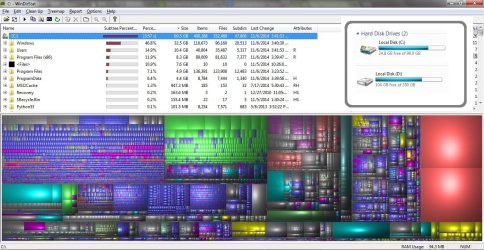
I checked with WinDirStat, which shows that C: does have 69.5GB in use. I don't know if this accounts for the part of the drive that I'm not allowed to use though.
I do not recall having installed or downloaded anything that large. I did update my Avast antivirus and downloaded some windows updates I believe. Disk Cleanup did not show anything large, and the Disk Defragmenter says it's 1% fragmented.
The file attached shows WinDirStat's results. My Users folder has my drobox folder using 4.75GB, which is almost half of the current Users size of 10.4GB. Unless it was empty before, I don't think the 5GB decrease came from here.
Am I missing something? I'm not really in need of that space if it's something unavoidable, but I am worried of spyware and viruses. Avast doesn't detect any threat so I can't be sure if it's that.
Any help would be appreciated. If there are better tools, I will try with those too.
Thank you.
I recently noticed that my drive C: decreased in around 5GB.
I have my HDD partitioned in 2 (100GB for C: and 350GB for D
, and I store everything in drive D:. I have kept my drive C: with around 30.5GB of free space for several months now, but since last week that suddenly dropped to 24.8GB.
I checked with WinDirStat, which shows that C: does have 69.5GB in use. I don't know if this accounts for the part of the drive that I'm not allowed to use though.
I do not recall having installed or downloaded anything that large. I did update my Avast antivirus and downloaded some windows updates I believe. Disk Cleanup did not show anything large, and the Disk Defragmenter says it's 1% fragmented.
The file attached shows WinDirStat's results. My Users folder has my drobox folder using 4.75GB, which is almost half of the current Users size of 10.4GB. Unless it was empty before, I don't think the 5GB decrease came from here.
Am I missing something? I'm not really in need of that space if it's something unavoidable, but I am worried of spyware and viruses. Avast doesn't detect any threat so I can't be sure if it's that.
Any help would be appreciated. If there are better tools, I will try with those too.
Thank you.
Attachments
My Computer
At a glance
Windows 7 Home Premium
- Computer type
- PC/Desktop
- OS
- Windows 7 Home Premium


