Sudden restart without warning, no BSOD, no power for several minutes

mmurray1988

New member
Member
Local time
2:54 PM
Messages
98
Location
San Diego
Hello

I've had two sudden restarts in the past week. The first time my screen went black, but the indicator light was still on my monitor, and my computer was still running. Sound was still coming through normally. However my fans picked up speed like crazy. I've never heard them that loud. I finally shut it off manually, and it started back up fine.

Now just a few minutes ago my computer shut off completely. It would not power back on for several minutes, even when I pressed the power button. I opened up my case to make sure nothing had come loose. Also I unplugged my PSU and plugged it back in. Afterwards it started up normally.

The only recent change I have made is an update for my NVIDIA GeForce GTX 670. It was only a day afterwards that the first error occurred.

12/14 I tried to turn on my computer after putting it on standby last night, but it would not start. All I could hear was the fans running. I had to turn it off manually and turn it back on for it to resume.

Any ideas?
 
Last edited:

My Computer My Computer

At a glance

Windows 7 ProfessionalGenuineIntel Intel(R) Core(TM) i7-3770K CPU @...16.0 GBNVIDIA GeForce GTX 1070
Computer type
PC/Desktop
Computer Manufacturer/Model Number
Custom Build
OS
Windows 7 Professional
CPU
GenuineIntel Intel(R) Core(TM) i7-3770K CPU @ 3.50GHz
Motherboard
ASRock, Z77 Extreme4
Memory
16.0 GB
Graphics Card(s)
NVIDIA GeForce GTX 1070
Monitor(s) Displays
Viewsonic VX2450WM-LED 24-Inch
Screen Resolution
1080
Hard Drives
1TB WD Black
250 GB 850 EVO
PSU
HX 650
Antivirus
MSE
Browser
Brave
Hello.

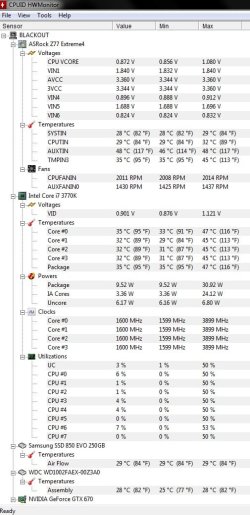
Maybe high temperatures are causing this issue;check your temperatures with some software,like HWMonitor.

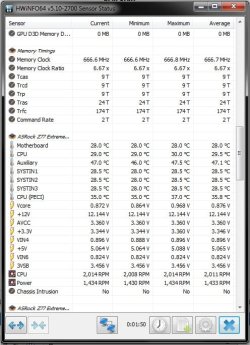
I would also check voltages,just to make sure you're getting enough volts (with HWiNFO).
You can download it here: HWiNFO, HWiNFO32/64 - Download ,64 bit version.
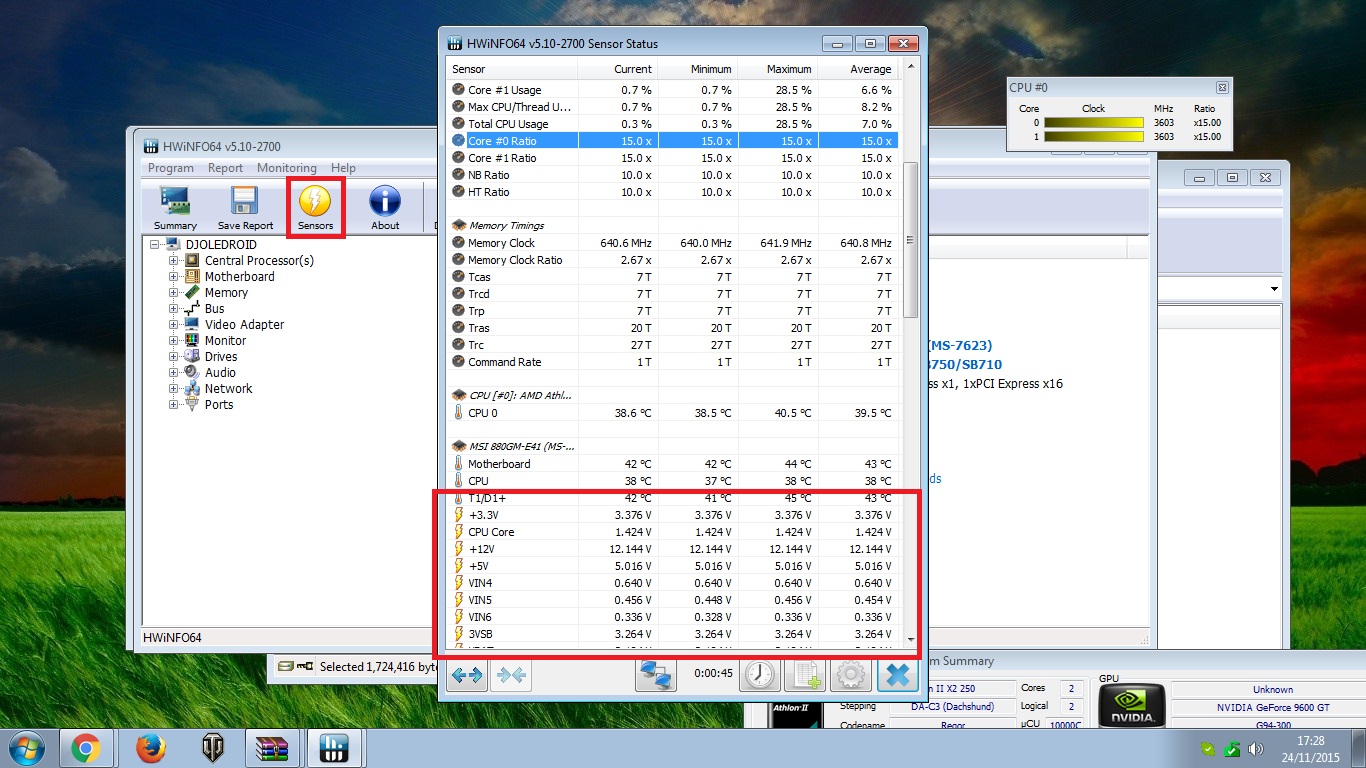
Open it and click on sensors.Scroll down until you find voltages.
WLNVisa.jpg


Report back here.
 

My Computer My Computer

At a glance

Windows 7 x64 Pro
OS
Windows 7 x64 Pro
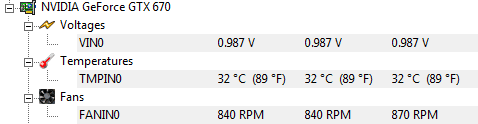
Here are the screenshots
 

Attachments

  • CPUid.jpg
    CPUid.jpg
    83.9 KB · Views: 3
  • HWinfo.jpg
    HWinfo.jpg
    64.4 KB · Views: 17

My Computer My Computer

At a glance

Windows 7 ProfessionalGenuineIntel Intel(R) Core(TM) i7-3770K CPU @...16.0 GBNVIDIA GeForce GTX 1070
Computer type
PC/Desktop
Computer Manufacturer/Model Number
Custom Build
OS
Windows 7 Professional
CPU
GenuineIntel Intel(R) Core(TM) i7-3770K CPU @ 3.50GHz
Motherboard
ASRock, Z77 Extreme4
Memory
16.0 GB
Graphics Card(s)
NVIDIA GeForce GTX 1070
Monitor(s) Displays
Viewsonic VX2450WM-LED 24-Inch
Screen Resolution
1080
Hard Drives
1TB WD Black
250 GB 850 EVO
PSU
HX 650
Antivirus
MSE
Browser
Brave
Voltages and idle temps are fine.
After reading your first post better,something caused graphics card to stop working hence gpu fans sped up.When computer is booting do you hear that same fan loudness?

Just to make sure:
Have you checked all motherboard connections (24 pin power connection,gpu power connection,etc)?
Run Windows memory diagnostic ;check for RAM errors.
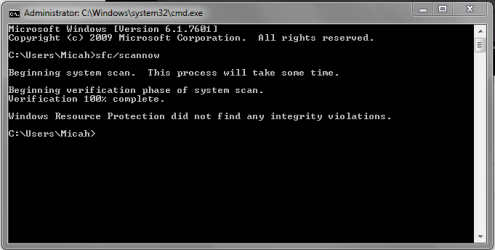
Run SFC /SCANNOW

PS
What power supply are you using?
 

My Computer My Computer

At a glance

Windows 7 x64 Pro
OS
Windows 7 x64 Pro
No, I've never heard my fans spin that quickly, which is what initially concerned me.

I gave an overlook and everything looks fine. Anything accessible I made sure was fit properly. Nothing was loose.

HX650
 

My Computer My Computer

At a glance

Windows 7 ProfessionalGenuineIntel Intel(R) Core(TM) i7-3770K CPU @...16.0 GBNVIDIA GeForce GTX 1070
Computer type
PC/Desktop
Computer Manufacturer/Model Number
Custom Build
OS
Windows 7 Professional
CPU
GenuineIntel Intel(R) Core(TM) i7-3770K CPU @ 3.50GHz
Motherboard
ASRock, Z77 Extreme4
Memory
16.0 GB
Graphics Card(s)
NVIDIA GeForce GTX 1070
Monitor(s) Displays
Viewsonic VX2450WM-LED 24-Inch
Screen Resolution
1080
Hard Drives
1TB WD Black
250 GB 850 EVO
PSU
HX 650
Antivirus
MSE
Browser
Brave
Hmm.
That's good and quality power supply I highly doubt it's the cause of your issue.
Check for RAM errors and use command from my last post in CMD.

Okay time for much more info:
Were graphics card fans spinning fast?
Also did screen turn black while you were gaming?
Can you write graphics card temp,no need to take screenshot again(it's not visible on original screenshot).
Did you overclocked your cpu or gpu recently?
Updated any driver (except video),bios?

Roll back to old drivers,graphics card is most likely the issue - driver related problem.

Sorry from going to unlikely to likely cause of your issue (I like to check everything and have all info - a bit ocd).
 

My Computer My Computer

At a glance

Windows 7 x64 Pro
OS
Windows 7 x64 Pro
It didn't find anything
 

Attachments

  • cmd.PNG
    cmd.PNG
    9 KB · Views: 16

My Computer My Computer

At a glance

Windows 7 ProfessionalGenuineIntel Intel(R) Core(TM) i7-3770K CPU @...16.0 GBNVIDIA GeForce GTX 1070
Computer type
PC/Desktop
Computer Manufacturer/Model Number
Custom Build
OS
Windows 7 Professional
CPU
GenuineIntel Intel(R) Core(TM) i7-3770K CPU @ 3.50GHz
Motherboard
ASRock, Z77 Extreme4
Memory
16.0 GB
Graphics Card(s)
NVIDIA GeForce GTX 1070
Monitor(s) Displays
Viewsonic VX2450WM-LED 24-Inch
Screen Resolution
1080
Hard Drives
1TB WD Black
250 GB 850 EVO
PSU
HX 650
Antivirus
MSE
Browser
Brave
Yeah,as I expected.
Like I've said,install older graphics card driver.
 

My Computer My Computer

At a glance

Windows 7 x64 Pro
OS
Windows 7 x64 Pro
I was working on my reply before I saw the rest of the info you asked for.

When the screen turned black, the graphics card fans spun really quickly. I believe that was the only fan making that noise, since my PSU would of been louder, and it was multiple fans spinning at once, which only my graphic card has.

I wasn't gaming when it turned black. I was watching YouTube.

I've never overclocked.

That's last update I had was about a week or so ago, and that was Windows.

How do I roll back the driver?

Don't worry about it. Being in depth in this case is a good thing.
 

Attachments

  • Temp.PNG
    Temp.PNG
    3.3 KB · Views: 16

My Computer My Computer

At a glance

Windows 7 ProfessionalGenuineIntel Intel(R) Core(TM) i7-3770K CPU @...16.0 GBNVIDIA GeForce GTX 1070
Computer type
PC/Desktop
Computer Manufacturer/Model Number
Custom Build
OS
Windows 7 Professional
CPU
GenuineIntel Intel(R) Core(TM) i7-3770K CPU @ 3.50GHz
Motherboard
ASRock, Z77 Extreme4
Memory
16.0 GB
Graphics Card(s)
NVIDIA GeForce GTX 1070
Monitor(s) Displays
Viewsonic VX2450WM-LED 24-Inch
Screen Resolution
1080
Hard Drives
1TB WD Black
250 GB 850 EVO
PSU
HX 650
Antivirus
MSE
Browser
Brave
Just finished the install

When should I update the NVIDIA driver? Cause I'll obviously be receiving notification the next time the new one is released.
 

My Computer My Computer

At a glance

Windows 7 ProfessionalGenuineIntel Intel(R) Core(TM) i7-3770K CPU @...16.0 GBNVIDIA GeForce GTX 1070
Computer type
PC/Desktop
Computer Manufacturer/Model Number
Custom Build
OS
Windows 7 Professional
CPU
GenuineIntel Intel(R) Core(TM) i7-3770K CPU @ 3.50GHz
Motherboard
ASRock, Z77 Extreme4
Memory
16.0 GB
Graphics Card(s)
NVIDIA GeForce GTX 1070
Monitor(s) Displays
Viewsonic VX2450WM-LED 24-Inch
Screen Resolution
1080
Hard Drives
1TB WD Black
250 GB 850 EVO
PSU
HX 650
Antivirus
MSE
Browser
Brave
Just finished the install

When should I update the NVIDIA driver? Cause I'll obviously be receiving notification the next time the new one is released.
Skip this one,install next update.
But let's make sure that problem is solved.
 

My Computer My Computer

At a glance

Windows 7 x64 Pro
OS
Windows 7 x64 Pro
I appreciate the help

Hopefully I won't have to come back
 

My Computer My Computer

At a glance

Windows 7 ProfessionalGenuineIntel Intel(R) Core(TM) i7-3770K CPU @...16.0 GBNVIDIA GeForce GTX 1070
Computer type
PC/Desktop
Computer Manufacturer/Model Number
Custom Build
OS
Windows 7 Professional
CPU
GenuineIntel Intel(R) Core(TM) i7-3770K CPU @ 3.50GHz
Motherboard
ASRock, Z77 Extreme4
Memory
16.0 GB
Graphics Card(s)
NVIDIA GeForce GTX 1070
Monitor(s) Displays
Viewsonic VX2450WM-LED 24-Inch
Screen Resolution
1080
Hard Drives
1TB WD Black
250 GB 850 EVO
PSU
HX 650
Antivirus
MSE
Browser
Brave
Back
Top