Suddenly, Java.exe will only run for 10 seconds. Cannot play Minceraft

PrismSpark

New member
Local time
4:11 PM
Messages
24
Location
Hollow Shades
I don't know why, but I was playing Minecraft just fine two weeks ago, and now this happened.

I would attempt ta run Minecraft, and it would start running, and then stop. And I don't mean "start running" as in the launcher opens up, but that there's a task running in TaskManager fer all of 4 seconds, and then it turns into java.exe, and then 6 seconds later it loses all of it's CPU usage and closes.
No error.
No popup.

There are two other programs that kick in called "conhost.exe" and "werfault.exe" at the same time, and close at the same time.
Again, no error.
No popup.
Nada.


It just refuses ta run suddenly.


This, and GyazoGif along with every java-based program also does the same.
Some websites like http://app.box.com or http://gyfcat.com/ on Firefox also has started ta crash Firefox right around the same time this started up.


I've been searching all around the net fer an answer fer 5 days now all ta no avail. Not a single thread has exactly what I'm dealin' withs with a decently fixing solution ta this.
It's as if there is NO FIX fer.... whatever this is.

HELP.

PLEASE.
 

My Computer

Computer type
Laptop
Computer Manufacturer/Model Number
HP
OS
Windows 7 Home (64)
CPU
Quad-Core AMD A8-3520M APU
Memory
6.00 GB
Graphics Card(s)
Radeon HD Graphics 1.60 GHz
Monitor(s) Displays
two
Screen Resolution
decent
Keyboard
built-in
Mouse
yes
Internet Speed
9mb↑ 3mb↓
Antivirus
Malwarebytes
Browser
Firefox
Other Info
Bazinga
Hi PrismSpark,

Welcome to the Seven Forums! We'll try help the best we can.

Please follow these steps and let me know what happens:


  1. Run the Java Uninstall Tool - https://java.com/en/download/faq/remove_olderversions.xml
  2. Remove All Versions of Java that it detects
  3. Go To Control Panel > Add/Remove Programs - Verify Java is not installed, if it is, uninstall it.
  4. Download CCleaner: CCleaner - Download
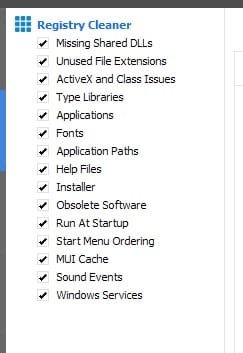
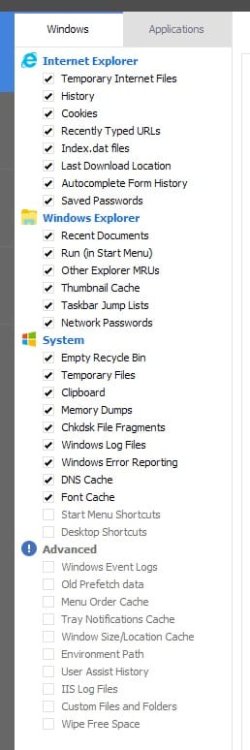
  5. In CCleaner there will be 2 tabs - 'Windows' & 'Applications'; in 'Windows' tick/select the settings as I have attached in a picture below, In Applications, tick/select everything.
  6. Press 'Run Cleaner'
  7. Then go to the 'Registry' Window: Scan For Issues > Fix Issues > Make A Backup (on your desktop) > Press 'Fix All'.
  8. Restart Your PC
  9. Download the latest version of Java from: https://java.com/en/download/
  10. Restart Your PC
After the second restart, hopefully this should rectify your problem. Please follow these steps as I have narrated and let me know of the outcome.
 

Attachments

  • CCleanerSettings.jpg
    CCleanerSettings.jpg
    31.2 KB · Views: 2
  • CCleanerSettings2.jpg
    CCleanerSettings2.jpg
    12.5 KB · Views: 47

My Computer

Computer type
PC/Desktop
Computer Manufacturer/Model Number
Custom Build
OS
Windows 7 Ultimate x64
CPU
Intel Core i7 Socket 1156 LGA
Motherboard
Asus P7P55D-E LX
Memory
Corsair Dominator 4GB DDR3
Graphics Card(s)
Gainward GTX 460
Monitor(s) Displays
Acer V243HL
Screen Resolution
1920x1080
Hard Drives
Western Digital 1TB HDD
PSU
Antec TruePower 650W
Case
Antec 300
Cooling
Thermalrite CPU Cooler
Antivirus
Avast Anti-Virus
I did all that you had suggested, and it still won't run correctly.
It still has the same issue, and I'm wonderin' if it will ever get fixed.

In fact, a few other programs also have this issue, like "Gyazo Gif", and "Slider Dock".
 
Last edited:

My Computer

Computer type
Laptop
Computer Manufacturer/Model Number
HP
OS
Windows 7 Home (64)
CPU
Quad-Core AMD A8-3520M APU
Memory
6.00 GB
Graphics Card(s)
Radeon HD Graphics 1.60 GHz
Monitor(s) Displays
two
Screen Resolution
decent
Keyboard
built-in
Mouse
yes
Internet Speed
9mb↑ 3mb↓
Antivirus
Malwarebytes
Browser
Firefox
Other Info
Bazinga
I did all that you had suggested, and it still won't run correctly.
It still has the same issue, and I'm wonderin' if it will ever get fixed.

In fact, a few other programs also have this issue, like "Gyazo Gif", and "Slider Dock".

There's a few pieces of information I'm going to need.

First Do This:

Follow the instructions here: Blue Screen of Death (BSOD) Posting Instructions

I know your problem is not BSOD related but still follow the instructions to use the DM Collector

Zip up the file, if it doesn't do it for you, then post it to this thread so I can take a look

Then Do This:

  1. Go to: Start > Type: msconfig.exe - Press Enter
  2. Go to the tab 'Boot'
  3. Bottom of the window there are check-boxes, tick the one called 'Boot log'
  4. Press Apply/OK
  5. Shutdown the PC
  6. Wait 10 seconds
  7. Turn on PC
  8. Go to - C:\Windows and find a file called ntbtlog.txt
  9. Upload this file to this thread also
Please upload both files when you can and then I'll get to work on solving this problem!


Thanks
 

My Computer

Computer type
PC/Desktop
Computer Manufacturer/Model Number
Custom Build
OS
Windows 7 Ultimate x64
CPU
Intel Core i7 Socket 1156 LGA
Motherboard
Asus P7P55D-E LX
Memory
Corsair Dominator 4GB DDR3
Graphics Card(s)
Gainward GTX 460
Monitor(s) Displays
Acer V243HL
Screen Resolution
1920x1080
Hard Drives
Western Digital 1TB HDD
PSU
Antec TruePower 650W
Case
Antec 300
Cooling
Thermalrite CPU Cooler
Antivirus
Avast Anti-Virus
Okay. Here's the BSOD zip file.
I'll get the second part in a minute after me computer restarts.
 

Attachments

My Computer

Computer type
Laptop
Computer Manufacturer/Model Number
HP
OS
Windows 7 Home (64)
CPU
Quad-Core AMD A8-3520M APU
Memory
6.00 GB
Graphics Card(s)
Radeon HD Graphics 1.60 GHz
Monitor(s) Displays
two
Screen Resolution
decent
Keyboard
built-in
Mouse
yes
Internet Speed
9mb↑ 3mb↓
Antivirus
Malwarebytes
Browser
Firefox
Other Info
Bazinga
Okay. Here's the BSOD zip file.
I'll get the second part in a minute after me computer restarts.

Thanks for this, i will take a look at it all - please can you upload the ntbtlog.txt?

Thanks
 

My Computer

Computer type
PC/Desktop
Computer Manufacturer/Model Number
Custom Build
OS
Windows 7 Ultimate x64
CPU
Intel Core i7 Socket 1156 LGA
Motherboard
Asus P7P55D-E LX
Memory
Corsair Dominator 4GB DDR3
Graphics Card(s)
Gainward GTX 460
Monitor(s) Displays
Acer V243HL
Screen Resolution
1920x1080
Hard Drives
Western Digital 1TB HDD
PSU
Antec TruePower 650W
Case
Antec 300
Cooling
Thermalrite CPU Cooler
Antivirus
Avast Anti-Virus
Here's the nbtlog text document.

Thanks fer tryin' ta help me on this~
 

Attachments

My Computer

Computer type
Laptop
Computer Manufacturer/Model Number
HP
OS
Windows 7 Home (64)
CPU
Quad-Core AMD A8-3520M APU
Memory
6.00 GB
Graphics Card(s)
Radeon HD Graphics 1.60 GHz
Monitor(s) Displays
two
Screen Resolution
decent
Keyboard
built-in
Mouse
yes
Internet Speed
9mb↑ 3mb↓
Antivirus
Malwarebytes
Browser
Firefox
Other Info
Bazinga
Also, it seems ta not let me run iTunes and also Skype as well now.

Also also, fer some reason going ta my "My Music" folder makes Windows Explorer crash.
 

My Computer

Computer type
Laptop
Computer Manufacturer/Model Number
HP
OS
Windows 7 Home (64)
CPU
Quad-Core AMD A8-3520M APU
Memory
6.00 GB
Graphics Card(s)
Radeon HD Graphics 1.60 GHz
Monitor(s) Displays
two
Screen Resolution
decent
Keyboard
built-in
Mouse
yes
Internet Speed
9mb↑ 3mb↓
Antivirus
Malwarebytes
Browser
Firefox
Other Info
Bazinga
Here's the nbtlog text document.

Thanks fer tryin' ta help me on this~

Thanks for uploading this.

After analysing your log, 1 driver is not loading at start-up when it should.

To rectify this, can you tell me the following:

  1. Please list every Anti-Virus Software you have installed (if you're not sure if its AV software, just add it).
  2. Do you have Microsoft Security Essentials installed?
Thanks,


MistUnleashed
 

My Computer

Computer type
PC/Desktop
Computer Manufacturer/Model Number
Custom Build
OS
Windows 7 Ultimate x64
CPU
Intel Core i7 Socket 1156 LGA
Motherboard
Asus P7P55D-E LX
Memory
Corsair Dominator 4GB DDR3
Graphics Card(s)
Gainward GTX 460
Monitor(s) Displays
Acer V243HL
Screen Resolution
1920x1080
Hard Drives
Western Digital 1TB HDD
PSU
Antec TruePower 650W
Case
Antec 300
Cooling
Thermalrite CPU Cooler
Antivirus
Avast Anti-Virus
I have had installed? Like, as in listing those that were installed but currently are not?
Because that's a lot that I don't remember.

I will try ta list what I can though:

•AVG
•Malwarebyte's Antimalware
•Spyhunter
•Spybot S&D
•ClamWin
•CCleaner
•ADW Cleaner
•Microsoft Security Essentials

Currently, what's installed is CCleaner, ADW Cleaner, & Microsoft Security Essentials.
 

My Computer

Computer type
Laptop
Computer Manufacturer/Model Number
HP
OS
Windows 7 Home (64)
CPU
Quad-Core AMD A8-3520M APU
Memory
6.00 GB
Graphics Card(s)
Radeon HD Graphics 1.60 GHz
Monitor(s) Displays
two
Screen Resolution
decent
Keyboard
built-in
Mouse
yes
Internet Speed
9mb↑ 3mb↓
Antivirus
Malwarebytes
Browser
Firefox
Other Info
Bazinga
I have had installed? Like, as in listing those that were installed but currently are not?
Because that's a lot that I don't remember.

I will try ta list what I can though:

•AVG
•Malwarebyte's Antimalware
•Spyhunter
•Spybot S&D
•ClamWin
•CCleaner
•ADW Cleaner
•Microsoft Security Essentials

Currently, what's installed is CCleaner, ADW Cleaner, & Microsoft Security Essentials.

That list is fine!

Right, what I need you to do is use the links below to find an UNINSTALLER for:

P.S - You need the 64bit versions.

Also run this fix: https://support.microsoft.com/en-us/mats/program_install_and_uninstall


Restart and then follow my previous instructions on re-installing Java again.


Let me know how you get on.
 

My Computer

Computer type
PC/Desktop
Computer Manufacturer/Model Number
Custom Build
OS
Windows 7 Ultimate x64
CPU
Intel Core i7 Socket 1156 LGA
Motherboard
Asus P7P55D-E LX
Memory
Corsair Dominator 4GB DDR3
Graphics Card(s)
Gainward GTX 460
Monitor(s) Displays
Acer V243HL
Screen Resolution
1920x1080
Hard Drives
Western Digital 1TB HDD
PSU
Antec TruePower 650W
Case
Antec 300
Cooling
Thermalrite CPU Cooler
Antivirus
Avast Anti-Virus
Okay, I ran the two uninstallers, and then the Microsoft Thing.

The Microsoft "Fix" tool thing, asked me if it was an install or an uninstall, and I didn't know which, so I did both on two occasions, but then it asked me fer a specific program, and I had no idea what I was lookin' fer, so I had ta cancel.

What on earth am I lookin' fer in that list it pulled up?
 

My Computer

Computer type
Laptop
Computer Manufacturer/Model Number
HP
OS
Windows 7 Home (64)
CPU
Quad-Core AMD A8-3520M APU
Memory
6.00 GB
Graphics Card(s)
Radeon HD Graphics 1.60 GHz
Monitor(s) Displays
two
Screen Resolution
decent
Keyboard
built-in
Mouse
yes
Internet Speed
9mb↑ 3mb↓
Antivirus
Malwarebytes
Browser
Firefox
Other Info
Bazinga
It is still interrupting many of my programs....
 

My Computer

Computer type
Laptop
Computer Manufacturer/Model Number
HP
OS
Windows 7 Home (64)
CPU
Quad-Core AMD A8-3520M APU
Memory
6.00 GB
Graphics Card(s)
Radeon HD Graphics 1.60 GHz
Monitor(s) Displays
two
Screen Resolution
decent
Keyboard
built-in
Mouse
yes
Internet Speed
9mb↑ 3mb↓
Antivirus
Malwarebytes
Browser
Firefox
Other Info
Bazinga
The issue still isn't fixed.... Please.... someone.... anyone.... help me....
 

My Computer

Computer type
Laptop
Computer Manufacturer/Model Number
HP
OS
Windows 7 Home (64)
CPU
Quad-Core AMD A8-3520M APU
Memory
6.00 GB
Graphics Card(s)
Radeon HD Graphics 1.60 GHz
Monitor(s) Displays
two
Screen Resolution
decent
Keyboard
built-in
Mouse
yes
Internet Speed
9mb↑ 3mb↓
Antivirus
Malwarebytes
Browser
Firefox
Other Info
Bazinga
I now can't open Skype or iTunes.

Is there anyone that can help me with this????
 

My Computer

Computer type
Laptop
Computer Manufacturer/Model Number
HP
OS
Windows 7 Home (64)
CPU
Quad-Core AMD A8-3520M APU
Memory
6.00 GB
Graphics Card(s)
Radeon HD Graphics 1.60 GHz
Monitor(s) Displays
two
Screen Resolution
decent
Keyboard
built-in
Mouse
yes
Internet Speed
9mb↑ 3mb↓
Antivirus
Malwarebytes
Browser
Firefox
Other Info
Bazinga
Sorry i've been MIA over the last few days... been very busy!

Okay, I ran the two uninstallers, and then the Microsoft Thing.

The Microsoft "Fix" tool thing, asked me if it was an install or an uninstall, and I didn't know which, so I did both on two occasions, but then it asked me fer a specific program, and I had no idea what I was lookin' fer, so I had ta cancel.

What on earth am I lookin' fer in that list it pulled up?

Leave the Microsoft Fix Tool - turns out you don't actually need it! :D

I now can't open Skype or iTunes.

Is there anyone that can help me with this????

Okay now that iTunes and Skype aren't working please can you upload a new BSOD fix file?
 

My Computer

Computer type
PC/Desktop
Computer Manufacturer/Model Number
Custom Build
OS
Windows 7 Ultimate x64
CPU
Intel Core i7 Socket 1156 LGA
Motherboard
Asus P7P55D-E LX
Memory
Corsair Dominator 4GB DDR3
Graphics Card(s)
Gainward GTX 460
Monitor(s) Displays
Acer V243HL
Screen Resolution
1920x1080
Hard Drives
Western Digital 1TB HDD
PSU
Antec TruePower 650W
Case
Antec 300
Cooling
Thermalrite CPU Cooler
Antivirus
Avast Anti-Virus
Sorry i've been MIA over the last few days... been very busy!

No worries! Thanks fer comin' back ta help though~!
I'll upload the new BSOD file right away!

EDIT: Attached the BSOD zip below.
 

Attachments

Last edited:

My Computer

Computer type
Laptop
Computer Manufacturer/Model Number
HP
OS
Windows 7 Home (64)
CPU
Quad-Core AMD A8-3520M APU
Memory
6.00 GB
Graphics Card(s)
Radeon HD Graphics 1.60 GHz
Monitor(s) Displays
two
Screen Resolution
decent
Keyboard
built-in
Mouse
yes
Internet Speed
9mb↑ 3mb↓
Antivirus
Malwarebytes
Browser
Firefox
Other Info
Bazinga
Sorry i've been MIA over the last few days... been very busy!

No worries! Thanks fer comin' back ta help though~!
I'll upload the new BSOD file right away!

EDIT: Attached the BSOD zip below.

Thanks for uploading these files - I may have found your problem.

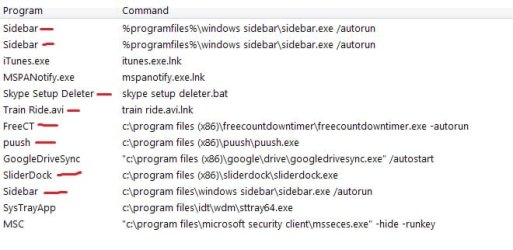
You seem to have some viruses on your computer, using the picture I am attaching to this post please follow my instructions below:

  1. Go to Control Panel
  2. Uninstall (If they're there):

  • Skype Setup Deleter
  • Train Ride
  • FreeCT
  • puush
  • SliderDock
After this follow these steps:

  1. Go To Start
  2. Type: "msconfig.exe"
  3. Go to "Start-Up"
  4. Disable the services which I have highlighted in the picture below
  5. Download CCleaner: CCleaner - Download
  6. In CCleaner there will be 2 tabs - 'Windows' & 'Applications'; in 'Windows' tick/select the settings as I have attached in a picture below, In Applications, tick/select everything.
  7. Press 'Run Cleaner'
  8. Then go to the 'Registry' Window: Scan For Issues > Fix Issues > Make A Backup (on your desktop) > Press 'Fix All'.
  9. Restart your PC
Let me know if it works.
 

Attachments

  • Start-Up_Items.jpg
    Start-Up_Items.jpg
    33.7 KB · Views: 16
  • CCleanerSettings.jpg
    CCleanerSettings.jpg
    31.2 KB · Views: 0
  • CCleanerSettings2.jpg
    CCleanerSettings2.jpg
    12.5 KB · Views: 16

My Computer

Computer type
PC/Desktop
Computer Manufacturer/Model Number
Custom Build
OS
Windows 7 Ultimate x64
CPU
Intel Core i7 Socket 1156 LGA
Motherboard
Asus P7P55D-E LX
Memory
Corsair Dominator 4GB DDR3
Graphics Card(s)
Gainward GTX 460
Monitor(s) Displays
Acer V243HL
Screen Resolution
1920x1080
Hard Drives
Western Digital 1TB HDD
PSU
Antec TruePower 650W
Case
Antec 300
Cooling
Thermalrite CPU Cooler
Antivirus
Avast Anti-Virus
You seem to have some viruses on your computer, using the picture I am attaching to this post please follow my instructions below:

  1. Go to Control Panel
  2. Uninstall (If they're there):

  • Skype Setup Deleter
  • Train Ride
  • FreeCT
  • puush
  • SliderDock
Skype Setup Deleter is a batch file I wrote. It deletes the updater fer Skype that continually barrages me with "You should update" messages with it's presence.
That's all it does. In fact, I'll attach the file in question.

Train Ride is an animation I made through photoshop, that I run on startup to put a nice visual on the screen.

FreeCT is a Countdown Timer I've had running fer a loooooooooong time that literally just runs an alarm notification system. It does nothing else, and has been checked by CNET as "safe".

Puush is a file uploader that "pushes" a selected image or file online t'the Puush website.

Sliderdock is a fancy desktop displayer that is based on the old videogame "dot.Hack//G.U." Here's the website I downloaded it from: The next evolution of dock application launcher - Sliderdock

Those startup programs are ones that I specifically put into place and know what they are.
I don't think they're what we're lookin' fer....
 

Attachments

My Computer

Computer type
Laptop
Computer Manufacturer/Model Number
HP
OS
Windows 7 Home (64)
CPU
Quad-Core AMD A8-3520M APU
Memory
6.00 GB
Graphics Card(s)
Radeon HD Graphics 1.60 GHz
Monitor(s) Displays
two
Screen Resolution
decent
Keyboard
built-in
Mouse
yes
Internet Speed
9mb↑ 3mb↓
Antivirus
Malwarebytes
Browser
Firefox
Other Info
Bazinga
I've determined that this issue is a registry issue.

Any help at all on this?
 

My Computer

Computer type
Laptop
Computer Manufacturer/Model Number
HP
OS
Windows 7 Home (64)
CPU
Quad-Core AMD A8-3520M APU
Memory
6.00 GB
Graphics Card(s)
Radeon HD Graphics 1.60 GHz
Monitor(s) Displays
two
Screen Resolution
decent
Keyboard
built-in
Mouse
yes
Internet Speed
9mb↑ 3mb↓
Antivirus
Malwarebytes
Browser
Firefox
Other Info
Bazinga
Back
Top