
Super slow boot time w/SSD and blue screen during shutdown

StrongForce

New member
Local time
2:29 AM
Messages
5
Hello, lately my windows 7 64, which is installed on a crucial MX100 256gb SSD (currently 22gb free) is slow as hell to boot up, I installed a 1TB extra HDD drive also, and installed Avira antivirus, the drive works fine and it appears to occur arround since that time.

Also I have 2 extra old 80gb hdd drives connected and a 640gb too, one of the 80gb drives suddenly stopped working for some reasons.

Also it was pretty slow during shutdown too and once it gave me a blue screen at shut down.

I tryed to unplug and replug all the cables of the ssd and the 80gb drive but no success, I think it might have died..

I also had a problem after doing that, my windows wouldn't boot up anymore, and it offered me to make a "startup repair" and then asked me for password.. which, to my suprise, gave me some trouble, there was 2 accounts to select from the basic one, and my name account, I tryed both, with my password, and it didn't work..needless to say I was pissed off !

So it finally booted even though I had to wait like 5mn, and it still take alot of time to boot everyday, to shutdown it seem fixed though.

I tryed to run a SFC /scannow, no errors, I also tryed to run a scandisk, which didn't inform me if there were errors or not, I was away from keyboard also so.. not sure.

here is a screenshot of whocrashed with info on the bluescreens, maybe that might help:
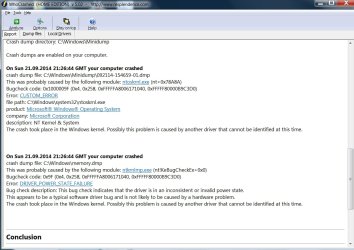
whocrashed1.jpg

Any help would be greatly appreciated !
 

My Computer My Computer

At a glance

windows 7 64fx [email protected]Gskill 2133 CL9Sapphire HD 7950
Computer type
PC/Desktop
OS
windows 7 64
CPU
fx [email protected]
Motherboard
M5a99FX pro rev 2.0
Memory
Gskill 2133 CL9
Graphics Card(s)
Sapphire HD 7950
Hard Drives
Crucial MX 100
Wester Digital caviar black 640gb
Seagate 1Tb
Antivirus
Avira
bump, anyone ??
 

My Computer My Computer

At a glance

windows 7 64fx [email protected]Gskill 2133 CL9Sapphire HD 7950
Computer type
PC/Desktop
OS
windows 7 64
CPU
fx [email protected]
Motherboard
M5a99FX pro rev 2.0
Memory
Gskill 2133 CL9
Graphics Card(s)
Sapphire HD 7950
Hard Drives
Crucial MX 100
Wester Digital caviar black 640gb
Seagate 1Tb
Antivirus
Avira
You said the slow boot happened after you added another drive? Then you discuss even more drives which were added and stopped working.

First post back a screenshot of Disk Management - Post a Screen Capture Image
with all drives attached. Tell us what is on each drive shown.

Next unplug all drives except the SSD, reboot a few times to see if it speeds up any.

If so, then power down to plug back in each other working drive one at a time with reboots in between to see which one is slowing it down.

Let us know how this goes.

Since you apparently have crash dump files you can also follow the Blue Screen of Death (BSOD) Posting Instructions - Windows 7 Forums
 
Thanks alot for your answer !

I simply did what you said with unplugging and testing each separately (can't believe I didn't thought about that myself :) ) and it's the dead HDD indeed that's the cause of the slow boot, so everything is solved !
I tryed an old cable laying arround it still doesn't work, so I'm guessing it is really dead.. I had a few games backup on it, guess no big dead, can't even access the drive in the "computer" so no way to retrieve data.. oh well.

Thanks again for your precious help mate !
 

My Computer My Computer

At a glance

windows 7 64fx [email protected]Gskill 2133 CL9Sapphire HD 7950
Computer type
PC/Desktop
OS
windows 7 64
CPU
fx [email protected]
Motherboard
M5a99FX pro rev 2.0
Memory
Gskill 2133 CL9
Graphics Card(s)
Sapphire HD 7950
Hard Drives
Crucial MX 100
Wester Digital caviar black 640gb
Seagate 1Tb
Antivirus
Avira
Cool thanks ! I'll definately keep this in mind, that's a handy trick, assuming it can see my hdd :).
 

My Computer My Computer

At a glance

windows 7 64fx [email protected]Gskill 2133 CL9Sapphire HD 7950
Computer type
PC/Desktop
OS
windows 7 64
CPU
fx [email protected]
Motherboard
M5a99FX pro rev 2.0
Memory
Gskill 2133 CL9
Graphics Card(s)
Sapphire HD 7950
Hard Drives
Crucial MX 100
Wester Digital caviar black 640gb
Seagate 1Tb
Antivirus
Avira
In addition to Greg's instructions there is this too

BOOTABLE UBUNTU

Make a bootable Ubuntu disk http://www.ubuntu.com/download

Set the BIOSto boot from the optical when the machine boots it will show you a screen with TRY or INSTALL >select TRY.You can of course remove the hard driveand any other drives when doing this as if the optical alone is the only driveleft in the machine then the BIOS willonly find it to boot from.

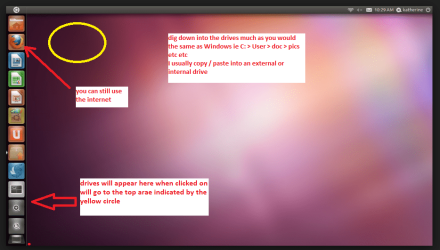
When it isfinished - it takes very little time you will get a screen like in the pic .

Open thedrive you want > User and dig down until you get to the data / settings you may be able to copy / paste the materialyou want to an external source or other installed drive doing this.

I am notsure if it will but I have recovered tons of data etc using this method both on"dead" or just plain drives that you cannot get data from using Windows.
 

Attachments

  • UBUTUX.PNG
    UBUTUX.PNG
    128.9 KB · Views: 0

My Computer My Computer

At a glance

Desk1 7 Home Prem / Desk2 10 Pro / Main lap A...Desk1 i5 3750K / Laptop i7 GTX 860M / Desk2 i...Desk1 8GB (1866) / Desk2 16GB (1333) / Laptop...Desk 1& 2NVidia GTX 650 & Laptops on board Intel
Computer type
PC/Desktop
Computer Manufacturer/Model Number
Own build (new) Desk1 / Asus ROG Win 7 / Desk2 1st build
OS
Desk1 7 Home Prem / Desk2 10 Pro / Main lap Asus ROG 10 Pro 2 laptop Toshiba 7 Pro Asus P2520 7 & 10
CPU
Desk1 i5 3750K / Laptop i7 GTX 860M / Desk2 i5 2500
Motherboard
Desk1 Asus P877-V / Desk2 Gigabyte H67 UD3H / Laptop ?
Memory
Desk1 8GB (1866) / Desk2 16GB (1333) / Laptop 8Gb DDR3
Graphics Card(s)
Desk 1& 2NVidia GTX 650 & Laptops on board Intel
Sound Card
Desk 1 & 2 -XONAR DG Realtek High Def audio Laptop
Monitor(s) Displays
Desk 1 Benq HD 2450 / Desk2 Philips 24" / Laptop 17.5"
Screen Resolution
1920x1080 D1 & D2 & Laptop 1
Hard Drives
Desk1 Samsung 120GB 830 SSD
Asus ROG 256GB 850 Pro SSD
Desk2 Samsung 840 256 SSD
Toshiba 120GB EVO
PSU
Desk 1 Corsair HX 1050/ Laptop ? / Desk 2 Corsair HX 650
Case
Desk 1 Cooler HAF XM ? Toshiba laptop / Desk2 Coolermaster
Cooling
Fans on all Desk1 -2 Desk2 - all Coolermasters 5 Laptop ?
Keyboard
Desk 1 MS Sidewinder X6 Desk 2 MS Sidewinder X 4
Mouse
Desk 1&2 - Gigabyte MS 900 gamer - laptop - Logitec wireless
Internet Speed
ADSL2+
Other Info
One other Desktop (tester) and spare Toshba laptop both with SSD's
Running Kaspersky 2016 ISS on all machines config'd identically
Logitec audio stereo systems on each machine (x3)
Canon MG5250MFC
Router/modem TP-Link running WPA2SK
Awesome, another options I forgot about, you guys are ressourceful ! :p thank you
 

My Computer My Computer

At a glance

windows 7 64fx [email protected]Gskill 2133 CL9Sapphire HD 7950
Computer type
PC/Desktop
OS
windows 7 64
CPU
fx [email protected]
Motherboard
M5a99FX pro rev 2.0
Memory
Gskill 2133 CL9
Graphics Card(s)
Sapphire HD 7950
Hard Drives
Crucial MX 100
Wester Digital caviar black 640gb
Seagate 1Tb
Antivirus
Avira
Back
Top