SuperBar Vs Normal Taskbar

Superleeds27

New member
Member
Local time
4:59 AM
Messages
65
Just a thought:

Who uses the old style taskbar still? Like the one in vista, thin strip...

And who uses the new 'Superbar'

Advantages of one over another?
 

My Computer

Computer Manufacturer/Model Number
Custom Built
OS
Windows 7 RTM X64
CPU
E6600
Motherboard
Gigabyte P31-DS3L
Memory
4GB
Graphics Card(s)
9800GTX+
Sound Card
Creative XtremeGamer
Monitor(s) Displays
23" Dell
Screen Resolution
1920X1080
Hard Drives
Samsung 250GB
Samsung 750GB
PSU
OCZ 600w
Case
Antec 300
Internet Speed
8MB
This is my only annoyance.

The gap from the bottom of the box, and the bottom of the taskbar. It annoying when you click it accidently when trying to click a box.

Can this be changed?
 

Attachments

  • Untitled.png
    Untitled.png
    2.6 KB · Views: 414

My Computer

Computer Manufacturer/Model Number
Custom Built
OS
Windows 7 RTM X64
CPU
E6600
Motherboard
Gigabyte P31-DS3L
Memory
4GB
Graphics Card(s)
9800GTX+
Sound Card
Creative XtremeGamer
Monitor(s) Displays
23" Dell
Screen Resolution
1920X1080
Hard Drives
Samsung 250GB
Samsung 750GB
PSU
OCZ 600w
Case
Antec 300
Internet Speed
8MB
Heh I love the new task bar. It could use some work to be even better (like allowing more than one!!!) but it took me a surprisingly long time to "grok" it.

So mired in the old task bar way of doing things I was really peeved that you couldn't make a new menu bar and attach it to the top or side like before. That's where I stored all my icons!

FINALLY I realized that you just stored them on the main task bar now (duh). Whether a program was open or not didn't matter! No more space was used either way. When you clicked on an icon it either launched or switched to it. Brilliant.

Now there are a couple of weird problems with that and multiple instances but I've already forgotten what they were so it must not have been critical. Actually still easier than dealing with an over crowded old style task bar.

I just wish... that you could pin a folder to the task bar and have it be a popup menu for other less used shortcuts or lists of common documents or whatever you wanted to throw into it...
 

My Computer

Computer Manufacturer/Model Number
Scratch built
OS
Windows 7 x64 Ultimate
CPU
i7 960
Motherboard
Asus P6X58D
Memory
12 Gig Corsair Dominator
Graphics Card(s)
Nvidia 480
Sound Card
Maudio Delta 44 + breakout box
Monitor(s) Displays
Dell UltraSharp U2410 24in and Samsung 21 dual monitors
Screen Resolution
1920x1200 and 1280x1024
Hard Drives
Primary: Intel X-25M G2 160G SSD
Secondary: Segate baracuda 1.0 TB
HDs in AHCI mode.
PSU
Corasair TX850
Case
Cooler Master HAF
Cooling
Corsair H50
Keyboard
Logitech G15 + N52 game pad
Mouse
Logitech MX518
Internet Speed
15kbs down 4.5kbps up
Other Info
WEI 7.6
CPU & RAM 7.6
Graphics 7.9
Hard disk 7.7
This is my only annoyance.

The gap from the bottom of the box, and the bottom of the taskbar. It annoying when you click it accidently when trying to click a box.

Can this be changed?

I think if you right click on taskbar and go to properties and choose use small icons, it should fix this.
 

My Computer

OS
Windows 7 RC
That halfs the size of the box.

If anything i would like the box to touch the bottom of the taskbar, fill that little ciupple of mm gap that there is.
 

My Computer

Computer Manufacturer/Model Number
Custom Built
OS
Windows 7 RTM X64
CPU
E6600
Motherboard
Gigabyte P31-DS3L
Memory
4GB
Graphics Card(s)
9800GTX+
Sound Card
Creative XtremeGamer
Monitor(s) Displays
23" Dell
Screen Resolution
1920X1080
Hard Drives
Samsung 250GB
Samsung 750GB
PSU
OCZ 600w
Case
Antec 300
Internet Speed
8MB
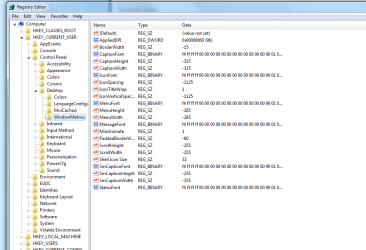
Im guessin one of these figures changes the height of the taskbar boxes?
 

Attachments

  • Untitled.png
    Untitled.png
    29.3 KB · Views: 218

My Computer

Computer Manufacturer/Model Number
Custom Built
OS
Windows 7 RTM X64
CPU
E6600
Motherboard
Gigabyte P31-DS3L
Memory
4GB
Graphics Card(s)
9800GTX+
Sound Card
Creative XtremeGamer
Monitor(s) Displays
23" Dell
Screen Resolution
1920X1080
Hard Drives
Samsung 250GB
Samsung 750GB
PSU
OCZ 600w
Case
Antec 300
Internet Speed
8MB
Heh I love the new task bar. It could use some work to be even better (like allowing more than one!!!) but it took me a surprisingly long time to "grok" it.

So mired in the old task bar way of doing things I was really peeved that you couldn't make a new menu bar and attach it to the top or side like before. That's where I stored all my icons!

FINALLY I realized that you just stored them on the main task bar now (duh). Whether a program was open or not didn't matter! No more space was used either way. When you clicked on an icon it either launched or switched to it. Brilliant.

Now there are a couple of weird problems with that and multiple instances but I've already forgotten what they were so it must not have been critical. Actually still easier than dealing with an over crowded old style task bar.

I just wish... that you could pin a folder to the task bar and have it be a popup menu for other less used shortcuts or lists of common documents or whatever you wanted to throw into it...

Look for 7 stacks here on the forum.
 

My Computer

OS
7264x64/7260x86
I actually tried 7 stacks but it wasn't quite right, it sort of half worked for what I wanted. (though I forget the details of what didn't work the way I expected atm)

I'm thinking I might make it a programming project, but it should work basically just like the program menu with multi level flyouts for any sub folders in the pinned folder and work justlike a launch menu. Super simple fast and easy.
 

My Computer

Computer Manufacturer/Model Number
Scratch built
OS
Windows 7 x64 Ultimate
CPU
i7 960
Motherboard
Asus P6X58D
Memory
12 Gig Corsair Dominator
Graphics Card(s)
Nvidia 480
Sound Card
Maudio Delta 44 + breakout box
Monitor(s) Displays
Dell UltraSharp U2410 24in and Samsung 21 dual monitors
Screen Resolution
1920x1200 and 1280x1024
Hard Drives
Primary: Intel X-25M G2 160G SSD
Secondary: Segate baracuda 1.0 TB
HDs in AHCI mode.
PSU
Corasair TX850
Case
Cooler Master HAF
Cooling
Corsair H50
Keyboard
Logitech G15 + N52 game pad
Mouse
Logitech MX518
Internet Speed
15kbs down 4.5kbps up
Other Info
WEI 7.6
CPU & RAM 7.6
Graphics 7.9
Hard disk 7.7
I like the new taskbar. It used to have alot of quick launch icons so they would take alot of space.
 

My Computer

OS
Windows Vista 64bit
I use the regular bar, looks cool and I don't need to have GIANT icons.
 

My Computer

Computer Manufacturer/Model Number
Dell E520
OS
7600x64 RTM
CPU
Intel® Q6700, 2.66 GHz stock clock (upgraded)
Motherboard
Dell
Memory
4g (upgraded)
Graphics Card(s)
Sapphire Radeon Toxic HD 3870 512MB GDDR4 (upgraded)
Sound Card
HT Omega Claro Plus (upgraded)
Monitor(s) Displays
22' , 40"
Screen Resolution
1050, 1080p
Hard Drives
1.5tb (upgraded)
PSU
Zalman 600w (upgraded)
Case
Dell
Cooling
stock Dell
Keyboard
dell
Mouse
dell
Internet Speed
100m Fiber optical
Other Info
Bought the Dell secondhand for cheap and upgraded cpu, vga, ram, soundcard, psu and HDD's.
I love the new taskbar, the big icons, the jumplist's, everything about it really :p
 
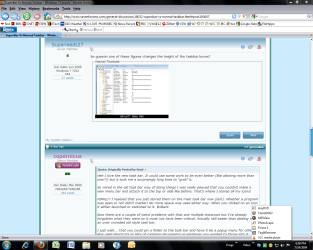
You can add toolbars to the taskbar to provide a popup menu for other shortcuts. See attached.
moz-screenshot.png
 

Attachments

  • Untitled.png
    Untitled.png
    84.8 KB · Views: 181

My Computer

Computer Manufacturer/Model Number
Home Built
OS
Windows 7 SP1 x64
CPU
AMD 9850 X4
Motherboard
ASUS
Memory
Corsair
Graphics Card(s)
ATI Radeon
Sound Card
Sigmatel
Monitor(s) Displays
Dell
Screen Resolution
1600X900
Hard Drives
(1) WD 1TB
Cooling
Corsair H60
Internet Speed
UVerse 12MB
Another cool thing about the new taskbar is that once you have the icons of frequently used apps arranged the way you want them, they don't change position depending on which program is opened first. I love that. Also prefer the small icons once I got used to it which just took a few days. It has a nice neat clean look.
 

My Computer

Computer Manufacturer/Model Number
HP DV8t quad
OS
Windows 7 Ultimate x64 (Retail)
CPU
i7-Q 720
Motherboard
Motherboard Chipset Intel Ibex Peak-M PM55, Intel Lynnfield
Memory
6 GB
Graphics Card(s)
nVidia GeForce GT 230M (1GB)
Sound Card
IDT High Definition Audio CODEC
Monitor(s) Displays
18.4 inch HP Infinity FHD (Samsung 184HT03-001)
Screen Resolution
1920 x 1080
Hard Drives
Hitachi 500GB 7200 rpm (x2)
Seagate FreeAgent 1.5 TB External USB (x2)
Thermaltake BlacX eSATA/USB 2.0 3.5/2.5 HD dock
Cooling
Zalman NC-2000 notebook cooling pad
Keyboard
laptop
Mouse
Logitech VX Revolution
Other Info
Backup Unit: Lenovo T61p
Old style here. I have 50 Quick Launch shortcuts. No way that would fit on the new one.
 

My Computer

Computer Manufacturer/Model Number
Haha! You peeked. Why so nosey?
OS
XP / Windows 7 Pro RTM
Confirmed, the new taskbar is great. Since I started beta testing the first thing that went away was the Dock. Don't need it with the new taskbar. And because I use a large monitor (28") I have placed the taskbar on the left side of the screen giving me the compete screen (1200) up and down which is great when viewing my browser, or working in Word, or Lightroom/Photoshop.
 

My Computer

Computer Manufacturer/Model Number
HP Pavilion a4302f
OS
Win 7 Pro x64, VM Win XP, Win7 Pro Sandbox, Kubuntu 11
CPU
AMD Athlon(tm) II X4 640 @ 3.0 Gbz
Memory
12GB 1066MHz DDR3 SDRAM - 2x4GB, 2x2GB
Graphics Card(s)
ATI Radeon HD 4350 HD Graphics/Audio with 512MB
Sound Card
Realtek High Definition Audio
Monitor(s) Displays
1. Dell 23" SP2307, 2. Mitsublishi 40" HDTV, Hannspree 25"
Screen Resolution
1. 2048x1152, 2. 1920-1080, 3. 1920x1200
Hard Drives
Int: 1 120 Gig SSD i
1 - 2.5" 500 USB External HDD
1 -1 Tb USB External HDD
Case
Mid Tower
Cooling
Standard Fans - 5 fans (very quiet)
Keyboard
Microsoft Wireless 2000
Mouse
Microsoft Wireless Mouse 5000
Internet Speed
10 Mbit (realistically 500 Kbit - 1.2 Mbit)
Other Info
Speakers - Bose Desktop (Excellent Sound)
1 external CD|DVD\Blue-ray Recorders/Players (Sony)
Ten,

50. . .:huh:
 

My Computer

Computer Manufacturer/Model Number
HP Pavilion a4302f
OS
Win 7 Pro x64, VM Win XP, Win7 Pro Sandbox, Kubuntu 11
CPU
AMD Athlon(tm) II X4 640 @ 3.0 Gbz
Memory
12GB 1066MHz DDR3 SDRAM - 2x4GB, 2x2GB
Graphics Card(s)
ATI Radeon HD 4350 HD Graphics/Audio with 512MB
Sound Card
Realtek High Definition Audio
Monitor(s) Displays
1. Dell 23" SP2307, 2. Mitsublishi 40" HDTV, Hannspree 25"
Screen Resolution
1. 2048x1152, 2. 1920-1080, 3. 1920x1200
Hard Drives
Int: 1 120 Gig SSD i
1 - 2.5" 500 USB External HDD
1 -1 Tb USB External HDD
Case
Mid Tower
Cooling
Standard Fans - 5 fans (very quiet)
Keyboard
Microsoft Wireless 2000
Mouse
Microsoft Wireless Mouse 5000
Internet Speed
10 Mbit (realistically 500 Kbit - 1.2 Mbit)
Other Info
Speakers - Bose Desktop (Excellent Sound)
1 external CD|DVD\Blue-ray Recorders/Players (Sony)
yea just pin the ones you really use like instatly after you login and other sh*ts can go in the startmnu
 

My Computer

OS
Windows 7 32bit RTM
For me the start menu is for low priority so don't tell me to use things the way you do. I'm not you.
 

My Computer

Computer Manufacturer/Model Number
Haha! You peeked. Why so nosey?
OS
XP / Windows 7 Pro RTM
Yea Buddy

For me the start menu is for low priority so don't tell me to use things the way you do. I'm not you.

I agree with you "Ten"
I have even created individual folders (and changed the Icon view) of categories of Applications that I use massively. With them in the Quick Launch part of the bar for easy access.

The start menu on Win 7 (in my opinion sucks) is to confused from the base level. To make it the way you need it means re-build it.

I have 40 Quick links in the Quick Launch part of the bar and 18 Quick links (pin to start menu) in the start menu. and I use them all constantly for lots of work.

For the Start menu, its, "Click", "Click", "Scroll", "Click", "Click".
For the Quick Launch, its, "Click", "Click".
 

My Computer

OS
Windows 7 7600 x86 &x64, Windows XPP sp3 (x86) & sp2 x64
CPU
C2Q 6600, C2D 6420, C2D T2060, C2-ATOM N270
Motherboard
Gigabyte GA-965P-DS3, GA-G31M-ES2L, Lenovo 3000 N100, Acer A
Memory
8 Gig, 4 Gig, 2 Gig, 1.5 Gig
Graphics Card(s)
nVidia 9400 GS, 7200GT, FX 5200
Monitor(s) Displays
2-Hanns-G HW191D, 1-Hanns-G JC199D, 1-AOC 720LM, 2-Samtron
Screen Resolution
1440x900, 1280x1024
Hard Drives
Seagate Barracuda 11 & 12 series
2-500G, 2-1Tb
WD My Book 1Tb
Samsung 3-500G
Maxtor Diamond 9 - 11 80G to 300G about 8 diff.
PSU
many from 1000w to 250w
Case
many
Cooling
Massive fans on all, and my home build AC unit
Keyboard
MS Natural Multimedia
Mouse
MS IntelliMouse 3.0
Internet Speed
10Mbs d/l 768Kbs u/l
Back
Top