
Superfetch registry entries

davexnet

New member
Local time
11:07 PM
Messages
10
Because this old Dell Dimension 4600 has such slow SATA performance
Superfecth disk activity lasts forever.
In this registry key
HKEY_LOCAL_MACHINE\SYSTEM\CurrentControlSet\Control\Session Manager\Memory Management\PrefetchParameters


I have set EnableSuperfetch to 1, which is supposed to enable Superfetch for the boot
files only. My thinking is that this would reduce the disk activity that runs about 5 minutes
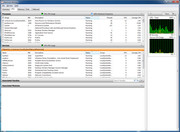
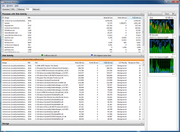
after you logon. But it still seems to be accessing some application files,
why I don't know ( see these two images)

How does superfetch get involved in the boot? Surely there is nothing in RAM to speed
up the process since you just turned on the PC.
Thanks for any info


My Computer

Computer type
PC/Desktop
Computer Manufacturer/Model Number
Dell
OS
windows 7 32 bit
CPU
Pentium 4
Memory
2 GB
Hard Drives
WD1600
Hi davexnet. welcome to the Forum.

Fiddling with the registry very often results in tears, so it's best to leave it alone.

A slow boot up is usually caused by having too many programs loading at start up. Click on the Start button & type msconfig in the search box. Then select the Start Up tab to see what gets started when you boot the computer.

Then post a screen shot of the Start Up tab using the following tutorial:

Screenshots and Files - Upload and Post in Seven Forums - Windows 7 Help Forums
 

My Computer

Computer type
PC/Desktop
Computer Manufacturer/Model Number
Self built using existing case
OS
Windows 7 Home Premium 64 bit sp1
CPU
Intel i5 3570 3.4Ghz Ivy Bridge SKT 1155 quad core
Motherboard
Gigabyte Z77-HD3 SKT 1155 2xSata 3, 4x USB 3.0
Memory
G-Skill Rip Jaws 16Gb (8x2) DDR3 -1600 PC3 12800 CL 10 red
Graphics Card(s)
Gigabyte NVIDIA GT610 1Gb DDR3 810/1200 PCI-E 2.0 Silent
Sound Card
NVIDIA High Definition & Realtech High Definition Audio
Monitor(s) Displays
2 x Philips 226V4L 16:9 aspect ratio
Screen Resolution
1920 x 1080 HD
Hard Drives
Samsung 840 Pro 256gb SSD, SATA 3.
Hitachi Touro Portable 1tb, USB 3.0 HDD used for image b/ups.
PSU
Corsair VS450
Case
Codeng
Cooling
PSU fan & CPU fan
Keyboard
Logitech
Mouse
Logitech Wireless trackball M570
Internet Speed
Wireless 3G. 3mg down & 550kb up.
Antivirus
Bitdefender Internet Security 2020
Browser
Opera (Current Version) & Firefox
Other Info
MS Office 2013 Pro. Davis weather station software. MGE Nova 600 avr UPS.
The boot up is not slow. From the Bios POST, typing in my password, and the desktop appearing
is about 20 - 25 seconds. I only have one entry in the startup and it's for the Creative soundcard.

I acquired this PC used and have taken some time to clean and optimize as best as I can.
The Windows 7 Home that was in the PC is still there, I did not reinstall. In my opinion,
it's in good shape


My question has to do with the furious HDD activity that takes place about 5 minutes after I've logged
on. This activity usually lasts about 10 minutes. The images I posted appear to show Superfetch
as the culprit - hence my specific questions about the working of Superfetch


EDIT for now I've disabled the SF service. I only use this PC for a bit of light-weight
web browsing. Having it hammer the HDD for 10, 15 minutes made no sense at all.
 
Last edited:

My Computer

Computer type
PC/Desktop
Computer Manufacturer/Model Number
Dell
OS
windows 7 32 bit
CPU
Pentium 4
Memory
2 GB
Hard Drives
WD1600
The furious HDD activity that takes place about 5 minutes after I've logged on can be the Antivirus checking for an update and doing a quick scan.
 

My Computers

System One System Two

  • Computer type
    PC/Desktop
    Computer Manufacturer/Model Number
    custom build
    OS
    Windows 7 HP 64
    CPU
    i5 6600K - 800MHz to 4200MHz
    Motherboard
    GA-Z170-HD3P
    Memory
    4+4G GSkill DDR4 3000
    Graphics Card(s)
    IG - Intel 530
    Monitor(s) Displays
    Samsung 226BW
    Screen Resolution
    1680x1050
    Hard Drives
    (1) -1 SM951 – 128GB M.2 AHCI PCIe SSD drive for Windows 7 and Lubuntu
    (2) -1 WD SATA 3 - 1T for Data
    (3) -1 WD SATA 3 - 1T for backup
    PSU
    Thermaltake 450W TR2 gold
    Keyboard
    Old and good Chicony mechanical keyboard
    Mouse
    Logitech mX performance - 9 buttons (had to disable some)
    Internet Speed
    500Mb/s
    Browser
    Firefox 64
    Other Info
    TinyWall firewall
  • Computer type
    Laptop
    System Manufacturer/Model Number
    Asus Q550LF
    OS
    Windows 7 Pro
    CPU
    i7-4500U 800MHz to 3.0GHz
    Motherboard
    Asus Q550LF
    Memory
    (4+4)G DDR3 1600
    Graphics Card(s)
    IG intel 4400 + NVIDIA GeForce GT 745M
    Sound Card
    Realtek
    Monitor(s) Displays
    LG Display LP156WF4-SPH1
    Screen Resolution
    1920 x 1080
    Hard Drives
    BX500 120G SSD for Windows and programs +
    1T HDD for data
    Internet Speed
    500 Mb/s
    Browser
    Firefox
    Other Info
    TinyWall firewall
Regarding the A/V updates. Thanks for the suggestion, by using the Task Manager
and Resmon.exe I do see some activity that appears to be related.


Bottom line, I think the slow HDD is the real problem, I might look around to see if I
can find an add on card (pci) that I can run / boot the disk from.
Thanks
 

My Computer

Computer type
PC/Desktop
Computer Manufacturer/Model Number
Dell
OS
windows 7 32 bit
CPU
Pentium 4
Memory
2 GB
Hard Drives
WD1600
The boot up is not slow. From the Bios POST, typing in my password, and the desktop appearing is about 20 - 25 seconds.

I would say that is very fast for a HDD and an old computer.
Don't spent too much money on it.
You can add a small SSD (128G) for windows and programs and use the HDD for data. It will cost you ~US$50.
 

My Computers

System One System Two

  • Computer type
    PC/Desktop
    Computer Manufacturer/Model Number
    custom build
    OS
    Windows 7 HP 64
    CPU
    i5 6600K - 800MHz to 4200MHz
    Motherboard
    GA-Z170-HD3P
    Memory
    4+4G GSkill DDR4 3000
    Graphics Card(s)
    IG - Intel 530
    Monitor(s) Displays
    Samsung 226BW
    Screen Resolution
    1680x1050
    Hard Drives
    (1) -1 SM951 – 128GB M.2 AHCI PCIe SSD drive for Windows 7 and Lubuntu
    (2) -1 WD SATA 3 - 1T for Data
    (3) -1 WD SATA 3 - 1T for backup
    PSU
    Thermaltake 450W TR2 gold
    Keyboard
    Old and good Chicony mechanical keyboard
    Mouse
    Logitech mX performance - 9 buttons (had to disable some)
    Internet Speed
    500Mb/s
    Browser
    Firefox 64
    Other Info
    TinyWall firewall
  • Computer type
    Laptop
    System Manufacturer/Model Number
    Asus Q550LF
    OS
    Windows 7 Pro
    CPU
    i7-4500U 800MHz to 3.0GHz
    Motherboard
    Asus Q550LF
    Memory
    (4+4)G DDR3 1600
    Graphics Card(s)
    IG intel 4400 + NVIDIA GeForce GT 745M
    Sound Card
    Realtek
    Monitor(s) Displays
    LG Display LP156WF4-SPH1
    Screen Resolution
    1920 x 1080
    Hard Drives
    BX500 120G SSD for Windows and programs +
    1T HDD for data
    Internet Speed
    500 Mb/s
    Browser
    Firefox
    Other Info
    TinyWall firewall
I would say that is very fast for a HDD and an old computer.
Don't spent too much money on it.
You can add a small SSD (128G) for windows and programs and use the HDD for data. It will cost you ~US$50.


Thanks for the info, that's interesting because it seems to be the HDD that is the bottleneck.
However, it is old, it's barely powerful enough to play Youtube video (the AGP video card installed
does not offer any acceleration)

I was having some problems with the Panda Dome free A/V so I uninstalled and reinstalled
Microsoft Security Essentials for the time being. After two or three boots it settled down and I got a
notification from Windows Update about a newer version if IE11. I never use it, but I thought
it may benefit the system due to the possibility of updated core files. I updated IE11
and I was surprised to see this version seems to have also installed the DISM subsystem;
it don't believe it was there before, I've never seen it until now.
Any pros/cons of this? After a couple of more boots it seems transparent, doesn't seem
as if there is anymore overhead to the system

One weird thing, when DISM was first installing it was running a process called dismhost.exe out of
the temp folder which I thought was a little strange
 

My Computer

Computer type
PC/Desktop
Computer Manufacturer/Model Number
Dell
OS
windows 7 32 bit
CPU
Pentium 4
Memory
2 GB
Hard Drives
WD1600
If you want to improve your computer, install more memory (2+2)G and a small (128G) SSD.
Over the years, Windows collects a lot of trash (specially on the register) that slows down the computer. I have a disk image from a fresh install (Windows and Office) and I load it every two years. I then install the other software.
I have a small SSD for Windows and programs and I have moved C:\users to D:\Users using Kari tutorial. I have the speed of a SSD and the space of a HDD at low cost.
In other words, I recommend you to install more memory (2+2)G and a small (128G) SSD and do a fresh install.
I can guide you on moving C:\users to D:\Users using Kari tutorial.
 

My Computers

System One System Two

  • Computer type
    PC/Desktop
    Computer Manufacturer/Model Number
    custom build
    OS
    Windows 7 HP 64
    CPU
    i5 6600K - 800MHz to 4200MHz
    Motherboard
    GA-Z170-HD3P
    Memory
    4+4G GSkill DDR4 3000
    Graphics Card(s)
    IG - Intel 530
    Monitor(s) Displays
    Samsung 226BW
    Screen Resolution
    1680x1050
    Hard Drives
    (1) -1 SM951 – 128GB M.2 AHCI PCIe SSD drive for Windows 7 and Lubuntu
    (2) -1 WD SATA 3 - 1T for Data
    (3) -1 WD SATA 3 - 1T for backup
    PSU
    Thermaltake 450W TR2 gold
    Keyboard
    Old and good Chicony mechanical keyboard
    Mouse
    Logitech mX performance - 9 buttons (had to disable some)
    Internet Speed
    500Mb/s
    Browser
    Firefox 64
    Other Info
    TinyWall firewall
  • Computer type
    Laptop
    System Manufacturer/Model Number
    Asus Q550LF
    OS
    Windows 7 Pro
    CPU
    i7-4500U 800MHz to 3.0GHz
    Motherboard
    Asus Q550LF
    Memory
    (4+4)G DDR3 1600
    Graphics Card(s)
    IG intel 4400 + NVIDIA GeForce GT 745M
    Sound Card
    Realtek
    Monitor(s) Displays
    LG Display LP156WF4-SPH1
    Screen Resolution
    1920 x 1080
    Hard Drives
    BX500 120G SSD for Windows and programs +
    1T HDD for data
    Internet Speed
    500 Mb/s
    Browser
    Firefox
    Other Info
    TinyWall firewall
Back
Top