Surround System Problem

aliawaiskhan

New member
Local time
4:34 PM
Messages
19
Hey everyone,

I installed windows 7 today, I'm a big fan of hooking up my comp to the TV and watching movies. It was a pain to get the video card working but all is good now. When i thought I was ready to start watching some quality TV, I came across an even bigger problem: Only 2 of my speakers were working, i went to the hardware and sound configs in the control panel and set it to 7.1 surround, sure enough it recognizes all of them, when i test it all 7 speakers and the subwoffer work perfectly, however no other program is using them, they all only use 2 speakers
frown.gif
.

I've tried winamp, vlc, windows media center, media player classic and it happens with all of them.

Help!

Thanks
 

My Computer

OS
Windows 7 64-Bit
CPU
Core i7
Motherboard
Msi Eclipse
Memory
Corsair 2GB*3 1600Bus Speed
Graphics Card(s)
Msi Gtx 295
Sound Card
Creative Xifi Xtream
Monitor(s) Displays
View Sonic 2262
Screen Resolution
1680*1050
Hard Drives
Segate 1TB
PSU
Coller Masteer 750W
Case
Coller MAsster HAF932
Cooling
Coller Master Z600
Hey everyone,

I installed windows 7 today, I'm a big fan of hooking up my comp to the TV and watching movies. It was a pain to get the video card working but all is good now. When i thought I was ready to start watching some quality TV, I came across an even bigger problem: Only 2 of my speakers were working, i went to the hardware and sound configs in the control panel and set it to 7.1 surround, sure enough it recognizes all of them, when i test it all 7 speakers and the subwoffer work perfectly, however no other program is using them, they all only use 2 speakers
frown.gif
.

I've tried winamp, vlc, windows media center, media player classic and it happens with all of them.

Help!

Thanks

Hi and welcome


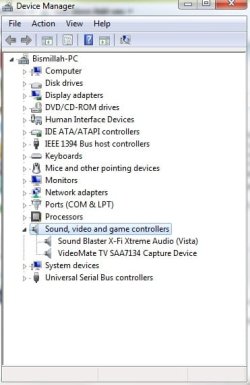
It is still probably a driver issue. can you check device manager to see if your driver is installed, and working properly.
type device manager in search>sound tab>Is your device listed? is there a yellow triangle on it? are there any other "unknown" devices?

Kenn J+
 

My Computer

Computer Manufacturer/Model Number
HP Pavillion dv-7 1005 Tx
OS
Win 8 Release candidate 8400
CPU
[email protected]
Memory
4 gigs
Graphics Card(s)
Nvidia 9600M
Sound Card
HD built-in
Monitor(s) Displays
17" Wxga
Screen Resolution
1440x900
Cooling
none
Internet Speed
45Mb down 5Mb up
Please see...

There is no yellow triangle on it....
 

Attachments

  • lol.jpg
    lol.jpg
    64.4 KB · Views: 13

My Computer

OS
Windows 7 64-Bit
CPU
Core i7
Motherboard
Msi Eclipse
Memory
Corsair 2GB*3 1600Bus Speed
Graphics Card(s)
Msi Gtx 295
Sound Card
Creative Xifi Xtream
Monitor(s) Displays
View Sonic 2262
Screen Resolution
1680*1050
Hard Drives
Segate 1TB
PSU
Coller Masteer 750W
Case
Coller MAsster HAF932
Cooling
Coller Master Z600
:cry: Still no reply.......
 

My Computer

OS
Windows 7 64-Bit
CPU
Core i7
Motherboard
Msi Eclipse
Memory
Corsair 2GB*3 1600Bus Speed
Graphics Card(s)
Msi Gtx 295
Sound Card
Creative Xifi Xtream
Monitor(s) Displays
View Sonic 2262
Screen Resolution
1680*1050
Hard Drives
Segate 1TB
PSU
Coller Masteer 750W
Case
Coller MAsster HAF932
Cooling
Coller Master Z600
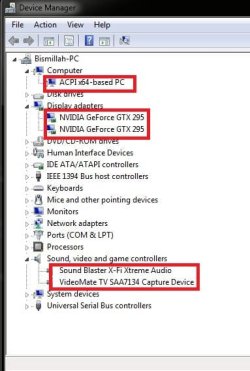
I have the same sound card as you but when I checked it in Device Manager, mine names the device as "Creative SB X-FI" and that's it. Yours has "Vista" added at the end.

Are you sure you have the newest drivers installed?

After installing Windows 7 / 64 a few weeks ago, I went to the Creative site and downloaded and installed the latest version on the driver and software packages for the card. I've had no sound related problems since.

Good luck... you have good taste in sound cards, by the way!
 

My Computer

OS
Windows 7 /64
Orlander Thanks for reply.

I go to updates and update my sound card too now i am enjoying my 7.1 :party:
i have also corei7 and a heavy duty GTX 295 Gaming Card :p
 

Attachments

  • Capture.JPG
    Capture.JPG
    71.4 KB · Views: 9

My Computer

OS
Windows 7 64-Bit
CPU
Core i7
Motherboard
Msi Eclipse
Memory
Corsair 2GB*3 1600Bus Speed
Graphics Card(s)
Msi Gtx 295
Sound Card
Creative Xifi Xtream
Monitor(s) Displays
View Sonic 2262
Screen Resolution
1680*1050
Hard Drives
Segate 1TB
PSU
Coller Masteer 750W
Case
Coller MAsster HAF932
Cooling
Coller Master Z600
Hey everyone,

I installed windows 7 today, I'm a big fan of hooking up my comp to the TV and watching movies. It was a pain to get the video card working but all is good now. When i thought I was ready to start watching some quality TV, I came across an even bigger problem: Only 2 of my speakers were working, i went to the hardware and sound configs in the control panel and set it to 7.1 surround, sure enough it recognizes all of them, when i test it all 7 speakers and the subwoffer work perfectly, however no other program is using them, they all only use 2 speakers
frown.gif
.

I've tried winamp, vlc, windows media center, media player classic and it happens with all of them.

Help!

Thanks

If i'm not mistaken, don't you have to set the sound options in each program to 7.1 to make it effective?
 

My Computer

Computer Manufacturer/Model Number
Custom Build
OS
W7 RTM Ultimate x64
CPU
Intel Q8400 @ 2.66GHZ
Motherboard
Gigabyte GA-EG45M-UD2H
Memory
4GB DDR2-800
Graphics Card(s)
Gainward GTS 450 GLH 1GB Edition
Sound Card
Integrated 8 Channel
Monitor(s) Displays
AOC 23.6 Inch Widescreen LCD
Screen Resolution
1920x1080
Hard Drives
Seagate 500GB Internal
Western Digital 1TB Internal

Hitachi 1TB External
PSU
Apevia Java Power 500W
Case
Cooler Master HAF 922 Black
Cooling
Stock Intel CPU Fan
Keyboard
HP SK-2960 Multimedia Keyboard
Mouse
Logitech M350 Wireless Gaming Mouse
Internet Speed
1.5MB
I checkd and verify there is no need to set the sound option in each programe
 

My Computer

OS
Windows 7 64-Bit
CPU
Core i7
Motherboard
Msi Eclipse
Memory
Corsair 2GB*3 1600Bus Speed
Graphics Card(s)
Msi Gtx 295
Sound Card
Creative Xifi Xtream
Monitor(s) Displays
View Sonic 2262
Screen Resolution
1680*1050
Hard Drives
Segate 1TB
PSU
Coller Masteer 750W
Case
Coller MAsster HAF932
Cooling
Coller Master Z600
You are welcome.

I have to hand it to Microsoft. Windows 7 is so much better then XP.

Nice setup you have there. I have the EVGA GTX 275 with a Q9550 quad. No i-Core in my near future... need a job first :(
 

My Computer

OS
Windows 7 /64
Back
Top