Solved Suspicious service "ABKR"

Johnny8

New member
Member
Local time
2:01 AM
Messages
31
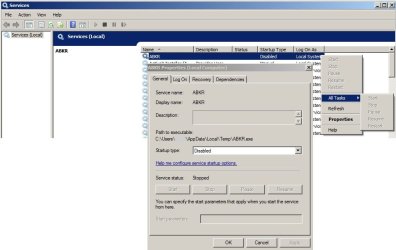
Today I was going through my services to check some stuff out and I've noticed this:
service.jpg
So I went to that "temp" folder to look for ABKR.exe, and there's nothing there. Looks like it's been deleted or something, I remember having some viruses a couple of months ago, guess I'll scan again with malwarebytes today, but does anybody know anything about this ? I googled and nothing except for some sites that WOT marks with red. My system is running as usual, but I just thought I should check here.
 
Last edited by a moderator:

My Computer

Computer Manufacturer/Model Number
ACER ASPIRE 5740G Notebook
OS
MS Windows 7 Ultimate 32-bit
CPU
Intel Core i3 330M
Motherboard
Aspire 5740 (CPU 1)
Memory
3 GB
Graphics Card(s)
ATI Mobility Radeon HD 5470
Sound Card
Realtek High Definition Audio, AMD High Definition Audio
Monitor(s) Displays
Generic PnP Monitor
Screen Resolution
1366x768 pixels
Hard Drives
Hitachi HTS545032B9A300
Mouse
A4Tech 747H
Download TDSSKiller and save it to your Desktop.
  • Extract the file and run it.
  • Once completed it will create a log in the root directory (usually C:\).
  • Please post the contents of that log in your next reply.
 
Last edited by a moderator:

My Computer

Computer type
PC/Desktop
Computer Manufacturer/Model Number
Bruce ... somewhere in his 40's
OS
Windows 7 Ultimate 32bit SP1
CPU
Intel(R) Core(TM)2 Quad CPU @ 2.40GHz, 2400 MHz
Motherboard
INTEL/D975XBX2
Memory
4 GB
Graphics Card(s)
ATI Radeon HD 2600 Pro
Monitor(s) Displays
Samsung SyncMaster 914v
Screen Resolution
1280 x 1024
Hard Drives
2/500GB each ... ST3500630AS ATA Device.
One is not connected
PSU
Rocketfish 700 W
Case
G.Skill Gigabyte Chassis
Keyboard
Standard PS/2 Keyboard
Mouse
Microsoft PS/2 Mouse
Internet Speed
DSL
Antivirus
Avira Internet Security
Browser
IE 11
Other Info
ATI HDMI Audio
Download TDSSKiller and save it to your Desktop.
  • Extract the file and run it.
  • Once completed it will create a log in the root directory (usually C:\).
  • Please post the contents of that log in your next reply.

Jacee,
Check your link, it has an error.

Jim :cool:
 

My Computer

Computer type
PC/Desktop
Computer Manufacturer/Model Number
Home Built
OS
Windows 8.1 Pro w/Media Center 64bit, Windows 7 HP 64bit
CPU
Phenom II X6 1100T
Motherboard
ASUS M5A99X EVO
Memory
Crucial Balistic 8gb DDR3-1866 CL9
Graphics Card(s)
MSI R6850 Cyclone IGD5 PE
Sound Card
On Board
Monitor(s) Displays
ASUS VE258Q 25" LED with DVI-HDMI-DisplayPort
Screen Resolution
1920 x 1080
Hard Drives
Two WD Cavier Black 2TB Sata III, WD My Book Essential 2TB USB 3.0
PSU
Seasonic X650 80 Plus GOLD Modular
Case
Corsair 400R
Cooling
Antec Kuhler H2O 620, Two 120mm and four 140mm
Keyboard
Logitech K120
Mouse
Logitech Marble Mouse USB, Logitech Precision Game Pad
Internet Speed
15MB
Antivirus
Norton IS 2013, Malwarebytes Pro Beta 2
Browser
IE-11, FF-27
Other Info
APC UPS ES 750, Netgear WNR3500L Gigabit & Wireless N Router with SamKnows Test Program, Motorola SB6120 Gigabit Cable Modem. Brother HL-2170W Laser Printer, Epson V300 Scanner
Link doesn't appear to work.
EDIT: but I found what you were trying to send me. So I'll give it a shot later, right now I'm scanning with malwarebytes. Everything still looks fine on CPU usage, RAM usage, same as usual.
 

My Computer

Computer Manufacturer/Model Number
ACER ASPIRE 5740G Notebook
OS
MS Windows 7 Ultimate 32-bit
CPU
Intel Core i3 330M
Motherboard
Aspire 5740 (CPU 1)
Memory
3 GB
Graphics Card(s)
ATI Mobility Radeon HD 5470
Sound Card
Realtek High Definition Audio, AMD High Definition Audio
Monitor(s) Displays
Generic PnP Monitor
Screen Resolution
1366x768 pixels
Hard Drives
Hitachi HTS545032B9A300
Mouse
A4Tech 747H
Oh, didn't know it would be that quick, here's the log, sorry for the delay.
View attachment TDSSKiller.2.7.34.0_04.05.2012_22.40.54_log.txt There were no detected threats with the program you sent me. Everything looked good in malwarebytes, gonna give hitman pro a shot as well. Did a windows defender quick scan too.

EDIT: once again, everything looks clean.

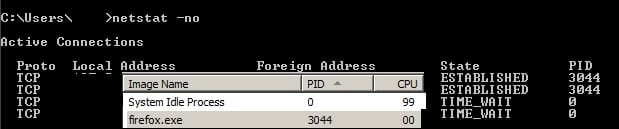
Here are my active connections:
Active Connections.jpg

Sometimes I get more connections on PID 0, I have no idea what that means, I just use this to see if any unknown or suspicious process connects to the internet. Any idea what else I should try ?
 
Last edited:

My Computer

Computer Manufacturer/Model Number
ACER ASPIRE 5740G Notebook
OS
MS Windows 7 Ultimate 32-bit
CPU
Intel Core i3 330M
Motherboard
Aspire 5740 (CPU 1)
Memory
3 GB
Graphics Card(s)
ATI Mobility Radeon HD 5470
Sound Card
Realtek High Definition Audio, AMD High Definition Audio
Monitor(s) Displays
Generic PnP Monitor
Screen Resolution
1366x768 pixels
Hard Drives
Hitachi HTS545032B9A300
Mouse
A4Tech 747H
Is your net secured with an encryption like WPA or WPA2? if not then I suggest doing it as someone may be piggy backing on your signal and if you do then they have sniffed your access code for the net.
 

My Computer

Computer Manufacturer/Model Number
HP
OS
Windows 7 Home Premium 64 bit at home and Windows 7 professional at school.
Memory
4gig
Graphics Card(s)
2: 2gig each
Monitor(s) Displays
1
Screen Resolution
1366/768
Internet Speed
40.6 Mps
Is your net secured with an encryption like WPA or WPA2? if not then I suggest doing it as someone may be piggy backing on your signal and if you do then they have sniffed your access code for the net.

Yes my connection (currently wireless) is secured through WPA2-PSK, and there are more people using this connection.
 

My Computer

Computer Manufacturer/Model Number
ACER ASPIRE 5740G Notebook
OS
MS Windows 7 Ultimate 32-bit
CPU
Intel Core i3 330M
Motherboard
Aspire 5740 (CPU 1)
Memory
3 GB
Graphics Card(s)
ATI Mobility Radeon HD 5470
Sound Card
Realtek High Definition Audio, AMD High Definition Audio
Monitor(s) Displays
Generic PnP Monitor
Screen Resolution
1366x768 pixels
Hard Drives
Hitachi HTS545032B9A300
Mouse
A4Tech 747H
Family or Work? Or Neighbors perhaps?
 

My Computer

Computer Manufacturer/Model Number
HP
OS
Windows 7 Home Premium 64 bit at home and Windows 7 professional at school.
Memory
4gig
Graphics Card(s)
2: 2gig each
Monitor(s) Displays
1
Screen Resolution
1366/768
Internet Speed
40.6 Mps
Family or Work? Or Neighbors perhaps?
Well, actually, currently I live in student housing, so just a couple of students using internet through a router. I have the network set to public though.
 

My Computer

Computer Manufacturer/Model Number
ACER ASPIRE 5740G Notebook
OS
MS Windows 7 Ultimate 32-bit
CPU
Intel Core i3 330M
Motherboard
Aspire 5740 (CPU 1)
Memory
3 GB
Graphics Card(s)
ATI Mobility Radeon HD 5470
Sound Card
Realtek High Definition Audio, AMD High Definition Audio
Monitor(s) Displays
Generic PnP Monitor
Screen Resolution
1366x768 pixels
Hard Drives
Hitachi HTS545032B9A300
Mouse
A4Tech 747H
Johnny,
When you say you made a scan with windows defender, would you please list the steps you took and when you performed this check/

you did declare the network as Public?

your AV is?
 

My Computer

Computer Manufacturer/Model Number
Toshiba Satellite S875D-S7239 laptop
OS
MS Windows 7 Ultimate SP1 64-bit
CPU
AMD A10-4600M
Motherboard
AMD Pumori (Socket FT1)
Memory
6.00 GB Dual-Channel DDR3 @ 798MHz (11-11-12-28)
Graphics Card(s)
AMD Radeon HD 7660G
Sound Card
High Definition Audio Device
Monitor(s) Displays
Generic PnP Monitor (1600x900@60Hz)
Screen Resolution
1600x900@60Hz
Hard Drives
SSD 119GB Corsair CSSD-V128GB2 ATA Device
Keyboard
Standard PS/2 Keyboard
Mouse
HP Wireless Optical Mobile Mouse Model FHA-3410
Internet Speed
What the local pub, local coffee shop offers.
Other Info
Optical Drive:MATSHITA BD-CMB UJ160B ATA Device


Also have an Asus ha1002xp netbook with Win 7 Ultimate installed.
I "think" you may have a 'backdoor (password stealer) Trojan' ... Change ALL passwords using a known "clean" computer, not the one that you are using now!

Let's flush the DNS cache , open an 'elevated' Command prompt by right clicking and choose to run as Administrator.
Copy/paste ipconfig /flushdns press 'enter'.

Next, download TFC by Old Timer TFC - Temp File Cleaner by OldTimer - Geeks to Go Forums and save it to your desktop.
Save any unsaved work. TFC will close ALL open programs including your browser!
Double-click on TFC.exe to run it. If you are using Vista/Windows 7 right-click on the file and choose Run As Administrator.
Click the Start button to begin the cleaning process and let it run uninterrupted to completion.
Important! If TFC prompts you to reboot, please do so immediately. If not prompted, manually reboot the machine anyway to ensure a complete clean.

Now,

Run a full scan with Malwarebytes' Anti-Malware:
download (free version) Malwarebytes' Anti-Malware to your desktop
Malwarebytes Special Offer!
* Double-click mbam-setup.exe and follow the prompts to install the program.
* At the end, be sure a checkmark is placed next to Update Malwarebytes' Anti-Malware and Launch Malwarebytes' Anti-Malware, then click Finish.
* If an update is found, it will download and install the latest version.
* Once the program has loaded, select Perform full scan, then click Scan.
* When the scan is complete, click OK, then Show Results to view the results.
* Be sure that everything is checked, and click Remove Selected.
* When completed, a log will open in Notepad. Please save it to a convenient location. Copy and Paste that log into your next reply.
 

My Computer

Computer type
PC/Desktop
Computer Manufacturer/Model Number
Bruce ... somewhere in his 40's
OS
Windows 7 Ultimate 32bit SP1
CPU
Intel(R) Core(TM)2 Quad CPU @ 2.40GHz, 2400 MHz
Motherboard
INTEL/D975XBX2
Memory
4 GB
Graphics Card(s)
ATI Radeon HD 2600 Pro
Monitor(s) Displays
Samsung SyncMaster 914v
Screen Resolution
1280 x 1024
Hard Drives
2/500GB each ... ST3500630AS ATA Device.
One is not connected
PSU
Rocketfish 700 W
Case
G.Skill Gigabyte Chassis
Keyboard
Standard PS/2 Keyboard
Mouse
Microsoft PS/2 Mouse
Internet Speed
DSL
Antivirus
Avira Internet Security
Browser
IE 11
Other Info
ATI HDMI Audio
Johnny,
When you say you made a scan with windows defender, would you please list the steps you took and when you performed this check/

you did declare the network as Public?

your AV is?

Well, I typed "windows defender" in start, launched the program, under scan I selected the quick scan option. So not the full scan. Yes the network is set as public, and I do not use real-time AV (never liked them), I do have Malwarebytes installed, Hitman Pro, Windows Defender. Always up to date same as everything on my system.
 

My Computer

Computer Manufacturer/Model Number
ACER ASPIRE 5740G Notebook
OS
MS Windows 7 Ultimate 32-bit
CPU
Intel Core i3 330M
Motherboard
Aspire 5740 (CPU 1)
Memory
3 GB
Graphics Card(s)
ATI Mobility Radeon HD 5470
Sound Card
Realtek High Definition Audio, AMD High Definition Audio
Monitor(s) Displays
Generic PnP Monitor
Screen Resolution
1366x768 pixels
Hard Drives
Hitachi HTS545032B9A300
Mouse
A4Tech 747H
I "think" you may have a 'backdoor (password stealer) Trojan' ... Change ALL passwords using a known "clean" computer, not the one that you are using now!

Let's flush the DNS cache , open an 'elevated' Command prompt by right clicking and choose to run as Administrator.
Copy/paste ipconfig /flushdns press 'enter'.

Next, download TFC by Old Timer TFC - Temp File Cleaner by OldTimer - Geeks to Go Forums and save it to your desktop.
Save any unsaved work. TFC will close ALL open programs including your browser!
Double-click on TFC.exe to run it. If you are using Vista/Windows 7 right-click on the file and choose Run As Administrator.
Click the Start button to begin the cleaning process and let it run uninterrupted to completion.
Important! If TFC prompts you to reboot, please do so immediately. If not prompted, manually reboot the machine anyway to ensure a complete clean.

Now,

Run a full scan with Malwarebytes' Anti-Malware:
download (free version) Malwarebytes' Anti-Malware to your desktop
Malwarebytes Special Offer!
* Double-click mbam-setup.exe and follow the prompts to install the program.
* At the end, be sure a checkmark is placed next to Update Malwarebytes' Anti-Malware and Launch Malwarebytes' Anti-Malware, then click Finish.
* If an update is found, it will download and install the latest version.
* Once the program has loaded, select Perform full scan, then click Scan.
* When the scan is complete, click OK, then Show Results to view the results.
* Be sure that everything is checked, and click Remove Selected.
* When completed, a log will open in Notepad. Please save it to a convenient location. Copy and Paste that log into your next reply.

I have carefully done precisely as instructed. Except I already had Malwarebytes installed, I hit update twice to make sure I had the latest version (I regularly check anyways). Here is the log View attachment mbam-log-2012-05-05 (12-37-44).txt once again everything seems fine. Sorry for the late reply, and I just want to say I really appreciate all the support I've been getting here on the forums. So thank you for your time !

EDIT: I didn't change any of my passwords though. I have never had any issues with them or my accounts, not even a hint at something suspicious. And this service ("ABKR") seems to have been disabled since always. I'm guessing I just noticed it recently but has been there since a while.

EDIT: I looked again in the temp folder to see if it's there. There is no ABKR.exe in that temp folder. Should I be enabling showing of certain files (not sure which) in folder options ?
 

My Computer

Computer Manufacturer/Model Number
ACER ASPIRE 5740G Notebook
OS
MS Windows 7 Ultimate 32-bit
CPU
Intel Core i3 330M
Motherboard
Aspire 5740 (CPU 1)
Memory
3 GB
Graphics Card(s)
ATI Mobility Radeon HD 5470
Sound Card
Realtek High Definition Audio, AMD High Definition Audio
Monitor(s) Displays
Generic PnP Monitor
Screen Resolution
1366x768 pixels
Hard Drives
Hitachi HTS545032B9A300
Mouse
A4Tech 747H
Johnny,
Do run and to learn how to run Windows Defender Offline:

Click on the WDO, Windows Defender Offline link in my signature. Use ONLY that link.
Run a full scan over all drives using Windows Defender Offline.

At that link,you will not only find the download link for WDO, but you will find instructions.
We also have a tutorial on WDO.

There is this write-up that I use:
HOW TO USE WINDOWS DEFENDER OFFLINE ON A USB STICK
Windows Defender Offline
· is a free standalone, bootable malware and virus remover from Microsoft.
· performs an offline scan of an infected PC to remove viruses, rootkits and other advanced malware.

Download Windows Defender Offline (about 764 kB)

You will have the choice of downloading the 32bit version (x86) or the 64 bit version (x64).
The link will help you determine whether you are running a 32 bit version or 64 bit version of Windows

NOTE!! You can download and prepare a 32 bit version using a 64 bit version of Windows
NOTE!! You can download and prepare a 64 bit version using a 32bit version of Windows.

You run the 32 bit version on a 32 bit version of Windows.
You run the 64 bit version on a 64 bit version of Windows.

The 32 bit download file name is: mssstool32.exe
The 64 bit download file name is: mssstool64.exe

For the curious, this program was originally name Microsoft Standalone System Sweeper.


INSTALLATION:
You will need an Internet Connection.
Insert 512 mB (Microsoft’s 256 mB is no longer accurate) or larger USB stick into a usb port.
Run the downloaded program--mssstool64.exe or mssstool32.exe
NEXT button
Choose the option On a USB flash drive that is not password protected
NEXT button
NEXT button
.
The install program will format the usb stick using the NTFS format.
The install program will download about 210 mB.
The install program will name the USB stick WDO_Media32 or WDO_Media64
The WDO_Media32 usb stick will have used space of 255 mB (268,140,544 bytes)
The WDO_Media64 usb stick will have used space of 282 mB (296,165,376 bytes)
You can expect the number of mB to increase as more malware appears.

UPDATE Windows Defender Offline USB stick:
· reinsert the usb stick
· run the installation program, mssstool64.exe or mssstool32.exe, again.
· the update will download about 66 mB (mssstool32.exe) and 68 mB (mssstool64.exe).

Since the malware database is sometimes updated several times in a day, always update before running.

PERFORM AN OFFLINE SCAN
Bootup your computer from the USB stick
Windows Defender Offline will automatically perform a quick scan.
After the quick scan finishes, Choose Full Scan
Select all of your drives

The initial, full scan can easily take several hours, but
Remember, your computer is being very thoroughly checked for all types of malware.


RESULTS OF THE SCAN
The results will be in:
\Windows\Windows Defender Offline\Support,
file name format is MPLOG- as one or more files with a TXT extension which can be viewed with Notepad.

 

My Computer

Computer Manufacturer/Model Number
Toshiba Satellite S875D-S7239 laptop
OS
MS Windows 7 Ultimate SP1 64-bit
CPU
AMD A10-4600M
Motherboard
AMD Pumori (Socket FT1)
Memory
6.00 GB Dual-Channel DDR3 @ 798MHz (11-11-12-28)
Graphics Card(s)
AMD Radeon HD 7660G
Sound Card
High Definition Audio Device
Monitor(s) Displays
Generic PnP Monitor (1600x900@60Hz)
Screen Resolution
1600x900@60Hz
Hard Drives
SSD 119GB Corsair CSSD-V128GB2 ATA Device
Keyboard
Standard PS/2 Keyboard
Mouse
HP Wireless Optical Mobile Mouse Model FHA-3410
Internet Speed
What the local pub, local coffee shop offers.
Other Info
Optical Drive:MATSHITA BD-CMB UJ160B ATA Device


Also have an Asus ha1002xp netbook with Win 7 Ultimate installed.
I read through everything you said and I'm not sure I know how to fulfill this step: "Bootup your computer from the USB stick" (does it do this automatically or do I have to enter BIOS and change the boot device ? -can't really remember how all that is done). Therefore I don't think I can get started on this whole process. And two question:
1. while this is scanning can I use my computer ? I have some reading and studying to do these days.
2. can I still use the USB stick to transfer data or whatnot after this procedure ?
Thanks

EDIT: oh, and about "You can expect the number of mB to increase as more malware appears." I have a 4GB USB Stick, with probably 3.7GB of available memory, will that be enough in case things get hectic ? I really want to get things straight so I can assign a chunk of time for this whole process seeing how it might take multiple hours.
 

My Computer

Computer Manufacturer/Model Number
ACER ASPIRE 5740G Notebook
OS
MS Windows 7 Ultimate 32-bit
CPU
Intel Core i3 330M
Motherboard
Aspire 5740 (CPU 1)
Memory
3 GB
Graphics Card(s)
ATI Mobility Radeon HD 5470
Sound Card
Realtek High Definition Audio, AMD High Definition Audio
Monitor(s) Displays
Generic PnP Monitor
Screen Resolution
1366x768 pixels
Hard Drives
Hitachi HTS545032B9A300
Mouse
A4Tech 747H
I read through everything you said and I'm not sure I know how to fulfill this step: "Bootup your computer from the USB stick" (does it do this automatically or do I have to enter BIOS and change the boot device ? -can't really remember how all that is done). Therefore I don't think I can get started on this whole process.
Johnny, fill in your system specs and we can advise you how to boot from a usb stick and, of course, you could read the manual for your computer.

And two question:
1. while this is scanning can I use my computer ? NO
I have some reading and studying to do these days.
2. can I still use the USB stick to transfer data or whatnot after this procedure ? YES
Thanks

EDIT: oh, and about "You can expect the number of mB to increase as more malware appears." I have a 4GB USB Stick, with probably 3.7GB of available memory, will that be enough in case things get hectic ? YES

Update your SevenForums System Specs
User CP (located on the top menu bar) |
Your Profile | Edit System Spec
(left-hand column)

To gather info, use Speccy (my favorite) or SIW or System Info

Add the word laptop or desktop or netbook to the
“system manufacturer” block, for example,
Toshiba Satellite L305D notebook.

Provide full windows version info, for example:
MS Windows 7 Ultimate SP1 64-bit

Use the “Other Info” block for Optical Reader,
Mouse, touchpad, wifi adapter, speakers, monitor, etc

Scroll down and click on SAVE CHANGES.
==========================================
 

My Computer

Computer Manufacturer/Model Number
Toshiba Satellite S875D-S7239 laptop
OS
MS Windows 7 Ultimate SP1 64-bit
CPU
AMD A10-4600M
Motherboard
AMD Pumori (Socket FT1)
Memory
6.00 GB Dual-Channel DDR3 @ 798MHz (11-11-12-28)
Graphics Card(s)
AMD Radeon HD 7660G
Sound Card
High Definition Audio Device
Monitor(s) Displays
Generic PnP Monitor (1600x900@60Hz)
Screen Resolution
1600x900@60Hz
Hard Drives
SSD 119GB Corsair CSSD-V128GB2 ATA Device
Keyboard
Standard PS/2 Keyboard
Mouse
HP Wireless Optical Mobile Mouse Model FHA-3410
Internet Speed
What the local pub, local coffee shop offers.
Other Info
Optical Drive:MATSHITA BD-CMB UJ160B ATA Device


Also have an Asus ha1002xp netbook with Win 7 Ultimate installed.
I have updated my specs here on the forum using Speccy as suggested. Hopefully it's all good.
 

My Computer

Computer Manufacturer/Model Number
ACER ASPIRE 5740G Notebook
OS
MS Windows 7 Ultimate 32-bit
CPU
Intel Core i3 330M
Motherboard
Aspire 5740 (CPU 1)
Memory
3 GB
Graphics Card(s)
ATI Mobility Radeon HD 5470
Sound Card
Realtek High Definition Audio, AMD High Definition Audio
Monitor(s) Displays
Generic PnP Monitor
Screen Resolution
1366x768 pixels
Hard Drives
Hitachi HTS545032B9A300
Mouse
A4Tech 747H
I have updated my specs here on the forum using Speccy as suggested. Hopefully it's all good.

Excellent.

Let us know the results of running the full scan with WDO.
 

My Computer

Computer Manufacturer/Model Number
Toshiba Satellite S875D-S7239 laptop
OS
MS Windows 7 Ultimate SP1 64-bit
CPU
AMD A10-4600M
Motherboard
AMD Pumori (Socket FT1)
Memory
6.00 GB Dual-Channel DDR3 @ 798MHz (11-11-12-28)
Graphics Card(s)
AMD Radeon HD 7660G
Sound Card
High Definition Audio Device
Monitor(s) Displays
Generic PnP Monitor (1600x900@60Hz)
Screen Resolution
1600x900@60Hz
Hard Drives
SSD 119GB Corsair CSSD-V128GB2 ATA Device
Keyboard
Standard PS/2 Keyboard
Mouse
HP Wireless Optical Mobile Mouse Model FHA-3410
Internet Speed
What the local pub, local coffee shop offers.
Other Info
Optical Drive:MATSHITA BD-CMB UJ160B ATA Device


Also have an Asus ha1002xp netbook with Win 7 Ultimate installed.
Excellent.

Let us know the results of running the full scan with WDO.

Actually, I'm still not sure of how to boot from USB Stick, can you give me a hint ? Is it BIOS ? Cause I'll just poke around there I guess, I just need to know if that's the way to do it.

EDIT: I don't have my manual around :-S


EDIT: Scratch that, I went into bios and it was friendly interfaced enough. But now my question is which one of these devices should be 1st ? USB HDD, USB FDD, USB KEY, USB CD/DVD ? These are all the options there (regarding USB).
Another question: should I create a restore point in case anything goes wrong ?
 

My Computer

Computer Manufacturer/Model Number
ACER ASPIRE 5740G Notebook
OS
MS Windows 7 Ultimate 32-bit
CPU
Intel Core i3 330M
Motherboard
Aspire 5740 (CPU 1)
Memory
3 GB
Graphics Card(s)
ATI Mobility Radeon HD 5470
Sound Card
Realtek High Definition Audio, AMD High Definition Audio
Monitor(s) Displays
Generic PnP Monitor
Screen Resolution
1366x768 pixels
Hard Drives
Hitachi HTS545032B9A300
Mouse
A4Tech 747H
johnny,
usb key.

Creating a restore point is unnecessary in this case.
 

My Computer

Computer Manufacturer/Model Number
Toshiba Satellite S875D-S7239 laptop
OS
MS Windows 7 Ultimate SP1 64-bit
CPU
AMD A10-4600M
Motherboard
AMD Pumori (Socket FT1)
Memory
6.00 GB Dual-Channel DDR3 @ 798MHz (11-11-12-28)
Graphics Card(s)
AMD Radeon HD 7660G
Sound Card
High Definition Audio Device
Monitor(s) Displays
Generic PnP Monitor (1600x900@60Hz)
Screen Resolution
1600x900@60Hz
Hard Drives
SSD 119GB Corsair CSSD-V128GB2 ATA Device
Keyboard
Standard PS/2 Keyboard
Mouse
HP Wireless Optical Mobile Mouse Model FHA-3410
Internet Speed
What the local pub, local coffee shop offers.
Other Info
Optical Drive:MATSHITA BD-CMB UJ160B ATA Device


Also have an Asus ha1002xp netbook with Win 7 Ultimate installed.
Back
Top