Solved SvcHost - Eating memory.

bobmartien

New member
Local time
1:48 AM
Messages
5
Hi guys.

So, yesterday I had a problem with a HDD.
And I used Easy BCD to move the bootmgr on my SSD where W7 is installed.
(here is my post: http://www.sevenforums.com/installa...ystem-reserved-partition-different-drive.html)

It's only 500k right now but it can be even more (800k+)

I installed my new HDD and now I saw -sometimes- "ScvHost.exe" is leaking my memory.
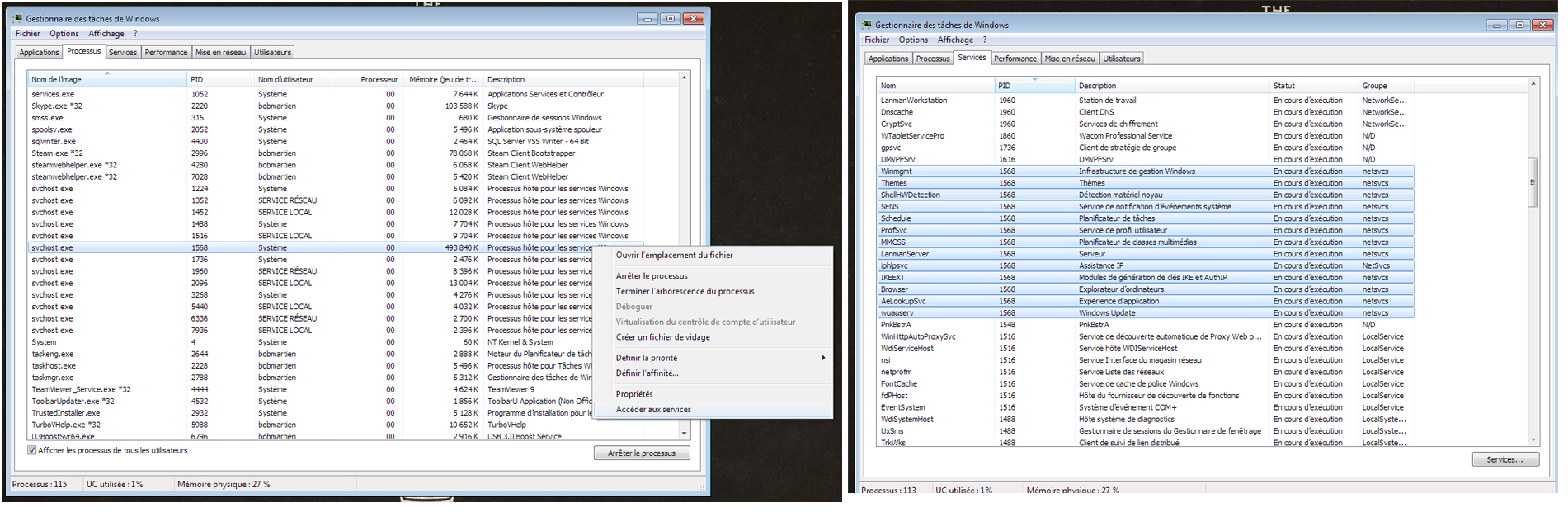
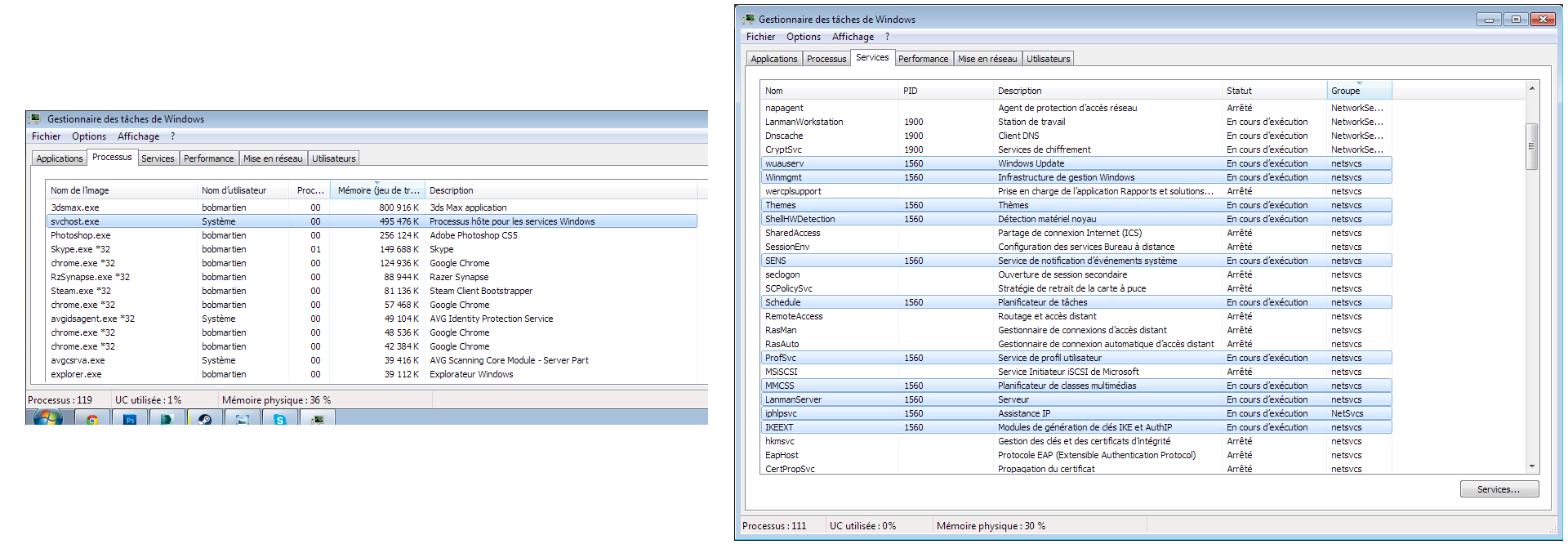
Here is a screenshot of the task manager whre we can see the problem.
And in the same screenshot you can see all services corresponding.
Xmbjo9O.jpg


Sorry, I know everything is in French but all services's name are still in english.

I hope someone will find a solution, because it's really anoying when I'm working on my 3D software. :X
Thank you !


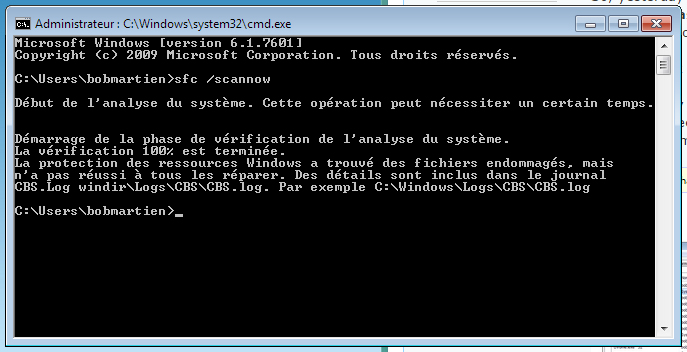
EDIT: so after a SFC /SCANOW, he found somes damaged files but he can't repair it.
uYQeVnZ.jpg


I uploaded the CBS.log found at C:\Windows\Logs\CBS
 
Last edited:

My Computer

Computer type
PC/Desktop
OS
Windows 7 Ultimate x64
You may have 2 different issues:

If you are up-to-date with Windows Updates - read this and see if it is applicable for you!

Windows 7 update (KB3022345) causing corrupt files

The WIndows 7 solution is on post #24 (x86 fix in post #23)

------------

Can't help with svchost.exe though. Hopefully someone else will comment on that.
 

My Computer

Computer type
PC/Desktop
Computer Manufacturer/Model Number
Custom Build
OS
Windows 7 Ultimate x64 SP1
CPU
AMD Phenom 2 1090T
Motherboard
Gigabyte GA-890FXA-UD5
Memory
2x8GB Kingston HyperX Fury Black 1600Mhz Unganged
Graphics Card(s)
MSI GTX 970 Gaming 4G
Sound Card
Realtek On-Board HD 7.1 Audio / Logitech G35
Monitor(s) Displays
3xAcer GD245HQ
Screen Resolution
1920x1080
Hard Drives
Samsung 850 Pro 512GB SSD - OS /
WD Caviar Black SATA 3 - 1 TBx2 - Dynamic RAID 0 /
WD Caviar Green SATA 2 - 640GBx2 - Dynamic RAID 0 /
WD Caviar Green SATA 2 - 640GB - Internal Backup /
Seagate Barracude SATA 3 - 3TB - External Backup/ Sync
PSU
HighPower 1000W
Case
Cooler Master HAF 932
Cooling
Noctua NH-D14
Keyboard
Logitech G19
Mouse
Logitech G500
Internet Speed
100/4 Mbit Cable (100GB quota)
Antivirus
ZoneAlarm Extreme Security / MBAM Pro / MBAE Free / SAS Free
Browser
IE 11 - Firefox - Chrome
Other Info
Logitech F710/ G27/ G940/ Z5500 // TrackIR 5 // Nvidia 3D Surround Vision
Okay, so I did the fix.
And it's look like he fixed the problem from the SFC.

So now, when I run a SFC /Scannow. Everything looks OK.
So thank you for this fix GokAy.


I have still the SVCHOST.EXE problem.
I don't know if it's "okay" that SVCHOST.EXE up to 400k sometimes and drop at 20k after few minutes.
 

My Computer

Computer type
PC/Desktop
OS
Windows 7 Ultimate x64
Re: svchost.exe your Task Manager screenshot doesn't show the PID. Are you sure you got the correct svchost.exe process?

There's usually several svchost.exe processes running.

Resource Monitor.jpg

Post a reply if you can pin it down to svchost (netsvcs)
 

My Computer

Computer type
Laptop
Computer Manufacturer/Model Number
ASUS
OS
Microsoft Windows 7 Home Premium 64-bit 7601 Multiprocessor Free Service Pack 1
CPU
AMD C-60 APU with Radeon(tm) HD Graphics
Motherboard
ASUSTeK COMPUTER INC. X501U
Memory
4.00 GB
Graphics Card(s)
AMD Radeon HD 6290 Graphics
Sound Card
(1) AMD High Definition Audio Device (2) Realtek High Defi
Screen Resolution
1366 x 768 x 32 bits (4294967296 colors) @ 60 Hz
Hard Drives
Hitachi HTS545050A7E380 SATA Disk Device
Antivirus
Comodo CIS & FW, SecureAplus App Whitelisting, Threatfire
Browser
Cyberfox 64bit, Opera 64bit, Airfox
Other Info
Spy-The-Spy, HitmanPro.Alert, Norton Connect Safe, MJRegWatcher, BitDefender TrafficLight, Voodoo Shield, Zemana AntiMalware
I did a right-click on svchost.exe who was at 400K and clicked to "Access to service".
And in the right-part of the screenshot you can see all services highlighted in blue with the PID 1560.

Others svchost are under were under 20k. So I guess it's OK.

Here is a new screen. It came when I tried to install a software.
NsLUZZP.jpg


It can be a problem from a "redistribuable visual c++ 2008" or something like that ?
 

My Computer

Computer type
PC/Desktop
OS
Windows 7 Ultimate x64
Stop services

Okay so try stopping the BITS service and the Windows Update Service and watch to see if memory usage goes back to normal.

Start > Run

type

sevices.msc

press Enter.

Stop Background Intelligent Transfer Service if running.

Stop Windows Update Service - if it won't stop, restart BITS and then stop BITS it. Then stop BITS. Then stop Windows Update.

Any difference in memory usage with those two stopped?
 
Last edited:

My Computer

Computer type
Laptop
Computer Manufacturer/Model Number
ASUS
OS
Microsoft Windows 7 Home Premium 64-bit 7601 Multiprocessor Free Service Pack 1
CPU
AMD C-60 APU with Radeon(tm) HD Graphics
Motherboard
ASUSTeK COMPUTER INC. X501U
Memory
4.00 GB
Graphics Card(s)
AMD Radeon HD 6290 Graphics
Sound Card
(1) AMD High Definition Audio Device (2) Realtek High Defi
Screen Resolution
1366 x 768 x 32 bits (4294967296 colors) @ 60 Hz
Hard Drives
Hitachi HTS545050A7E380 SATA Disk Device
Antivirus
Comodo CIS & FW, SecureAplus App Whitelisting, Threatfire
Browser
Cyberfox 64bit, Opera 64bit, Airfox
Other Info
Spy-The-Spy, HitmanPro.Alert, Norton Connect Safe, MJRegWatcher, BitDefender TrafficLight, Voodoo Shield, Zemana AntiMalware
Back
Top