svchost.exe CPU Problem

tyg123

New member
Local time
2:56 PM
Messages
16
Hello;
My CPU is almost always at 100% usage, and so my computer starts to run real slow.
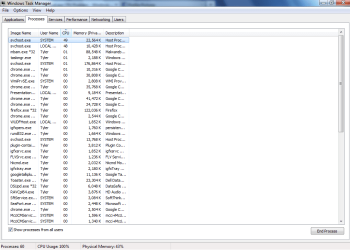
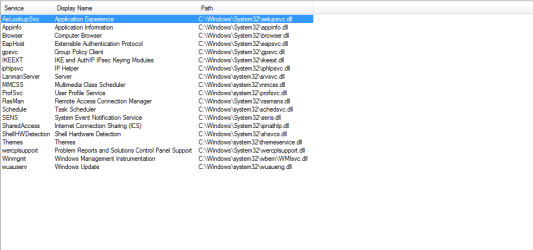
I have used procexp.exe to find out what it was being used by, and I found this svchost taking up the most (below is a picture).
If more information is needed, just ask.
Thanks for the help!
 

Attachments
  • svchost.png
    svchost.png
    12.2 KB · Views: 105

My Computer

OS
Windows 7
Hello;
My CPU is almost always at 100% usage, and so my computer starts to run real slow.
I have used procexp.exe to find out what it was being used by, and I found this svchost taking up the most (below is a picture).
If more information is needed, just ask.
Thanks for the help!

Hi tyg123 welcome to SF :)

Please run task manager\Processes click on CPU to move up in the list the most cpu consuming processes.

Then take a screenshot of the manager\Processes and post it here.

Also write here ur cpu and ram specs.
 

Attachments

  • Capture.PNG
    Capture.PNG
    12.9 KB · Views: 39

My Computer

Computer Manufacturer/Model Number
Custom Built by me.
OS
Windows 7 Ultimate 64bit SP1
CPU
Intel Core 2 Quad Q6600
Motherboard
Gigabyte GA-X38-DS4
Memory
2X2GB DDR2 PC6400 800MHZ DUAL CHANNEL
Graphics Card(s)
XFX RADEON HD 6850 1GB GDDR5
Sound Card
2/4/5.1/7.1-channel Realtek High Definition
Monitor(s) Displays
Samsung LE40A656F1 1080p 100Hz LCD HD TV 50,000:1
Screen Resolution
1366x768 in Desktop,1920x1080p in gaming and video
Hard Drives
C:\WD VelociRaptor 150 GB,10,000 RPM
E:\WESTERN DIGITAL WD15EADS 1.5TB CAVIAR GREEN SATA2 F:\WESTERN DIGITAL WD15EADS 1.5TB CAVIAR GREEN SATA2
PSU
THERMALTAKE W0229 TOUGHPOWER XT 750W
Case
A-Case Twin Engine BB
Cooling
3 x thermaltake smart case fan II + 1 arctic cooling fan
Keyboard
Wireless Logitech LX710
Mouse
Logitech Wireless Gaming Mouse G700
Internet Speed
ADSL 12000 plus
Other Info
Mouse Logitech G700,with 13 buttons who needs keyboard in RPG?

D:\Sony high speed sata Dvd Rewriter
Logitech Cordless Rumblepad 2
Thanks for the welcome!
Also, the svchost highlighted is the one I mentioned before. It's gone down in CPU usage somewhat since my computer has been on for some time.
I have a 64-bit OS with 6 Gigs of RAM.
 

Attachments

  • taskmanager.png
    taskmanager.png
    30.1 KB · Views: 87

My Computer

OS
Windows 7
Thanks for the welcome!
Also, the svchost highlighted is the one I mentioned before. It's gone down in CPU usage somewhat since my computer has been on for some time.
I have a 64-bit OS with 6 Gigs of RAM.

What cpu you have? CPU is your computer Processor.

You can see ur cpu in Start\Control Panel\System Processor:.......

Btw the next time before you take a screenshot please expand the names in the list :)
 

My Computer

Computer Manufacturer/Model Number
Custom Built by me.
OS
Windows 7 Ultimate 64bit SP1
CPU
Intel Core 2 Quad Q6600
Motherboard
Gigabyte GA-X38-DS4
Memory
2X2GB DDR2 PC6400 800MHZ DUAL CHANNEL
Graphics Card(s)
XFX RADEON HD 6850 1GB GDDR5
Sound Card
2/4/5.1/7.1-channel Realtek High Definition
Monitor(s) Displays
Samsung LE40A656F1 1080p 100Hz LCD HD TV 50,000:1
Screen Resolution
1366x768 in Desktop,1920x1080p in gaming and video
Hard Drives
C:\WD VelociRaptor 150 GB,10,000 RPM
E:\WESTERN DIGITAL WD15EADS 1.5TB CAVIAR GREEN SATA2 F:\WESTERN DIGITAL WD15EADS 1.5TB CAVIAR GREEN SATA2
PSU
THERMALTAKE W0229 TOUGHPOWER XT 750W
Case
A-Case Twin Engine BB
Cooling
3 x thermaltake smart case fan II + 1 arctic cooling fan
Keyboard
Wireless Logitech LX710
Mouse
Logitech Wireless Gaming Mouse G700
Internet Speed
ADSL 12000 plus
Other Info
Mouse Logitech G700,with 13 buttons who needs keyboard in RPG?

D:\Sony high speed sata Dvd Rewriter
Logitech Cordless Rumblepad 2
I'm not sure if this is what you meant, but:
CPU E7500
@2.93GHz
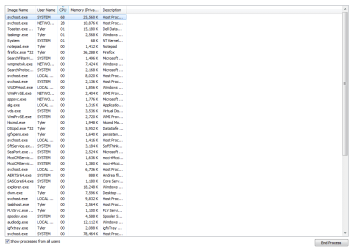
Also, I got a larger image of the tasks, but this is as large as it can get, I think.
(Is that what you meant by "expand it"?)
 

Attachments

  • taskmanager2.png
    taskmanager2.png
    24.8 KB · Views: 28

My Computer

OS
Windows 7
For first step,

Download,install and update SUPERAntiSpyware

Restart in safe mode,scan with superantispyware.

Restart in normal mode,scan again with superantispyware.

Finish with the above and post back.
 
Last edited:

My Computer

Computer Manufacturer/Model Number
Custom Built by me.
OS
Windows 7 Ultimate 64bit SP1
CPU
Intel Core 2 Quad Q6600
Motherboard
Gigabyte GA-X38-DS4
Memory
2X2GB DDR2 PC6400 800MHZ DUAL CHANNEL
Graphics Card(s)
XFX RADEON HD 6850 1GB GDDR5
Sound Card
2/4/5.1/7.1-channel Realtek High Definition
Monitor(s) Displays
Samsung LE40A656F1 1080p 100Hz LCD HD TV 50,000:1
Screen Resolution
1366x768 in Desktop,1920x1080p in gaming and video
Hard Drives
C:\WD VelociRaptor 150 GB,10,000 RPM
E:\WESTERN DIGITAL WD15EADS 1.5TB CAVIAR GREEN SATA2 F:\WESTERN DIGITAL WD15EADS 1.5TB CAVIAR GREEN SATA2
PSU
THERMALTAKE W0229 TOUGHPOWER XT 750W
Case
A-Case Twin Engine BB
Cooling
3 x thermaltake smart case fan II + 1 arctic cooling fan
Keyboard
Wireless Logitech LX710
Mouse
Logitech Wireless Gaming Mouse G700
Internet Speed
ADSL 12000 plus
Other Info
Mouse Logitech G700,with 13 buttons who needs keyboard in RPG?

D:\Sony high speed sata Dvd Rewriter
Logitech Cordless Rumblepad 2
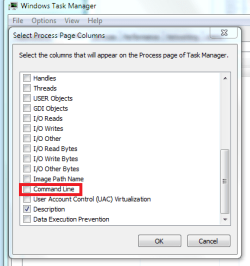
Go in task manager and enable the 'command line' option
Then see which program is triggering the svchost.exe processes

Capture.PNG
 

My Computer

Computer type
PC/Desktop
Computer Manufacturer/Model Number
Custom Build
OS
Windows 10 Pro x64, Arch Linux
CPU
Intel Core 2 Quad Q8200 OC'd 3.08GHz
Motherboard
Asus Rampage formula LGA775
Memory
8GB DDR2 900Mhz
Graphics Card(s)
MSI GT730 2GB GDDR5 (Kepler)
Sound Card
Supreme FX2
Monitor(s) Displays
Samsung LS22F350 LED
Screen Resolution
1080P
Hard Drives
Kingston SSDNow UV400 120GB, 500GB Hitachi, 2TB Samsung, 500GB Seagate FreeAgent, 640GB Samsung, 160GB Toshiba (Arch)
PSU
AeroCool 500W Bronze
Cooling
Cooler Master V6 + 3X fans
Keyboard
Prolink keyboard
Mouse
Logitech M705
Internet Speed
1MiB/s
Browser
Chrome Beta
@ panais: I've scanned in both modes, and it only resulted in tracking cookies being removed. It still runs like it did.
@yowanvista: The command line leads to System32, and the process is still svchost.exe.
 

My Computer

OS
Windows 7
Back
Top