svchost.exe CPU usage

JayNYC

New member
Local time
6:39 PM
Messages
13
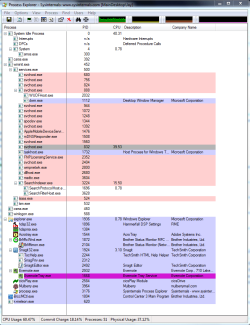
I've attached a screenshot from ProcessExplorer.

Notice the high activity svchost.exe

I had just closed another application, and this lasted for a few minutes. It then went to zero.

How do I determine what is actually going on here? I have Dual Core 3ghz & 4GB RAM running 7RC with no anti-virus.
 

Attachments

  • svchost_usage.png
    svchost_usage.png
    45.6 KB · Views: 10,408

My Computer

OS
W7 64 Ult

My Computer

Computer type
PC/Desktop
Computer Manufacturer/Model Number
Airbot 2.0
OS
Windows 7 Ultimate x64 SP1
CPU
Core i7 920 (D0) @ 4Ghz, *26c idle *65c full load on air
Motherboard
Asus P6X58D Premium - Sata 6Gb/s - USB 3.0
Memory
12GB DDR3 Corsair Dominator -CMD12GX3M6A1600C8 at 1600MHz
Graphics Card(s)
Zotac Geforce GTX 770
Sound Card
ASUS Xonar D2X
Monitor(s) Displays
1 LG 24" Flatron W2453V-PF 1 Samsung 24" P2450H both 2ms RT
Screen Resolution
1920x1080@60hz
Hard Drives
1 Samsung 250GB 840 Evo SSD
1 OCZ Vertex2 180GB SSD
1 TB Samsung Spinpoint F1 7200RPM 32MB cache
2 500GB WD Caviar Blacks 7200RPM 32MB cache (WD5001AALS)

Pioneer DVD Burner DVR-S18M
PSU
Corsair HX1000W
Case
Cooler Master HAF 932
Cooling
Case Fans *3 230mm, *1 140mm/CPU - *Tuniq Tower 120 Extreme
Keyboard
Logitech Wireless MK700
Mouse
Logitech Wireless MK700
Internet Speed
DL 15 Mbps UL 0.98 Mbps
Antivirus
None
Browser
Firefox Nightly
Other Info
Processor-7.7 *RAM- 7.9 *Graphics-7.9 *Gaming Graphics- 7.9 *SSD- 7.8 W.E.I final score= 7.7
*Phone- LG Nexus 5
Well, Jay... yours was nowhere near as bad as mine. Over the past week or 2 I've noticed the SVCHOST process using between 50%-100% of both of my cores on my 2.9 GHz dual core 64 X2 keeping me from doing much else so I've been toying with it... painfully, for over a week. Disabling the SVCHOST process in it's entirety would normally stop explorer from responding, kill my audio or drop my network, however it would also free up my CPU usage. This wasn't all too helpful since I had lost my functionality. I noticed different services eating CPU's up but found it's either impossible to stop some of them on their own, or doing so does not free up any CPU (not sure why). After all this time I've gone ahead and simply removed my PC from the homegroup it was in, rebooted and ta-da! I'm now idling around 3%-5% CPU usage.
I hope this helps someone out there and I hope if it does that you don't need to use a homegroup. If anyone has more info on this please reply so I can better understand why this was eating up my CPU.
 

My Computer

Computer Manufacturer/Model Number
Custom Built
OS
Windows 7
CPU
AMD Athlon(tm) 64 X2 Dual Core Processor 5600+ 2.9 GHz
Motherboard
Gigabyte GA-MA78GM-US2H
Memory
4GB kit (2GBx2), Ballistix 240-pin DIMM, DDR2 PC2-6400
Graphics Card(s)
NVIDIA GeForce 9600 GSO 512 MB
Sound Card
Onboard Realtek Audio
Hard Drives
SATA 7200 RPM
WD 640 GB
WD 200 GB
PSU
CORSAIR CMPSU-650TX
well after a lot of trial and error, i concluded the issue was my Nvidia graphics card. So I replaced it with a lower end, cool running, ATI card and now I have no problems. Basically, the Nvidia graphics drivers, whether from MSFT or Nvidia, official or beta, just caused major bottlenecking in Windows7.
 

My Computer

OS
W7 64 Ult
Well, Jay... yours was nowhere near as bad as mine. Over the past week or 2 I've noticed the SVCHOST process using between 50%-100% of both of my cores on my 2.9 GHz dual core 64 X2 keeping me from doing much else so I've been toying with it... painfully, for over a week. Disabling the SVCHOST process in it's entirety would normally stop explorer from responding, kill my audio or drop my network, however it would also free up my CPU usage. This wasn't all too helpful since I had lost my functionality. I noticed different services eating CPU's up but found it's either impossible to stop some of them on their own, or doing so does not free up any CPU (not sure why). After all this time I've gone ahead and simply removed my PC from the homegroup it was in, rebooted and ta-da! I'm now idling around 3%-5% CPU usage.
I hope this helps someone out there and I hope if it does that you don't need to use a homegroup. If anyone has more info on this please reply so I can better understand why this was eating up my CPU.


svchost is a generic windows process which may be used by any number of applications and drivers. The link that Airbot provided earlier is to a tool you can use to analyze the specific process that is using svchost - Whichever application/driver is the source process would be the cause of the issue.
 

My Computer

Computer Manufacturer/Model Number
Home Built
OS
Windows 7 (x64)
CPU
Intel Core i7 960 @ 3.8GHz (3.2GHz stock)
Motherboard
EVGA E758 X-58
Memory
6GB OCZ DDR3 1600
Graphics Card(s)
Powercolor AX5870 (ATI 5870 w/improved cooling)
Sound Card
Omega Claro+
Monitor(s) Displays
1. Acer P243W (24") 2. Samsung T260 HD HDMI HDTV/Monitor
Screen Resolution
1920 x 1200 x 2
Hard Drives
(1) 128GB Kingston SNVP325-S2 SSD for OS/Games
(2) 500GB WD Caviar Black - Storage
PSU
Corsair CMPSU-850HX
Case
Lian Li PC-K60WB
Cooling
Thermalright Venemous-X
Keyboard
Microsoft Natural keyboard 4000
Mouse
Microsoft Sidewinder
Internet Speed
Cable
Other Info
165 bclk, 23 Multi
svchost problems, too

Hey guys. svchost has been a major pain lately.

upon win7 startup SVChost will use more and more of my cpu and ram until it locks up. If i end the problematic svchost process before it locks up the computer is functional, but the hotkeys on my keyboard, such as volume, don't work. Upon rare occasion svchost starts back up, spikes my CPU performance then, then fixes itself and I get my keyboard functions back!
it's annoying =P

thanks for any help if you've got it.

oh,
q9550, 4gb ddr2 800, gtx 260 core216, 680i mb chipset
 

My Computer

OS
7 & vista ultimate
Hey guys. svchost has been a major pain lately.

upon win7 startup SVChost will use more and more of my cpu and ram until it locks up. If i end the problematic svchost process before it locks up the computer is functional, but the hotkeys on my keyboard, such as volume, don't work. Upon rare occasion svchost starts back up, spikes my CPU performance then, then fixes itself and I get my keyboard functions back!
it's annoying =P

thanks for any help if you've got it.

oh,
q9550, 4gb ddr2 800, gtx 260 core216, 680i mb chipset

You should consider starting your own thread. It's possible to troubleshoot this sort of thing fairly effectively.
 

My Computer

Computer Manufacturer/Model Number
Multiple machines in various stages of decomposition.
OS
Win7x64
svchost solution

G'day all,
Found a solution that works for me.
The problem was a left over svchost.exe file for a Visual C++ installation in conjunction with MS Office.
Offending file was found at c:\user\...\Appdata\Roaming\dll\svchost.exe.
Deleted it, and now no problems.
Hope it helps at least some of the situations.
 

My Computer

OS
windows 7 ultimate x64
I met the same problem without any solution...

I bought a new laptop with SU3500 and 4G memory. I found CPU usage is very high after I pick up the small tool in Win7 to show CPU and Memory Usage. I update the Graphic Card driver. It can not solve the problem. Svchost.exe could be ended. But I do not wanna end it everytime after restart my computer.
Is there any solution?
Thank you.
 

My Computer

Computer Manufacturer/Model Number
Microsoft Windows 7
OS
Windows 7
CPU
SU3500
Memory
4G
Same problem, more or less

I don't see why this thread is marked "Solved"...

My cpu gets quite hot, so I have a fan enhancer installed, and I've been monitoring cpu usage and temperature closely. Yesterday my svchost started taking 50% of the cpu, and it's killing my system... It runs at exactly 49-51% for hours at a time, sometimes stopping for a few minutes, regardless of what I'm doing.

I've installed Win7 about 2 weeks ago and everything used to be fine.
The only things that changed yesterday: I installed Spybot, and Foxit Reader (careful not to install the toolbar etc).

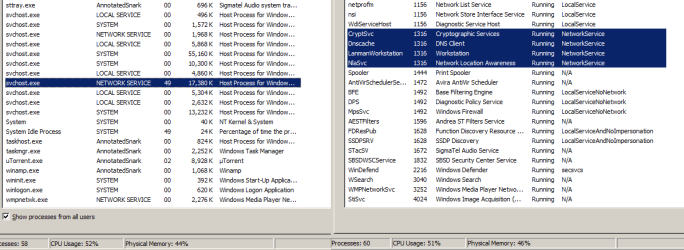
Attached are screenshots of the offending services, and a hijackthis log... My antivirus is Avira.

:( What else can I do? :confused:

Thanks in advance for any advice...


---

Logfile of HijackThis v1.99.1
Scan saved at 14:31:08, on 17/07/10
Platform: Unknown Windows (WinNT 6.01.3504)
MSIE: Internet Explorer v8.00 (8.00.7600.16385)

Running processes:
C:\Windows\system32\taskhost.exe
C:\Windows\system32\Dwm.exe
C:\Windows\Explorer.EXE
C:\Program Files\Avira\AntiVir Desktop\avgnt.exe
C:\Program Files\SigmaTel\C-Major Audio\WDM\sttray.exe
C:\Program Files\DellTPad\Apoint.exe
C:\Program Files\Logitech\SetPointP\SetPoint.exe
C:\Program Files\Babylon\Babylon-Pro\Babylon.exe
C:\Program Files\Windows Sidebar\sidebar.exe
C:\Program Files\uTorrent\uTorrent.exe
C:\Program Files\I8kfanGUI\I8kfanGUI.exe
C:\Users\AnnotatedSnark\AppData\Roaming\Dropbox\bin\Dropbox.exe
C:\Program Files\DellTPad\ApMsgFwd.exe
C:\Program Files\DellTPad\Apntex.exe
C:\Program Files\Common Files\LogiShrd\KHAL3\KHALMNPR.EXE
C:\Windows\system32\conhost.exe
C:\Program Files\DellTPad\HidFind.exe
C:\Program Files\OpenOffice.org 3\program\soffice.exe
C:\Program Files\Winamp\winamp.exe
C:\Program Files\OpenOffice.org 3\program\soffice.bin
C:\Program Files\Mozilla Firefox\firefox.exe
C:\Program Files\Mozilla Firefox\plugin-container.exe
C:\Program Files\Internet Explorer\iexplore.exe
C:\Windows\system32\SearchFilterHost.exe
C:\Program Files\Total Commander\TOTALCMD.EXE
C:\Systools\hijack\HijackThis.exe

R1 - HKCU\Software\Microsoft\Internet Explorer\Main,Search Page = Bing
R1 - HKLM\Software\Microsoft\Internet Explorer\Main,Default_Page_URL = MSN.com
R1 - HKLM\Software\Microsoft\Internet Explorer\Main,Default_Search_URL = Bing
R1 - HKLM\Software\Microsoft\Internet Explorer\Main,Search Page = Bing
R0 - HKLM\Software\Microsoft\Internet Explorer\Main,Start Page = MSN.com
R0 - HKLM\Software\Microsoft\Internet Explorer\Search,SearchAssistant =
R0 - HKLM\Software\Microsoft\Internet Explorer\Search,CustomizeSearch =
R1 - HKCU\Software\Microsoft\Windows\CurrentVersion\Internet Settings,ProxyOverride = *.local
R0 - HKCU\Software\Microsoft\Internet Explorer\Toolbar,LinksFolderName =
O2 - BHO: SkypeIEPluginBHO - {AE805869-2E5C-4ED4-8F7B-F1F7851A4497} - C:\Program Files\Skype\Toolbars\Internet Explorer\skypeieplugin.dll
O2 - BHO: Java(tm) Plug-In 2 SSV Helper - {DBC80044-A445-435b-BC74-9C25C1C588A9} - C:\Program Files\Java\jre6\bin\jp2ssv.dll
O4 - HKLM\..\Run: [avgnt] "C:\Program Files\Avira\AntiVir Desktop\avgnt.exe" /min
O4 - HKLM\..\Run: [SigmatelSysTrayApp] %ProgramFiles%\SigmaTel\C-Major Audio\WDM\sttray.exe
O4 - HKLM\..\Run: [Apoint] C:\Program Files\DellTPad\Apoint.exe
O4 - HKLM\..\Run: [EvtMgr6] C:\Program Files\Logitech\SetPointP\SetPoint.exe /launchGaming
O4 - HKLM\..\Run: [Babylon Client] C:\Program Files\Babylon\Babylon-Pro\Babylon.exe -AutoStart
O4 - HKCU\..\Run: [Sidebar] C:\Program Files\Windows Sidebar\sidebar.exe /autoRun
O4 - HKCU\..\Run: [uTorrent] "C:\Program Files\uTorrent\uTorrent.exe"
O4 - HKCU\..\Run: [i8kfangui] C:\Program Files\I8kfanGUI\I8kfanGUI.exe /startup
O4 - Startup: Dropbox.lnk = C:\Users\AnnotatedSnark\AppData\Roaming\Dropbox\bin\Dropbox.exe
O4 - Startup: Logitech . Product Registration.lnk.disabled
O4 - Startup: OpenOffice.org 3.2.lnk = C:\Program Files\OpenOffice.org 3\program\quickstart.exe
O4 - Startup: Winamp.lnk = C:\Program Files\Winamp\winamp.exe
O8 - Extra context menu item: Translate with &Babylon - res://C:\Program Files\Babylon\Babylon-Pro\Utils\BabylonIEPI.dll/Translate.htm
O9 - Extra button: Skype add-on for Internet Explorer - {898EA8C8-E7FF-479B-8935-AEC46303B9E5} - C:\Program Files\Skype\Toolbars\Internet Explorer\skypeieplugin.dll
O9 - Extra 'Tools' menuitem: Skype add-on for Internet Explorer - {898EA8C8-E7FF-479B-8935-AEC46303B9E5} - C:\Program Files\Skype\Toolbars\Internet Explorer\skypeieplugin.dll
O10 - Unknown file in Winsock LSP: c:\windows\system32\nlaapi.dll
O10 - Unknown file in Winsock LSP: c:\windows\system32\napinsp.dll
O11 - Options group: [INTERNATIONAL] International
O13 - Gopher Prefix:
O18 - Protocol: skype-ie-addon-data - {91774881-D725-4E58-B298-07617B9B86A8} - C:\Program Files\Skype\Toolbars\Internet Explorer\skypeieplugin.dll
O18 - Protocol: skype4com - {FFC8B962-9B40-4DFF-9458-1830C7DD7F5D} - C:\PROGRA~1\COMMON~1\Skype\SKYPE4~1.DLL
O20 - Winlogon Notify: LBTWlgn - c:\program files\common files\logishrd\bluetooth\LBTWlgn.dll
O23 - Service: Andrea ST Filters Service (AESTFilters) - Andrea Electronics Corporation - C:\Windows\system32\aestsrv.exe
O23 - Service: Avira AntiVir Scheduler (AntiVirSchedulerService) - Avira GmbH - C:\Program Files\Avira\AntiVir Desktop\sched.exe
O23 - Service: Avira AntiVir Guard (AntiVirService) - Avira GmbH - C:\Program Files\Avira\AntiVir Desktop\avguard.exe
O23 - Service: FLEXnet Licensing Service - Macrovision Europe Ltd. - C:\Program Files\Common Files\Macrovision Shared\FLEXnet Publisher\FNPLicensingService.exe
O23 - Service: Logitech Bluetooth Service (LBTServ) - Logitech, Inc. - C:\Program Files\Common Files\LogiShrd\Bluetooth\lbtserv.exe
O23 - Service: @%SystemRoot%\system32\qwave.dll,-1 (QWAVE) - Unknown owner - %windir%\system32\svchost.exe (file missing)
O23 - Service: SBSD Security Center Service (SBSDWSCService) - Safer Networking Ltd. - C:\Program Files\Spybot\SDWinSec.exe
O23 - Service: @%SystemRoot%\system32\seclogon.dll,-7001 (seclogon) - Unknown owner - %windir%\system32\svchost.exe (file missing)
O23 - Service: SigmaTel Audio Service (STacSV) - IDT, Inc. - C:\Windows\system32\STacSV.exe
O23 - Service: @%SystemRoot%\system32\Wat\WatUX.exe,-601 (WatAdminSvc) - Unknown owner - C:\Windows\system32\Wat\WatAdminSvc.exe
O23 - Service: @%PROGRAMFILES%\Windows Media Player\wmpnetwk.exe,-101 (WMPNetworkSvc) - Unknown owner - %PROGRAMFILES%\Windows Media Player\wmpnetwk.exe (file missing)

 

Attachments

  • screen01.png
    screen01.png
    23.2 KB · Views: 1,443

My Computer

Computer Manufacturer/Model Number
Dell Vostro 1400
OS
Windows 7
CPU
Centrino
Memory
2gb
Graphics Card(s)
Intel
If you have "Microsoft" Security Essentials installed try uninstalling it. That worked for me.
 

My Computer

OS
Windows 7 Home Premium 64bit
CPU
AMD Phenom II X4 955 3.21 (3.81 OC)
Motherboard
ASUS M4A78T-E
Memory
6Gb
Graphics Card(s)
Nvidia GTX 470
Monitor(s) Displays
I-INC iF281D
Case
CoolerMaster Scout Storm
Hallooo! ok, i think im kinda late but if you right click svchost.exe in task manager > Properties > safety
uncheck the boxes: Read and run , change. there you have it. thats how i did and it worked for me. It may not be translated correctly. swedish :)
 

My Computer

Computer type
PC/Desktop
OS
64 bit windows 7 home premium
Back
Top