svchost.exe high cpu load problem

optprime

New member
Local time
9:27 PM
Messages
12
Hello everyone!
Since this is my first post I wish you all the best and thanks for your help.
I really appreciate it.

My problem is the following:

Since 2 days my cpu load is always at maximum load.
I searched the web and found out that many people have the same problem.
The funny thing and this is the reason I started a new thread is:

When I open the task manager or similiar programs like process explorer the cpu load goes back to idle or normal levels.

The reason I found out that svchost is causing the problem is simple:
I killed one (svchost)process at a time and when I got lucky the cpu load got idle again.

So I ask you if anybody has an idea why this is happening and why the cpu load idles out when I open the task manager.

Of course this is really annoying, the only thing that is helping right now is that I have the task manager opened constantly.

Thx in advance,
opt.prime
 

My Computer

Computer Manufacturer/Model Number
custom
OS
Windows 7 Ultimate x64
CPU
i7-950
Motherboard
asus p6t deluxe v2
Memory
ocz 6gb 8-8-8-24
Graphics Card(s)
gtx 570
Sound Card
creative x-fi
Monitor(s) Displays
samsung 27
Hard Drives
vertex4
PSU
cougar 1000w
Case
silentmaxx
Cooling
cpu air, gpu water
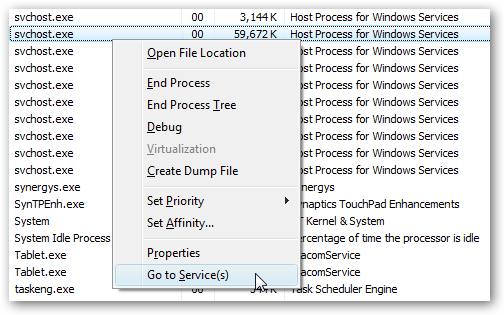
Take a look at this article. svchost is a Windows application that separates running services on multiple executables. The reason they did that is so that if one service fails then it wouldn't take down all running applications together. Thus it sounds like one of your services/applications is causing an issue.

Doing the following:
image78.png


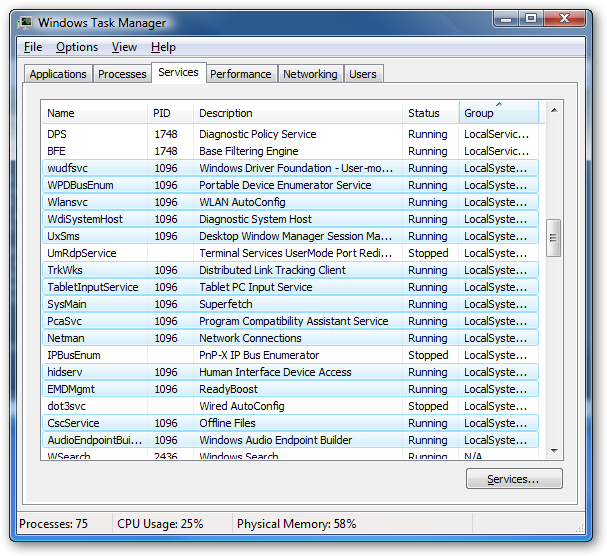
Will allow you to view which processes are being used for the svchost:
image79.png


Using Process Explorer can give you more information that what the normal Task Manager would.
 

My Computer

Computer Manufacturer/Model Number
Me
OS
Windows 7 Pro x64
CPU
Intel Core i7 920
Motherboard
ASUS P6T Deluxe V2
Memory
Corsair XMS3 12GB (3x2GB) DDR3 1333
Graphics Card(s)
EVGA GTX 470 1280MB GDDR5 DX11
Monitor(s) Displays
ASUS VW246H | ACER AL2216W
Screen Resolution
3600x1080
Hard Drives
1x Corsair Vertex 3 SSD (120GB)
1x Corsair Vertex 2 SSD (60GB)
2x Western Digital Black (500GB/1TB)
1x External WD Green eSATA (1TB)
PSU
Corsair 850HX
Case
Velocity Micro FullTower
Keyboard
Logitech G110
Mouse
Logitech G500
Internet Speed
http://www.speedtest.net/result/1226664359.png
Antivirus
MSE
Browser
Chrome
Other Info
Logitech Z-5500 5.1 Surround Sound
Logitech C260 Webcam
Creative Fatal1ty Headset
Thanks for your reply.
Yes i know what svchost does, my problem is as soon as I open the task manager or process explorer
the cpu load goes back to idle.
so it´s really hard to notify which service causes this issue...
 

My Computer

Computer Manufacturer/Model Number
custom
OS
Windows 7 Ultimate x64
CPU
i7-950
Motherboard
asus p6t deluxe v2
Memory
ocz 6gb 8-8-8-24
Graphics Card(s)
gtx 570
Sound Card
creative x-fi
Monitor(s) Displays
samsung 27
Hard Drives
vertex4
PSU
cougar 1000w
Case
silentmaxx
Cooling
cpu air, gpu water
A infection can cause this problem. It could be using a service host to call home or remotely using your computer.
 

My Computer

Computer type
PC/Desktop
Computer Manufacturer/Model Number
Home made Desktop
OS
Windows 10 Pro. 64/ version 1709 Windows 7 Pro/64
CPU
Intel i7-6800K @ 4.3
Motherboard
ASUS X-99 Deluxe II
Memory
Corsair Platinum 16 gig @2400
Graphics Card(s)
EVGA GTX 1070 OC
Monitor(s) Displays
Asus 27" LED LCD/VE278Q
Screen Resolution
1920-1080 or 1280-720 HDMI
Hard Drives
INTEL SSD 730-240 Gb Sata 3.0/
PSU
EVGA Platium 1200W
Case
Phanteks Luxe Tempered Glass 8 fans/ one radiator
Cooling
XSPC/ Water Cooled CPU
Keyboard
Das 4 Professional
Mouse
Logitech M705/MX Anywhere 2-S
Internet Speed
100 mbits
Antivirus
Microsoft Security Essentials/ Malwarebytes Premium 3.0/ SAS
Browser
I.E. 11 default/Firefox/ ISP Time Warner Cable/Spectrum
Other Info
LG BluRay Burner/
Sound system-KLipsch-THX/
Icy Dock ssd Hot Swap bays.
yeah i thought of an infection too. but i use kaspersky and scanned like ten times, nothing there.
but isn´t it really stange that the cpu load goes back to idle after opening task manager?

it really looks like an infection but i cant find anything
 

My Computer

Computer Manufacturer/Model Number
custom
OS
Windows 7 Ultimate x64
CPU
i7-950
Motherboard
asus p6t deluxe v2
Memory
ocz 6gb 8-8-8-24
Graphics Card(s)
gtx 570
Sound Card
creative x-fi
Monitor(s) Displays
samsung 27
Hard Drives
vertex4
PSU
cougar 1000w
Case
silentmaxx
Cooling
cpu air, gpu water
I think I need a program which is able to record the pase cpu usage, but the problem may be that it cannot record the used cpu time similiar to the task manager.
This thing reminds me of a quantum mechanical system ;) If you try to look at it it disappears. lol
 

My Computer

Computer Manufacturer/Model Number
custom
OS
Windows 7 Ultimate x64
CPU
i7-950
Motherboard
asus p6t deluxe v2
Memory
ocz 6gb 8-8-8-24
Graphics Card(s)
gtx 570
Sound Card
creative x-fi
Monitor(s) Displays
samsung 27
Hard Drives
vertex4
PSU
cougar 1000w
Case
silentmaxx
Cooling
cpu air, gpu water
No one anti virus will find everything. They all are a little different.
If it was my computer the first thing I would do is check for infection. These are the programs I would use.
Malwarebytes Anti Malware free (Google)
Eset On Line scan free (Google)
Windows Defender Off Line (also free)
Windows Defender Offline
---------------------------
This is a very good program to watch things that are running.
http://technet.microsoft.com/en-us/sysinternals/bb896653.aspx
 

My Computer

Computer type
PC/Desktop
Computer Manufacturer/Model Number
Home made Desktop
OS
Windows 10 Pro. 64/ version 1709 Windows 7 Pro/64
CPU
Intel i7-6800K @ 4.3
Motherboard
ASUS X-99 Deluxe II
Memory
Corsair Platinum 16 gig @2400
Graphics Card(s)
EVGA GTX 1070 OC
Monitor(s) Displays
Asus 27" LED LCD/VE278Q
Screen Resolution
1920-1080 or 1280-720 HDMI
Hard Drives
INTEL SSD 730-240 Gb Sata 3.0/
PSU
EVGA Platium 1200W
Case
Phanteks Luxe Tempered Glass 8 fans/ one radiator
Cooling
XSPC/ Water Cooled CPU
Keyboard
Das 4 Professional
Mouse
Logitech M705/MX Anywhere 2-S
Internet Speed
100 mbits
Antivirus
Microsoft Security Essentials/ Malwarebytes Premium 3.0/ SAS
Browser
I.E. 11 default/Firefox/ ISP Time Warner Cable/Spectrum
Other Info
LG BluRay Burner/
Sound system-KLipsch-THX/
Icy Dock ssd Hot Swap bays.
tried all you said with the exception of windows defender.
nothing so far
 

My Computer

Computer Manufacturer/Model Number
custom
OS
Windows 7 Ultimate x64
CPU
i7-950
Motherboard
asus p6t deluxe v2
Memory
ocz 6gb 8-8-8-24
Graphics Card(s)
gtx 570
Sound Card
creative x-fi
Monitor(s) Displays
samsung 27
Hard Drives
vertex4
PSU
cougar 1000w
Case
silentmaxx
Cooling
cpu air, gpu water
ok i also scanned with windows defender but it found nothing, all the programs didn´t find anything.
i also installed SP1 but the problem still exists.
 

My Computer

Computer Manufacturer/Model Number
custom
OS
Windows 7 Ultimate x64
CPU
i7-950
Motherboard
asus p6t deluxe v2
Memory
ocz 6gb 8-8-8-24
Graphics Card(s)
gtx 570
Sound Card
creative x-fi
Monitor(s) Displays
samsung 27
Hard Drives
vertex4
PSU
cougar 1000w
Case
silentmaxx
Cooling
cpu air, gpu water

My Computer

Computer type
PC/Desktop
Computer Manufacturer/Model Number
Home made Desktop
OS
Windows 10 Pro. 64/ version 1709 Windows 7 Pro/64
CPU
Intel i7-6800K @ 4.3
Motherboard
ASUS X-99 Deluxe II
Memory
Corsair Platinum 16 gig @2400
Graphics Card(s)
EVGA GTX 1070 OC
Monitor(s) Displays
Asus 27" LED LCD/VE278Q
Screen Resolution
1920-1080 or 1280-720 HDMI
Hard Drives
INTEL SSD 730-240 Gb Sata 3.0/
PSU
EVGA Platium 1200W
Case
Phanteks Luxe Tempered Glass 8 fans/ one radiator
Cooling
XSPC/ Water Cooled CPU
Keyboard
Das 4 Professional
Mouse
Logitech M705/MX Anywhere 2-S
Internet Speed
100 mbits
Antivirus
Microsoft Security Essentials/ Malwarebytes Premium 3.0/ SAS
Browser
I.E. 11 default/Firefox/ ISP Time Warner Cable/Spectrum
Other Info
LG BluRay Burner/
Sound system-KLipsch-THX/
Icy Dock ssd Hot Swap bays.
Back
Top