Intermittent 100% CPU load, slow down, can't find the cause

pmhutch

New member
Local time
5:12 AM
Messages
24
Hello

Periodically (maybe every 5-15 minutes) the CPU usage in the Task Manager Performance tab shoots up to 100% and the machine slows to a crawl. If I'm watching a video or a video conference it freezes, or at least the audio breaks up badly.

The CPU column under Processes doesn't give much of a clue - the process at the top of the list when it happens could be a variety of different ones. Also, using Process Hacker to look at CPU usage doesn't really help - the top process when it happens could be Chrome, System Idle Process, Process Hacker or just about anything else.

I reinstalled Windows and it was OK for a while (I think) but then it started happening again. However, this may have been after I started re-installing drivers and/or programs (but I still haven't found a rogue program).

I have run Avast anti-virus and Malwarebytes, with no result. Should I scan for a root kit with some other tool?

This is driving me a bit crazy - all suggestions welcome.

Thanks
Paul
Melbourne, Aus

Lenovo X201t
Win 7 Pro 64 bit
8 GB RAM
i5 2.67 GHz
 

Attachments

  • 2018-09-26 21_46_49-Process Hacker [X201t_PP].png
    2018-09-26 21_46_49-Process Hacker [X201t_PP].png
    43.9 KB · Views: 1

My Computer My Computer

At a glance

Win 7 Pro 64 biti5 2.67 GHz8 GB
Computer type
Laptop
Computer Manufacturer/Model Number
Lenovo X201t
OS
Win 7 Pro 64 bit
CPU
i5 2.67 GHz
Memory
8 GB
Hard Drives
500 GB 2.5 inch
Browser
Chrome, Firefox, Opera
Hi pmhutch,
Welcome to SevenForums!
It's most likely Windows Update, if you have it set to check for updates. How do you have it configured?
This is an excellent tool to view what's using CPU cycles!
Windows Directory Statistics WinDirStat

I would temporarily set Win Update to Never check for updates, if your issue stops, that's the culprit!
 

My Computer My Computer

At a glance

Win 10 x64, Linux Lite, Win 7 x64, BlackArch,...
Computer type
PC/Desktop
Computer Manufacturer/Model Number
HP Desktop & Compaq Laptop
OS
Win 10 x64, Linux Lite, Win 7 x64, BlackArch, & Kali
Hard Drives
Samsung 850 Pro 256Gb,
Hitachi HDD 1Tb,
Crucial MX SSD 250Gb
Segate 3Tb USB 3.0 Ext. Backup HDD
Internet Speed
150Mbps dn, 20Mbps up
Antivirus
Avast Free, Malwarebytes Anti-Exploit & Anti-Ransomware
Browser
Firefox, Chrome, Opera, & VPN
Welcome to the Forum.

I agree with Snick. Can be WU.
I've once faced a delay as described.
It wasn't an update file. It was the SEARCH for update that was running forever and kept the computer so busy that was causing the delays.
So I set, under services, WU to manual and on WU page to never check and the problem has gone.

Run WU manually. Does it search forever?

Is your Malwarebytes free or paid?
 
Last edited:

My Computers My Computers

  • At a glance

    Windows 7 HP 64i5 6600K - 800MHz to 4200MHz4+4G GSkill DDR4 3000IG - Intel 530
    Computer type
    PC/Desktop
    Computer Manufacturer/Model Number
    custom build
    OS
    Windows 7 HP 64
    CPU
    i5 6600K - 800MHz to 4200MHz
    Motherboard
    GA-Z170-HD3P
    Memory
    4+4G GSkill DDR4 3000
    Graphics Card(s)
    IG - Intel 530
    Monitor(s) Displays
    Samsung 226BW
    Screen Resolution
    1680x1050
    Hard Drives
    (1) -1 SM951 – 128GB M.2 AHCI PCIe SSD drive for Windows 7 and Lubuntu
    (2) -1 WD SATA 3 - 1T for Data
    (3) -1 WD SATA 3 - 1T for backup
    PSU
    Thermaltake 450W TR2 gold
    Keyboard
    Old and good Chicony mechanical keyboard
    Mouse
    Logitech mX performance - 9 buttons (had to disable some)
    Internet Speed
    500Mb/s
    Browser
    Firefox 64
    Other Info
    TinyWall firewall
  • At a glance

    Windows 7 Proi7-4500U 800MHz to 3.0GHz(4+4)G DDR3 1600IG intel 4400 + NVIDIA GeForce GT 745M
    Computer type
    Laptop
    System Manufacturer/Model Number
    Asus Q550LF
    OS
    Windows 7 Pro
    CPU
    i7-4500U 800MHz to 3.0GHz
    Motherboard
    Asus Q550LF
    Memory
    (4+4)G DDR3 1600
    Graphics Card(s)
    IG intel 4400 + NVIDIA GeForce GT 745M
    Sound Card
    Realtek
    Monitor(s) Displays
    LG Display LP156WF4-SPH1
    Screen Resolution
    1920 x 1080
    Hard Drives
    BX500 120G SSD for Windows and programs +
    1T HDD for data
    Internet Speed
    500 Mb/s
    Browser
    Firefox
    Other Info
    TinyWall firewall
Agree with @Megahertz07.
WU latest engine update was supposed to address this "SEARCH for update", yea, supposed to.
 

My Computer My Computer

At a glance

Win 10 x64, Linux Lite, Win 7 x64, BlackArch,...
Computer type
PC/Desktop
Computer Manufacturer/Model Number
HP Desktop & Compaq Laptop
OS
Win 10 x64, Linux Lite, Win 7 x64, BlackArch, & Kali
Hard Drives
Samsung 850 Pro 256Gb,
Hitachi HDD 1Tb,
Crucial MX SSD 250Gb
Segate 3Tb USB 3.0 Ext. Backup HDD
Internet Speed
150Mbps dn, 20Mbps up
Antivirus
Avast Free, Malwarebytes Anti-Exploit & Anti-Ransomware
Browser
Firefox, Chrome, Opera, & VPN
Hi there

Thanks for the replies.

I set Windows Update to "Never check for updates" and got quite hopeful as the problem seemed to have stopped. However, after about 10 minutes it started again :(

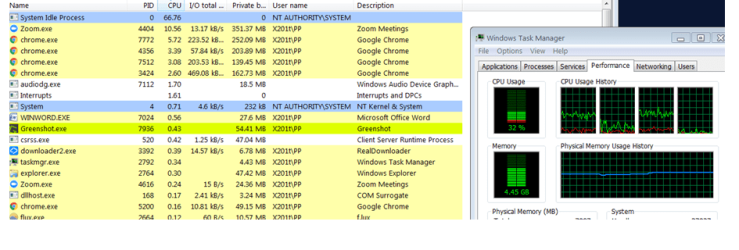
I was in a Zoom video conference for about an hour and it gave a good opportunity to see the problem in action. See attached screen shot.

For much of the time, things were fine - CPU load at a reasonable level in Windows Task Manager (32% in the screen shot), top of the CPU column in Process Hacker was System Idle Process, at 66.76, Zoom.exe at position no. 2 with CPU = 10.56, everything working fine.

Then, every few minutes, the CPU Usage in Task Manager would go to 100%, Zoom.exe would go to the top of the list with CPU = 50 to 60 in Process Hacker and System Idle Process would have disappeared from the list (or dropped down the list - not sure, but not at the top any more). The fan on the PC speeded up and the audio in the Zoom conference started to break up and Zoom gave a warning message about "Low System Resources". After a minute or two, things would go back to normal, with System Idles Process at the top of the list and Zoom.exe at #2 with a reasonable (much lower) CPU figure in Process Hacker.

I have subsequently noticed this with other tasks instead of Zoom e.g Chrome: Windows Task Manager CPU goes to 100%, Chrome.exe goes to the top of the list with a high (50+) CPU figure in Process Hacker and everything slows down or grinds to a halt (to the extent that I can't use Greenshot to take a screenshot in this condition - cursor movement is very sluggish and erratic). Then after a minute or two things go back to normal.

So, it looks like something in the OS may be boosting the priority or CPU allocation of a legitimate task to an excessive degree such that it hogs resources for a while, then it sorts itself out. Very annoying.

Any further ideas welcome.

Thanks
Paul

PS I am using the free version of Malwarebytes. Would the paid version be better for trying to find and fix the problem (hope it's available on a free trial...) I don't know much about "root kits" - could one of these be to blame, and how would I find out?
 

Attachments

  • Process Hacker 2.png
    Process Hacker 2.png
    54 KB · Views: 5

My Computer My Computer

At a glance

Win 7 Pro 64 biti5 2.67 GHz8 GB
Computer type
Laptop
Computer Manufacturer/Model Number
Lenovo X201t
OS
Win 7 Pro 64 bit
CPU
i5 2.67 GHz
Memory
8 GB
Hard Drives
500 GB 2.5 inch
Browser
Chrome, Firefox, Opera
I've asked about Malwarebytes version because the paid version is active all times and should be considered a antvirus replacement. I don't like programs that are loaded on startup and remains in memory even when not in use. That is the case of Chrome and Malwarebytes free.

You can use msconfig to disable all startup programs (leave only MS services). If the problem is over, enable half. Proceed till you find the one is causing the problem.
 

My Computers My Computers

  • At a glance

    Windows 7 HP 64i5 6600K - 800MHz to 4200MHz4+4G GSkill DDR4 3000IG - Intel 530
    Computer type
    PC/Desktop
    Computer Manufacturer/Model Number
    custom build
    OS
    Windows 7 HP 64
    CPU
    i5 6600K - 800MHz to 4200MHz
    Motherboard
    GA-Z170-HD3P
    Memory
    4+4G GSkill DDR4 3000
    Graphics Card(s)
    IG - Intel 530
    Monitor(s) Displays
    Samsung 226BW
    Screen Resolution
    1680x1050
    Hard Drives
    (1) -1 SM951 – 128GB M.2 AHCI PCIe SSD drive for Windows 7 and Lubuntu
    (2) -1 WD SATA 3 - 1T for Data
    (3) -1 WD SATA 3 - 1T for backup
    PSU
    Thermaltake 450W TR2 gold
    Keyboard
    Old and good Chicony mechanical keyboard
    Mouse
    Logitech mX performance - 9 buttons (had to disable some)
    Internet Speed
    500Mb/s
    Browser
    Firefox 64
    Other Info
    TinyWall firewall
  • At a glance

    Windows 7 Proi7-4500U 800MHz to 3.0GHz(4+4)G DDR3 1600IG intel 4400 + NVIDIA GeForce GT 745M
    Computer type
    Laptop
    System Manufacturer/Model Number
    Asus Q550LF
    OS
    Windows 7 Pro
    CPU
    i7-4500U 800MHz to 3.0GHz
    Motherboard
    Asus Q550LF
    Memory
    (4+4)G DDR3 1600
    Graphics Card(s)
    IG intel 4400 + NVIDIA GeForce GT 745M
    Sound Card
    Realtek
    Monitor(s) Displays
    LG Display LP156WF4-SPH1
    Screen Resolution
    1920 x 1080
    Hard Drives
    BX500 120G SSD for Windows and programs +
    1T HDD for data
    Internet Speed
    500 Mb/s
    Browser
    Firefox
    Other Info
    TinyWall firewall
I agree with Megahertz07!

I have most startup programs disabled, done from CCleaner > Tools > Startup with the exception of Windows/Microsoft system programs, updaters, Anti-virus or similar.

Malwarebytes Premium or Free utilizes the same search engine and definitions. The advantage of Premium is that it is Real-Time protection & compatible with & an excellent supplement to other Anti-virus programs.

I don't like Chrome (not installed), Edge, or Internet Explorer. I prefer Firefox Quantum, like the customization options, and about:config tweak-ability
 

My Computer My Computer

At a glance

Win 10 x64, Linux Lite, Win 7 x64, BlackArch,...
Computer type
PC/Desktop
Computer Manufacturer/Model Number
HP Desktop & Compaq Laptop
OS
Win 10 x64, Linux Lite, Win 7 x64, BlackArch, & Kali
Hard Drives
Samsung 850 Pro 256Gb,
Hitachi HDD 1Tb,
Crucial MX SSD 250Gb
Segate 3Tb USB 3.0 Ext. Backup HDD
Internet Speed
150Mbps dn, 20Mbps up
Antivirus
Avast Free, Malwarebytes Anti-Exploit & Anti-Ransomware
Browser
Firefox, Chrome, Opera, & VPN
Run Autoruns, post the ARN file. You will need to zip it.

What is zoom? What is that downloader process? Zoom.exe looks to be some form of so-called "PC booster."
 

My Computer My Computer

At a glance

Windows 7 Ultimate x64
Computer type
PC/Desktop
OS
Windows 7 Ultimate x64
Zoom: Video Conferencing, Web Conferencing, Webinars, Screen ...

Zoom above is similar to TeamViewer

Zoom.exe is also a virus, and not the same as above linked ZOOM

Downloaded process is RealDownloader is a freemium download manager by RealNetworks that downloads embedded Internet videos in multiple formats including MOV and FLV from sites such as YouTube, CollegeHumor, Facebook, Funny or Die and Dailymotion. This software utility lets users share downloaded videos on social networks and transfer them to their mobile devices.

Nic
 

My Computer My Computer

At a glance

Win 10 x64, Linux Lite, Win 7 x64, BlackArch,...
Computer type
PC/Desktop
Computer Manufacturer/Model Number
HP Desktop & Compaq Laptop
OS
Win 10 x64, Linux Lite, Win 7 x64, BlackArch, & Kali
Hard Drives
Samsung 850 Pro 256Gb,
Hitachi HDD 1Tb,
Crucial MX SSD 250Gb
Segate 3Tb USB 3.0 Ext. Backup HDD
Internet Speed
150Mbps dn, 20Mbps up
Antivirus
Avast Free, Malwarebytes Anti-Exploit & Anti-Ransomware
Browser
Firefox, Chrome, Opera, & VPN
Hello again

Zoom.exe is the client software for Video Conferencing, Web Conferencing, Webinars, Screen Sharing - Zoom, a video conferencing service which I was using at the time that I took the screen shot (not a virus in this case). It goes away when I exit the application.

Have run Autoruns - .arn file is attached (as a Zip - actually I'm a bit surprised at the difference in file size : 7.5 megs as .arn, 253 kb as a Zip - is that simply because there's a lot of blank space in the .arn which can be compressed?)

I'm quite amazed at the number of items in the Autoruns result!

I'm going to go and cut back on the Autorun / Auto start programs using Ccleaner, as suggested above. I'm wondering whether pruning the Services might also help? Given that there is nothing visible in Task Manager which is causing this (i.e no visible task) is it more likely that it is a Service?

Thanks for all the on-going help and advice.
 

Attachments

My Computer My Computer

At a glance

Win 7 Pro 64 biti5 2.67 GHz8 GB
Computer type
Laptop
Computer Manufacturer/Model Number
Lenovo X201t
OS
Win 7 Pro 64 bit
CPU
i5 2.67 GHz
Memory
8 GB
Hard Drives
500 GB 2.5 inch
Browser
Chrome, Firefox, Opera
It's probably the combination of Malwarebytes, Windows Updates and your other antivirus. Annoying that Malwarebytes free is now the full version as a trial for the first two weeks so it will scan or update regularly and slow things down. After two weeks when the trial runs out that should stop.
 

My Computer My Computer

At a glance

W7 HP 64 bitCore i3 1st gen8gbNvidia 330M
Computer type
Laptop
Computer Manufacturer/Model Number
Sony Vaio VPCCW2S1E
OS
W7 HP 64 bit
CPU
Core i3 1st gen
Memory
8gb
Graphics Card(s)
Nvidia 330M
Internet Speed
8 mbps
Browser
Firefox
You don't have to opt in for the trial version of Malwarebytes, additionally, you can opt out (revert to free versions) on the GUI.
Nic
 

My Computer My Computer

At a glance

Win 10 x64, Linux Lite, Win 7 x64, BlackArch,...
Computer type
PC/Desktop
Computer Manufacturer/Model Number
HP Desktop & Compaq Laptop
OS
Win 10 x64, Linux Lite, Win 7 x64, BlackArch, & Kali
Hard Drives
Samsung 850 Pro 256Gb,
Hitachi HDD 1Tb,
Crucial MX SSD 250Gb
Segate 3Tb USB 3.0 Ext. Backup HDD
Internet Speed
150Mbps dn, 20Mbps up
Antivirus
Avast Free, Malwarebytes Anti-Exploit & Anti-Ransomware
Browser
Firefox, Chrome, Opera, & VPN
Anti Virus

I've uninstalled Malwarebytes (free version).

When I type "Anti-Virus" into the search box I get a Window which says "Windows did not find any anti-virus software on this computer".

However, when I type "Defender" into the search box I get the Defender Window which tells me that Defender is installed and active for real time protection and also scheduled system scans.

Isn't Defender an anti-virus program? Or is it just "anti-spyware"? Which anti-virus (preferably free) should I use?


Windows Update

Another question: Windows Update is now set to "Never check for updates". I assume that this poses a bit of a risk unless I remember to regularly do a manual check. Is that the recommended course of action, say, once a week?

Revised Autoruns

Autoruns: The revised Autoruns .arn file is attached (after disabling a number of items using CCLeaner>Startup) . Even if I hide the Microsoft items, there are a lot of others - most of which are not shown in CCleaner or MSconfig. Does this mean that they are being started by Registry entries? In which case, do they need attention? (Hoping that this doesn't involve excessively risky registry editing...)


PS Why does Microsoft make this all so hard and time-consuming?
 

Attachments

My Computer My Computer

At a glance

Win 7 Pro 64 biti5 2.67 GHz8 GB
Computer type
Laptop
Computer Manufacturer/Model Number
Lenovo X201t
OS
Win 7 Pro 64 bit
CPU
i5 2.67 GHz
Memory
8 GB
Hard Drives
500 GB 2.5 inch
Browser
Chrome, Firefox, Opera
Update: Sadly, even with the items disabled using CCleaner (and verified through msconfig) the problem is still present.

It may possibly be less frequent: I was watching a Youtube video for about 10 minutes with the CPU Usage in Task Manager below 50% and trhe video playing well. Then it suddenly jumped to 100% and stayed there for about 90 seconds. The video stuttered and then froze, but returned to normal play when the CPU usage dropped down again.

Unfortunately I didn't have TaskHacker running at the time and the system was so compromised that I couldn't launch it to see what was happening.

(BTW, is TaskHacker as good as the SysInternals programs? Which one is best to use to help diagnose this issue?)

I guess my next step is to disable some of the Win 7 Services that may not be needed.

After that, with guidance from someone more expert than me (please), to disable potential culprits which are started by Registry entries (as per previous screen shot).

Rgds
Paul
 

My Computer My Computer

At a glance

Win 7 Pro 64 biti5 2.67 GHz8 GB
Computer type
Laptop
Computer Manufacturer/Model Number
Lenovo X201t
OS
Win 7 Pro 64 bit
CPU
i5 2.67 GHz
Memory
8 GB
Hard Drives
500 GB 2.5 inch
Browser
Chrome, Firefox, Opera
Did you set, under services, WU to manual?

Every month I install the security only update Update history
I run WU manually to see if there is any Office updates.
 

My Computers My Computers

  • At a glance

    Windows 7 HP 64i5 6600K - 800MHz to 4200MHz4+4G GSkill DDR4 3000IG - Intel 530
    Computer type
    PC/Desktop
    Computer Manufacturer/Model Number
    custom build
    OS
    Windows 7 HP 64
    CPU
    i5 6600K - 800MHz to 4200MHz
    Motherboard
    GA-Z170-HD3P
    Memory
    4+4G GSkill DDR4 3000
    Graphics Card(s)
    IG - Intel 530
    Monitor(s) Displays
    Samsung 226BW
    Screen Resolution
    1680x1050
    Hard Drives
    (1) -1 SM951 – 128GB M.2 AHCI PCIe SSD drive for Windows 7 and Lubuntu
    (2) -1 WD SATA 3 - 1T for Data
    (3) -1 WD SATA 3 - 1T for backup
    PSU
    Thermaltake 450W TR2 gold
    Keyboard
    Old and good Chicony mechanical keyboard
    Mouse
    Logitech mX performance - 9 buttons (had to disable some)
    Internet Speed
    500Mb/s
    Browser
    Firefox 64
    Other Info
    TinyWall firewall
  • At a glance

    Windows 7 Proi7-4500U 800MHz to 3.0GHz(4+4)G DDR3 1600IG intel 4400 + NVIDIA GeForce GT 745M
    Computer type
    Laptop
    System Manufacturer/Model Number
    Asus Q550LF
    OS
    Windows 7 Pro
    CPU
    i7-4500U 800MHz to 3.0GHz
    Motherboard
    Asus Q550LF
    Memory
    (4+4)G DDR3 1600
    Graphics Card(s)
    IG intel 4400 + NVIDIA GeForce GT 745M
    Sound Card
    Realtek
    Monitor(s) Displays
    LG Display LP156WF4-SPH1
    Screen Resolution
    1920 x 1080
    Hard Drives
    BX500 120G SSD for Windows and programs +
    1T HDD for data
    Internet Speed
    500 Mb/s
    Browser
    Firefox
    Other Info
    TinyWall firewall
Go into Autoruns under the logon tab and uncheck 3xAV which is Myspeed.exe. Reboot and see if you have slow downs. What exactly is that anyway?

Chrome is auto starting, too. So you might want to fix that in Chrome. Turn off Ccleaner monitoring. It's still on.

A good replacement for Adobe is Foxit. I have found Adobe to be bloat.

Opera is scheduled to run as well. Turn that off. In fact, Opera is owned by the Chinese just so you know.

Go into Realdownloader and disable its automatic update check. Check for updates manually in everything.
 

My Computer My Computer

At a glance

Windows 7 Ultimate x64
Computer type
PC/Desktop
OS
Windows 7 Ultimate x64
MySpeed allows you to speed up or slow down the playback rate of Flash and HTML5 videos
 

My Computer My Computer

At a glance

Win 10 x64, Linux Lite, Win 7 x64, BlackArch,...
Computer type
PC/Desktop
Computer Manufacturer/Model Number
HP Desktop & Compaq Laptop
OS
Win 10 x64, Linux Lite, Win 7 x64, BlackArch, & Kali
Hard Drives
Samsung 850 Pro 256Gb,
Hitachi HDD 1Tb,
Crucial MX SSD 250Gb
Segate 3Tb USB 3.0 Ext. Backup HDD
Internet Speed
150Mbps dn, 20Mbps up
Antivirus
Avast Free, Malwarebytes Anti-Exploit & Anti-Ransomware
Browser
Firefox, Chrome, Opera, & VPN
That could be the reason to YT lock up.
 

My Computer My Computer

At a glance

Windows 7 Ultimate x64
Computer type
PC/Desktop
OS
Windows 7 Ultimate x64
You don't have to opt in for the trial version of Malwarebytes, additionally, you can opt out (revert to free versions) on the GUI.
Nic
Yes you can! On the Dashboard turn off the four options on the right and also go through the settings and turn off anything related to the premium version. Anyway you've uninstalled it now but if you reinstall that would be the thing to do - then it's just an on-demand scanner.


On Windows 7 - Defender isn't an antivirus program - it turns on when there is no antivirus program installed as a layer of protection. You could download Microsoft Security Essentials from the Microsoft website then Defender would turn itself off again. It's lightweight and better than no protection. On Windows 10, Defender is actually Microsoft Security Essentials (I believe) - so confusing.


Maybe try running ADW cleaner - in case some adware is causing the issue?


https://www.microsoft.com/en-us/download/details.aspx?id=5201


AdwCleaner - Free Adware Cleaner & Removal Tool | Malwarebytes
 

My Computer My Computer

At a glance

W7 HP 64 bitCore i3 1st gen8gbNvidia 330M
Computer type
Laptop
Computer Manufacturer/Model Number
Sony Vaio VPCCW2S1E
OS
W7 HP 64 bit
CPU
Core i3 1st gen
Memory
8gb
Graphics Card(s)
Nvidia 330M
Internet Speed
8 mbps
Browser
Firefox
Thanks for the suggestions and the explanation of Win Defender. It's amazing to me that Microsoft manages to create so much confusion with its product names (Windows Explorer vs Internet Explorer, Outlook vs Outlook.com, etc.)

I'll try the other programs / virus scanners etc. tomorrow.

I have disabled Windows Update in Services, and just about everything in Autostart via msconfig... and for some reason the problem is worse than ever, cranking up to 100% CPU for several minutes at a time.

Is it significant that I can't see the offending Process in Sysinternals process explorer or in Process Hacker? I would expect to see something obvious at the top of the list in the CPU column?

Thks
Paul
 

My Computer My Computer

At a glance

Win 7 Pro 64 biti5 2.67 GHz8 GB
Computer type
Laptop
Computer Manufacturer/Model Number
Lenovo X201t
OS
Win 7 Pro 64 bit
CPU
i5 2.67 GHz
Memory
8 GB
Hard Drives
500 GB 2.5 inch
Browser
Chrome, Firefox, Opera
Back
Top