
Intermittent 100% CPU load, slow down, can't find the cause

You did a lot of things. Lets do the basic
Open a CMD window and type
chkdsk c: /f
It will say the disk is in use and if you want to schedule to next start = yes
Reboot.
Pay attention on the results, specially bad blocks or bad clusters. Report.
Back to windows, open a CMD window and type
sfc /scannow
If it find issues, reboot and repeat 2 more times.
 

My Computers My Computers

  • At a glance

    Windows 7 HP 64i5 6600K - 800MHz to 4200MHz4+4G GSkill DDR4 3000IG - Intel 530
    Computer type
    PC/Desktop
    Computer Manufacturer/Model Number
    custom build
    OS
    Windows 7 HP 64
    CPU
    i5 6600K - 800MHz to 4200MHz
    Motherboard
    GA-Z170-HD3P
    Memory
    4+4G GSkill DDR4 3000
    Graphics Card(s)
    IG - Intel 530
    Monitor(s) Displays
    Samsung 226BW
    Screen Resolution
    1680x1050
    Hard Drives
    (1) -1 SM951 – 128GB M.2 AHCI PCIe SSD drive for Windows 7 and Lubuntu
    (2) -1 WD SATA 3 - 1T for Data
    (3) -1 WD SATA 3 - 1T for backup
    PSU
    Thermaltake 450W TR2 gold
    Keyboard
    Old and good Chicony mechanical keyboard
    Mouse
    Logitech mX performance - 9 buttons (had to disable some)
    Internet Speed
    500Mb/s
    Browser
    Firefox 64
    Other Info
    TinyWall firewall
  • At a glance

    Windows 7 Proi7-4500U 800MHz to 3.0GHz(4+4)G DDR3 1600IG intel 4400 + NVIDIA GeForce GT 745M
    Computer type
    Laptop
    System Manufacturer/Model Number
    Asus Q550LF
    OS
    Windows 7 Pro
    CPU
    i7-4500U 800MHz to 3.0GHz
    Motherboard
    Asus Q550LF
    Memory
    (4+4)G DDR3 1600
    Graphics Card(s)
    IG intel 4400 + NVIDIA GeForce GT 745M
    Sound Card
    Realtek
    Monitor(s) Displays
    LG Display LP156WF4-SPH1
    Screen Resolution
    1920 x 1080
    Hard Drives
    BX500 120G SSD for Windows and programs +
    1T HDD for data
    Internet Speed
    500 Mb/s
    Browser
    Firefox
    Other Info
    TinyWall firewall
Yes you can! On the Dashboard turn off the four options on the right and also go through the settings and turn off anything related to the premium version. Anyway you've uninstalled it now but if you reinstall that would be the thing to do - then it's just an on-demand scanner.

UHH, I believe that I said that you can OPT OUT of premium trial during the installation process, and from the GUI if you wish. All it well!

hazel123 good suggestion on the malware tools!
 

My Computer My Computer

At a glance

Win 10 x64, Linux Lite, Win 7 x64, BlackArch,...
Computer type
PC/Desktop
Computer Manufacturer/Model Number
HP Desktop & Compaq Laptop
OS
Win 10 x64, Linux Lite, Win 7 x64, BlackArch, & Kali
Hard Drives
Samsung 850 Pro 256Gb,
Hitachi HDD 1Tb,
Crucial MX SSD 250Gb
Segate 3Tb USB 3.0 Ext. Backup HDD
Internet Speed
150Mbps dn, 20Mbps up
Antivirus
Avast Free, Malwarebytes Anti-Exploit & Anti-Ransomware
Browser
Firefox, Chrome, Opera, & VPN
Sorry :-) Only just working out the new Malwarebytes installs myself!
 

My Computer My Computer

At a glance

W7 HP 64 bitCore i3 1st gen8gbNvidia 330M
Computer type
Laptop
Computer Manufacturer/Model Number
Sony Vaio VPCCW2S1E
OS
W7 HP 64 bit
CPU
Core i3 1st gen
Memory
8gb
Graphics Card(s)
Nvidia 330M
Internet Speed
8 mbps
Browser
Firefox
Megahertz07:

I followed your instructions (thank you),

chkdsk results attached. Sfc /scannow produced a message saying that it did not find any integrity violations.

Not sure what to try next...

As mentioned earlier, is it not strange that I can't see the CPU-hogging task at the top in Process Explorer or ProcessHacker when the CPU in Task Manager is showing 100% and everything has slowed down to a crawl?

Further suggestions welcome.

Thanks
Paul
Melbourne
 

Attachments

My Computer My Computer

At a glance

Win 7 Pro 64 biti5 2.67 GHz8 GB
Computer type
Laptop
Computer Manufacturer/Model Number
Lenovo X201t
OS
Win 7 Pro 64 bit
CPU
i5 2.67 GHz
Memory
8 GB
Hard Drives
500 GB 2.5 inch
Browser
Chrome, Firefox, Opera

My Computer My Computer

At a glance

Win 10 x64, Linux Lite, Win 7 x64, BlackArch,...
Computer type
PC/Desktop
Computer Manufacturer/Model Number
HP Desktop & Compaq Laptop
OS
Win 10 x64, Linux Lite, Win 7 x64, BlackArch, & Kali
Hard Drives
Samsung 850 Pro 256Gb,
Hitachi HDD 1Tb,
Crucial MX SSD 250Gb
Segate 3Tb USB 3.0 Ext. Backup HDD
Internet Speed
150Mbps dn, 20Mbps up
Antivirus
Avast Free, Malwarebytes Anti-Exploit & Anti-Ransomware
Browser
Firefox, Chrome, Opera, & VPN
Your disk is healthy and if System File Check didn't find any issues, Windows is also fine.
Did you check Task Scheduler to see what programs are loaded from it?
 

My Computers My Computers

  • At a glance

    Windows 7 HP 64i5 6600K - 800MHz to 4200MHz4+4G GSkill DDR4 3000IG - Intel 530
    Computer type
    PC/Desktop
    Computer Manufacturer/Model Number
    custom build
    OS
    Windows 7 HP 64
    CPU
    i5 6600K - 800MHz to 4200MHz
    Motherboard
    GA-Z170-HD3P
    Memory
    4+4G GSkill DDR4 3000
    Graphics Card(s)
    IG - Intel 530
    Monitor(s) Displays
    Samsung 226BW
    Screen Resolution
    1680x1050
    Hard Drives
    (1) -1 SM951 – 128GB M.2 AHCI PCIe SSD drive for Windows 7 and Lubuntu
    (2) -1 WD SATA 3 - 1T for Data
    (3) -1 WD SATA 3 - 1T for backup
    PSU
    Thermaltake 450W TR2 gold
    Keyboard
    Old and good Chicony mechanical keyboard
    Mouse
    Logitech mX performance - 9 buttons (had to disable some)
    Internet Speed
    500Mb/s
    Browser
    Firefox 64
    Other Info
    TinyWall firewall
  • At a glance

    Windows 7 Proi7-4500U 800MHz to 3.0GHz(4+4)G DDR3 1600IG intel 4400 + NVIDIA GeForce GT 745M
    Computer type
    Laptop
    System Manufacturer/Model Number
    Asus Q550LF
    OS
    Windows 7 Pro
    CPU
    i7-4500U 800MHz to 3.0GHz
    Motherboard
    Asus Q550LF
    Memory
    (4+4)G DDR3 1600
    Graphics Card(s)
    IG intel 4400 + NVIDIA GeForce GT 745M
    Sound Card
    Realtek
    Monitor(s) Displays
    LG Display LP156WF4-SPH1
    Screen Resolution
    1920 x 1080
    Hard Drives
    BX500 120G SSD for Windows and programs +
    1T HDD for data
    Internet Speed
    500 Mb/s
    Browser
    Firefox
    Other Info
    TinyWall firewall
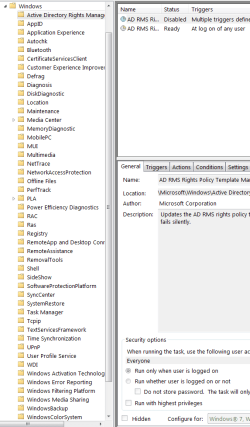
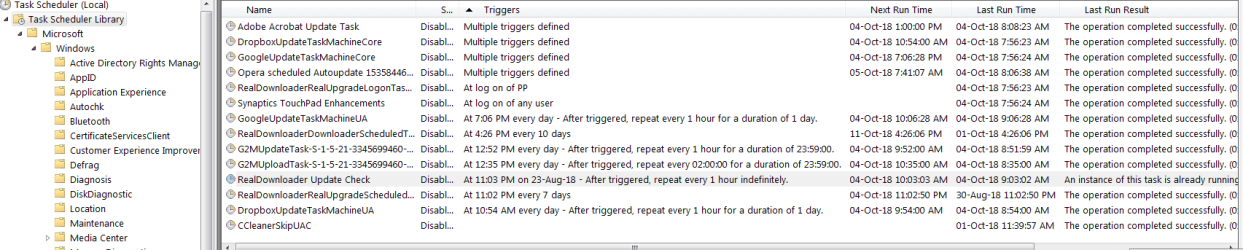
Attached is a screenshot of the scheduled tasks under 'Task Scheduler Library'. I'm not sure if this is the full list as the display window doesn't seem to have a way to scroll down

G2M is the GoToMeeting conferencing client.

I guess I could try disabling some of these scheduled tasks, but I am wondering what happens about getting essential updates to the various applications.

If I expand the Microsoft > Windows folders there are many scheduled Microsoft tasks. I have disabled some relating to Customer Experience Program (as per attached instructions) but I have no idea which others should (safely) be disabled.

I can't help feeling that there must be some tool which will tell me the task(s) or process(es) which are hogging the CPU so that I can target effectively, rather than disabling things more-or-less at random and hoping for the best.

There was the suggestion to use WinDirStat to find out more. I've installed this program, but it seems to be more about disc activity diagnosis rather than CPU. As mentioned in an earlier post, ProcessExplorer and ProcessHacker don't seem to show the cause :-(

Any thoughts on other diagnostic tools, or other steps to take, would be welcome.

Thanks
Paul
 

Attachments

My Computer My Computer

At a glance

Win 7 Pro 64 biti5 2.67 GHz8 GB
Computer type
Laptop
Computer Manufacturer/Model Number
Lenovo X201t
OS
Win 7 Pro 64 bit
CPU
i5 2.67 GHz
Memory
8 GB
Hard Drives
500 GB 2.5 inch
Browser
Chrome, Firefox, Opera
Further observation: when the CPU load jumps to 100%, usually the fan also speeds up instantly.

Just a thought: could this be a problem with the BIOS? (Seems unlikely as the computer has been OK for years and I don't think that the BIOS is prone to getting corrupted... But the investigations into Windows problems don't seem to be leading anywhere.)
 

My Computer My Computer

At a glance

Win 7 Pro 64 biti5 2.67 GHz8 GB
Computer type
Laptop
Computer Manufacturer/Model Number
Lenovo X201t
OS
Win 7 Pro 64 bit
CPU
i5 2.67 GHz
Memory
8 GB
Hard Drives
500 GB 2.5 inch
Browser
Chrome, Firefox, Opera
When the CPU goes to 100% it generates much more heat and then the fan speeds up to keep it cool. That is how it should be.
There are update tasks that are scheduled to do run many times a day. Set to run once a week.
Try to Disable all them to see what happens (open the task - Trigger tab - double click on the trigger and on the bottom there is a Enable box- un mark it

Please attach the images directly to the post. Use the paper clip- browse to the image file - upload
 

My Computers My Computers

  • At a glance

    Windows 7 HP 64i5 6600K - 800MHz to 4200MHz4+4G GSkill DDR4 3000IG - Intel 530
    Computer type
    PC/Desktop
    Computer Manufacturer/Model Number
    custom build
    OS
    Windows 7 HP 64
    CPU
    i5 6600K - 800MHz to 4200MHz
    Motherboard
    GA-Z170-HD3P
    Memory
    4+4G GSkill DDR4 3000
    Graphics Card(s)
    IG - Intel 530
    Monitor(s) Displays
    Samsung 226BW
    Screen Resolution
    1680x1050
    Hard Drives
    (1) -1 SM951 – 128GB M.2 AHCI PCIe SSD drive for Windows 7 and Lubuntu
    (2) -1 WD SATA 3 - 1T for Data
    (3) -1 WD SATA 3 - 1T for backup
    PSU
    Thermaltake 450W TR2 gold
    Keyboard
    Old and good Chicony mechanical keyboard
    Mouse
    Logitech mX performance - 9 buttons (had to disable some)
    Internet Speed
    500Mb/s
    Browser
    Firefox 64
    Other Info
    TinyWall firewall
  • At a glance

    Windows 7 Proi7-4500U 800MHz to 3.0GHz(4+4)G DDR3 1600IG intel 4400 + NVIDIA GeForce GT 745M
    Computer type
    Laptop
    System Manufacturer/Model Number
    Asus Q550LF
    OS
    Windows 7 Pro
    CPU
    i7-4500U 800MHz to 3.0GHz
    Motherboard
    Asus Q550LF
    Memory
    (4+4)G DDR3 1600
    Graphics Card(s)
    IG intel 4400 + NVIDIA GeForce GT 745M
    Sound Card
    Realtek
    Monitor(s) Displays
    LG Display LP156WF4-SPH1
    Screen Resolution
    1920 x 1080
    Hard Drives
    BX500 120G SSD for Windows and programs +
    1T HDD for data
    Internet Speed
    500 Mb/s
    Browser
    Firefox
    Other Info
    TinyWall firewall
To clarify, please: Are you talking about disabling all the Windows scheduled tasks? There are many of them (see attached image) and it will take a while to go through them and disable them all.

Also, I'm concerned that I may 'break' Windows and make the machine unusable if I disable too much that is core to the operation of the system.

In my thinking, I keep coming back to the concern that I haven't really diagnosed the problem in that the CPU jumps to 100% but ProcessExplorer and ProcessHacker do not show the task or process that is occupying the CPU. Isn't this a bit unusual - and is there some other diagnostic tool that will show what the CPU is so busy with?

Thanks
 

Attachments

  • Windows Schedduled Tasks.png
    Windows Schedduled Tasks.png
    25.3 KB · Views: 0

My Computer My Computer

At a glance

Win 7 Pro 64 biti5 2.67 GHz8 GB
Computer type
Laptop
Computer Manufacturer/Model Number
Lenovo X201t
OS
Win 7 Pro 64 bit
CPU
i5 2.67 GHz
Memory
8 GB
Hard Drives
500 GB 2.5 inch
Browser
Chrome, Firefox, Opera
By the way, I have disabled all the non-Microsoft scheduled tasks in the Task Scheduler Library (see screen shot).
 

Attachments

  • Task Scheduler Library - Tasks Disabled.png
    Task Scheduler Library - Tasks Disabled.png
    38.5 KB · Views: 4

My Computer My Computer

At a glance

Win 7 Pro 64 biti5 2.67 GHz8 GB
Computer type
Laptop
Computer Manufacturer/Model Number
Lenovo X201t
OS
Win 7 Pro 64 bit
CPU
i5 2.67 GHz
Memory
8 GB
Hard Drives
500 GB 2.5 inch
Browser
Chrome, Firefox, Opera
Just to add to something I mentioned in an earlier post:

The problem of 100% CPU often seems to be related to a legitimate task than suddenly starts receiving too much CPU time.

For example, earlier this evening I was running Chrome with ProcessExporeer and Windows Task Manager (Performance tab) running on another screen. Suddenly the CPU load went up to 100% in Win Task Manager and the CPU figure for Chrome in Process Explorer went shooting up to a high figure - one of the many Chrome Processes was at the top of the list. The machine slowed down, juddering cursor movement etc.

I went to the Processes Tab in Win Task manager and aborted all the Chrome processes and the CPU load then dropped down to a low figure - under 10%.

This happened to occur with Chrome this time, but I am pretty sure that I have seen it occur with other tasks or processes suddenly getting (or taking) an excessive amount of CPU resources when Chrome is not running. In other words, I don't think it is a problem with Chrome (though I am aware that it is a resource hog in normal use).

Something in Windows' system management seems to be sporadically boosting the CPu allocation to a running task or process, to the detriment of everything else - so I'm not sure that the problem is due to a rogue program or scheduled task (e.g. a program updater).

I'm a bit of a novice at this so I stand to be corrected - and any further help will be greatly appreciated as this problem is driving me a bit crazy.

Thanks
Paul
 

My Computer My Computer

At a glance

Win 7 Pro 64 biti5 2.67 GHz8 GB
Computer type
Laptop
Computer Manufacturer/Model Number
Lenovo X201t
OS
Win 7 Pro 64 bit
CPU
i5 2.67 GHz
Memory
8 GB
Hard Drives
500 GB 2.5 inch
Browser
Chrome, Firefox, Opera
I don't know why people like Chrome. It loads at startup, has high resources consumption and spy everything you do.

As you have disabled all tasks, chrome won't load at startup. Try to use another browser (even MS IE) to see if you get the issue.
 

My Computers My Computers

  • At a glance

    Windows 7 HP 64i5 6600K - 800MHz to 4200MHz4+4G GSkill DDR4 3000IG - Intel 530
    Computer type
    PC/Desktop
    Computer Manufacturer/Model Number
    custom build
    OS
    Windows 7 HP 64
    CPU
    i5 6600K - 800MHz to 4200MHz
    Motherboard
    GA-Z170-HD3P
    Memory
    4+4G GSkill DDR4 3000
    Graphics Card(s)
    IG - Intel 530
    Monitor(s) Displays
    Samsung 226BW
    Screen Resolution
    1680x1050
    Hard Drives
    (1) -1 SM951 – 128GB M.2 AHCI PCIe SSD drive for Windows 7 and Lubuntu
    (2) -1 WD SATA 3 - 1T for Data
    (3) -1 WD SATA 3 - 1T for backup
    PSU
    Thermaltake 450W TR2 gold
    Keyboard
    Old and good Chicony mechanical keyboard
    Mouse
    Logitech mX performance - 9 buttons (had to disable some)
    Internet Speed
    500Mb/s
    Browser
    Firefox 64
    Other Info
    TinyWall firewall
  • At a glance

    Windows 7 Proi7-4500U 800MHz to 3.0GHz(4+4)G DDR3 1600IG intel 4400 + NVIDIA GeForce GT 745M
    Computer type
    Laptop
    System Manufacturer/Model Number
    Asus Q550LF
    OS
    Windows 7 Pro
    CPU
    i7-4500U 800MHz to 3.0GHz
    Motherboard
    Asus Q550LF
    Memory
    (4+4)G DDR3 1600
    Graphics Card(s)
    IG intel 4400 + NVIDIA GeForce GT 745M
    Sound Card
    Realtek
    Monitor(s) Displays
    LG Display LP156WF4-SPH1
    Screen Resolution
    1920 x 1080
    Hard Drives
    BX500 120G SSD for Windows and programs +
    1T HDD for data
    Internet Speed
    500 Mb/s
    Browser
    Firefox
    Other Info
    TinyWall firewall
It still happens even when I'm using Firefox and not Chrome.


Is there a disgnostic tool which is better than ProcessExplorer or ProcessHacker which will give insight into what the CPU is busy doing?
 

My Computer My Computer

At a glance

Win 7 Pro 64 biti5 2.67 GHz8 GB
Computer type
Laptop
Computer Manufacturer/Model Number
Lenovo X201t
OS
Win 7 Pro 64 bit
CPU
i5 2.67 GHz
Memory
8 GB
Hard Drives
500 GB 2.5 inch
Browser
Chrome, Firefox, Opera
Sorry, can't think anything else to do.
 

My Computers My Computers

  • At a glance

    Windows 7 HP 64i5 6600K - 800MHz to 4200MHz4+4G GSkill DDR4 3000IG - Intel 530
    Computer type
    PC/Desktop
    Computer Manufacturer/Model Number
    custom build
    OS
    Windows 7 HP 64
    CPU
    i5 6600K - 800MHz to 4200MHz
    Motherboard
    GA-Z170-HD3P
    Memory
    4+4G GSkill DDR4 3000
    Graphics Card(s)
    IG - Intel 530
    Monitor(s) Displays
    Samsung 226BW
    Screen Resolution
    1680x1050
    Hard Drives
    (1) -1 SM951 – 128GB M.2 AHCI PCIe SSD drive for Windows 7 and Lubuntu
    (2) -1 WD SATA 3 - 1T for Data
    (3) -1 WD SATA 3 - 1T for backup
    PSU
    Thermaltake 450W TR2 gold
    Keyboard
    Old and good Chicony mechanical keyboard
    Mouse
    Logitech mX performance - 9 buttons (had to disable some)
    Internet Speed
    500Mb/s
    Browser
    Firefox 64
    Other Info
    TinyWall firewall
  • At a glance

    Windows 7 Proi7-4500U 800MHz to 3.0GHz(4+4)G DDR3 1600IG intel 4400 + NVIDIA GeForce GT 745M
    Computer type
    Laptop
    System Manufacturer/Model Number
    Asus Q550LF
    OS
    Windows 7 Pro
    CPU
    i7-4500U 800MHz to 3.0GHz
    Motherboard
    Asus Q550LF
    Memory
    (4+4)G DDR3 1600
    Graphics Card(s)
    IG intel 4400 + NVIDIA GeForce GT 745M
    Sound Card
    Realtek
    Monitor(s) Displays
    LG Display LP156WF4-SPH1
    Screen Resolution
    1920 x 1080
    Hard Drives
    BX500 120G SSD for Windows and programs +
    1T HDD for data
    Internet Speed
    500 Mb/s
    Browser
    Firefox
    Other Info
    TinyWall firewall

My Computer My Computer

At a glance

Win 10 x64, Linux Lite, Win 7 x64, BlackArch,...
Computer type
PC/Desktop
Computer Manufacturer/Model Number
HP Desktop & Compaq Laptop
OS
Win 10 x64, Linux Lite, Win 7 x64, BlackArch, & Kali
Hard Drives
Samsung 850 Pro 256Gb,
Hitachi HDD 1Tb,
Crucial MX SSD 250Gb
Segate 3Tb USB 3.0 Ext. Backup HDD
Internet Speed
150Mbps dn, 20Mbps up
Antivirus
Avast Free, Malwarebytes Anti-Exploit & Anti-Ransomware
Browser
Firefox, Chrome, Opera, & VPN

My Computer My Computer

At a glance

Windows 7 Ultimate x64
Computer type
PC/Desktop
OS
Windows 7 Ultimate x64
Can you please run Autoruns again and post the ARN file.
 

My Computer My Computer

At a glance

Windows 7 Ultimate x64
Computer type
PC/Desktop
OS
Windows 7 Ultimate x64
Back
Top