
svchost.exe in kav 8

algis87

New member
Local time
7:52 PM
Messages
27
Hello everyone, I have installed windows 7 RC 32 bit and kaspersky antivirus 8. Now I am getting these messages every few seconds, that svchost.exe file has been changed. Is anyone else getting these messages too? How do I get rid of these? Thanks in advance.
 

Attachments
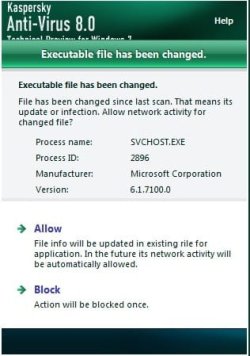
  • Untitled.jpg
    Untitled.jpg
    23.4 KB · Views: 209

My Computer My Computer

OS
Windows 7 x64 build 7600 RTM
CPU
Intel [email protected]
Motherboard
ASUS P7P55D-E
Memory
Kingston 4GB 1600MHz CL7
Graphics Card(s)
Asus 5830 + 9600gt
Monitor(s) Displays
Samsung syncmaster 931BF 19''
Screen Resolution
1024x1280
Hard Drives
WD 1TB 64MB
PSU
Chieftec 750w
Case
Thermaltake element s
Cooling
Prolimatech megahalems
Keyboard
Logitech G15
Mouse
Logitech G500
Internet Speed
100Mbps
No solutions so far I see, I will probably change my anti virus then.
Btw in task manager I saw, that svchost.exe is always doing some activity, and taking about 5-10% cpu, is this normal, there might be a reason why kav is showing those messages. In older windows 7 builds I was getting these messages too, but very rarely once a day or so, but now its like every 20 seconds. Can someone answer me why?
 

My Computer My Computer

OS
Windows 7 x64 build 7600 RTM
CPU
Intel [email protected]
Motherboard
ASUS P7P55D-E
Memory
Kingston 4GB 1600MHz CL7
Graphics Card(s)
Asus 5830 + 9600gt
Monitor(s) Displays
Samsung syncmaster 931BF 19''
Screen Resolution
1024x1280
Hard Drives
WD 1TB 64MB
PSU
Chieftec 750w
Case
Thermaltake element s
Cooling
Prolimatech megahalems
Keyboard
Logitech G15
Mouse
Logitech G500
Internet Speed
100Mbps
Download Process Explorer:
Process Explorer

Find out what process is using svchost.exe
 

My Computer My Computer

Computer type
PC/Desktop
Computer Manufacturer/Model Number
Bruce ... somewhere in his 40's
OS
Windows 7 Ultimate 32bit SP1
CPU
Intel(R) Core(TM)2 Quad CPU @ 2.40GHz, 2400 MHz
Motherboard
INTEL/D975XBX2
Memory
4 GB
Graphics Card(s)
ATI Radeon HD 2600 Pro
Monitor(s) Displays
Samsung SyncMaster 914v
Screen Resolution
1280 x 1024
Hard Drives
2/500GB each ... ST3500630AS ATA Device.
One is not connected
PSU
Rocketfish 700 W
Case
G.Skill Gigabyte Chassis
Keyboard
Standard PS/2 Keyboard
Mouse
Microsoft PS/2 Mouse
Internet Speed
DSL
Antivirus
Avira Internet Security
Browser
IE 11
Other Info
ATI HDMI Audio
from what i have seen the KAV beta did the same...
they were all good (i mean non malware related) svchosts (frequently use PE myself)
and so i dumped it...:p
follow Jacee's advice and see if there are any abnormalities in the service host (svchost.exe's)...
 

My Computer My Computer

Computer Manufacturer/Model Number
Tx2500z Tablet Pc/Homemade Server
OS
Windows 7 Ult x64(x2), HomePrem x32(x4), Server 08 (+VM), 08 R2 (VM) , SuSe 11.2 (VM), XP 32 (VM)
CPU
Turion X2 ultra (oh well came with laptop)/P4 @3.2 (yes P4)
Motherboard
IDK HP Motherboard / Intel DG965SS
Memory
OCZ Dual Channel 4GB kit/ 1gb Dual Channel
Graphics Card(s)
HD 3200 graphics /GMA x3100 (yay for intergrated!!)
Sound Card
Realtek HD Audio(mic working, well sort of)/Siig IC-70012
Monitor(s) Displays
built-in Hp 12" laptop screen/ Acer 19"
Screen Resolution
1280x800 /1440x900
Cooling
All Air Cooled
Mouse
Logi MX Rev. /MS Wheel Optical 1.1A /Logitech Optical Mouse
Internet Speed
College baby but its still routed through vpn to 1536k...
Other Info
love my wacom pen and pressure sensitivity...
wished it worked in 7, SUSE for that matter though
just remove it

Hi,

I have exactly the same problem with KAV8. As soon as it's installed every 3 or four seconds 2 or three times it complains about svchost. Adding it to trusted apps, exclusions, etc doesn't help. Disabling ProActive defense doesn't either. PE doesn't list any apps as calling it on that PID. I wonder if it will still complain if I deleted svchost? My advice is to save yourself some hassle and aggravation and just get something other than KAV, thats what I'm doing right now :)
 

My Computer My Computer

OS
Windows 7 RC7100
There is a way to remove the message, not too sure how it will affect the integrity of the Antivirus software, but to disable those annoying messages go into Settings>Anti-Hacker and Uncheck svchost and it should work no constant nagging, allows you to get some work done:)
 

My Computer My Computer

OS
Windows 7 RC
Back
Top