Solved svchost.exe (Local Service) eating my RAM!

MrDuck

New member
Local time
5:18 PM
Messages
36
Location
Suffolk
I have a vanilla Dell Vostro 270s with Intel i5 CPU, 8GB of RAM and Windows 7 Professional 64 bit. Add-ons are limited to IE10, Java, Flash, Zone Alarm Free Firewall, Microsoft Essentials A/V and Nero for DVD burning. I can also connect to a second (Windows XP) machine using remote desktop.

I thought this all worked well until I started experiencing massive slowdown which was corrected by rebooting. On investigation this is due to the RAM being used up over a period of about a week and the culprit is svchost.exe (Local Service). This instance of svchost.exe is associated with EventSystem, fdPHost, FontCache, netprofm, nsi, SstpSvc and WdiServiceHost. Beyond that I am stuck..

I believe others have had this sort of problem, but with variations, and I would appreciate any guidance as to what to do next.
 

My Computer My Computer

At a glance

Windows 7 Professional 64 bitIntel Core i5
Computer type
PC/Desktop
Computer Manufacturer/Model Number
Dell Vostro 270s
OS
Windows 7 Professional 64 bit
CPU
Intel Core i5
Hard Drives
SATA 500GB
Internet Speed
80mb/s
Antivirus
Microsoft Security Essentials
Browser
IE11
While Java probably has nothing to do with the issue, you might want to uninstall Java and see if you ever miss it. Java presents a security risk.

Perhaps there was an update to Zone Alarm Free Firewall that is causing a problem. You might try uninstalling it - just as a test.

You might try this scan:
http://www.sevenforums.com/tutorials/1538-sfc-scannow-command-system-file-checker.html

Perhaps:
http://www.sevenforums.com/tutorial...ation-conflicts-performing-clean-startup.html
Hopefully, you can see the memory climb without having to wait a week.
 

My Computer My Computer

At a glance

W7 Pro SP1 64biti78GBIntel HD Graphics
Computer type
Laptop
Computer Manufacturer/Model Number
Employer provided Dell Latitude
OS
W7 Pro SP1 64bit
CPU
i7
Memory
8GB
Graphics Card(s)
Intel HD Graphics
Hard Drives
crappy SSD
Antivirus
Employer mandated Symantec Endpoint Protection
Browser
Pale Moon 64bit, IE11 64bit & Chrome 64bit
Just a note to say that someone else reported a problem with svchost and the same set of services. For them the solution was either:

Update graphics card driver

or

Roll back graphics card driver to previous version.
 

My Computer My Computer

At a glance

Microsoft Windows 7 Home Premium 64-bit 7601 ...AMD C-60 APU with Radeon(tm) HD Graphics4.00 GBAMD Radeon HD 6290 Graphics
Computer type
Laptop
Computer Manufacturer/Model Number
ASUS
OS
Microsoft Windows 7 Home Premium 64-bit 7601 Multiprocessor Free Service Pack 1
CPU
AMD C-60 APU with Radeon(tm) HD Graphics
Motherboard
ASUSTeK COMPUTER INC. X501U
Memory
4.00 GB
Graphics Card(s)
AMD Radeon HD 6290 Graphics
Sound Card
(1) AMD High Definition Audio Device (2) Realtek High Defi
Screen Resolution
1366 x 768 x 32 bits (4294967296 colors) @ 60 Hz
Hard Drives
Hitachi HTS545050A7E380 SATA Disk Device
Antivirus
Comodo CIS & FW, SecureAplus App Whitelisting, Threatfire
Browser
Cyberfox 64bit, Opera 64bit, Airfox
Other Info
Spy-The-Spy, HitmanPro.Alert, Norton Connect Safe, MJRegWatcher, BitDefender TrafficLight, Voodoo Shield, Zemana AntiMalware
Thanks Callender. It's all very confusing. The Dell Update Utility tells me that my desktop is up to date, Windows Update offers me an optional Intel graphics driver update but if I try and install that it fails with an error message stating that a later driver is already installed (!), but Intel own update utility offered me a much updated driver which (with fingers and toes crossed) I have now installed. Time will tell, but thanks anyway for the suggestion. I did make a Restore Point first...
 

My Computer My Computer

At a glance

Windows 7 Professional 64 bitIntel Core i5
Computer type
PC/Desktop
Computer Manufacturer/Model Number
Dell Vostro 270s
OS
Windows 7 Professional 64 bit
CPU
Intel Core i5
Hard Drives
SATA 500GB
Internet Speed
80mb/s
Antivirus
Microsoft Security Essentials
Browser
IE11
That seems to have turned out well! Memory usage is now capped at under 3GB and svchost.exe (LocalService) has dropped way down the memory usage chart. I have also uninstalled Java as UNI's advice about it being unwanted these days is spot on. I just have 100MB+ of Intel Graphics bloatware cluttering up my hard disc...

It's very annoying that driver update info is so variable. I also have an AMD based HP ProBook which doesn't need a graphics update according to Windows, but does according to the ATI/Radeon utility. I guess I shall just have to bite the bullet and update that as well, but I just wish I understood why the update is required was doing as in this case there isn't a memory leak.

Many thanks to you both for your focussed and accurate advice.
 

My Computer My Computer

At a glance

Windows 7 Professional 64 bitIntel Core i5
Computer type
PC/Desktop
Computer Manufacturer/Model Number
Dell Vostro 270s
OS
Windows 7 Professional 64 bit
CPU
Intel Core i5
Hard Drives
SATA 500GB
Internet Speed
80mb/s
Antivirus
Microsoft Security Essentials
Browser
IE11

My Computer My Computer

At a glance

Microsoft Windows 7 Home Premium 64-bit Servi...Intel(R) Core(TM) i3 CPU M 330 @ 2.13GHz8 GB DDR3Intel(R) HD Graphics
Computer type
Laptop
Computer Manufacturer/Model Number
Hewlett-Packard/G62-107SA Notebook
OS
Microsoft Windows 7 Home Premium 64-bit Service Pack 1
CPU
Intel(R) Core(TM) i3 CPU M 330 @ 2.13GHz
Motherboard
Hewlett-Packard 1425
Memory
8 GB DDR3
Graphics Card(s)
Intel(R) HD Graphics
Sound Card
Realtek High Definition Audio
Monitor(s) Displays
Builtin
Screen Resolution
1366 x 768 x 32 bits (4294967296 colors) @ 60 Hz
Hard Drives
250 GB SATA Hard Disk Drive 7200 rpm
2TB Seagate GoFlex USB 2 Drive
1TB Iomega Prestige USB 2 Drive
1.5TB Iomega Prestige USB 2 Drive (Samsung)
2TB WD MyBook Live NAS.
Mouse
Logitech Anywhere MX
Internet Speed
152 Mbs download 10 Mbs upload
Antivirus
Norton 360
Browser
Chrome
If that doesn't fix the problem this worked for me. https://support.microsoft.com/en-us/kb/2889748

If I am right - attempting to install that hotfix on a machine that doesn't need it should result in the hotfix failing to install. At least that's what I hope would happen!

Re: Driver updates. If that seems to have fixed the problem stick with the driver you've got for the time being. The latest driver may have some issues on some machines that need to be resolved by the manufacturer. What you need is a driver that works and you don't always need the most up to date driver unless it offers new features that you really need to use.
 

My Computer My Computer

At a glance

Microsoft Windows 7 Home Premium 64-bit 7601 ...AMD C-60 APU with Radeon(tm) HD Graphics4.00 GBAMD Radeon HD 6290 Graphics
Computer type
Laptop
Computer Manufacturer/Model Number
ASUS
OS
Microsoft Windows 7 Home Premium 64-bit 7601 Multiprocessor Free Service Pack 1
CPU
AMD C-60 APU with Radeon(tm) HD Graphics
Motherboard
ASUSTeK COMPUTER INC. X501U
Memory
4.00 GB
Graphics Card(s)
AMD Radeon HD 6290 Graphics
Sound Card
(1) AMD High Definition Audio Device (2) Realtek High Defi
Screen Resolution
1366 x 768 x 32 bits (4294967296 colors) @ 60 Hz
Hard Drives
Hitachi HTS545050A7E380 SATA Disk Device
Antivirus
Comodo CIS & FW, SecureAplus App Whitelisting, Threatfire
Browser
Cyberfox 64bit, Opera 64bit, Airfox
Other Info
Spy-The-Spy, HitmanPro.Alert, Norton Connect Safe, MJRegWatcher, BitDefender TrafficLight, Voodoo Shield, Zemana AntiMalware
After further testing I still have an svchost.exe (LocalService) memory leak but at a much lower rate, but one that increases exponentially with time (up to 2GB yesterday before I rebooted). I will try the further suggestions but don't want to apply a hotfix I don't need (!) so will tread carefully and feedback what I find.
 

My Computer My Computer

At a glance

Windows 7 Professional 64 bitIntel Core i5
Computer type
PC/Desktop
Computer Manufacturer/Model Number
Dell Vostro 270s
OS
Windows 7 Professional 64 bit
CPU
Intel Core i5
Hard Drives
SATA 500GB
Internet Speed
80mb/s
Antivirus
Microsoft Security Essentials
Browser
IE11
I've had no problem with it so far.
 

My Computer My Computer

At a glance

Microsoft Windows 7 Home Premium 64-bit Servi...Intel(R) Core(TM) i3 CPU M 330 @ 2.13GHz8 GB DDR3Intel(R) HD Graphics
Computer type
Laptop
Computer Manufacturer/Model Number
Hewlett-Packard/G62-107SA Notebook
OS
Microsoft Windows 7 Home Premium 64-bit Service Pack 1
CPU
Intel(R) Core(TM) i3 CPU M 330 @ 2.13GHz
Motherboard
Hewlett-Packard 1425
Memory
8 GB DDR3
Graphics Card(s)
Intel(R) HD Graphics
Sound Card
Realtek High Definition Audio
Monitor(s) Displays
Builtin
Screen Resolution
1366 x 768 x 32 bits (4294967296 colors) @ 60 Hz
Hard Drives
250 GB SATA Hard Disk Drive 7200 rpm
2TB Seagate GoFlex USB 2 Drive
1TB Iomega Prestige USB 2 Drive
1.5TB Iomega Prestige USB 2 Drive (Samsung)
2TB WD MyBook Live NAS.
Mouse
Logitech Anywhere MX
Internet Speed
152 Mbs download 10 Mbs upload
Antivirus
Norton 360
Browser
Chrome
Is it the same set of services running under the problematic instance of svchost.exe? I'm just asking because many users are experiencing issues with Windows Update service but if it's not listed then it can't be the problem on your machine.

RE: RAM Usage.

Take a look at RAMMap: https://technet.microsoft.com/en-us/library/ff700229.aspx

It's portable. On the "Use Counts" tab sort by "Active" and see what shows up at the top of the list.

Also check "Driver Locked" as a high figure could indicate a driver problem.

See if anything shows up in the "Bad" tab.

Lastly check the "File Summary" tab and sort by "Active" and see what is at the top.
 

My Computer My Computer

At a glance

Microsoft Windows 7 Home Premium 64-bit 7601 ...AMD C-60 APU with Radeon(tm) HD Graphics4.00 GBAMD Radeon HD 6290 Graphics
Computer type
Laptop
Computer Manufacturer/Model Number
ASUS
OS
Microsoft Windows 7 Home Premium 64-bit 7601 Multiprocessor Free Service Pack 1
CPU
AMD C-60 APU with Radeon(tm) HD Graphics
Motherboard
ASUSTeK COMPUTER INC. X501U
Memory
4.00 GB
Graphics Card(s)
AMD Radeon HD 6290 Graphics
Sound Card
(1) AMD High Definition Audio Device (2) Realtek High Defi
Screen Resolution
1366 x 768 x 32 bits (4294967296 colors) @ 60 Hz
Hard Drives
Hitachi HTS545050A7E380 SATA Disk Device
Antivirus
Comodo CIS & FW, SecureAplus App Whitelisting, Threatfire
Browser
Cyberfox 64bit, Opera 64bit, Airfox
Other Info
Spy-The-Spy, HitmanPro.Alert, Norton Connect Safe, MJRegWatcher, BitDefender TrafficLight, Voodoo Shield, Zemana AntiMalware
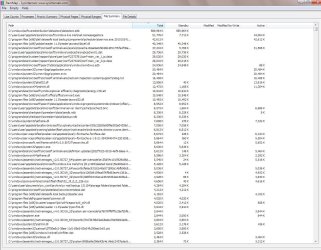
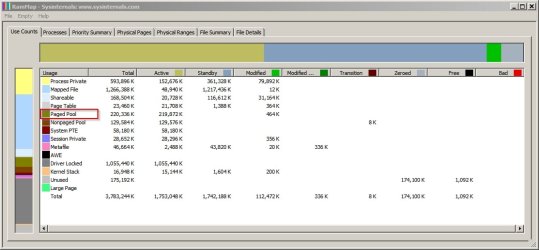
Well I tried using RAMMap and my results are attached. But I'm not clear what they may mean. Right nor svchost.exe (LocalService) has crept up to 498MB after about 30 hours since rebooting, and growth is accelerating (it's some sort of exponential process).

I've tried disabling the Dell utilities bit this made no difference and virtually all that is left is Microsoft stuff. Can there be threads though which are kicked off from within the Registry that don't show in the Services or Startup tabs of msconfig?

I haven't tried the Hot Fix yet, but I guess I could if I made a restore Point first in case it goes wrong!
 

Attachments

  • Use Counts 151027.jpg
    Use Counts 151027.jpg
    83.2 KB · Views: 3
  • File Summary 151027.jpg
    File Summary 151027.jpg
    197.4 KB · Views: 41

My Computer My Computer

At a glance

Windows 7 Professional 64 bitIntel Core i5
Computer type
PC/Desktop
Computer Manufacturer/Model Number
Dell Vostro 270s
OS
Windows 7 Professional 64 bit
CPU
Intel Core i5
Hard Drives
SATA 500GB
Internet Speed
80mb/s
Antivirus
Microsoft Security Essentials
Browser
IE11
Okay you've got a new problem with a different service. It's is not the same instance of svchost running the same services as shown in your original post.

Now you have a problem with windows updates and svchost.exe (netsvcs)

If you right click on the problematic svchost in task manager and hover over "Go to service you should see "windows update" listed as one of the services.

The fix for that is not easy at all although you might see some menbers posting a solution where installing a certain version of Windows Update client worked for them. Really it requires a full removal of all versions of Windows Update Client followed by a manual cleanup of certain files and folders, running a few command lines and running advanced disk cleanup (including windows updates cleanup) and even then you might need to run through the fixes a few times and it can be hard to sort out.

I know this because I had the same problem several times over the last 6 months and each time I fixed it the problem eventually returned. Currently my machine runs okay averaging about 1.7GB RAM usage rising to a maximum of 2.2GB when runiing a windows update check.

Note: Your peak usaage indicates a problem reads/ writes to datastore.edb which is used when checking for windows updates. I do not see any driver problem when I look at your screenshots.


EDIT:

Okay ignore the above as it is not correct. Please post a screenshot like the one you posted here:

374573d1445969478-svchost-exe-local-service-eating-my-ram-file-summary-151027.jpg


But sort by "Active" tab (higheset to lowest) when you experience the high RAM usage issue so we can see what is at the top of the list. Thanks.
 
Last edited:

My Computer My Computer

At a glance

Microsoft Windows 7 Home Premium 64-bit 7601 ...AMD C-60 APU with Radeon(tm) HD Graphics4.00 GBAMD Radeon HD 6290 Graphics
Computer type
Laptop
Computer Manufacturer/Model Number
ASUS
OS
Microsoft Windows 7 Home Premium 64-bit 7601 Multiprocessor Free Service Pack 1
CPU
AMD C-60 APU with Radeon(tm) HD Graphics
Motherboard
ASUSTeK COMPUTER INC. X501U
Memory
4.00 GB
Graphics Card(s)
AMD Radeon HD 6290 Graphics
Sound Card
(1) AMD High Definition Audio Device (2) Realtek High Defi
Screen Resolution
1366 x 768 x 32 bits (4294967296 colors) @ 60 Hz
Hard Drives
Hitachi HTS545050A7E380 SATA Disk Device
Antivirus
Comodo CIS & FW, SecureAplus App Whitelisting, Threatfire
Browser
Cyberfox 64bit, Opera 64bit, Airfox
Other Info
Spy-The-Spy, HitmanPro.Alert, Norton Connect Safe, MJRegWatcher, BitDefender TrafficLight, Voodoo Shield, Zemana AntiMalware
Thanks for your continued interest. I think this is what you are after...

svchosts.exe (LocalService) now up to 768Mb!
 

Attachments

  • File Summary 151028.jpg
    File Summary 151028.jpg
    219.5 KB · Views: 2

My Computer My Computer

At a glance

Windows 7 Professional 64 bitIntel Core i5
Computer type
PC/Desktop
Computer Manufacturer/Model Number
Dell Vostro 270s
OS
Windows 7 Professional 64 bit
CPU
Intel Core i5
Hard Drives
SATA 500GB
Internet Speed
80mb/s
Antivirus
Microsoft Security Essentials
Browser
IE11
Okay thanks. Your screenshot doesn't show the problem that I suspected you might have. I noticed from your earlier screenshot that the most unusual thing that stands out is your "paged pool" memory usage. It does look way too high. How to track down the culprit and fix it isn't something that I am able to deal with but maybe it will give other members some ideas.

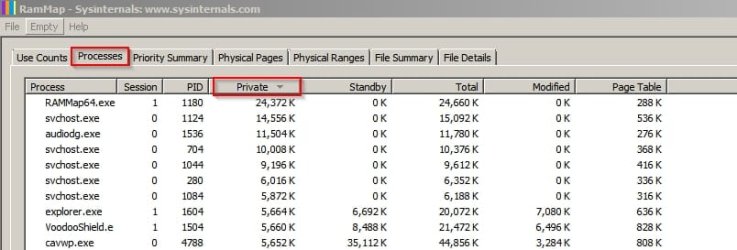
Also "Process Private" seems to be a little on the high side so what do you see if you switch to the "Processes" tab and sort by "Private" - highest to lowest.

For comparison screenshots from my machine.

RamMap1.jpg

RamMap2.jpg

Also can you state which services are running under your problematic svchost instance?
 
Last edited:

My Computer My Computer

At a glance

Microsoft Windows 7 Home Premium 64-bit 7601 ...AMD C-60 APU with Radeon(tm) HD Graphics4.00 GBAMD Radeon HD 6290 Graphics
Computer type
Laptop
Computer Manufacturer/Model Number
ASUS
OS
Microsoft Windows 7 Home Premium 64-bit 7601 Multiprocessor Free Service Pack 1
CPU
AMD C-60 APU with Radeon(tm) HD Graphics
Motherboard
ASUSTeK COMPUTER INC. X501U
Memory
4.00 GB
Graphics Card(s)
AMD Radeon HD 6290 Graphics
Sound Card
(1) AMD High Definition Audio Device (2) Realtek High Defi
Screen Resolution
1366 x 768 x 32 bits (4294967296 colors) @ 60 Hz
Hard Drives
Hitachi HTS545050A7E380 SATA Disk Device
Antivirus
Comodo CIS & FW, SecureAplus App Whitelisting, Threatfire
Browser
Cyberfox 64bit, Opera 64bit, Airfox
Other Info
Spy-The-Spy, HitmanPro.Alert, Norton Connect Safe, MJRegWatcher, BitDefender TrafficLight, Voodoo Shield, Zemana AntiMalware
Thanks for the note Callender. but please could you remind me of the easiest way of checking the services running under the svchost.exe process.
 

My Computer My Computer

At a glance

Windows 7 Professional 64 bitIntel Core i5
Computer type
PC/Desktop
Computer Manufacturer/Model Number
Dell Vostro 270s
OS
Windows 7 Professional 64 bit
CPU
Intel Core i5
Hard Drives
SATA 500GB
Internet Speed
80mb/s
Antivirus
Microsoft Security Essentials
Browser
IE11
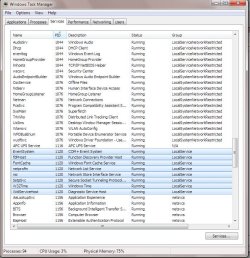
Well I found out how to use Task Manager to split out the services and attach screen shots of the svchost.exe processes running, and (highlighted in blue) the Services running under svchost.exe (Local Service) (PID1120). I hope this helps.

On the Processes screen I note that STService.exe *32 is using nearly 12,000 handles. Is this normal? Very little is actually happening on the machine as I write...
 

Attachments

  • Processes 151028.jpg
    Processes 151028.jpg
    169.3 KB · Views: 4
  • Services 151028.jpg
    Services 151028.jpg
    133.4 KB · Views: 0

My Computer My Computer

At a glance

Windows 7 Professional 64 bitIntel Core i5
Computer type
PC/Desktop
Computer Manufacturer/Model Number
Dell Vostro 270s
OS
Windows 7 Professional 64 bit
CPU
Intel Core i5
Hard Drives
SATA 500GB
Internet Speed
80mb/s
Antivirus
Microsoft Security Essentials
Browser
IE11
Thanks for your last screenshot. It's the same set of services as in your first post. All I can really ask is did you somehow update your graphics card driver again? Maybe windows update installed a driver update. Do you have Windows Updates configured like this?

Change settings.jpg

RE: STService.exe

All I can find out is that it seems to be related to Dell DataSafe backup/recovery software. If you don't make use of it or if you use something else for backup then disable it.

See: Safely Disable Stservice.exe Process In Windows 7 - Software Hangout - MSFN Forum

However I believe that you would need to stop these processes:

Toaster.exe
STService.exe

Then uninstall Dell Datasafe. It's up to you if you want to try that as I am not familiar with this software.
 

My Computer My Computer

At a glance

Microsoft Windows 7 Home Premium 64-bit 7601 ...AMD C-60 APU with Radeon(tm) HD Graphics4.00 GBAMD Radeon HD 6290 Graphics
Computer type
Laptop
Computer Manufacturer/Model Number
ASUS
OS
Microsoft Windows 7 Home Premium 64-bit 7601 Multiprocessor Free Service Pack 1
CPU
AMD C-60 APU with Radeon(tm) HD Graphics
Motherboard
ASUSTeK COMPUTER INC. X501U
Memory
4.00 GB
Graphics Card(s)
AMD Radeon HD 6290 Graphics
Sound Card
(1) AMD High Definition Audio Device (2) Realtek High Defi
Screen Resolution
1366 x 768 x 32 bits (4294967296 colors) @ 60 Hz
Hard Drives
Hitachi HTS545050A7E380 SATA Disk Device
Antivirus
Comodo CIS & FW, SecureAplus App Whitelisting, Threatfire
Browser
Cyberfox 64bit, Opera 64bit, Airfox
Other Info
Spy-The-Spy, HitmanPro.Alert, Norton Connect Safe, MJRegWatcher, BitDefender TrafficLight, Voodoo Shield, Zemana AntiMalware
Thanks Callender for the continued support. I am confident I still have the latest graphics driver. I believe (but have yet to completely analyse) that the growth of svchost.exe (LocalService) is some sort of exponential so after the driver update there seemed to be a radical improvement, but after time the rate of memory eating increases and I shall need to reboot my machine today to stop it running out of RAM as svchost.exe is now up to 1.5GB.

I think that all this trouble started after I updated to IE11 a couple of months back as the machine was highly stable before. All seemed to be well at first but after a week or so the browser virtually stopped and was giving error messages. On reflection this must have been due to the machine running of RAM, but I didn't realise that at the time and reverted to IE10. Unfortunately the memory eating defect has remained.

I'm now thinking of applying one or more of the various HotFixes that MS offer but that's really out of desperation, as otherwise I feel a complete rebuild coming on which is not good news.
 

My Computer My Computer

At a glance

Windows 7 Professional 64 bitIntel Core i5
Computer type
PC/Desktop
Computer Manufacturer/Model Number
Dell Vostro 270s
OS
Windows 7 Professional 64 bit
CPU
Intel Core i5
Hard Drives
SATA 500GB
Internet Speed
80mb/s
Antivirus
Microsoft Security Essentials
Browser
IE11
I've just noticed rather interestingly that the process using the most active RAM in your screenshot from Post #13 in this thread shows Dell Datasafe Backup log (under STSservice) is using the most RAM. It doesn't appear to be very high RAM usage but as you say with 12000 open handles for the service it could be a problem.

RE: Internet Explorer issues. Have you tried a full reset of IE yet? I have to confess that I'm not much of an expert on IE as I rarely use it.

Reset IE:

Control Panel> Internet Options> Advanced Reset

Reset IE.jpg

After a reset you need to go to Control Panel> Internet Options> Programs> Manage Add-Ons and re-renable any that you still use.

It might also be worth taking a look at the tutorial by Brink here:

How to Uninstall IE11 in Windows 7 to Restore Previous Version of Internet Explorer

Note: Windows Update may attempt to download IE11 again if you have configured it to automatically download updates.

RE: Rebuild. Personally I find it best to create weekly system image backups and then if a hard to fix problem occurs I simply make an image backup of my current windows partition and restore the working backup image. Then copy any changed or missing personal files in certain directories from the backup I made to the restored partiton.
 

My Computer My Computer

At a glance

Microsoft Windows 7 Home Premium 64-bit 7601 ...AMD C-60 APU with Radeon(tm) HD Graphics4.00 GBAMD Radeon HD 6290 Graphics
Computer type
Laptop
Computer Manufacturer/Model Number
ASUS
OS
Microsoft Windows 7 Home Premium 64-bit 7601 Multiprocessor Free Service Pack 1
CPU
AMD C-60 APU with Radeon(tm) HD Graphics
Motherboard
ASUSTeK COMPUTER INC. X501U
Memory
4.00 GB
Graphics Card(s)
AMD Radeon HD 6290 Graphics
Sound Card
(1) AMD High Definition Audio Device (2) Realtek High Defi
Screen Resolution
1366 x 768 x 32 bits (4294967296 colors) @ 60 Hz
Hard Drives
Hitachi HTS545050A7E380 SATA Disk Device
Antivirus
Comodo CIS & FW, SecureAplus App Whitelisting, Threatfire
Browser
Cyberfox 64bit, Opera 64bit, Airfox
Other Info
Spy-The-Spy, HitmanPro.Alert, Norton Connect Safe, MJRegWatcher, BitDefender TrafficLight, Voodoo Shield, Zemana AntiMalware
Hello Callender. In response to your various suggestions:

1. I tried disabling the Dell applications but it made no difference.

2. There is a huge amount of info on the internet about the nsi service leaking memory, and it seems almost certain that this is the service running under svchost.exe (LocalService) that is causing my problem. The exponential nature of the memory leak is also mentioned so it all fits together. Some people have found rewinding to an early version of IE to be solution (e.g. Massive svchost.exe memory leak w/ nsi windows 7 - Tech Support Forum) but I don't think I can get back to an earlier version than IE10 on my build, as IE10 is not shown in the Uninstall list via Control Panel.

3. I used to do image backups with XP but unfortunately the tool I used (a Ghost variant) did not work with W7. What tool do you use, please?

Now I know that I am very much not alone I will keep researching. This ten page thread seems pretty relevant: nsi memory leaks fixed yet? - Microsoft Community so maybe a Hotfix is the best way forward.

Kind regards
 

My Computer My Computer

At a glance

Windows 7 Professional 64 bitIntel Core i5
Computer type
PC/Desktop
Computer Manufacturer/Model Number
Dell Vostro 270s
OS
Windows 7 Professional 64 bit
CPU
Intel Core i5
Hard Drives
SATA 500GB
Internet Speed
80mb/s
Antivirus
Microsoft Security Essentials
Browser
IE11
Back
Top