svchost.exe (netsvcs) is always downloading something

Local time
9:53 PM
Messages
64
Location
Jakarta
im running build 7100 fresh install. help, i need to shut this thing down.
 

My Computer My Computer

At a glance

Windows 7 build 7100, XP SP3QX6850Patriot 4GB Viper IIASUS HD4890
Computer Manufacturer/Model Number
Desktop
OS
Windows 7 build 7100, XP SP3
CPU
QX6850
Motherboard
DFI LANParty UT P45 T3RS
Memory
Patriot 4GB Viper II
Graphics Card(s)
ASUS HD4890
Monitor(s) Displays
Asus LS201 LCD 20"
Hard Drives
Hitachi 160GB x2
PSU
CoolerMaster Real Power 850w
Case
Thermaltake Armor
Internet Speed
768kbps DSL
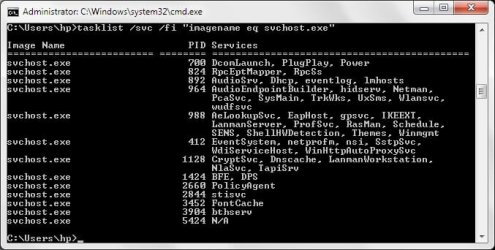
Open a command prompt and type;
tasklist /svc /fi "imagename eq svchost.exe"
From there you should be able to determine by the PID which service is the culprit.
Open up taskmgr and under the services tab, find the corresponding PID and shut her down.
Hope this helped :D
 

My Computer My Computer

At a glance

Windows 7 Ultimate x64AMD Turion(tm) 64 X2 Mobile Technology TL-563GB Nanya PC2-6400 DDR2-SDRAM SO-DIM (400MHz)NVIDIA GeForce Go 7600 256MB GDDR3 SDRAM
Computer Manufacturer/Model Number
HP Touchsmart IQ771.uk
OS
Windows 7 Ultimate x64
CPU
AMD Turion(tm) 64 X2 Mobile Technology TL-56
Motherboard
ASUS Pheonix
Memory
3GB Nanya PC2-6400 DDR2-SDRAM SO-DIM (400MHz)
Graphics Card(s)
NVIDIA GeForce Go 7600 256MB GDDR3 SDRAM
Sound Card
High Definition Intergrated NVIDIA MCP51
Monitor(s) Displays
46" Sony Bravia HDTV
Screen Resolution
1600x1200
Hard Drives
1.5TB Samsug
320GB Seagate ST3320820AS - SATA 3Gb/s 8MB
500GB Maxtor Basics STM305003EHD301-RK
Internet Speed
↓6.32 Mb/s ↑0.35 Mb/s ↔26ms
Other Info
BIOS - American Megatrends Inc. 5.07
Ethernet Port - NVIDIA nForce 10/100/1000 Mbps
DVD Drive - TSSTcorp DVDR/RW TS-T632L
thanks, it's annoying no more
 

My Computer My Computer

At a glance

Windows 7 build 7100, XP SP3QX6850Patriot 4GB Viper IIASUS HD4890
Computer Manufacturer/Model Number
Desktop
OS
Windows 7 build 7100, XP SP3
CPU
QX6850
Motherboard
DFI LANParty UT P45 T3RS
Memory
Patriot 4GB Viper II
Graphics Card(s)
ASUS HD4890
Monitor(s) Displays
Asus LS201 LCD 20"
Hard Drives
Hitachi 160GB x2
PSU
CoolerMaster Real Power 850w
Case
Thermaltake Armor
Internet Speed
768kbps DSL
Julio Andretti said:
thanks, it's annoying no more
You're welcome Julio :D out of interest what was the service bothering you?
 

My Computer My Computer

At a glance

Windows 7 Ultimate x64AMD Turion(tm) 64 X2 Mobile Technology TL-563GB Nanya PC2-6400 DDR2-SDRAM SO-DIM (400MHz)NVIDIA GeForce Go 7600 256MB GDDR3 SDRAM
Computer Manufacturer/Model Number
HP Touchsmart IQ771.uk
OS
Windows 7 Ultimate x64
CPU
AMD Turion(tm) 64 X2 Mobile Technology TL-56
Motherboard
ASUS Pheonix
Memory
3GB Nanya PC2-6400 DDR2-SDRAM SO-DIM (400MHz)
Graphics Card(s)
NVIDIA GeForce Go 7600 256MB GDDR3 SDRAM
Sound Card
High Definition Intergrated NVIDIA MCP51
Monitor(s) Displays
46" Sony Bravia HDTV
Screen Resolution
1600x1200
Hard Drives
1.5TB Samsug
320GB Seagate ST3320820AS - SATA 3Gb/s 8MB
500GB Maxtor Basics STM305003EHD301-RK
Internet Speed
↓6.32 Mb/s ↑0.35 Mb/s ↔26ms
Other Info
BIOS - American Megatrends Inc. 5.07
Ethernet Port - NVIDIA nForce 10/100/1000 Mbps
DVD Drive - TSSTcorp DVDR/RW TS-T632L
i have the same problem but there r so many services with the same pid.
can i shut them down one by one??
Julio which one was the bad service?


edit: found it. service name: BITS
 
Last edited:

My Computer My Computer

At a glance

Windows 7 x64
OS
Windows 7 x64
I have a similar issue.

After reading this thread I ended the svc.exe that was the one downloading something constantly. I had already identified it by matching it by the number of threads it was using because I never knew what the PIDs were before, so thank you for that information first off.

But my problem is that it started up running again with a different PID and is continuing to download at about 120kb/s which is the maximum speed of my internet.

This worries me because I don't feel that my computer should be downloading something like this without telling me, and it is using up all my available bandwidth so my whole internet usage is being slowed down.

Does anyone know what is going on here? Should I be worried? Or is Windows just doing a background update of some kind?
 

My Computer My Computer

At a glance

Windows 7 Home Premium 64bitCore i5-750 (2.67Ghz Quad-core)Kingston 4Gb DDR3EVGA GeForce GTX 460 (768mb DDR5)
OS
Windows 7 Home Premium 64bit
CPU
Core i5-750 (2.67Ghz Quad-core)
Motherboard
Asus P7H55-M LX
Memory
Kingston 4Gb DDR3
Graphics Card(s)
EVGA GeForce GTX 460 (768mb DDR5)
Sound Card
N/A (Intergrated Motherboard Audio)
Monitor(s) Displays
LG TV/Monitor (1440x900 @ 50Hz)
Hard Drives
WD Caviar Green 1Tb (Internal)
iomega 1Tb (External)
PSU
550 Watt
Case
Antec Two-Hundred
Cooling
Stock
Keyboard
Microsoft Sidewinder x6
Mouse
HP Wireless Comfort Mouse
Internet Speed
126Kb/s Download - 124Kb/s Upload
stop and deactivate the service called BITS not the .exe
(on my german windows the service is named: "Intelligenter Hintergrundübertragungsdienst"
so maybe then shown name is like: intelligent backroundtransferservice or so ^^ )

do u know where to find the services??
 

My Computer My Computer

At a glance

Windows 7 x64
OS
Windows 7 x64
Thank you for your quick response. I do not know how to find the service, I am not entirely sure as to what that means actually.
I'm no computer pro, I'm only 17, I just learn as I go, haha, and I've never had a problem like this before.
I've been reading some stuff though, and it seems to say that this "svchost.eve (netsvcs)" as it shows up in my resource manager is a virus, some kind of trojan or something.


Edit: I figured out what you meant by services, and I stopped the service, but I do not know how to deactivate it.
When I looked into it in more detail it seemed to say that it's a "Background Information Transfer System" and that it is used by Windows in updating, so is this really something I want to stop from running?
I'm very confused as to whether it is good or bad at this point.. :(
 

My Computer My Computer

At a glance

Windows 7 Home Premium 64bitCore i5-750 (2.67Ghz Quad-core)Kingston 4Gb DDR3EVGA GeForce GTX 460 (768mb DDR5)
OS
Windows 7 Home Premium 64bit
CPU
Core i5-750 (2.67Ghz Quad-core)
Motherboard
Asus P7H55-M LX
Memory
Kingston 4Gb DDR3
Graphics Card(s)
EVGA GeForce GTX 460 (768mb DDR5)
Sound Card
N/A (Intergrated Motherboard Audio)
Monitor(s) Displays
LG TV/Monitor (1440x900 @ 50Hz)
Hard Drives
WD Caviar Green 1Tb (Internal)
iomega 1Tb (External)
PSU
550 Watt
Case
Antec Two-Hundred
Cooling
Stock
Keyboard
Microsoft Sidewinder x6
Mouse
HP Wireless Comfort Mouse
Internet Speed
126Kb/s Download - 124Kb/s Upload
I think I found an easy way to stop this from happening... I had the same problem, and was sure there wasn't a virus or malware problem in my computer.

Take a look to make sure that your computer isn't sharing it's internet connection. You can do this by going into network and sharing center, managing or changing your adapter settings, then click on your connection's properties. There will be a tab for Sharing in the properties, if the internet connection sharing is checked, uncheck it.

Basically ICS is for situations where your computer acts as a router for other computers on your network (i.e. your computer is connected directly to the modem for internet connection, and other computers connect to your computer in order to get to the internet conncection). Most home networks are set up so that a router will take care of all of this, so you don't need to have it checked.

When it is checked, it means that Windows is constantly looking to see if anyone wants to connect to the internet through that computer.


Hope this helps someone
 

My Computer My Computer

At a glance

Windows 7 Home Edition 64bit
OS
Windows 7 Home Edition 64bit
I attempted to follow the instructions above to stop the offending service. tasklist produced a list of 12 entries, some with quite a few names associated with a give PID. There were no clue there, that I could recognize, about what might be causing the constant downloading activity.

Using Task Manager I located BITS in the list of services. “Access Denied” was the result when I attempted to stop it. I attempted to stop many of the services tasklist associated with svchost.exe. I attempted to stop other services whose descriptions seemed to suggest they are probably not critical. The system protected all.

Eventually I managed to stop one, name unfortunately forgotten in an immediate distraction. When I stopped it there was a message bubble from the notification area. I think it said something like “Windows Security Center deactivated” but like those message always do, it immediately evaporated without a trace.

The distraction was that I spent some time trying to find out what had just happened. This produced nothing; there isn’t a Windows Security Center in Win7 and nothing in the Activity Center revealed a deficiency I could recognize.

Anyway, back at the Task Manager services list, I tried a few more stops, again being rebuffed with “Access Denied” every time. Eventually I tried BITS again and this time it did stop. The download traffic immediately stopped. I was able to use the internet connection for myself.

By and by I rebooted the machine. Everything was then back to as before (with the possible exception of whatever it was that produced that brief message in the notification area). Downloading, of who knows what, was constant as long as the modem was connected to the internet. There were 12 PIDs listed for svchost.exe. 14 other services had the same PID as BITS. None could be stopped.

Is there some other way, some effective way to make services stop? Either BITS was responsible or some coincidence occurred, but managing to stop it that one time had no lasting effect. Probably something else is controlling it. that is what needs to be discovered and remedied, but how can that be done?

 

My Computer My Computer

At a glance

Win 7 Home Premium 64 bit
OS
Win 7 Home Premium 64 bit
I am experiencing exactly the same problem as AndyH W7F with the BITS service the apparent culprit. As with Andy I can stop the service and the problem goes away only to return again the next time the machine is restarted.
Can anybody help ?
 

My Computer My Computer

At a glance

Windows 7 HomeIntel i52GB?
Computer Manufacturer/Model Number
?
OS
Windows 7 Home
CPU
Intel i5
Motherboard
?
Memory
2GB
Graphics Card(s)
?
Sound Card
?
Monitor(s) Displays
?
Hard Drives
500GB
PSU
?
Case
tower
Cooling
fan forced
Having read things posted on many sites, it seems to me there are many potential causes of this. Svchost.exe is used for dozens of legitimate purposes so various types of malwear also fine ways to utilize it. Some of these are hard to find and hard to excise. However, I seem to have solved it, at least in a manner of speaking (I've so far been able to make the symptoms go away).

I never allow any automatic updates. If you want automatic updates, this will not work.
In Control Panel select Administrative Tools/Services. BITS is Background Intelligent Transfer Service. Select it and stop it.

Then Find Windows Update. Although I have Windows Updates under Control Panel set as Never Check for Updates, which requires me to go there and click on Check for Updates when I want to get the latest updates, the service Windows Update was set to Automatic and was running. Stop it and set it to Manual.

p.s. somehow, as if just by looking at it in order to assure I was writing this post correctly, BITS was turned on again and set to Automatic (not while I was looking at, however). Windows Update was still set to manual but started. The subsequent downloading prevented the forum page from re-displaying, once I had signed on. I've reset them as above again. The downloading had been stopped for a couple of days, but obviously this isn't exceedingly reliable.
 

My Computer My Computer

At a glance

Win 7 Home Premium 64 bit
OS
Win 7 Home Premium 64 bit
Thanks. I will give it a try.
I have also set Windows update to only advise when updates are available but not download them without my command. However just like you have experienced, the Windows update service seems to continue doing its own thing regardless of how I set it.
I was not aware of the Control Panel manual control - so l'll try it and let you know how it goes.
 

My Computer My Computer

At a glance

Windows 7 HomeIntel i52GB?
Computer Manufacturer/Model Number
?
OS
Windows 7 Home
CPU
Intel i5
Motherboard
?
Memory
2GB
Graphics Card(s)
?
Sound Card
?
Monitor(s) Displays
?
Hard Drives
500GB
PSU
?
Case
tower
Cooling
fan forced
The PID thing is really cool, just wanted to say so.

But forget about it for now, BITS is the problem. You need to go to control panel -> Administrative tools -> view local services ---> Search for BITS (Background Intelligence transfer service) Right click and stop service (it'll take 10 secs or so) then right click again and go to properties and change the "Start-up type" to (disabled) so that when you restart the PC the service doesn't Auto-start.

Forget about disabling the service from task manager, or any other service for that matter. Otherwise it should work well... Reply if it doesn't work.
 

My Computer My Computer

At a glance

Windows 7 Home enterprise 32bit
OS
Windows 7 Home enterprise 32bit
I sucseed

i stopped the BITS and my problem solved. :) thanks all:party:
 

My Computer My Computer

At a glance

Windows 7 Ultimate 32bit2GB DDR2 800Nvidia 9400GT 512
OS
Windows 7 Ultimate 32bit
Motherboard
asus
Memory
2GB DDR2 800
Graphics Card(s)
Nvidia 9400GT 512
type services in start menu search,click it and you get a list of services,find background intelligent transfer service,right click,select properties,click startup type and set it as manuel or disabled,press ok and exit...your'e done...
 

My Computer My Computer

At a glance

Windows 7 Ultimate x84intel pentium dasusasus onbboard
Computer Manufacturer/Model Number
Asus
OS
Windows 7 Ultimate x84
CPU
intel pentium d
Memory
asus
Graphics Card(s)
asus onbboard
Sound Card
onboard
Monitor(s) Displays
samsung sync master 732
Hard Drives
seagate barracuda 250gb
Thanks a lot

Hello Dear,
Today you taught me how to keep programs other than the browser, away from eating up big chunks from the already scanty internet speed I am getting.
Thanks a lot for this forum and the discussion therein.
Girish
 

My Computer My Computer

At a glance

I had windows 7 previously. But recently I ha...Z5704 GBNVIDIA GEFORCE with CUDA
Computer type
Laptop
Computer Manufacturer/Model Number
Lenovo
OS
I had windows 7 previously. But recently I have upgraded to windows 8 64 bit
CPU
Z570
Motherboard
intel
Memory
4 GB
Graphics Card(s)
NVIDIA GEFORCE with CUDA
Hard Drives
700 GB
Antivirus
McAfee AntiVirus Plus
Browser
IE 10.0.6
Could not find BITS. Using windows 7 Home Basic on HP Pavilion g series. For the relative PID it shows N/A. And Whenever I stop it, svchost automatically starts from another PID. What to do??
 

Attachments

  • NA.jpg
    NA.jpg
    41.4 KB · Views: 25

My Computer My Computer

At a glance

Windows 7 Ultimate 32bit Dual Boot with Windo...Intel Core 2 Duo ProcessorStarlite 2GB RAMN/A
Computer type
PC/Desktop
Computer Manufacturer/Model Number
Custom Build
OS
Windows 7 Ultimate 32bit Dual Boot with Windows XP Professional
CPU
Intel Core 2 Duo Processor
Motherboard
Intel DG41WV
Memory
Starlite 2GB RAM
Graphics Card(s)
N/A
Sound Card
N/A
Monitor(s) Displays
SyncMaster B1930
Screen Resolution
1360X768
Hard Drives
320GB Western Digital HDD
Keyboard
Microsoft
Mouse
Microsoft
Antivirus
Avast Free Antivirus
Browser
Google Chrome, Mozilla Firefox
Hello, the BITS thing seems to have worked. I don't know if it's related or not, but when I "disabled" it, my wireless card didn't "have enough resources" or something when I started up. So I changed BITS to manual, restarted and now I'm fine, so I'll leave it as is for now.

But my problem NOW is that where are the file(s) that this thing has been downloading for the last few days? I'm currently running on a very small partition which I can't increase and can't re-install right now, so I'm trying to remove all unnecessary stuff (managed to get to 15 GB free a couple days ago, and now at 13.6) (these numbers don't match EXACTLY what I've had reading on my charts, but it's most certainly the cause for the loss of over a gig in a few days). Any ideas/help would be great, thank you.
 

My Computer My Computer

At a glance

Windows 7 Ultimate x64Q66008GB8800 GT
Computer type
PC/Desktop
Computer Manufacturer/Model Number
Custon
OS
Windows 7 Ultimate x64
CPU
Q6600
Motherboard
Asus P5K-C
Memory
8GB
Graphics Card(s)
8800 GT
Hard Drives
etc
Browser
Opera
Stop Services

go to control Panel, administrative tools, Open Services

Stop Background Intelligent Transfer Service, and make it disable
 

My Computer My Computer

At a glance

CairoIntel Q94008 GBHD Radeon 5770
Computer type
PC/Desktop
Computer Manufacturer/Model Number
GigaByte
OS
Cairo
CPU
Intel Q9400
Motherboard
GA-EP45-UD3R
Memory
8 GB
Graphics Card(s)
HD Radeon 5770
Hard Drives
WD 1T
Antivirus
Windows Defender
Browser
Google Chrome
Back
Top