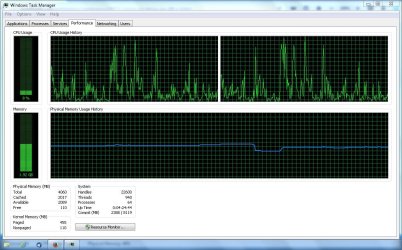
svchost.exe taking CPU to 100%

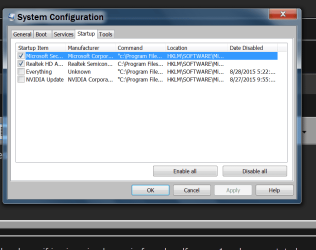
What I noticed in System Configuration (post #8) is everything is being started at boot except the lawn mower and the neighbors washing machine.

Also AVG and Zone Alarm are both being used and started at boot in Startup and Services.

I would recommend removing everything AVG and Zone Alarm using their online removal tool.

For testing install MSE
Microsoft Security Essentials - Microsoft Windows

Then do a Clean Startup and see how things work. This little tutorial by Brink will help.

http://www.sevenforums.com/tutorial...ation-conflicts-performing-clean-startup.html
 

My Computer My Computer

At a glance

Windows 10 Pro. 64/ version 1709 Windows 7 Pr...Intel i7-6800K @ 4.3Corsair Platinum 16 gig @2400EVGA GTX 1070 OC
Computer type
PC/Desktop
Computer Manufacturer/Model Number
Home made Desktop
OS
Windows 10 Pro. 64/ version 1709 Windows 7 Pro/64
CPU
Intel i7-6800K @ 4.3
Motherboard
ASUS X-99 Deluxe II
Memory
Corsair Platinum 16 gig @2400
Graphics Card(s)
EVGA GTX 1070 OC
Monitor(s) Displays
Asus 27" LED LCD/VE278Q
Screen Resolution
1920-1080 or 1280-720 HDMI
Hard Drives
INTEL SSD 730-240 Gb Sata 3.0/
PSU
EVGA Platium 1200W
Case
Phanteks Luxe Tempered Glass 8 fans/ one radiator
Cooling
XSPC/ Water Cooled CPU
Keyboard
Das 4 Professional
Mouse
Logitech M705/MX Anywhere 2-S
Internet Speed
100 mbits
Antivirus
Microsoft Security Essentials/ Malwarebytes Premium 3.0/ SAS
Browser
I.E. 11 default/Firefox/ ISP Time Warner Cable/Spectrum
Other Info
LG BluRay Burner/
Sound system-KLipsch-THX/
Icy Dock ssd Hot Swap bays.

My Computer My Computer

At a glance

Microsoft Windows 7 Home Premium 64-bit 7601 ...AMD C-60 APU with Radeon(tm) HD Graphics4.00 GBAMD Radeon HD 6290 Graphics
Computer type
Laptop
Computer Manufacturer/Model Number
ASUS
OS
Microsoft Windows 7 Home Premium 64-bit 7601 Multiprocessor Free Service Pack 1
CPU
AMD C-60 APU with Radeon(tm) HD Graphics
Motherboard
ASUSTeK COMPUTER INC. X501U
Memory
4.00 GB
Graphics Card(s)
AMD Radeon HD 6290 Graphics
Sound Card
(1) AMD High Definition Audio Device (2) Realtek High Defi
Screen Resolution
1366 x 768 x 32 bits (4294967296 colors) @ 60 Hz
Hard Drives
Hitachi HTS545050A7E380 SATA Disk Device
Antivirus
Comodo CIS & FW, SecureAplus App Whitelisting, Threatfire
Browser
Cyberfox 64bit, Opera 64bit, Airfox
Other Info
Spy-The-Spy, HitmanPro.Alert, Norton Connect Safe, MJRegWatcher, BitDefender TrafficLight, Voodoo Shield, Zemana AntiMalware
Hello CG

"Important Internet Protocol version 6 (IPv6) is a mandatory part of Windows Vista and later versions. We do not recommend that you disable IPv6 or its components, or some Windows components may not function."

After all the actions I took yesterday without result I don't want to remove IPv6 in light of that warning.
Thanks anyway. And yes, I also sense it is an update issue.
______________________
Hello Layback Bear ... don't know what yr seeing but the start up is not heavy as you suggest ...see sc.shot. Also your suggestion of MSE is not satisfactory. I tried MSE and had to get MS Technicians to work on the computer as MSE was causing awful conflicts with downloads.
I will read the tutorial mentioned.
_________________________

Hello Callender, although not clear to me yet I will try to follow yr recommendation and report back after.
 

Attachments

  • Capture.JPG
    Capture.JPG
    53.8 KB · Views: 1

My Computer My Computer

At a glance

Windows 7 Pro 64bit SP1Intel Core Duo CPU 2.20 GHz4 GB RAM
Computer type
PC/Desktop
Computer Manufacturer/Model Number
Toshiba Satellite L500
OS
Windows 7 Pro 64bit SP1
CPU
Intel Core Duo CPU 2.20 GHz
Motherboard
Model KSWAA (U2E1) Version PSLS3A-01301D
Memory
4 GB RAM
Sound Card
AMD High Definition Audio Device Realtek High Definition Aud
Monitor(s) Displays
Generic PnP Monitor on ATI Mobility Radeon HD 4600 Series
Results:
1. Performed Troubleshoot Application Conflicts by Performing a Clean Startup


2. Installed RAMMAP and while the list is too long to show more than a small window on I can't see anything like the numbers showing in the other thread (#post3128740) .

3. Have turned off Win Updates. (Win7 Pro came out years ago ... if it's not up to date yet it never will be and it is more than enough for my purposes)

LaybackBear - I've had some very negative feed-back on MSE from folk in the business so would suggest you check it out further. I'm told that it's not actually made by Microsoft. I liked it at first as it's light and was recommended here on the Forum but it caused enormous problems and had to be removed.

Thanks for all your imput ... this is quite a learning experience.

Something has helped as the CPU usage has fallen back down to normal levels and the laptop isn't heating up like it was.


Attachments

  • Capture.JPG
    Capture.JPG
    126.2 KB · Views: 0
Last edited:

My Computer My Computer

At a glance

Windows 7 Pro 64bit SP1Intel Core Duo CPU 2.20 GHz4 GB RAM
Computer type
PC/Desktop
Computer Manufacturer/Model Number
Toshiba Satellite L500
OS
Windows 7 Pro 64bit SP1
CPU
Intel Core Duo CPU 2.20 GHz
Motherboard
Model KSWAA (U2E1) Version PSLS3A-01301D
Memory
4 GB RAM
Sound Card
AMD High Definition Audio Device Realtek High Definition Aud
Monitor(s) Displays
Generic PnP Monitor on ATI Mobility Radeon HD 4600 Series
Installed RAMMAP and while the list is too long to show more than a small window on I can't see anything like the numbers showing in the other thread (#post3128740) .


Have turned off Win Updates. (Win7 Pro came out years ago ... if it's not up to date yet it never will be and it is more than enough for my purposes)

If you turned off Windows Updates you won't see the problem in RAMMap.

Something has helped as the CPU usage has fallen back down to normal levels and the laptop isn't heating up like it was.

That would be disabling Windows Updates. If you want to test - re-enable then run an update check and watch RAM usage.
 

My Computer My Computer

At a glance

Microsoft Windows 7 Home Premium 64-bit 7601 ...AMD C-60 APU with Radeon(tm) HD Graphics4.00 GBAMD Radeon HD 6290 Graphics
Computer type
Laptop
Computer Manufacturer/Model Number
ASUS
OS
Microsoft Windows 7 Home Premium 64-bit 7601 Multiprocessor Free Service Pack 1
CPU
AMD C-60 APU with Radeon(tm) HD Graphics
Motherboard
ASUSTeK COMPUTER INC. X501U
Memory
4.00 GB
Graphics Card(s)
AMD Radeon HD 6290 Graphics
Sound Card
(1) AMD High Definition Audio Device (2) Realtek High Defi
Screen Resolution
1366 x 768 x 32 bits (4294967296 colors) @ 60 Hz
Hard Drives
Hitachi HTS545050A7E380 SATA Disk Device
Antivirus
Comodo CIS & FW, SecureAplus App Whitelisting, Threatfire
Browser
Cyberfox 64bit, Opera 64bit, Airfox
Other Info
Spy-The-Spy, HitmanPro.Alert, Norton Connect Safe, MJRegWatcher, BitDefender TrafficLight, Voodoo Shield, Zemana AntiMalware
Something has helped as the CPU usage has fallen back down to normal levels and the laptop isn't heating up like it was.

That would be disabling Windows Updates. If you want to test - re-enable then run an update check and watch RAM usage.
+1
Your earlier snapshot showed winupdate service taking something like 45% CPU. Turning it off will drop CPU usage

re: ipv6
I should finish my thought. You don't need to turn off ipv6 and keep it off. Rather, you can just disable it for 24 hours to see if that affects winupdate service eating the CPU. ipv6 in Win 7 only affects HomeGroup and Remote Access services. I've seen ipv6 cause problems in the past. You can try disabling it for 24 hours to see if its suspect in your case as well.

In addition:
> If you choose to disable WinUpdate service, you can still turn it back once a week (like on Wednesdays). See if it still collects and applies the weekly MS updates
> I've never used them, but there are also some offline Windows update tools you might choose to look at

/* EDIT */
Also, check if there;s a firmware update for your router
 

My Computer My Computer

At a glance

Desk 1: Win 7 Pro x32; Desk 2: Windows 10 x64
Computer type
PC/Desktop
Computer Manufacturer/Model Number
Dell Optiplex 360 and Optiplex 755
OS
Desk 1: Win 7 Pro x32; Desk 2: Windows 10 x64
Hard Drives
500GB Crucial SSD in both Desktops
Other Info
Buffalo 6TB NAS, Raid 1
If you turned off Windows Updates you won't see the problem in RAMMap.
Callender, I completed the RAMMap first ... prior to turning off updates which was the last thing I did.

ComputerGeek, thanks. Just now I need to rest from this material as there are other tasks waiting and learning so much about technical matters I know so little about is a little exhausting. So what I'll do is retain the link to this thread and after a break return and check the effect of ipv6 and also the update tools.
 

My Computer My Computer

At a glance

Windows 7 Pro 64bit SP1Intel Core Duo CPU 2.20 GHz4 GB RAM
Computer type
PC/Desktop
Computer Manufacturer/Model Number
Toshiba Satellite L500
OS
Windows 7 Pro 64bit SP1
CPU
Intel Core Duo CPU 2.20 GHz
Motherboard
Model KSWAA (U2E1) Version PSLS3A-01301D
Memory
4 GB RAM
Sound Card
AMD High Definition Audio Device Realtek High Definition Aud
Monitor(s) Displays
Generic PnP Monitor on ATI Mobility Radeon HD 4600 Series
nithig - Absolutely. Not at all a problem.

It's your machine and always your choice if, what and when you want to do something (and at your convenience)

Happy Computing! :)
 

My Computer My Computer

At a glance

Desk 1: Win 7 Pro x32; Desk 2: Windows 10 x64
Computer type
PC/Desktop
Computer Manufacturer/Model Number
Dell Optiplex 360 and Optiplex 755
OS
Desk 1: Win 7 Pro x32; Desk 2: Windows 10 x64
Hard Drives
500GB Crucial SSD in both Desktops
Other Info
Buffalo 6TB NAS, Raid 1
Update:-
Ran Avira scan, Malwarebytes and the house call from Trend Micro so assume no infections.

ran the IPv6 removal suggested above

unfortunately the well behaved system didn't last long and now the sheer instability at rest is so very strange as I've never experienced anything like this before.
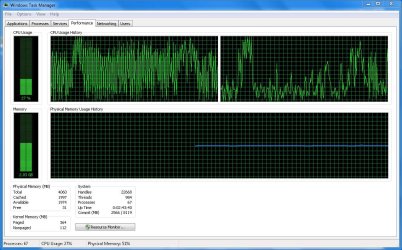
Picture speaks a 1000 words so here's a sc. shot of what's happening.
 

Attachments

  • Capture1.JPG
    Capture1.JPG
    153.6 KB · Views: 0

My Computer My Computer

At a glance

Windows 7 Pro 64bit SP1Intel Core Duo CPU 2.20 GHz4 GB RAM
Computer type
PC/Desktop
Computer Manufacturer/Model Number
Toshiba Satellite L500
OS
Windows 7 Pro 64bit SP1
CPU
Intel Core Duo CPU 2.20 GHz
Motherboard
Model KSWAA (U2E1) Version PSLS3A-01301D
Memory
4 GB RAM
Sound Card
AMD High Definition Audio Device Realtek High Definition Aud
Monitor(s) Displays
Generic PnP Monitor on ATI Mobility Radeon HD 4600 Series
Having more than one anti virus program on one computer at one time is a NO NO. That is one thing that I meant.

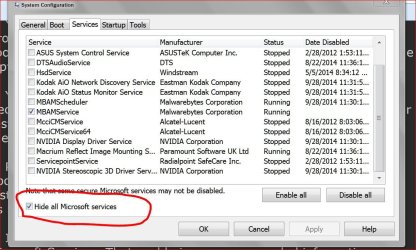
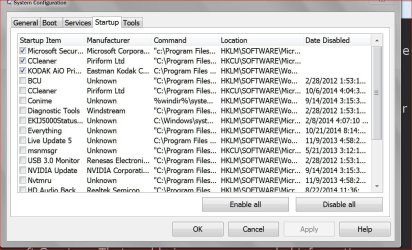
On Startups and Non Microsoft services this is what I mean.
These are from one of my system. Of course it's your computer so you can and should do as you see fit.

Services.JPG

Start Ups.JPG
 

My Computer My Computer

At a glance

Windows 10 Pro. 64/ version 1709 Windows 7 Pr...Intel i7-6800K @ 4.3Corsair Platinum 16 gig @2400EVGA GTX 1070 OC
Computer type
PC/Desktop
Computer Manufacturer/Model Number
Home made Desktop
OS
Windows 10 Pro. 64/ version 1709 Windows 7 Pro/64
CPU
Intel i7-6800K @ 4.3
Motherboard
ASUS X-99 Deluxe II
Memory
Corsair Platinum 16 gig @2400
Graphics Card(s)
EVGA GTX 1070 OC
Monitor(s) Displays
Asus 27" LED LCD/VE278Q
Screen Resolution
1920-1080 or 1280-720 HDMI
Hard Drives
INTEL SSD 730-240 Gb Sata 3.0/
PSU
EVGA Platium 1200W
Case
Phanteks Luxe Tempered Glass 8 fans/ one radiator
Cooling
XSPC/ Water Cooled CPU
Keyboard
Das 4 Professional
Mouse
Logitech M705/MX Anywhere 2-S
Internet Speed
100 mbits
Antivirus
Microsoft Security Essentials/ Malwarebytes Premium 3.0/ SAS
Browser
I.E. 11 default/Firefox/ ISP Time Warner Cable/Spectrum
Other Info
LG BluRay Burner/
Sound system-KLipsch-THX/
Icy Dock ssd Hot Swap bays.
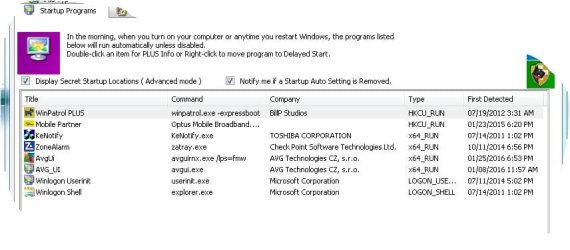
Thanks Layback Bear ... yes, I returned to yr comment and carried out that action through syst. config (viz disable all)

There is only one active anti virus (avira - which I loaded today getting rid of AVG which I found too invasive and memory hungry) - the Trend Micro used is the online one (wanted to be sure in light of the bizarre CPU behaviour) and I use malwarebytes only for scanning for malware.

What would you suggest as a next line of inquiry to stop what's shown in the sc. shot above (taken when the laptop is at rest)?
 

My Computer My Computer

At a glance

Windows 7 Pro 64bit SP1Intel Core Duo CPU 2.20 GHz4 GB RAM
Computer type
PC/Desktop
Computer Manufacturer/Model Number
Toshiba Satellite L500
OS
Windows 7 Pro 64bit SP1
CPU
Intel Core Duo CPU 2.20 GHz
Motherboard
Model KSWAA (U2E1) Version PSLS3A-01301D
Memory
4 GB RAM
Sound Card
AMD High Definition Audio Device Realtek High Definition Aud
Monitor(s) Displays
Generic PnP Monitor on ATI Mobility Radeon HD 4600 Series
Make sure you only have one anti virus program installed. Just disabling them is not good enough. That includes online/cloud or any other kind of anti virus program. I noticed you did have Zone Alarm installed. Is it completely removed?

Malwarebytes is not a anti virus program. I know of no problems that Malwarebytes will cause.

Reboot and then see if it helps. Using around 2 gigs of memory is normal.
I use 2 gigs of ram on my systems with just 1 Firefox page open.

Your hard drive at 27 % indicates something is running in the background doing something.
At the present time my hard drive is between 1 and 2 %. I have MSE and Malwarbytes both active at this time. Because you have a laptop their will be some things you will need to have checked in Services and Startups that a desktop doesn't need. You will not need all those auto updates like Google and such.
I do all updates manually. That way I can keep track of what is installing and when.

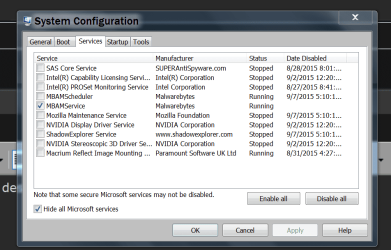
I'm on my other system at this time and this is what it looks like.


msconfig SERVECES.PNG

msconfig STARTUP.PNG
 

My Computer My Computer

At a glance

Windows 10 Pro. 64/ version 1709 Windows 7 Pr...Intel i7-6800K @ 4.3Corsair Platinum 16 gig @2400EVGA GTX 1070 OC
Computer type
PC/Desktop
Computer Manufacturer/Model Number
Home made Desktop
OS
Windows 10 Pro. 64/ version 1709 Windows 7 Pro/64
CPU
Intel i7-6800K @ 4.3
Motherboard
ASUS X-99 Deluxe II
Memory
Corsair Platinum 16 gig @2400
Graphics Card(s)
EVGA GTX 1070 OC
Monitor(s) Displays
Asus 27" LED LCD/VE278Q
Screen Resolution
1920-1080 or 1280-720 HDMI
Hard Drives
INTEL SSD 730-240 Gb Sata 3.0/
PSU
EVGA Platium 1200W
Case
Phanteks Luxe Tempered Glass 8 fans/ one radiator
Cooling
XSPC/ Water Cooled CPU
Keyboard
Das 4 Professional
Mouse
Logitech M705/MX Anywhere 2-S
Internet Speed
100 mbits
Antivirus
Microsoft Security Essentials/ Malwarebytes Premium 3.0/ SAS
Browser
I.E. 11 default/Firefox/ ISP Time Warner Cable/Spectrum
Other Info
LG BluRay Burner/
Sound system-KLipsch-THX/
Icy Dock ssd Hot Swap bays.
Don't mean to interject as many have offered good advice in finding a solution, but earlier I noticed that the OP is running both Zone Alarm and AVG. As Layback Bear mentions, running two antivirus' can wreak havoc on the system and based on the OP's recent screenshot (post #23), there appears to be an AVG process that was detected and started on the 25th of this month which is right about the time the problems surfaced. Perhaps AVG is causing a resource conflict with Zone Alarm?

Just a thought.
 

My Computer My Computer

At a glance

Windows 7 Home 64-bit
Computer type
PC/Desktop
OS
Windows 7 Home 64-bit
Zone alarm is firewall only. There is only one anti virus.
 

My Computer My Computer

At a glance

Windows 7 Pro 64bit SP1Intel Core Duo CPU 2.20 GHz4 GB RAM
Computer type
PC/Desktop
Computer Manufacturer/Model Number
Toshiba Satellite L500
OS
Windows 7 Pro 64bit SP1
CPU
Intel Core Duo CPU 2.20 GHz
Motherboard
Model KSWAA (U2E1) Version PSLS3A-01301D
Memory
4 GB RAM
Sound Card
AMD High Definition Audio Device Realtek High Definition Aud
Monitor(s) Displays
Generic PnP Monitor on ATI Mobility Radeon HD 4600 Series
Hello HIMA,
yes, not sure now but think the latter was AVG -Zen. Anyway I found AVG rather intrusive and demanding of memory so have removed it entirely and replaced it with Avira. I've also been scratching my head as to what may have happened ... have scanned individual folders added etc but really I haven't been doing much as I get lousy internet during the day (oversubscribed tower) and recently the Service Provider has been upgrading the local towers so there have been outages ... = low usage of computer.
 

My Computer My Computer

At a glance

Windows 7 Pro 64bit SP1Intel Core Duo CPU 2.20 GHz4 GB RAM
Computer type
PC/Desktop
Computer Manufacturer/Model Number
Toshiba Satellite L500
OS
Windows 7 Pro 64bit SP1
CPU
Intel Core Duo CPU 2.20 GHz
Motherboard
Model KSWAA (U2E1) Version PSLS3A-01301D
Memory
4 GB RAM
Sound Card
AMD High Definition Audio Device Realtek High Definition Aud
Monitor(s) Displays
Generic PnP Monitor on ATI Mobility Radeon HD 4600 Series
Okay, so now that you have Avira installed is you SVC host still showing high CPU?
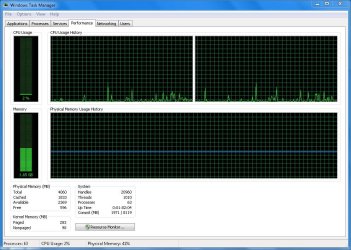
CPU is highly erratic, even when computer is at rest ... see last screen shot. However, SCVhost seems to have settled since Updates were turned off.

What antivirus have you been using prior to having installed AVG earlier this month?
MSE - however that caused a major conflict (again with Updates) and it necessitated my first even Remote Assistance with Microsoft to remedy. So I was keen to not continue using MSE.

With the removal of AVG I followed up with a Registry scan (CCleaner) and that removed what was lingering .
 

My Computer My Computer

At a glance

Windows 7 Pro 64bit SP1Intel Core Duo CPU 2.20 GHz4 GB RAM
Computer type
PC/Desktop
Computer Manufacturer/Model Number
Toshiba Satellite L500
OS
Windows 7 Pro 64bit SP1
CPU
Intel Core Duo CPU 2.20 GHz
Motherboard
Model KSWAA (U2E1) Version PSLS3A-01301D
Memory
4 GB RAM
Sound Card
AMD High Definition Audio Device Realtek High Definition Aud
Monitor(s) Displays
Generic PnP Monitor on ATI Mobility Radeon HD 4600 Series
CCleaner doesn't remove everything especially antivirus programs for security reasons. They recommend running the antivirus removal tools designed by the developer of the software. Check out the following link to download the removal tools from that specific software developer (i.e AVG) to completely remove it.

https://support.kaspersky.com/us/consumer/tools-utilities

AVG | Download tools and utilities

Did you disable either your firewall or antivirus temporarily and observe if there is still a high CPU indication?

I had a lot of problems when I ran a separate firewall like Zone Alarm and some other antivirus program. A tech once told me it's a good idea to run a internet security software that has both a firewall and antivirus that way they won't conflict with each other.
 

My Computer My Computer

At a glance

Windows 7 Home 64-bit
Computer type
PC/Desktop
OS
Windows 7 Home 64-bit
Thanks ... d/loaded and ran the removal tool.

However, as you can see the CPU remains highly erratic.
 

Attachments

  • Capture.JPG
    Capture.JPG
    146.7 KB · Views: 2

My Computer My Computer

At a glance

Windows 7 Pro 64bit SP1Intel Core Duo CPU 2.20 GHz4 GB RAM
Computer type
PC/Desktop
Computer Manufacturer/Model Number
Toshiba Satellite L500
OS
Windows 7 Pro 64bit SP1
CPU
Intel Core Duo CPU 2.20 GHz
Motherboard
Model KSWAA (U2E1) Version PSLS3A-01301D
Memory
4 GB RAM
Sound Card
AMD High Definition Audio Device Realtek High Definition Aud
Monitor(s) Displays
Generic PnP Monitor on ATI Mobility Radeon HD 4600 Series
I'm assuming that you already disabled the Zone Alarm and/or Avira as a way to attempt to isolate if its either of those programs that are causing the problem.

As Usernameissues mentioned, it might be a good idea to play around with Process Monitor or Process Explorer to see what processes are causing the CPU to thrash.
 

My Computer My Computer

At a glance

Windows 7 Home 64-bit
Computer type
PC/Desktop
OS
Windows 7 Home 64-bit
Alvira only loaded on yesterday ... ZA is a remnant. I had ZA suite for many years and after I ended subscription I retained the fire-wall as it's familiar and I liked the notifications. It's never caused a problem and doesn't show up on Resource Monitor.

I do appreciate your input HIME but to be honest I'm feeling exhausted as I'm not very technical and for now I've run out of things to check. I've been staring at Resource Monitor non stop for a few days now :) Maybe it's best to leave it for a bit and come back with fresh eyes.
 

My Computer My Computer

At a glance

Windows 7 Pro 64bit SP1Intel Core Duo CPU 2.20 GHz4 GB RAM
Computer type
PC/Desktop
Computer Manufacturer/Model Number
Toshiba Satellite L500
OS
Windows 7 Pro 64bit SP1
CPU
Intel Core Duo CPU 2.20 GHz
Motherboard
Model KSWAA (U2E1) Version PSLS3A-01301D
Memory
4 GB RAM
Sound Card
AMD High Definition Audio Device Realtek High Definition Aud
Monitor(s) Displays
Generic PnP Monitor on ATI Mobility Radeon HD 4600 Series
Back
Top