Solved svchost.exe uses 99 % CPU !

jordikok

New member
Member
VIP
Local time
1:07 AM
Messages
103
Location
Netherlands
Helo guys, so now i got a kind of a weird problem..

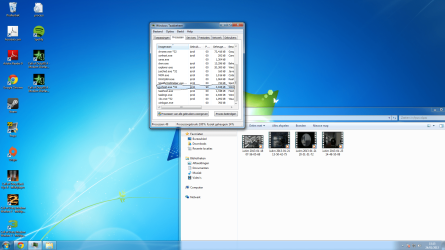
i realised my pc was getting realy slow, so i opened taskmanager and i discovered something..
i hope someone can help me!

Screenshot:
 

Attachments

  • Naamloos.png
    Naamloos.png
    426.7 KB · Views: 15

My Computer

OS
Windows 7 64 bit home premium
CPU
AMD FX-4170: 4X4.2Ghz
Motherboard
Asrock N68-VS3 FX
Memory
8GB DDR3-1600 (2X4GB)
Graphics Card(s)
AMD HD7770 Ghz-Edition 1GB GDDR5
Sound Card
Realtek audio
Monitor(s) Displays
Phillips 23"
Screen Resolution
1920x1080
Hard Drives
500 GB
PSU
420 Watt
Cooling
4 Fans
Keyboard
Medion
Mouse
Logitech
Internet Speed
50 MB
Hi since your computer is running very slow i would update your anti-virus definitions to the latest signature and then run a thorough virus scan as one of the reasons a computer can run slow is thru being infected.

Please let us know how it goes.
 

My Computer

Computer Manufacturer/Model Number
HP Compaq 6715B
OS
Windows 7 Ultimate x64
CPU
AMD turion 64x2 TL-64 2.2Ghz
Motherboard
HC030
Memory
Sodimm DDR2 4GB
Graphics Card(s)
ATI Radeon 1250 128MB IGP
Hard Drives
Fujitsu Siemens 500GB sata 3.0 Gb/s
svchost.exe can run any .dll process. We'll have to find out which are the processes running under that svchost.exe.

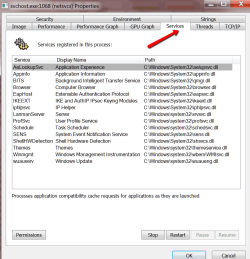
Get Process Explorer and look for this particular svchost.exe - best by looking into the CPU column. Then either hover over that one or even better look into the properties of that svchost.exe. Under the services tab you should see something like the picture (could be less or more processes). Open the little window such that all processes are visible and make a snip picture like mine. Post that here and we'll have a look.
 

Attachments

  • 2013-01-24_1918.png
    2013-01-24_1918.png
    33.7 KB · Views: 3

My Computer

Computer Manufacturer/Model Number
HP, Dell, Gateway, Toshiba - 4 laptops and 2 desktops
OS
Vista, Windows7, Mint Mate, Zorin, Windows 8
CPU
from 1.6GHz Duo to i7
Monitor(s) Displays
2x HP w2207
Hard Drives
5x HDD, 7x SSD, 12x Externals
Keyboard
with trackball - no mices
Mouse
Trackball mice
Internet Speed
DSL 6000
Its all fixed! i scanned the whole pc it was a virus.

Thanks everyone! :)
 

My Computer

OS
Windows 7 64 bit home premium
CPU
AMD FX-4170: 4X4.2Ghz
Motherboard
Asrock N68-VS3 FX
Memory
8GB DDR3-1600 (2X4GB)
Graphics Card(s)
AMD HD7770 Ghz-Edition 1GB GDDR5
Sound Card
Realtek audio
Monitor(s) Displays
Phillips 23"
Screen Resolution
1920x1080
Hard Drives
500 GB
PSU
420 Watt
Cooling
4 Fans
Keyboard
Medion
Mouse
Logitech
Internet Speed
50 MB
Please mark the problem as solved.
 

My Computer

Computer Manufacturer/Model Number
HP Desktop Slimline
OS
Windows 7 Home Premium 64-bit
CPU
Athlon
Memory
3GB
Graphics Card(s)
Integrated
Monitor(s) Displays
HP 20" LCD
Hard Drives
500GB
Internet Speed
Slow
Last edited:

My Computer

Computer Manufacturer/Model Number
HP Compaq 6715B
OS
Windows 7 Ultimate x64
CPU
AMD turion 64x2 TL-64 2.2Ghz
Motherboard
HC030
Memory
Sodimm DDR2 4GB
Graphics Card(s)
ATI Radeon 1250 128MB IGP
Hard Drives
Fujitsu Siemens 500GB sata 3.0 Gb/s
Back
Top