svchost.exe

mjwilson94

New member
Member
VIP
Local time
9:55 AM
Messages
139
Location
England
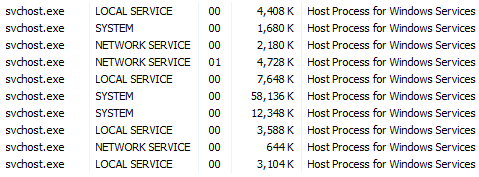
I have noticed recently that in my Task Manager I have 10 svchost.exe running!! This is using my CPU up and therefore making my computer slow. I have included a screenshot, can anybody please help me to solve this problem.
 

Attachments

  • SVCHOST.png
    SVCHOST.png
    3.3 KB · Views: 23

My Computer

Computer Manufacturer/Model Number
Acer Aspire 5745P
OS
Window 7 Home Premium 64-Bit
CPU
Intel Core i3
Memory
3GB
Hard Drives
WD Scorpio Blue 300Gb
Each svchost.exe is running services that your computer needs. Each instance can be,and probably is, running multiple services. Think of it as a "group" of services that each svchost.exe is running. There are a lot of services, and it takes a lot to run them. This is nothing out of the ordinary.

I have 11 running at the moment, and i've seen plenty more than that also.

Mine:
 

Attachments

  • Capture.JPG
    Capture.JPG
    38.3 KB · Views: 13

My Computer

Computer Manufacturer/Model Number
Toshiba Satellite L455D
OS
Windows 7 Home Premium
CPU
Amd Semperon 2.10GHz
Memory
2 Gig
Graphics Card(s)
ATI Radeon 3100
Sound Card
Realtek
Monitor(s) Displays
15.6 inch
Screen Resolution
1366x768
Hard Drives
250gig
Mouse
Logitech Wireless
Internet Speed
16/2 cable
Have a look at this. It will give you a better idea why all these service hosts are required. And there are even more that you might not have seen called rundll.exe.
 

My Computer

Computer Manufacturer/Model Number
HP, Dell, Gateway, Toshiba - 4 laptops and 2 desktops
OS
Vista, Windows7, Mint Mate, Zorin, Windows 8
CPU
from 1.6GHz Duo to i7
Monitor(s) Displays
2x HP w2207
Hard Drives
5x HDD, 7x SSD, 12x Externals
Keyboard
with trackball - no mices
Mouse
Trackball mice
Internet Speed
DSL 6000
Have a look at this. It will give you a better idea why all these service hosts are required. And there are even more that you might not have seen called rundll.exe.
Thanks whs. :)

I have to remember that page. It seems like it's an all too common question.
 

My Computer

Computer Manufacturer/Model Number
Toshiba Satellite L455D
OS
Windows 7 Home Premium
CPU
Amd Semperon 2.10GHz
Memory
2 Gig
Graphics Card(s)
ATI Radeon 3100
Sound Card
Realtek
Monitor(s) Displays
15.6 inch
Screen Resolution
1366x768
Hard Drives
250gig
Mouse
Logitech Wireless
Internet Speed
16/2 cable
Have a look at this. It will give you a better idea why all these service hosts are required. And there are even more that you might not have seen called rundll.exe.
Thanks whs. :)

I have to remember that page. It seems like it's an all too common question.
You are welcome. And you are right. The question comes up quite frequently. Some people even wanted to stop the exes.
 

My Computer

Computer Manufacturer/Model Number
HP, Dell, Gateway, Toshiba - 4 laptops and 2 desktops
OS
Vista, Windows7, Mint Mate, Zorin, Windows 8
CPU
from 1.6GHz Duo to i7
Monitor(s) Displays
2x HP w2207
Hard Drives
5x HDD, 7x SSD, 12x Externals
Keyboard
with trackball - no mices
Mouse
Trackball mice
Internet Speed
DSL 6000
Thanks guys, I was just curious because before i only had one running, but i realised I didn't have the checkbox for
"Proccesses from all users" checked. REP for you guys
 

My Computer

Computer Manufacturer/Model Number
Acer Aspire 5745P
OS
Window 7 Home Premium 64-Bit
CPU
Intel Core i3
Memory
3GB
Hard Drives
WD Scorpio Blue 300Gb
No problem. It's a pretty common question, I'm guessing because it does look odd compared to the rest of the processes, since there's so many instances of it running.
 

My Computer

Computer Manufacturer/Model Number
Toshiba Satellite L455D
OS
Windows 7 Home Premium
CPU
Amd Semperon 2.10GHz
Memory
2 Gig
Graphics Card(s)
ATI Radeon 3100
Sound Card
Realtek
Monitor(s) Displays
15.6 inch
Screen Resolution
1366x768
Hard Drives
250gig
Mouse
Logitech Wireless
Internet Speed
16/2 cable
Thanks for letting us know and thanks for the reps.
 

My Computer

Computer Manufacturer/Model Number
HP, Dell, Gateway, Toshiba - 4 laptops and 2 desktops
OS
Vista, Windows7, Mint Mate, Zorin, Windows 8
CPU
from 1.6GHz Duo to i7
Monitor(s) Displays
2x HP w2207
Hard Drives
5x HDD, 7x SSD, 12x Externals
Keyboard
with trackball - no mices
Mouse
Trackball mice
Internet Speed
DSL 6000
Back
Top
