Switch Between Windows - Flip 3D Shortcut

How to Create a Flip 3D Switch Between Windows Shortcut in Windows 7

   Information
This will show you how to create a Switch Between Windows, also known as Flip 3D, shortcut in Windows 7.

   Note
Keyboard Shortcut Keys for Flip 3D

NOTE: Press the key combinations below in blue to activate.
  • Windows Key + Tab = Press and hold Windows Key, then press Tab (or roll mouse scroll wheel) to scroll through the open windows. Choose the open window you want by releasing the Windows Key when the window is at the front.
  • Ctrl + Windows Key + Tab = Scroll through the open windows by pressing the Tab key, arrow keys, or roll the mouse scroll wheel. Click on the window you want to see, or press Enter when it is up front.
If you would like to assign your own keyboard shortcut to the shortcut in this tutorial, then for how, see: How to Create a Keyboard Shortcut for a Program in Vista and Windows 7

   Tip
To pin this shortcut to the taskbar, you will need to have Recent Programs turned on.

Taskbar.jpg

   Warning
Aero Requirements to be Enabled in Windows 7:

NOTE: If Aero is not enabled, then Switch Between Windows - Flip 3D - will not work.
  • 1 GHz 32-bit or 64-bit processor
  • 1 GB of system memory
  • A graphics card with support for DirectX 9 graphics with at least 128 MB of memory.
  • The graphics card must support Pixel Shader 2.0 and the Windows Display Driver Model (WDDM).
  • You must be have True Color (32 bit) set instead of High Color (16 bit).
  • The desktop composition and Animate controls and elements inside windows options enabled in Visual Effects.
  • The Desktop Window Manager Session Manager and Themes Services need to be set as Started and Automatic.
  • Refresh or update your WEI score.
  • Using a Aero theme.
This shortcut will not work in Windows 7 Starter and Windows 7 Home Basic editions since they do not include the Aero feature.


EXAMPLE: Switch Between Windows - Flip-3D

Flip_3D.jpg


OPTION ONE

To Download a Flip 3D Shortcut


1. Click on the Download button below to download the file below.
Switch_Between_Windows.zip

Download


2. Click on Save, and save the .zip file to the desktop.

3. Open the .zip file and extract the Switch Between Windows shortcut to the desktop.

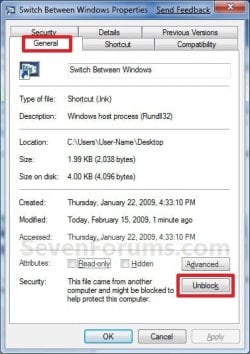
4. Right click on the Switch Between Windows shortcut, and click on Properties, General tab, and on the Unblock button. (See screenshot below)
NOTE: If you do not have a Unblock button under the General tab, then the shortcut is already unblocked and you can continue on to step 5.
Unblock.jpg
5. You can now Pin to Taskbar or Pin to Start Menu this shortcut, assign a keyboard shortcut to it, or move it where you like for easy use.

6. When done, you can delete the downloaded .zip file on the desktop if you like.


OPTION TWO

To Manually Create a Flip 3D Shortcut


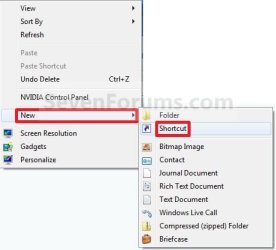
1. Right click on a empty area on desktop, and click on New and Shortcut. (See screenshot below)
Right_Click.jpg
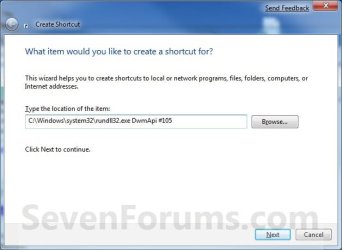
2. Copy and paste the path below into the location area, and click on the Next button. (See screenshot below)
%windir%\system32\rundll32.exe DwmApi #105
Step1.jpg
3. Type Switch Between Windows for the name, and click on the Finish button. (See screenshot below)
NOTE: You can name this anything you would like though. For example, Flip 3D.
Step2.jpg
4. Right click on the new Switch Between Windows shortcut on the Desktop and click on Properties. (See screenshot below)
Step3.jpg
5. Click on the Change Icon button. (See screenshot below)
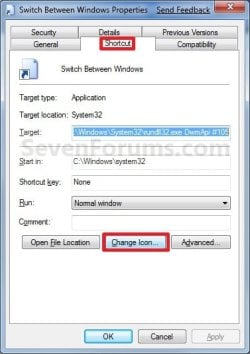
Step4.jpg
6. In the line under "Look for icons in this file", copy and paste the path below and press Enter. (See screenshot below)
%SystemRoot%\System32\imageres.dll
Step5.jpg
7. Select the Flip-3D icon in blue below and click on OK. (See screenshot above)

8. Click on OK. (See screenshot below)
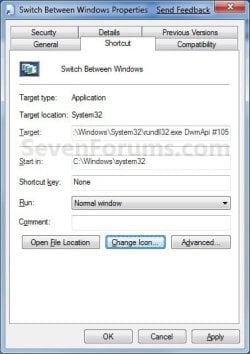
Step6.jpg
9. You can now Pin to Taskbar or Pin to Start Menu this shortcut, assign a keyboard shortcut to it, or move it where you like for easy use.
Shortcut.jpg
That's it,
Shawn


Attachments

Last edited:
LOL, you're most welcome Petes. :)
 

My Computer

Computer type
PC/Desktop
Computer Manufacturer/Model Number
Self built custom
OS
64-bit Windows 11 Pro for Workstations
CPU
Intel i7-8700K OC'd to 5 GHz
Motherboard
ASUS ROG Maximus XI Formula Z390
Memory
64 GB (4x16GB) G.SKILL TridentZ RGB DDR4 3600 MHz
Graphics Card(s)
ASUS ROG-STRIX-GTX1080TI-O11G-GAMING
Sound Card
Integrated
Monitor(s) Displays
2 x Samsung Odyssey G7 27"
Screen Resolution
2560x1440
Hard Drives
1TB Samsung 990 PRO M.2,
4TB Samsung 990 PRO PRO M.2,
TerraMaster F8 SSD Plus NAS
PSU
Seasonic Prime Titanium 850W
Case
Thermaltake Core P3
Cooling
Corsair Hydro H115i
Keyboard
Logitech wireless K800
Mouse
Logitech MX Master 4
Internet Speed
2 Gb/s Download and 100 Mb/s Upload
Antivirus
Malwarebyte Anti-Malware Premium
Browser
Google Chrome
Other Info
Logitech Z625 speaker system,
Logitech BRIO 4K Pro webcam,
HP Color LaserJet Pro MFP M477fdn,
APC SMART-UPS RT 1000 XL - SURT1000XLI,
Galaxy S23 Plus phone
Thanks a lot. I thought that this was lacking in Windows 7... LOL
 

My Computer

Computer Manufacturer/Model Number
Dell Latitude E6400
OS
Windows 7 Ultimate SP1 x64
CPU
Intel Mobile Core 2 Duo P8400 2.26GHz
Motherboard
Intel PM45 Express
Memory
4GB (2x2GB) DDR2 333MHz
Graphics Card(s)
256MB DDR2 NVIDIA Quadro NVS 160M
Sound Card
IDT
Monitor(s) Displays
Samsung 14.1" WXGA+ LED Display
Screen Resolution
1440x900
Hard Drives
Samsung 830 128GB SSD +
250GB Western Digital Scorpio Black 7200RPM
PSU
9-cell 84Whr battery
Case
Black
Keyboard
Backlit
Internet Speed
3mbps
LOL, you're most welcome d0m0. :)
 

My Computer

Computer type
PC/Desktop
Computer Manufacturer/Model Number
Self built custom
OS
64-bit Windows 11 Pro for Workstations
CPU
Intel i7-8700K OC'd to 5 GHz
Motherboard
ASUS ROG Maximus XI Formula Z390
Memory
64 GB (4x16GB) G.SKILL TridentZ RGB DDR4 3600 MHz
Graphics Card(s)
ASUS ROG-STRIX-GTX1080TI-O11G-GAMING
Sound Card
Integrated
Monitor(s) Displays
2 x Samsung Odyssey G7 27"
Screen Resolution
2560x1440
Hard Drives
1TB Samsung 990 PRO M.2,
4TB Samsung 990 PRO PRO M.2,
TerraMaster F8 SSD Plus NAS
PSU
Seasonic Prime Titanium 850W
Case
Thermaltake Core P3
Cooling
Corsair Hydro H115i
Keyboard
Logitech wireless K800
Mouse
Logitech MX Master 4
Internet Speed
2 Gb/s Download and 100 Mb/s Upload
Antivirus
Malwarebyte Anti-Malware Premium
Browser
Google Chrome
Other Info
Logitech Z625 speaker system,
Logitech BRIO 4K Pro webcam,
HP Color LaserJet Pro MFP M477fdn,
APC SMART-UPS RT 1000 XL - SURT1000XLI,
Galaxy S23 Plus phone
Finally found this feature! Thanks for the help!!

rt
 

My Computer

Computer Manufacturer/Model Number
Home build
OS
Windows 7 Ultimate 64-bit
CPU
Intel core i5 2500k
Motherboard
ASRock pro 3
Memory
8GB DDR3 1600
Graphics Card(s)
onboard Intel
Sound Card
on board
Monitor(s) Displays
Viewsonic
Hard Drives
WD 1TB
PSU
Antec 625w
Case
Cooler Master HAF
Internet Speed
6Mbps download 1Mbps upload
You're most welcome RT. :)
 

My Computer

Computer type
PC/Desktop
Computer Manufacturer/Model Number
Self built custom
OS
64-bit Windows 11 Pro for Workstations
CPU
Intel i7-8700K OC'd to 5 GHz
Motherboard
ASUS ROG Maximus XI Formula Z390
Memory
64 GB (4x16GB) G.SKILL TridentZ RGB DDR4 3600 MHz
Graphics Card(s)
ASUS ROG-STRIX-GTX1080TI-O11G-GAMING
Sound Card
Integrated
Monitor(s) Displays
2 x Samsung Odyssey G7 27"
Screen Resolution
2560x1440
Hard Drives
1TB Samsung 990 PRO M.2,
4TB Samsung 990 PRO PRO M.2,
TerraMaster F8 SSD Plus NAS
PSU
Seasonic Prime Titanium 850W
Case
Thermaltake Core P3
Cooling
Corsair Hydro H115i
Keyboard
Logitech wireless K800
Mouse
Logitech MX Master 4
Internet Speed
2 Gb/s Download and 100 Mb/s Upload
Antivirus
Malwarebyte Anti-Malware Premium
Browser
Google Chrome
Other Info
Logitech Z625 speaker system,
Logitech BRIO 4K Pro webcam,
HP Color LaserJet Pro MFP M477fdn,
APC SMART-UPS RT 1000 XL - SURT1000XLI,
Galaxy S23 Plus phone
Great feature. Thanks for the tutorial.

Gets funky with two or more windows of Excel open, as the "flip windows" are miniaturized. However, the last Excel window open is also standard size.
 

Attachments

  • Untitled.png
    Untitled.png
    534 KB · Views: 323

My Computer

Computer type
PC/Desktop
Computer Manufacturer/Model Number
Dell Vostro 3558 (Laptop)
OS
Windows 7 Professional 64bit
Motherboard
Dell
Memory
8GB
Graphics Card(s)
Intel HD Graphics, NVIDIA GeForce
Screen Resolution
1366 x 768
Antivirus
Avira Free, MalwareBytes AntiMalware Pro
Browser
Chrome
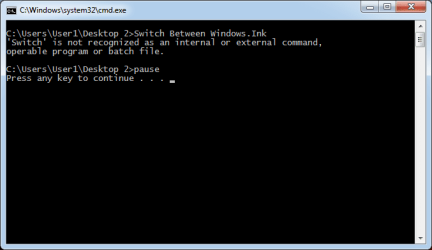
Hi Brink, mine doesn't work so I made a batch file: "Switch Between Windows.bat"! :banghead:

Here's A Screenshot: :party:
Switch Between Windows.png

Here's A Zipped Video: :zip:
View attachment Switch Between Windows.zip

I'm gonna :cry:

Just joking :p

Please help me I can't fixit! :tip:

- Thanks
 

My Computer

OS
Windows 7 Home Basic x64, Windows XP Professional x86
Hello Andrie,

I noticed your specs say you have Windows 7 Home Basic. Unfortunately, it doesn't include Aero. Flip-3D is part of Aero, so it will not work in your Windows 7 Home Basic edition. :(
 

My Computer

Computer type
PC/Desktop
Computer Manufacturer/Model Number
Self built custom
OS
64-bit Windows 11 Pro for Workstations
CPU
Intel i7-8700K OC'd to 5 GHz
Motherboard
ASUS ROG Maximus XI Formula Z390
Memory
64 GB (4x16GB) G.SKILL TridentZ RGB DDR4 3600 MHz
Graphics Card(s)
ASUS ROG-STRIX-GTX1080TI-O11G-GAMING
Sound Card
Integrated
Monitor(s) Displays
2 x Samsung Odyssey G7 27"
Screen Resolution
2560x1440
Hard Drives
1TB Samsung 990 PRO M.2,
4TB Samsung 990 PRO PRO M.2,
TerraMaster F8 SSD Plus NAS
PSU
Seasonic Prime Titanium 850W
Case
Thermaltake Core P3
Cooling
Corsair Hydro H115i
Keyboard
Logitech wireless K800
Mouse
Logitech MX Master 4
Internet Speed
2 Gb/s Download and 100 Mb/s Upload
Antivirus
Malwarebyte Anti-Malware Premium
Browser
Google Chrome
Other Info
Logitech Z625 speaker system,
Logitech BRIO 4K Pro webcam,
HP Color LaserJet Pro MFP M477fdn,
APC SMART-UPS RT 1000 XL - SURT1000XLI,
Galaxy S23 Plus phone
You're most welcome musicollector. :)
 

My Computer

Computer type
PC/Desktop
Computer Manufacturer/Model Number
Self built custom
OS
64-bit Windows 11 Pro for Workstations
CPU
Intel i7-8700K OC'd to 5 GHz
Motherboard
ASUS ROG Maximus XI Formula Z390
Memory
64 GB (4x16GB) G.SKILL TridentZ RGB DDR4 3600 MHz
Graphics Card(s)
ASUS ROG-STRIX-GTX1080TI-O11G-GAMING
Sound Card
Integrated
Monitor(s) Displays
2 x Samsung Odyssey G7 27"
Screen Resolution
2560x1440
Hard Drives
1TB Samsung 990 PRO M.2,
4TB Samsung 990 PRO PRO M.2,
TerraMaster F8 SSD Plus NAS
PSU
Seasonic Prime Titanium 850W
Case
Thermaltake Core P3
Cooling
Corsair Hydro H115i
Keyboard
Logitech wireless K800
Mouse
Logitech MX Master 4
Internet Speed
2 Gb/s Download and 100 Mb/s Upload
Antivirus
Malwarebyte Anti-Malware Premium
Browser
Google Chrome
Other Info
Logitech Z625 speaker system,
Logitech BRIO 4K Pro webcam,
HP Color LaserJet Pro MFP M477fdn,
APC SMART-UPS RT 1000 XL - SURT1000XLI,
Galaxy S23 Plus phone
Hello Andrie,

I noticed your specs say you have Windows 7 Home Basic. Unfortunately, it doesn't include Aero. Flip-3D is part of Aero, so it will not work in your Windows 7 Home Basic edition. :(

I sometimes hate Microsoft!! :mad:
 

My Computer

OS
Windows 7 Home Basic x64, Windows XP Professional x86
Yeah, less features is the price to pay to get a lower priced version of Windows 7. :(
 

My Computer

Computer type
PC/Desktop
Computer Manufacturer/Model Number
Self built custom
OS
64-bit Windows 11 Pro for Workstations
CPU
Intel i7-8700K OC'd to 5 GHz
Motherboard
ASUS ROG Maximus XI Formula Z390
Memory
64 GB (4x16GB) G.SKILL TridentZ RGB DDR4 3600 MHz
Graphics Card(s)
ASUS ROG-STRIX-GTX1080TI-O11G-GAMING
Sound Card
Integrated
Monitor(s) Displays
2 x Samsung Odyssey G7 27"
Screen Resolution
2560x1440
Hard Drives
1TB Samsung 990 PRO M.2,
4TB Samsung 990 PRO PRO M.2,
TerraMaster F8 SSD Plus NAS
PSU
Seasonic Prime Titanium 850W
Case
Thermaltake Core P3
Cooling
Corsair Hydro H115i
Keyboard
Logitech wireless K800
Mouse
Logitech MX Master 4
Internet Speed
2 Gb/s Download and 100 Mb/s Upload
Antivirus
Malwarebyte Anti-Malware Premium
Browser
Google Chrome
Other Info
Logitech Z625 speaker system,
Logitech BRIO 4K Pro webcam,
HP Color LaserJet Pro MFP M477fdn,
APC SMART-UPS RT 1000 XL - SURT1000XLI,
Galaxy S23 Plus phone
I have just downloaded this -I will add it to one of my taskbar toolbars which I first learned to create courtesy of your good self.Thank you very much Mr. Brink.
 

My Computer

Computer Manufacturer/Model Number
Dell
OS
Windows 7 Home Premium 64bit
You're most welcome Jack. I'm glad it was able to help. :)
 

My Computer

Computer type
PC/Desktop
Computer Manufacturer/Model Number
Self built custom
OS
64-bit Windows 11 Pro for Workstations
CPU
Intel i7-8700K OC'd to 5 GHz
Motherboard
ASUS ROG Maximus XI Formula Z390
Memory
64 GB (4x16GB) G.SKILL TridentZ RGB DDR4 3600 MHz
Graphics Card(s)
ASUS ROG-STRIX-GTX1080TI-O11G-GAMING
Sound Card
Integrated
Monitor(s) Displays
2 x Samsung Odyssey G7 27"
Screen Resolution
2560x1440
Hard Drives
1TB Samsung 990 PRO M.2,
4TB Samsung 990 PRO PRO M.2,
TerraMaster F8 SSD Plus NAS
PSU
Seasonic Prime Titanium 850W
Case
Thermaltake Core P3
Cooling
Corsair Hydro H115i
Keyboard
Logitech wireless K800
Mouse
Logitech MX Master 4
Internet Speed
2 Gb/s Download and 100 Mb/s Upload
Antivirus
Malwarebyte Anti-Malware Premium
Browser
Google Chrome
Other Info
Logitech Z625 speaker system,
Logitech BRIO 4K Pro webcam,
HP Color LaserJet Pro MFP M477fdn,
APC SMART-UPS RT 1000 XL - SURT1000XLI,
Galaxy S23 Plus phone
Same for Cool Switch?

How would I find the GUID for the "Switch Between Windows" 2-d interface (the one that displays when you press Alt-Tab, known many years ago as 'cool switch')?

In Windows 8, there is a "switch between windows.lnk" shortcut in the quick launch folder (%userprofile%\AppData\Roaming\Microsoft\Internet Explorer\Quick Launch), but you can't pin that to your taskbar. You also can't create a shortcut to it, because it is itself already a shortcut (lnk).
 

My Computer

Computer type
Laptop
Computer Manufacturer/Model Number
Asus G1
OS
Windows 8
CPU
Intel Core 2 Duo T7200 (2 GHz)
Memory
4 GB
Graphics Card(s)
nVidia GeForce GO 7700
Antivirus
Windows Defender
Browser
IE10 or Chrome, depending on mood

My Computer

Computer type
PC/Desktop
Computer Manufacturer/Model Number
Self built custom
OS
64-bit Windows 11 Pro for Workstations
CPU
Intel i7-8700K OC'd to 5 GHz
Motherboard
ASUS ROG Maximus XI Formula Z390
Memory
64 GB (4x16GB) G.SKILL TridentZ RGB DDR4 3600 MHz
Graphics Card(s)
ASUS ROG-STRIX-GTX1080TI-O11G-GAMING
Sound Card
Integrated
Monitor(s) Displays
2 x Samsung Odyssey G7 27"
Screen Resolution
2560x1440
Hard Drives
1TB Samsung 990 PRO M.2,
4TB Samsung 990 PRO PRO M.2,
TerraMaster F8 SSD Plus NAS
PSU
Seasonic Prime Titanium 850W
Case
Thermaltake Core P3
Cooling
Corsair Hydro H115i
Keyboard
Logitech wireless K800
Mouse
Logitech MX Master 4
Internet Speed
2 Gb/s Download and 100 Mb/s Upload
Antivirus
Malwarebyte Anti-Malware Premium
Browser
Google Chrome
Other Info
Logitech Z625 speaker system,
Logitech BRIO 4K Pro webcam,
HP Color LaserJet Pro MFP M477fdn,
APC SMART-UPS RT 1000 XL - SURT1000XLI,
Galaxy S23 Plus phone
Back
Top