Switch to new tab

tonyvella

New member
Member
VIP
Local time
2:31 AM
Messages
161
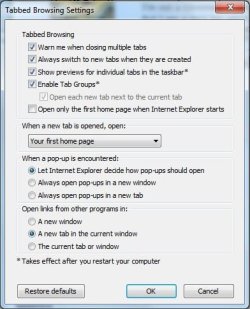
I like ie11 to switch to a new tab when it is created. So I went to internet options and tabs and ticked the box: Always switch to new tabs when they are created. This works fine as long as I do not shut down ie11; if I do shut it down, then when I start ie11 again,, the "go to new tabs" box has been unticked and I have to tick it again. Can anyone give me any idea what is causing this? Thanks in advance for all help. Incidentally, switching to Chrome is not an option. :confused:
 

My Computer

OS
windows 7 Home Premium
Not really sure why that would happen have you changed anything else recently ?
I'm not a Chrome fan either ;)
But I am a ie10 fan which I have passed on the ie11 update or better yet rolled back to ie10 for now,
I don't have any screen shots of the ie10 Tab settings page I don't think if you would post a screen shot of the options possibly we or I can see what options are shown and see if simply Unchecking Let Internet explorer decide how to open links works/ which by memory I believe still exists in ie11,
See the link above my signature for how to take and post screen shots if you need to,
Cheers.
 

My Computer

Computer type
PC/Desktop
Computer Manufacturer/Model Number
Custom assembled by me :}
OS
Win-7-Pro64bit 7-H-Prem-64bit
CPU
i7-5930K 2nd i9-9940x both water blocked VRM's too
Motherboard
ASUS SABERTOOTH X99 2nd ASUS x299 Apex
Memory
Trident-z 3200C14 2nd Trident-z 3600C16
Graphics Card(s)
EVGA 1080ti ftw3 2nd Titan Xp both water blocked
Sound Card
Built-in Realtek
Monitor(s) Displays
1-AOC G2460PG 24"G-Sync 144Hz/ 2nd 1-ASUS VG248QE 24" 144Hz
Screen Resolution
1920 x 1080 144Hz
Hard Drives
2-Samsung M.2 Evo & Evo Plus
2-Samsung 850 EVO 500GB SSD's/ 3-2.5 W.D. Black 1tb-&3-1tb/3-3.5 WD Black 1tb hdd's
PSU
EVGA SuperNOVA 1000-P2 2nd 1200-P2
Case
2-Corsair Obsidian Series 450D Black ATX Mid Tower
Cooling
Custom water loops
Keyboard
Logitech G710+/ 2nd Logitech G910
Mouse
2-RedDragon M901 Perdition 16400 dpi Gaming mouse = wired
Internet Speed
Comcast Ping 19ms 89.31mbps download speed 6.12mbps upload
Antivirus
Malwarebytes Pro/ Superantispyware Pro
Browser
FireFox & Pale moon
Other Info
2nd ASUS X299 Apex/Intel i9-9940x with Custom water loop/7H-Prem-x64/Corsair 450D case/Ram Trident-z 3600C16 4x8gb / Samsung970Evo plus 500gb SSD/Dual ssd EZ swap evo/PSU EVGA SuperNova 1200w-P2 80+Platinum/GPU Titan Xp /8-ML-140 on push-pull on 2-280GTX rads
I shall try to show an image of the tabs portion of internet options of my ie11.
 

Attachments

  • ie11_tabs_options.jpg
    ie11_tabs_options.jpg
    34.7 KB · Views: 10

My Computer

OS
windows 7 Home Premium
OK, the image is up, I must have done something right for a change.
You will notice that the second box from the top is ticked. If I shut down IE11 and start it again, that box will be unticked. AND that's annoying. Thanks again in advance.
 

My Computer

OS
windows 7 Home Premium
Just so you click on Okay to exit that page and on the other page use Apply and Okay should make it stick but these changes don't take effect until ie is closed and reopened although on the bottom it say changes don't take effect until you restart your computer which is a little odd there ?
You might try accessing Internet options via your Control panel instead of from the Gear symbol and see if it makes any difference,
I never used tab groups,
And I always use/ Always open popups in a new tab, but that's just personal preference there,
Cheers.
 

My Computer

Computer type
PC/Desktop
Computer Manufacturer/Model Number
Custom assembled by me :}
OS
Win-7-Pro64bit 7-H-Prem-64bit
CPU
i7-5930K 2nd i9-9940x both water blocked VRM's too
Motherboard
ASUS SABERTOOTH X99 2nd ASUS x299 Apex
Memory
Trident-z 3200C14 2nd Trident-z 3600C16
Graphics Card(s)
EVGA 1080ti ftw3 2nd Titan Xp both water blocked
Sound Card
Built-in Realtek
Monitor(s) Displays
1-AOC G2460PG 24"G-Sync 144Hz/ 2nd 1-ASUS VG248QE 24" 144Hz
Screen Resolution
1920 x 1080 144Hz
Hard Drives
2-Samsung M.2 Evo & Evo Plus
2-Samsung 850 EVO 500GB SSD's/ 3-2.5 W.D. Black 1tb-&3-1tb/3-3.5 WD Black 1tb hdd's
PSU
EVGA SuperNOVA 1000-P2 2nd 1200-P2
Case
2-Corsair Obsidian Series 450D Black ATX Mid Tower
Cooling
Custom water loops
Keyboard
Logitech G710+/ 2nd Logitech G910
Mouse
2-RedDragon M901 Perdition 16400 dpi Gaming mouse = wired
Internet Speed
Comcast Ping 19ms 89.31mbps download speed 6.12mbps upload
Antivirus
Malwarebytes Pro/ Superantispyware Pro
Browser
FireFox & Pale moon
Other Info
2nd ASUS X299 Apex/Intel i9-9940x with Custom water loop/7H-Prem-x64/Corsair 450D case/Ram Trident-z 3600C16 4x8gb / Samsung970Evo plus 500gb SSD/Dual ssd EZ swap evo/PSU EVGA SuperNova 1200w-P2 80+Platinum/GPU Titan Xp /8-ML-140 on push-pull on 2-280GTX rads
I have seen security programs cause this. Since we don't know your system specs (always helpful ;))

http://www.sevenforums.com/tutorials/180324-system-info-see-your-system-specs.html

we don't know which AV you are using (although it could be another program)

As a test, boot to Safe Mode with Networking.

http://www.sevenforums.com/tutorials/69585-safe-mode.html

Open IE and try saving the tab preferences, close IE, and reopen it. Is the option unchecked again? If not, try a clean start to see if it still behaves.

http://www.sevenforums.com/tutorial...ation-conflicts-performing-clean-startup.html

If the same issue occurs in Safe Mode, is the user this occurs on an Admin user? If not, try it from an Admin user. If it is an Admin user, try it from the built in Admin user (disable it again after testing)

http://www.sevenforums.com/tutorials/507-built-administrator-account-enable-disable.html

See if the behavior happens with all variables.

A Guy
 

My Computer

Computer type
PC/Desktop
OS
Windows 10 Home x64
CPU
INTEL Core i5-750 Quad-Core 3.37GHz
Motherboard
ASUS P7P55D
Memory
HyperX Fury Black Series 8GB (2 x 4GB) 1866Mhz
Graphics Card(s)
EVGA GeForce GTX 750 Superclocked 1GB 128-Bit GDDR5
Monitor(s) Displays
LG 32MA68HY 32" IPS
Screen Resolution
1920 x 1080
Hard Drives
Samsung 840 Evo 120GB, SEAGATE 500GB Barracuda® 7200.12, SATA 3 Gb/s, 7200 RPM, 16MB cache
PSU
ANTEC TruePower New TP-550, 80 PLUS, 550W
Case
ANTEC Three Hundred Illusion
Cooling
COOLER MASTER Hyper 212 Plus, 4 x 120mm 1 x 140mm Noctua's
Internet Speed
85 + Mbps
Antivirus
Avast
Browser
Vivaldi
Back
Top