Solved Synaptics Touchpad - Auto disable with USB mouse

mick823

New member
Member
Local time
6:24 AM
Messages
54
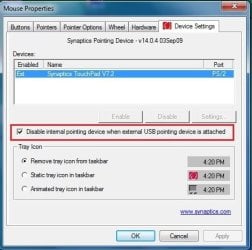
No option to disable your Synaptics Touchpad when you plugin a USB mouse? The function is there but is disabled in the registry. Click the link and scroll down to message #9. Make the change, reboot and the auto disable works immediately if you have a USB mouse plugged in. Making the change in HKLM didn't work for me but HKCU did the trick. Navigate to the Synaptics settings page and the option to disable is now there. No credit due here, just passing it on to help others.

NP8662 - Auto-deactivate touchpad (scroll down to message #9)
 

Attachments
  • touchpad.jpg
    touchpad.jpg
    32.6 KB · Views: 855

My Computer My Computer

OS
Win 7 Professional and Windows 8 Professional
Thanks I never knew that.
 

My Computer My Computer

Computer type
Laptop
Computer Manufacturer/Model Number
Hewlett-Packard/G62-107SA Notebook
OS
Microsoft Windows 7 Home Premium 64-bit Service Pack 1
CPU
Intel(R) Core(TM) i3 CPU M 330 @ 2.13GHz
Motherboard
Hewlett-Packard 1425
Memory
8 GB DDR3
Graphics Card(s)
Intel(R) HD Graphics
Sound Card
Realtek High Definition Audio
Monitor(s) Displays
Builtin
Screen Resolution
1366 x 768 x 32 bits (4294967296 colors) @ 60 Hz
Hard Drives
250 GB SATA Hard Disk Drive 7200 rpm
2TB Seagate GoFlex USB 2 Drive
1TB Iomega Prestige USB 2 Drive
1.5TB Iomega Prestige USB 2 Drive (Samsung)
2TB WD MyBook Live NAS.
Mouse
Logitech Anywhere MX
Internet Speed
152 Mbs download 10 Mbs upload
Antivirus
Norton 360
Browser
Chrome
Why would it not be active to start with? Weird for sure.
 

My Computer My Computer

Computer type
PC/Desktop
Computer Manufacturer/Model Number
Lenovo IdeaCenter 450
OS
Windows 10 Pro X64
CPU
Intel Quad Core i7-4770 @ 3.4Ghz
Memory
16.0GB PC3-12800 DDR3 SDRAM 1600 MHz
Graphics Card(s)
Intel Integrated HD Graphics
Sound Card
Realtek HD Audio
Monitor(s) Displays
HP 22" LCD
Screen Resolution
1680 x 1050
Hard Drives
250GB Samsung EVO SATA-3 SSD
2TB Seagate ST2000DM001 SATA-2
1.5TB Seagate ST3150041AS SATA
Keyboard
Dell USB
Mouse
Lenovo USB
Internet Speed
Cable via Road Runner 3MB Upload, 30MB Download
Antivirus
Windows Defender, MBAM Pro, MBAE
Browser
Seamonkey
Other Info
UEFI/GPT
PLDS DVD-RW DH16AERSH
I think it has something to do with how the OEM set it up. My Gateway mini did not have the option to disable until I did the registry tweak while a Dell I own has always had the option.
 

My Computer My Computer

OS
Win 7 Professional and Windows 8 Professional
It also disables when a Bluetooth mouse is on. Haven't tried it with a wireless mouse.
 

My Computer My Computer

Computer type
Laptop
Computer Manufacturer/Model Number
Hewlett-Packard/G62-107SA Notebook
OS
Microsoft Windows 7 Home Premium 64-bit Service Pack 1
CPU
Intel(R) Core(TM) i3 CPU M 330 @ 2.13GHz
Motherboard
Hewlett-Packard 1425
Memory
8 GB DDR3
Graphics Card(s)
Intel(R) HD Graphics
Sound Card
Realtek High Definition Audio
Monitor(s) Displays
Builtin
Screen Resolution
1366 x 768 x 32 bits (4294967296 colors) @ 60 Hz
Hard Drives
250 GB SATA Hard Disk Drive 7200 rpm
2TB Seagate GoFlex USB 2 Drive
1TB Iomega Prestige USB 2 Drive
1.5TB Iomega Prestige USB 2 Drive (Samsung)
2TB WD MyBook Live NAS.
Mouse
Logitech Anywhere MX
Internet Speed
152 Mbs download 10 Mbs upload
Antivirus
Norton 360
Browser
Chrome
my dell laptop does not have this kind of function


mousediseblewhenusbmous.jpg


how can i get that !!!!!
 

My Computer My Computer

Computer Manufacturer/Model Number
DELL
OS
windows 7
CPU
Intel® Core™ i3-330M (3M Cache, 2.13 GHz)
Motherboard
dell inc .03C6YH
Memory
4Gb DDR3
Graphics Card(s)
ATI Mobility Radeon HD 5470
Sound Card
onboard
Monitor(s) Displays
pnp moniter
Hard Drives
samsun 300gb
Internet Speed
512kpbs
Not sure which DELL lappy you have..I've got the Vostro and this worked for me..

Drivers and Downloads


May be you can find the updated driver for yours on the site if this doesn't work for you?
 

My Computer My Computer

Computer type
PC/Desktop
OS
openSUSE 13.1 64bit
CPU
i7
Motherboard
Gigabyte UD5
Memory
6gb Gskill matched DDR3
Graphics Card(s)
Radeon HD4600
Sound Card
All onboard
Monitor(s) Displays
HP 2159v
Hard Drives
120gb Samsung SSD for the OS
2 * 1tb WD Caviar Black for storage
PSU
Corsair 750w
Case
Antec 920
Cooling
Aksas Nero
my dell laptop does not have this kind of function

how can i get that !!!!!

Follow the instructions in post #1 and you will have the option to disable after modifying the registry and doing a reboot. My control page looked like yours before the registry tweak - no option to disable.

Just updating the driver is probably not going to work. I came across reports of people having the same exact driver and one would have the auto disable feature and the other would not.
 
Last edited:

My Computer My Computer

OS
Win 7 Professional and Windows 8 Professional
hey, i already got exactly like the image you inserted, but it didn't work. even after more than 5/6 times checking and unchecking with a reboot, both pointing device and touchpad still work. is there any other way to fix it? please...

regards and God Bless,

Zeamann

No option to disable your Synaptics Touchpad when you plugin a USB mouse? The function is there but is disabled in the registry. Click the link and scroll down to message #9. Make the change, reboot and the auto disable works immediately if you have a USB mouse plugged in. Making the change in HKLM didn't work for me but HKCU did the trick. Navigate to the Synaptics settings page and the option to disable is now there. No credit due here, just passing it on to help others.

NP8662 - Auto-deactivate touchpad (scroll down to message #9)
 

My Computer My Computer

Computer type
Laptop
Computer Manufacturer/Model Number
Toshiba Satellite C875
OS
Windows 7 Ultimate x64 SP1
CPU
Intel Core i3-3110M CPU @ 2.4GHz, 2 Core (s), 4 Logical Proc
Memory
4.0GB RAM
Graphics Card(s)
Intel HD Graphics 4000
New registry location

With the newer Alps driver version 7.1208 (from 2011-09-21) the USBMouse Registry value exists in 4 locations:
• HKEY_LOCAL_MACHINE\SOFTWARE\Alps\Apoint\Params\Default\
• HKEY_LOCAL_MACHINE\SOFTWARE\Alps\Apoint\USBMouse\
• HKEY_CURRENT_USER\Software\Alps\Apoint\Params\Default\
• HKEY_CURRENT_USER\Software\Alps\Apoint\USBMouse\
but only the last location works for me!
 

My Computer My Computer

Computer Manufacturer/Model Number
Dell Latitude D630
OS
Windows 7 Enterprise 32bit
Last edited:

My Computer My Computer

Computer type
PC/Desktop
Computer Manufacturer/Model Number
Acer Aspire 4741G
OS
Windows 7 x86 Ultimate
CPU
Inter Core i3
Memory
2GB DDR3
Graphics Card(s)
NVIDIA Geforce GT 420M
Hard Drives
500 GB
Antivirus
AVG Free Edition 2013
Browser
Firefox Ver 21.0
my dell laptop does not have this kind of function


mousediseblewhenusbmous.jpg


how can i get that !!!!!

My Lenovo G570 doesn't either. The registry tweaks linked don't work either.
 

My Computer My Computer

Computer type
PC/Desktop
Computer Manufacturer/Model Number
Custom Build
OS
Win 7 Ultimate 64 bit
CPU
Intel i7-3930K
Motherboard
ASUS P9X79 WS
Memory
Kingston HyperX Genesis 32GB Kit (8x4GB Modules) 1600MHz DDR
Graphics Card(s)
MSI R7850 Twin Frozr 2GD5/OC Radeon HD 7850 2GB 256-bit GDDR
Sound Card
Asus Xonar Essence STX
Monitor(s) Displays
3x Asus VG248QE 24", Vizio 32" TV
Screen Resolution
1920 x 1080, ?
Hard Drives
Samsung 128GB 840 Pro SSD (1),
Samsung 4TB 850 EVO SSDs (4)
Samsung 4TB 850 EVO SSDs (16) external backup drives used in 2.5" hot swap bays in the computer.
PSU
Corsair HX750w
Case
Antec Two Hundred v2 (modified)
Cooling
Cooler Master GeminII S524 120mm (fan replaced with a 140mm)
Keyboard
Logitech G510s
Mouse
Logitech M525 (two in use)
Internet Speed
=< 32Mbps down, 8Mbps up
Antivirus
AVAST!, MBAM, SAS, Spybot S&D (all but MBAM free) Glary Util
Browser
IE11
Other Info
LSI 9211-8i HBA card (8 SATA III ports), 2.5" & 3.5" Hot Swap Bays, HooToo HT-CR001 PCI-E to USB 3.0 Internal Hub + 6 Slot Card Reader, and LG Model CH12LS28 BD-ROM Optical Drive. Also, ScanSnap S1500 ADF duplexing scanner, Canon 9000F flat bed scanner, Corsair SP2500 2.1 speakers, Samsung CLP 415nw laser color printer, Cyberpower PP2200SW UPS
Did you install a new driver on it?
 

My Computer My Computer

Computer type
PC/Desktop
Computer Manufacturer/Model Number
Acer Aspire 4741G
OS
Windows 7 x86 Ultimate
CPU
Inter Core i3
Memory
2GB DDR3
Graphics Card(s)
NVIDIA Geforce GT 420M
Hard Drives
500 GB
Antivirus
AVG Free Edition 2013
Browser
Firefox Ver 21.0

My Computer My Computer

Computer type
PC/Desktop
Computer Manufacturer/Model Number
Custom Build
OS
Win 7 Ultimate 64 bit
CPU
Intel i7-3930K
Motherboard
ASUS P9X79 WS
Memory
Kingston HyperX Genesis 32GB Kit (8x4GB Modules) 1600MHz DDR
Graphics Card(s)
MSI R7850 Twin Frozr 2GD5/OC Radeon HD 7850 2GB 256-bit GDDR
Sound Card
Asus Xonar Essence STX
Monitor(s) Displays
3x Asus VG248QE 24", Vizio 32" TV
Screen Resolution
1920 x 1080, ?
Hard Drives
Samsung 128GB 840 Pro SSD (1),
Samsung 4TB 850 EVO SSDs (4)
Samsung 4TB 850 EVO SSDs (16) external backup drives used in 2.5" hot swap bays in the computer.
PSU
Corsair HX750w
Case
Antec Two Hundred v2 (modified)
Cooling
Cooler Master GeminII S524 120mm (fan replaced with a 140mm)
Keyboard
Logitech G510s
Mouse
Logitech M525 (two in use)
Internet Speed
=< 32Mbps down, 8Mbps up
Antivirus
AVAST!, MBAM, SAS, Spybot S&D (all but MBAM free) Glary Util
Browser
IE11
Other Info
LSI 9211-8i HBA card (8 SATA III ports), 2.5" & 3.5" Hot Swap Bays, HooToo HT-CR001 PCI-E to USB 3.0 Internal Hub + 6 Slot Card Reader, and LG Model CH12LS28 BD-ROM Optical Drive. Also, ScanSnap S1500 ADF duplexing scanner, Canon 9000F flat bed scanner, Corsair SP2500 2.1 speakers, Samsung CLP 415nw laser color printer, Cyberpower PP2200SW UPS
Lenovo Touch Pad Driver

What version do you have in your laptop? The latest version for the touch pad driver for your Lenovo G570 is Version: 8.0.4.3/15.3.0.0 is it what you have right now?

If not try to download it from here:

Lenovo Touch Pad Driver

And install it, It's from Lenovo support website.

Richard
 

My Computer My Computer

Computer type
PC/Desktop
Computer Manufacturer/Model Number
Acer Aspire 4741G
OS
Windows 7 x86 Ultimate
CPU
Inter Core i3
Memory
2GB DDR3
Graphics Card(s)
NVIDIA Geforce GT 420M
Hard Drives
500 GB
Antivirus
AVG Free Edition 2013
Browser
Firefox Ver 21.0
What version do you have in your laptop? The latest version for the touch pad driver for your Lenovo G570 is Version: 8.0.4.3/15.3.0.0 is it what you have right now?

If not try to download it from here:

Lenovo Touch Pad Driver

And install it, It's from Lenovo support website.

Richard

I have that one. No joy.
 

My Computer My Computer

Computer type
PC/Desktop
Computer Manufacturer/Model Number
Custom Build
OS
Win 7 Ultimate 64 bit
CPU
Intel i7-3930K
Motherboard
ASUS P9X79 WS
Memory
Kingston HyperX Genesis 32GB Kit (8x4GB Modules) 1600MHz DDR
Graphics Card(s)
MSI R7850 Twin Frozr 2GD5/OC Radeon HD 7850 2GB 256-bit GDDR
Sound Card
Asus Xonar Essence STX
Monitor(s) Displays
3x Asus VG248QE 24", Vizio 32" TV
Screen Resolution
1920 x 1080, ?
Hard Drives
Samsung 128GB 840 Pro SSD (1),
Samsung 4TB 850 EVO SSDs (4)
Samsung 4TB 850 EVO SSDs (16) external backup drives used in 2.5" hot swap bays in the computer.
PSU
Corsair HX750w
Case
Antec Two Hundred v2 (modified)
Cooling
Cooler Master GeminII S524 120mm (fan replaced with a 140mm)
Keyboard
Logitech G510s
Mouse
Logitech M525 (two in use)
Internet Speed
=< 32Mbps down, 8Mbps up
Antivirus
AVAST!, MBAM, SAS, Spybot S&D (all but MBAM free) Glary Util
Browser
IE11
Other Info
LSI 9211-8i HBA card (8 SATA III ports), 2.5" & 3.5" Hot Swap Bays, HooToo HT-CR001 PCI-E to USB 3.0 Internal Hub + 6 Slot Card Reader, and LG Model CH12LS28 BD-ROM Optical Drive. Also, ScanSnap S1500 ADF duplexing scanner, Canon 9000F flat bed scanner, Corsair SP2500 2.1 speakers, Samsung CLP 415nw laser color printer, Cyberpower PP2200SW UPS
Then in that case, try using a third party software if its okay with you.

Try using this: Touchpad Blocker

Personally i haven't tried it but base on the review it seems to work on Synaptics Manufactured Touchpad. Though there is one drawback, it run sluggish in IE but that would not be a problem if you will just use other web browser.

Hope it helps.


Richard
 

My Computer My Computer

Computer type
PC/Desktop
Computer Manufacturer/Model Number
Acer Aspire 4741G
OS
Windows 7 x86 Ultimate
CPU
Inter Core i3
Memory
2GB DDR3
Graphics Card(s)
NVIDIA Geforce GT 420M
Hard Drives
500 GB
Antivirus
AVG Free Edition 2013
Browser
Firefox Ver 21.0
I've tried it. By the time I set it to delay enough to avoid problems, I lose my mouse for a short while. Also, I run IE and do not want to change.
 

My Computer My Computer

Computer type
PC/Desktop
Computer Manufacturer/Model Number
Custom Build
OS
Win 7 Ultimate 64 bit
CPU
Intel i7-3930K
Motherboard
ASUS P9X79 WS
Memory
Kingston HyperX Genesis 32GB Kit (8x4GB Modules) 1600MHz DDR
Graphics Card(s)
MSI R7850 Twin Frozr 2GD5/OC Radeon HD 7850 2GB 256-bit GDDR
Sound Card
Asus Xonar Essence STX
Monitor(s) Displays
3x Asus VG248QE 24", Vizio 32" TV
Screen Resolution
1920 x 1080, ?
Hard Drives
Samsung 128GB 840 Pro SSD (1),
Samsung 4TB 850 EVO SSDs (4)
Samsung 4TB 850 EVO SSDs (16) external backup drives used in 2.5" hot swap bays in the computer.
PSU
Corsair HX750w
Case
Antec Two Hundred v2 (modified)
Cooling
Cooler Master GeminII S524 120mm (fan replaced with a 140mm)
Keyboard
Logitech G510s
Mouse
Logitech M525 (two in use)
Internet Speed
=< 32Mbps down, 8Mbps up
Antivirus
AVAST!, MBAM, SAS, Spybot S&D (all but MBAM free) Glary Util
Browser
IE11
Other Info
LSI 9211-8i HBA card (8 SATA III ports), 2.5" & 3.5" Hot Swap Bays, HooToo HT-CR001 PCI-E to USB 3.0 Internal Hub + 6 Slot Card Reader, and LG Model CH12LS28 BD-ROM Optical Drive. Also, ScanSnap S1500 ADF duplexing scanner, Canon 9000F flat bed scanner, Corsair SP2500 2.1 speakers, Samsung CLP 415nw laser color printer, Cyberpower PP2200SW UPS
I just recently test the software now and basically it runs great. The Issue of sluggish in IE can be solve by adjusting your plug in external mouse motion in the mouse properties. And unchecked the block accidental taps and clicks as we will not be using it. What we are looking is the functionality that we can disable the touch pad when we plug any external pointing device.

Then check the Enable / Disable Touch Pad Option. Then by just pressing CTRL + ALT + F9 simultaneously we can toggle on and off the internal touch pad.

Hope it helps.

Richard
 

My Computer My Computer

Computer type
PC/Desktop
Computer Manufacturer/Model Number
Acer Aspire 4741G
OS
Windows 7 x86 Ultimate
CPU
Inter Core i3
Memory
2GB DDR3
Graphics Card(s)
NVIDIA Geforce GT 420M
Hard Drives
500 GB
Antivirus
AVG Free Edition 2013
Browser
Firefox Ver 21.0
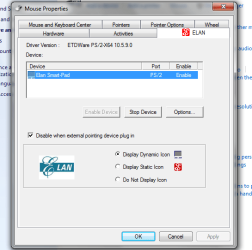
I don't know if anyone is still having trouble accessing the device settings tab in the mouse properties, but this is how mine looks and there is a box to check to disable the touchpad when an external pointing device is plugged in.
 

Attachments

  • touchpad fix.png
    touchpad fix.png
    21.4 KB · Views: 11

My Computer My Computer

Computer type
PC/Desktop
OS
windows 7 home premium x64
Back
Top