
Synaptics Touchpad

kyzersoze

Awesome XD
Member
Local time
4:02 AM
Messages
60
Location
Inside my House ^_^
Hey, can I uninstall the synaptics touchpad in my laptop, and reinstall it again? Synaptics is not running on start-up but it is activated in msconfig, and CCleaner. Is it safe to uninstall and reinstall it again? If I uninstall it, will my touchpad still operate?
 

My Computer

Computer Manufacturer/Model Number
Acer Aspire 4820TG
OS
Windows 7 Home Premium 64-bit Service Pack 1
CPU
Intel Core i5 M460 @ 2.53Ghz
Motherboard
Acer ZQ1B
Memory
4GB DDR3
Graphics Card(s)
ATI Mobility Radeon HD 5650, Intel HD Graphics
Monitor(s) Displays
AUO - 14 inches
Screen Resolution
1366x768
Hard Drives
Western Digital WD6400BEVT-22A0RT0 (640GB)
Hi, kyzersoze. :)

You'll be fine. On my Toshiba, I've done it at least a half dozen times for various reasons - none which are important here. ;)
 

My Computer

Computer Manufacturer/Model Number
Toshiba L355D
OS
Windows 7 Ultimate x64 SP1
CPU
Core2 Duo
Motherboard
Intel
Memory
4 GB
Graphics Card(s)
GM965 on-board
Sound Card
RealTek on-board
Monitor(s) Displays
19"+17"(laptop)
Screen Resolution
1440x900 (x 2)
Hard Drives
500GB Ext. 200GB Internal
PSU
N/A
Case
N/A
Cooling
N/A
Ohh, Okay. Thanks Mike :D
 

My Computer

Computer Manufacturer/Model Number
Acer Aspire 4820TG
OS
Windows 7 Home Premium 64-bit Service Pack 1
CPU
Intel Core i5 M460 @ 2.53Ghz
Motherboard
Acer ZQ1B
Memory
4GB DDR3
Graphics Card(s)
ATI Mobility Radeon HD 5650, Intel HD Graphics
Monitor(s) Displays
AUO - 14 inches
Screen Resolution
1366x768
Hard Drives
Western Digital WD6400BEVT-22A0RT0 (640GB)
Hey Mike, you still there?
I uninstalled and reinstalled it but, it still doesn't work. :|
 

My Computer

Computer Manufacturer/Model Number
Acer Aspire 4820TG
OS
Windows 7 Home Premium 64-bit Service Pack 1
CPU
Intel Core i5 M460 @ 2.53Ghz
Motherboard
Acer ZQ1B
Memory
4GB DDR3
Graphics Card(s)
ATI Mobility Radeon HD 5650, Intel HD Graphics
Monitor(s) Displays
AUO - 14 inches
Screen Resolution
1366x768
Hard Drives
Western Digital WD6400BEVT-22A0RT0 (640GB)
What about it is not working? The touchpad doesn't work at all?
 

My Computer

Computer Manufacturer/Model Number
Toshiba L355D
OS
Windows 7 Ultimate x64 SP1
CPU
Core2 Duo
Motherboard
Intel
Memory
4 GB
Graphics Card(s)
GM965 on-board
Sound Card
RealTek on-board
Monitor(s) Displays
19"+17"(laptop)
Screen Resolution
1440x900 (x 2)
Hard Drives
500GB Ext. 200GB Internal
PSU
N/A
Case
N/A
Cooling
N/A
The touchpad works, but synaptics is not. it still wont run on start-up
 

My Computer

Computer Manufacturer/Model Number
Acer Aspire 4820TG
OS
Windows 7 Home Premium 64-bit Service Pack 1
CPU
Intel Core i5 M460 @ 2.53Ghz
Motherboard
Acer ZQ1B
Memory
4GB DDR3
Graphics Card(s)
ATI Mobility Radeon HD 5650, Intel HD Graphics
Monitor(s) Displays
AUO - 14 inches
Screen Resolution
1366x768
Hard Drives
Western Digital WD6400BEVT-22A0RT0 (640GB)
Are you sure it's not running? Have you checked the Task Manager?:

ScreenShot00323.jpg
 

My Computer

Computer Manufacturer/Model Number
Toshiba L355D
OS
Windows 7 Ultimate x64 SP1
CPU
Core2 Duo
Motherboard
Intel
Memory
4 GB
Graphics Card(s)
GM965 on-board
Sound Card
RealTek on-board
Monitor(s) Displays
19"+17"(laptop)
Screen Resolution
1440x900 (x 2)
Hard Drives
500GB Ext. 200GB Internal
PSU
N/A
Case
N/A
Cooling
N/A
Yes, I manually run it after the start-up to use the scrolling function in the touchpad.
 

My Computer

Computer Manufacturer/Model Number
Acer Aspire 4820TG
OS
Windows 7 Home Premium 64-bit Service Pack 1
CPU
Intel Core i5 M460 @ 2.53Ghz
Motherboard
Acer ZQ1B
Memory
4GB DDR3
Graphics Card(s)
ATI Mobility Radeon HD 5650, Intel HD Graphics
Monitor(s) Displays
AUO - 14 inches
Screen Resolution
1366x768
Hard Drives
Western Digital WD6400BEVT-22A0RT0 (640GB)

Which version have you been installing?

ScreenShot00324.jpg

The driver has been updated to 15.1.22 here but, since I've had no issues, I haven't bothered to update.
 

My Computer

Computer Manufacturer/Model Number
Toshiba L355D
OS
Windows 7 Ultimate x64 SP1
CPU
Core2 Duo
Motherboard
Intel
Memory
4 GB
Graphics Card(s)
GM965 on-board
Sound Card
RealTek on-board
Monitor(s) Displays
19"+17"(laptop)
Screen Resolution
1440x900 (x 2)
Hard Drives
500GB Ext. 200GB Internal
PSU
N/A
Case
N/A
Cooling
N/A
I downloaded the driver version in the Acer website wherein it is compatible with my laptop. The version is 14.0.6.0
 

My Computer

Computer Manufacturer/Model Number
Acer Aspire 4820TG
OS
Windows 7 Home Premium 64-bit Service Pack 1
CPU
Intel Core i5 M460 @ 2.53Ghz
Motherboard
Acer ZQ1B
Memory
4GB DDR3
Graphics Card(s)
ATI Mobility Radeon HD 5650, Intel HD Graphics
Monitor(s) Displays
AUO - 14 inches
Screen Resolution
1366x768
Hard Drives
Western Digital WD6400BEVT-22A0RT0 (640GB)
Give the Synaptics driver a shot. I found it to be better than the OEM driver for my use. You can always roll-back if necessary.

YMMV. ;)
 

My Computer

Computer Manufacturer/Model Number
Toshiba L355D
OS
Windows 7 Ultimate x64 SP1
CPU
Core2 Duo
Motherboard
Intel
Memory
4 GB
Graphics Card(s)
GM965 on-board
Sound Card
RealTek on-board
Monitor(s) Displays
19"+17"(laptop)
Screen Resolution
1440x900 (x 2)
Hard Drives
500GB Ext. 200GB Internal
PSU
N/A
Case
N/A
Cooling
N/A
I'll try to reinstall it again.
 

My Computer

Computer Manufacturer/Model Number
Acer Aspire 4820TG
OS
Windows 7 Home Premium 64-bit Service Pack 1
CPU
Intel Core i5 M460 @ 2.53Ghz
Motherboard
Acer ZQ1B
Memory
4GB DDR3
Graphics Card(s)
ATI Mobility Radeon HD 5650, Intel HD Graphics
Monitor(s) Displays
AUO - 14 inches
Screen Resolution
1366x768
Hard Drives
Western Digital WD6400BEVT-22A0RT0 (640GB)
I downloaded the driver version in the Acer website wherein it is compatible with my laptop. The version is 14.0.6.0

That's the right one...stick with it!
I would uninstall all from "Program & Feature" => Synaptics Pointing Device Driver, then reboot and reinstall the Acer stock v14.0.6.0
 

My Computer

Computer type
PC/Desktop
Computer Manufacturer/Model Number
Custom Build
OS
Windows 7 Professional SP1 - x64 [Non-UEFI Boot]
CPU
Ivy Bridge Core i5 3570K (Delidded)
Motherboard
Asus P8Z77-V LE PLUS
Memory
G.Skill "Ares" DDR3 PC3-12800 - 1600MHz (16Gb)
Graphics Card(s)
Asus Dual-RX480-O4G
Sound Card
Creative Sound Blaster Z w/5.1 sound system
Monitor(s) Displays
Asus IPS 23"
Screen Resolution
16/9
Hard Drives
Internal:
500Go Sata 6Gb/s (x2)
500Go Sata 3Gb/s (x2)
SSD 60Go Sata 6Gb/s
PSU
In Win C 900W Series 80+ Platinum
Case
Thermaltake Chaser A71
Cooling
Custom Water Cooling Loop
Keyboard
Cooler Master QuickFire XTi
Mouse
Razer Imperator 2012 (4G)
Antivirus
MSE
Browser
IE 11.0.xxx Rtm
Other Info
"Raid0" with Intel Smart Response Technology (HDD/SSD)
Yes, I keep on doing that but it still won't run on start-up. I keep on running it manually to use the features
 

My Computer

Computer Manufacturer/Model Number
Acer Aspire 4820TG
OS
Windows 7 Home Premium 64-bit Service Pack 1
CPU
Intel Core i5 M460 @ 2.53Ghz
Motherboard
Acer ZQ1B
Memory
4GB DDR3
Graphics Card(s)
ATI Mobility Radeon HD 5650, Intel HD Graphics
Monitor(s) Displays
AUO - 14 inches
Screen Resolution
1366x768
Hard Drives
Western Digital WD6400BEVT-22A0RT0 (640GB)
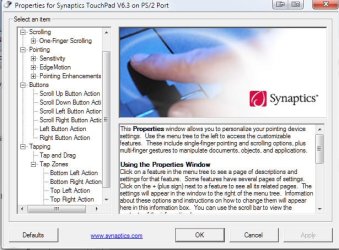
Yes, I keep on doing that but it still won't run on start-up. I keep on running it manually to use the features
Have you tried the download from the Synaptics website I linked to earlier, kysersoze?

If you haven't, uninstall your existing driver and install the one from the link. As I mentioned, I found it to be more versatile and customizable than the OEM driver.

ScreenShot00330.jpg
 

My Computer

Computer Manufacturer/Model Number
Toshiba L355D
OS
Windows 7 Ultimate x64 SP1
CPU
Core2 Duo
Motherboard
Intel
Memory
4 GB
Graphics Card(s)
GM965 on-board
Sound Card
RealTek on-board
Monitor(s) Displays
19"+17"(laptop)
Screen Resolution
1440x900 (x 2)
Hard Drives
500GB Ext. 200GB Internal
PSU
N/A
Case
N/A
Cooling
N/A
It still won't work. :| it won't run on start-up every after boot. is %Program Files%\Synaptics\SynTP\SynTPEnh.exe a proper file address?
 

My Computer

Computer Manufacturer/Model Number
Acer Aspire 4820TG
OS
Windows 7 Home Premium 64-bit Service Pack 1
CPU
Intel Core i5 M460 @ 2.53Ghz
Motherboard
Acer ZQ1B
Memory
4GB DDR3
Graphics Card(s)
ATI Mobility Radeon HD 5650, Intel HD Graphics
Monitor(s) Displays
AUO - 14 inches
Screen Resolution
1366x768
Hard Drives
Western Digital WD6400BEVT-22A0RT0 (640GB)
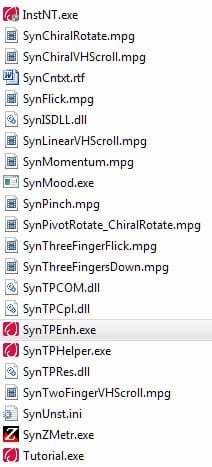
It still won't work. :| it won't run on start-up every after boot. is %Program Files%\Synaptics\SynTP\SynTPEnh.exe a proper file address?
Yep. This is what I get: "C:\Program Files\Synaptics\SynTP\SynTPEnh.exe"

The files in "Synaptics\SynTP":

ScreenShot00331.jpg

Are you running any type of startup control program such as Soluto?
 

My Computer

Computer Manufacturer/Model Number
Toshiba L355D
OS
Windows 7 Ultimate x64 SP1
CPU
Core2 Duo
Motherboard
Intel
Memory
4 GB
Graphics Card(s)
GM965 on-board
Sound Card
RealTek on-board
Monitor(s) Displays
19"+17"(laptop)
Screen Resolution
1440x900 (x 2)
Hard Drives
500GB Ext. 200GB Internal
PSU
N/A
Case
N/A
Cooling
N/A
Mine is not "C:Program Files\Synaptics\SynTP\SynTPEnh.exe" it's just the % sign; %Program Files%\Synaptics\SynTP\SynTPEnh.exe it wont run on start-up.
 

My Computer

Computer Manufacturer/Model Number
Acer Aspire 4820TG
OS
Windows 7 Home Premium 64-bit Service Pack 1
CPU
Intel Core i5 M460 @ 2.53Ghz
Motherboard
Acer ZQ1B
Memory
4GB DDR3
Graphics Card(s)
ATI Mobility Radeon HD 5650, Intel HD Graphics
Monitor(s) Displays
AUO - 14 inches
Screen Resolution
1366x768
Hard Drives
Western Digital WD6400BEVT-22A0RT0 (640GB)
Mine is not "C:Program Files\Synaptics\SynTP\SynTPEnh.exe" it's just the % sign; %Program Files%\Synaptics\SynTP\SynTPEnh.exe it wont run on start-up.


Do you mean in msconfig? Mine shows the complete path (I have it disabled because I use a wireless keyboard and mouse 95 percent of the time and run it manually when I need it):

ScreenShot00332.jpg
 

My Computer

Computer Manufacturer/Model Number
Toshiba L355D
OS
Windows 7 Ultimate x64 SP1
CPU
Core2 Duo
Motherboard
Intel
Memory
4 GB
Graphics Card(s)
GM965 on-board
Sound Card
RealTek on-board
Monitor(s) Displays
19"+17"(laptop)
Screen Resolution
1440x900 (x 2)
Hard Drives
500GB Ext. 200GB Internal
PSU
N/A
Case
N/A
Cooling
N/A
Check this registry entry:

"HKEY_LOCAL_MACHINE\SOFTWARE\Microsoft\Shared Tools\MSConfig\startupreg\SynTPEnh"

and see what it says in the "command" sub-key.

It should be:

ScreenShot00333.jpg
 

My Computer

Computer Manufacturer/Model Number
Toshiba L355D
OS
Windows 7 Ultimate x64 SP1
CPU
Core2 Duo
Motherboard
Intel
Memory
4 GB
Graphics Card(s)
GM965 on-board
Sound Card
RealTek on-board
Monitor(s) Displays
19"+17"(laptop)
Screen Resolution
1440x900 (x 2)
Hard Drives
500GB Ext. 200GB Internal
PSU
N/A
Case
N/A
Cooling
N/A
Back
Top