Synaptics Touchpad

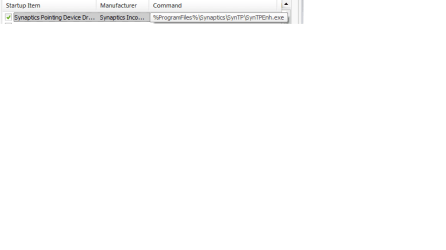
Yes, msconfig. Mine shows a different path.
 

Attachments

  • Untitled.png
    Untitled.png
    3.4 KB · Views: 61

My Computer

Computer Manufacturer/Model Number
Acer Aspire 4820TG
OS
Windows 7 Home Premium 64-bit Service Pack 1
CPU
Intel Core i5 M460 @ 2.53Ghz
Motherboard
Acer ZQ1B
Memory
4GB DDR3
Graphics Card(s)
ATI Mobility Radeon HD 5650, Intel HD Graphics
Monitor(s) Displays
AUO - 14 inches
Screen Resolution
1366x768
Hard Drives
Western Digital WD6400BEVT-22A0RT0 (640GB)
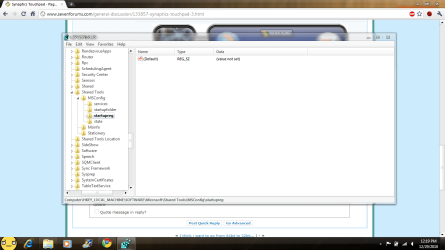
There is nothing in my startupreg folder
 

My Computer

Computer Manufacturer/Model Number
Acer Aspire 4820TG
OS
Windows 7 Home Premium 64-bit Service Pack 1
CPU
Intel Core i5 M460 @ 2.53Ghz
Motherboard
Acer ZQ1B
Memory
4GB DDR3
Graphics Card(s)
ATI Mobility Radeon HD 5650, Intel HD Graphics
Monitor(s) Displays
AUO - 14 inches
Screen Resolution
1366x768
Hard Drives
Western Digital WD6400BEVT-22A0RT0 (640GB)
There is nothing in my startupreg folder
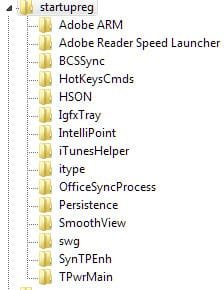
Uh-oh. Is anything running at startup? You should at least have a list of some type in "HKEY_LOCAL_MACHINE\SOFTWARE\Microsoft\Shared Tools\MSConfig\startupreg".
Here's mine (not all are checked in msconfig but they show up there):

ScreenShot00334.jpg
 

My Computer

Computer Manufacturer/Model Number
Toshiba L355D
OS
Windows 7 Ultimate x64 SP1
CPU
Core2 Duo
Motherboard
Intel
Memory
4 GB
Graphics Card(s)
GM965 on-board
Sound Card
RealTek on-board
Monitor(s) Displays
19"+17"(laptop)
Screen Resolution
1440x900 (x 2)
Hard Drives
500GB Ext. 200GB Internal
PSU
N/A
Case
N/A
Cooling
N/A
uhh, the windows sidebar gagdets are running on startup but, they are not on the list, my anti-virus is also running on start-up. Avast
 

Attachments

  • Untitled.png
    Untitled.png
    56.8 KB · Views: 29

My Computer

Computer Manufacturer/Model Number
Acer Aspire 4820TG
OS
Windows 7 Home Premium 64-bit Service Pack 1
CPU
Intel Core i5 M460 @ 2.53Ghz
Motherboard
Acer ZQ1B
Memory
4GB DDR3
Graphics Card(s)
ATI Mobility Radeon HD 5650, Intel HD Graphics
Monitor(s) Displays
AUO - 14 inches
Screen Resolution
1366x768
Hard Drives
Western Digital WD6400BEVT-22A0RT0 (640GB)
My AV and gadgets aren't in the startupreg, either, but many other things are as I have shown, specifically, the Synaptics startup.

Sorry, kyzersoze, you've got me stumped. I've never seen it that way. Maybe it's an Acer issue?

If it were me, I'd do a repair install. However, that's not to say there isn't something else at play here. Until someone chimes in with a better idea, though, that is what I would do.

I hesitate to even mention it because, to me, it should always be a last resort. I hope I'm wrong.

 

My Computer

Computer Manufacturer/Model Number
Toshiba L355D
OS
Windows 7 Ultimate x64 SP1
CPU
Core2 Duo
Motherboard
Intel
Memory
4 GB
Graphics Card(s)
GM965 on-board
Sound Card
RealTek on-board
Monitor(s) Displays
19"+17"(laptop)
Screen Resolution
1440x900 (x 2)
Hard Drives
500GB Ext. 200GB Internal
PSU
N/A
Case
N/A
Cooling
N/A
Woah, It was not like this before when I tried the clean boot. And After the clean boot. It went all like this. -_-
 

My Computer

Computer Manufacturer/Model Number
Acer Aspire 4820TG
OS
Windows 7 Home Premium 64-bit Service Pack 1
CPU
Intel Core i5 M460 @ 2.53Ghz
Motherboard
Acer ZQ1B
Memory
4GB DDR3
Graphics Card(s)
ATI Mobility Radeon HD 5650, Intel HD Graphics
Monitor(s) Displays
AUO - 14 inches
Screen Resolution
1366x768
Hard Drives
Western Digital WD6400BEVT-22A0RT0 (640GB)
Woah, It was not like this before when I tried the clean boot. And After the clean boot. It went all like this. -_-
I'm not understanding what you mean. Sorry.
 

My Computer

Computer Manufacturer/Model Number
Toshiba L355D
OS
Windows 7 Ultimate x64 SP1
CPU
Core2 Duo
Motherboard
Intel
Memory
4 GB
Graphics Card(s)
GM965 on-board
Sound Card
RealTek on-board
Monitor(s) Displays
19"+17"(laptop)
Screen Resolution
1440x900 (x 2)
Hard Drives
500GB Ext. 200GB Internal
PSU
N/A
Case
N/A
Cooling
N/A
my laptop was infected with malware last 2 days, then I scanned and removed it. But before I went on and do that, richc46 adviced me to do a clean boot. And after I finished the clean boot, EzioAuditore adviced me to use malwarebytes and scan for infected files, then it found infected files and removed it. But before I scanned, and after the clean boot, synaptics won't run on start-up
 

My Computer

Computer Manufacturer/Model Number
Acer Aspire 4820TG
OS
Windows 7 Home Premium 64-bit Service Pack 1
CPU
Intel Core i5 M460 @ 2.53Ghz
Motherboard
Acer ZQ1B
Memory
4GB DDR3
Graphics Card(s)
ATI Mobility Radeon HD 5650, Intel HD Graphics
Monitor(s) Displays
AUO - 14 inches
Screen Resolution
1366x768
Hard Drives
Western Digital WD6400BEVT-22A0RT0 (640GB)
wait, I got to see the files in startupreg. it's just that I'm not running it as Administrator. But Synaptics still won't run :|
 

My Computer

Computer Manufacturer/Model Number
Acer Aspire 4820TG
OS
Windows 7 Home Premium 64-bit Service Pack 1
CPU
Intel Core i5 M460 @ 2.53Ghz
Motherboard
Acer ZQ1B
Memory
4GB DDR3
Graphics Card(s)
ATI Mobility Radeon HD 5650, Intel HD Graphics
Monitor(s) Displays
AUO - 14 inches
Screen Resolution
1366x768
Hard Drives
Western Digital WD6400BEVT-22A0RT0 (640GB)
wait, I got to see the files in startupreg. it's just that I'm not running it as Administrator. But Synaptics still won't run :|
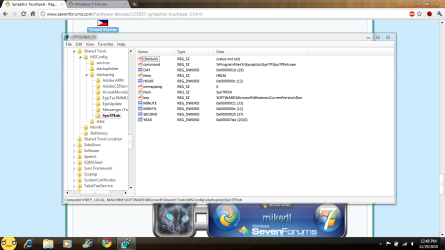
What is the string in the "command" key? Is it "C:\Program Files ..." or "%Program Files% ..."?

richc46 and EzioAuditore gave you good advice, BTW. They're great members who have helped a lot of people. :)
 

My Computer

Computer Manufacturer/Model Number
Toshiba L355D
OS
Windows 7 Ultimate x64 SP1
CPU
Core2 Duo
Motherboard
Intel
Memory
4 GB
Graphics Card(s)
GM965 on-board
Sound Card
RealTek on-board
Monitor(s) Displays
19"+17"(laptop)
Screen Resolution
1440x900 (x 2)
Hard Drives
500GB Ext. 200GB Internal
PSU
N/A
Case
N/A
Cooling
N/A
%Program Files%....
 

Attachments

  • Untitled.png
    Untitled.png
    80.7 KB · Views: 59

My Computer

Computer Manufacturer/Model Number
Acer Aspire 4820TG
OS
Windows 7 Home Premium 64-bit Service Pack 1
CPU
Intel Core i5 M460 @ 2.53Ghz
Motherboard
Acer ZQ1B
Memory
4GB DDR3
Graphics Card(s)
ATI Mobility Radeon HD 5650, Intel HD Graphics
Monitor(s) Displays
AUO - 14 inches
Screen Resolution
1366x768
Hard Drives
Western Digital WD6400BEVT-22A0RT0 (640GB)
%Program Files%....
Change it to "C:\Program Files\Synaptics\SynTP\SynTPEnh.exe" (without the quotes, of course). Reboot and report back.

You could just delete the entire SynTPEnh key and reinstall but let's not go there yet.
 

My Computer

Computer Manufacturer/Model Number
Toshiba L355D
OS
Windows 7 Ultimate x64 SP1
CPU
Core2 Duo
Motherboard
Intel
Memory
4 GB
Graphics Card(s)
GM965 on-board
Sound Card
RealTek on-board
Monitor(s) Displays
19"+17"(laptop)
Screen Resolution
1440x900 (x 2)
Hard Drives
500GB Ext. 200GB Internal
PSU
N/A
Case
N/A
Cooling
N/A
apparently, it didn't much do anything :| there is nothing in the startupreg because, I ran all the startup items
 

My Computer

Computer Manufacturer/Model Number
Acer Aspire 4820TG
OS
Windows 7 Home Premium 64-bit Service Pack 1
CPU
Intel Core i5 M460 @ 2.53Ghz
Motherboard
Acer ZQ1B
Memory
4GB DDR3
Graphics Card(s)
ATI Mobility Radeon HD 5650, Intel HD Graphics
Monitor(s) Displays
AUO - 14 inches
Screen Resolution
1366x768
Hard Drives
Western Digital WD6400BEVT-22A0RT0 (640GB)
Considering you couldn't see the startupreg entries without running as admin (I automatically get a UAC popup when I run regedit), perhaps your user account is not letting anything in the startupreg key run at all with your user account. Maybe an AV setting?

Again, kyzersoze, I will have to admit if the suggestions I thus far presented have not worked, something else is at play here and I'm a bit stumped.
 

My Computer

Computer Manufacturer/Model Number
Toshiba L355D
OS
Windows 7 Ultimate x64 SP1
CPU
Core2 Duo
Motherboard
Intel
Memory
4 GB
Graphics Card(s)
GM965 on-board
Sound Card
RealTek on-board
Monitor(s) Displays
19"+17"(laptop)
Screen Resolution
1440x900 (x 2)
Hard Drives
500GB Ext. 200GB Internal
PSU
N/A
Case
N/A
Cooling
N/A
It is always run as admin, it's just that the startupreg folder only shows startup items that is not enabled. And I think other startup items run fine, except for synaptics. And why would Avast block the Admin
 

My Computer

Computer Manufacturer/Model Number
Acer Aspire 4820TG
OS
Windows 7 Home Premium 64-bit Service Pack 1
CPU
Intel Core i5 M460 @ 2.53Ghz
Motherboard
Acer ZQ1B
Memory
4GB DDR3
Graphics Card(s)
ATI Mobility Radeon HD 5650, Intel HD Graphics
Monitor(s) Displays
AUO - 14 inches
Screen Resolution
1366x768
Hard Drives
Western Digital WD6400BEVT-22A0RT0 (640GB)
It is always run as admin, it's just that the startupreg folder only shows startup items that is not enabled. And I think other startup items run fine, except for synaptics. And why would Avast block the Admin

I wouldn't think it does. Hang on, let me check something, you brought up an interesting point, kyzersoze. BRB.
 

My Computer

Computer Manufacturer/Model Number
Toshiba L355D
OS
Windows 7 Ultimate x64 SP1
CPU
Core2 Duo
Motherboard
Intel
Memory
4 GB
Graphics Card(s)
GM965 on-board
Sound Card
RealTek on-board
Monitor(s) Displays
19"+17"(laptop)
Screen Resolution
1440x900 (x 2)
Hard Drives
500GB Ext. 200GB Internal
PSU
N/A
Case
N/A
Cooling
N/A
You are right about the startupreg folder in the registry. Not that I doubted you, I certainly did not, it's just been a while since I've had to troubleshoot an issue like this.

Check this entry (I should have looked there first but I wasn't comparing apples to apples - my bad, I had tunnel vision regarding the SynTPEnh file):
"HKEY_LOCAL_MACHINE\SOFTWARE\Microsoft\Windows\CurrentVersion\Run"
 

My Computer

Computer Manufacturer/Model Number
Toshiba L355D
OS
Windows 7 Ultimate x64 SP1
CPU
Core2 Duo
Motherboard
Intel
Memory
4 GB
Graphics Card(s)
GM965 on-board
Sound Card
RealTek on-board
Monitor(s) Displays
19"+17"(laptop)
Screen Resolution
1440x900 (x 2)
Hard Drives
500GB Ext. 200GB Internal
PSU
N/A
Case
N/A
Cooling
N/A
SynTPEnh.exe is there. I am currently manually running it, and it is on right now, for me to use the scrolling feature
 

Attachments

  • Untitled.png
    Untitled.png
    45 KB · Views: 51

My Computer

Computer Manufacturer/Model Number
Acer Aspire 4820TG
OS
Windows 7 Home Premium 64-bit Service Pack 1
CPU
Intel Core i5 M460 @ 2.53Ghz
Motherboard
Acer ZQ1B
Memory
4GB DDR3
Graphics Card(s)
ATI Mobility Radeon HD 5650, Intel HD Graphics
Monitor(s) Displays
AUO - 14 inches
Screen Resolution
1366x768
Hard Drives
Western Digital WD6400BEVT-22A0RT0 (640GB)
How are you certain it's not running at start-up. Does it not show up in Task Manager and are your scrolling functions on the touch-pad inactive after start-up and before you run it manually?
 

My Computer

Computer Manufacturer/Model Number
Toshiba L355D
OS
Windows 7 Ultimate x64 SP1
CPU
Core2 Duo
Motherboard
Intel
Memory
4 GB
Graphics Card(s)
GM965 on-board
Sound Card
RealTek on-board
Monitor(s) Displays
19"+17"(laptop)
Screen Resolution
1440x900 (x 2)
Hard Drives
500GB Ext. 200GB Internal
PSU
N/A
Case
N/A
Cooling
N/A
yes, yes, and yes
 

My Computer

Computer Manufacturer/Model Number
Acer Aspire 4820TG
OS
Windows 7 Home Premium 64-bit Service Pack 1
CPU
Intel Core i5 M460 @ 2.53Ghz
Motherboard
Acer ZQ1B
Memory
4GB DDR3
Graphics Card(s)
ATI Mobility Radeon HD 5650, Intel HD Graphics
Monitor(s) Displays
AUO - 14 inches
Screen Resolution
1366x768
Hard Drives
Western Digital WD6400BEVT-22A0RT0 (640GB)
Back
Top