Sysprep (basic as possible)

hipsterdoofus

New member
Local time
2:42 AM
Messages
14
Hello, I have about 175 machines I deploy each year in our organization. In the past with XP, I simply created a profile and copied it to default. That always worked well from me, but from what I understand was not necessarily the "correct" way to do things, nor will it work anymore.

Everytime I've tried to read up on sysprep though, my eyes glaze over. It seems like every resource I've found goes into way more detail than I need. I also realize that I've somewhat been forced into it and have to figure out my next step. In the past, I've simply used an open source imaging tool (g4l) set up the image with a generic page, and made a few changes as necessary.

So knowing my setup, would someone here be kind enough to either point me in the direction of something very basic for what I need, or be willing to work with me a bit more one-on-one? Thanks for the help.
 

My Computer

OS
XP, 7
Gregrocker, while I appreciate your post, it doesn't help me figure out how to customize a default profile, from what I can tell. My computers are not extremely complicated, but I do like to have a few things configured on the default profile beforehand.

Could anyone give me some times on the easiest way to configure the default profile on 7?
 

My Computer

OS
XP, 7
Preferences, etc

I have another thread on here explaining about how I would like to customize a default profile. Sounds like this is rather a large pain in 7. I thought I would have to use sysprep but I think that is more involved than I want to go right now.

I have seen some other solutions and I can't seem to get them to work. Would appreciate any tips.

1) Set up some preferences in GPMC with changes I may want for defaults. I have tried this, but none of my preferences seem to work. Policies in the same group work fine, but not preferences.

2) Edit the registry of the ntuser.dat file for the default user. I do this, but it makes no difference. Where I'm editing is c:\users\default\ . I also see a c:\users\default user\ but I have no access to that, even as an administrator. I really only need to make a few small changes (background, etc) and would love some assistance and need to figure out how preferences and such work anyway.

Thanks.

on edit: the reason I made another thread for this was because my new thread was not about sysprep anylonger and I didn't want to scare away people who knew nothing about sysprep.
 
Last edited:

My Computer

OS
XP, 7
Why couldn't you create a Default User account as you wish, then Sysprep the HD installed upon as described in Kari's tutorial, image it then deploy images using your preferred method?
 
Well I did not recall seeing anything in her tutorial about default profiles and configuring a profile and copying that info over, for one thing.

Another thing is, using sysprep seems to bring a whole other level of complexity that is way beyond what we need right now. I simply want to customize a few minor things, such as a default wallpaper, screensaver, etc...

I realize sysprep may be the way to go long-term, but it seems a bit extreme if I could just make some minor registry changes to a default profile.
 

My Computer

OS
XP, 7
This is how to do it only with built-in Windows 7 tools.

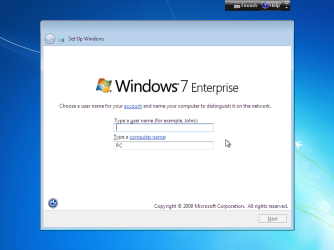
When starting to create the master image, start a clean install to an empty hard disk. When Seven installation stops to ask user and computer name, do not enter anything. Instead of typing your username and computer name, press CTRL + SHIFT +F3 (press and hold down CTRL and SHIFT, press F3 still holding CTRL and SHIFT down, release all three keys).

Finalizing installation is now interrupted, and Windows reboots to a so called Audit Mode:
Microsoft said:
By default, immediately after installation, Windows® starts Windows Welcome. However, you can configure a computer to boot to audit mode instead.

Audit mode enables you to customize a Windows installation without having to configure the user interface pages of Windows Welcome. During Windows Welcome, you are prompted to create user accounts and configure your location and time zone. By booting to audit mode you can ensure that the Windows image you are customizing would not have additional configurations that you would need to remove. Audit mode is ideal for making change to a Windows image before shipping a computer to a customer or capturing the image for reuse in your organization.
Simply, Audit Mode allows you to modify and customize the Seven setup as you wish before any user accounts are created or any user specific information is entered, using built-in administrator account. You can install all the apps needed in your master image, create default folders, user profiles etc. and set default locations.

When ready, use sysprep to generalize and create your hardware independent Windows 7 setup. Reboot to Audit Mode, create a system image using built-in imaging tool. Deploy the image.

To enter Audit mode, press CTRL + SHIFT + F3 when this screen appears during the installation:

Audit_01.png

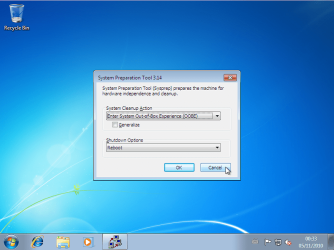
When Windows has rebooted to Audit Mode, close Sysprep GUI by clicking Cancel here:

Audit_02.png

Do your customization. When finished, open command prompt, enter the folder C:\Windows\System32\Sysprep\, type the command sysprep.exe /audit /reboot /generalize. Windows reboots now back to Audit Mode. Create your image, open command prompt, enter the folder C:\Windows\System32\Sysprep\, type the command sysprep.exe /oobe /shutdown. Deploy the image to other computers.

You can also use so called unattend XML-scripts to customize your setup. In that case, the syntax to use sysprep is sysprep.exe /audit /reboot /generalize /unattend:X:\Unattend.xml, where X:\Unattend.xml is the path and filename of your script.

More about Audit Mode:
About unattended setup:

Kari
 

My Computer

Computer type
Laptop
Computer Manufacturer/Model Number
HP ENVY 17-1150eg
OS
Windows 10 Pro x64 EN-GB
CPU
1.6 GHz Intel Core i7-720QM Processor
Memory
6 GB
Graphics Card(s)
ATI Mobility Radeon HD 5850 Graphics
Sound Card
Beats sound system with integrated subwoofer
Monitor(s) Displays
17" laptop display, 22" LED and 32" Full HD TV through HDMI
Screen Resolution
1600*900 (1), 1920*1080 (2&3)
Hard Drives
Internal: 2 x 500 GB SATA Hard Disk Drive 7200 rpm
External: 2TB for backups, 3TB USB3 network drive for media
Cooling
As Envy runs a bit warm, I have it on a Cooler Master pad
Keyboard
Logitech diNovo Media Desktop Laser (bluetooth)
Mouse
Logitech Performance Mouse MX
Internet Speed
50/10 Mbps VDSL
Antivirus
Windows Defender 4.3.9431.0
Browser
Maxthon 3.5.2., IE11
Question - so audit mode will let me essentially edit a default profile? Or am I misunderstanding that? I was just wondering if it was possible to do the stuff in audit mode then not even use sysprep, but instead use my 3rd party tools after that?
 

My Computer

OS
XP, 7
Depends on what you mean with default profile. Normally you need to use sysprep to generalize the image, make it hardware independent.

If you interrupt the install procedure to enter Audit Mode as I told in my previous post, no user profiles are yet created. You enter in Windows 7 in Audit Mode using the native, built-in administrator account.

An example scenario: you need to install Seven on 10 computers in an office. All computers should have the normal Windows 7 setup, plus Virtual PC with XP Mode installed. All computers should have two user accounts, one administrator account called NetworkAdmin, and one standard user account called Office.

So, you enter Audit Mode. You download and install VirtualPC and XP Mode, and create administrator account NetworkAdmin and standard user Office. Using sysprep you generalize the setup, make an image, and install the image to all 10 computers. Generalizing means no hardware drivers are installed; instead, they are installed when Windows is run first time in each computer.

I would recommend you to read carefully those TechNet articles on Audit Mode, links in my previous post.

Kari
 

My Computer

Computer type
Laptop
Computer Manufacturer/Model Number
HP ENVY 17-1150eg
OS
Windows 10 Pro x64 EN-GB
CPU
1.6 GHz Intel Core i7-720QM Processor
Memory
6 GB
Graphics Card(s)
ATI Mobility Radeon HD 5850 Graphics
Sound Card
Beats sound system with integrated subwoofer
Monitor(s) Displays
17" laptop display, 22" LED and 32" Full HD TV through HDMI
Screen Resolution
1600*900 (1), 1920*1080 (2&3)
Hard Drives
Internal: 2 x 500 GB SATA Hard Disk Drive 7200 rpm
External: 2TB for backups, 3TB USB3 network drive for media
Cooling
As Envy runs a bit warm, I have it on a Cooler Master pad
Keyboard
Logitech diNovo Media Desktop Laser (bluetooth)
Mouse
Logitech Performance Mouse MX
Internet Speed
50/10 Mbps VDSL
Antivirus
Windows Defender 4.3.9431.0
Browser
Maxthon 3.5.2., IE11
Thanks for the information. I ended up with my current setup just using some registry edits to HKCU to customize a bit. I really would like to learn how to use sysprep to generalize, but was kind of short on time. Everytime I try to do it, it ends up being more complicated than I thought!
 

My Computer

OS
XP, 7
Kari, I've already used your Tutorial to create my Images and love it! To bad Windows 7 is coming to an end because this is a tool I've only learned how to use recently.

I have an old Windows 7 laptop I want to use for my sysprep image. The only spare drive I have lying around is SLOW SATA 1.5. I like things to go a little faster no matter what I'm doing. So my question is: Can I use an SSD to do this and use that image as usual, for an HDD etc.? SSD's are cheap right now so thought I would use one for this project.

I have an image from another computer but used that pc for something else recently, and the Image is getting old.

Thanks, Nasty
 

My Computer

Computer type
Laptop
Computer Manufacturer/Model Number
HP Pavilion dv7-6c23cl
OS
Windows 7 Home Premium 64bit
CPU
AMD A8-3520M
Motherboard
Hewlett-Packard 180B (Socket FS1)
Memory
6.00GB DDR3 @ 674MHz (9-9-9-24)
Graphics Card(s)
512MB ATI AMD Radeon HD 6620G
Sound Card
IDT High Definition Audio CODEC
Monitor(s) Displays
Generic PnP Monitor
Screen Resolution
(1600x900@60Hz)
Hard Drives
Samsung 850 EVO 250GB SSD
Mouse
Logitec M525
Internet Speed
30-75Mbps
Antivirus
Avast Free, Unfortunately
Browser
Google Chrome, Firefox, IE
Nasty, despite Trim, a 2.5" SSD is seen by BIOS and Windows as a HDD.

As your SATA is old (150MB/s) it wont take full advantage of SSD speed (SATA 600). It will run around 150MB/s, but will be more or less 2 times faster than old HDD.
 

My Computers

System One System Two

  • Computer type
    PC/Desktop
    Computer Manufacturer/Model Number
    custom build
    OS
    Windows 7 HP 64
    CPU
    i5 6600K - 800MHz to 4200MHz
    Motherboard
    GA-Z170-HD3P
    Memory
    4+4G GSkill DDR4 3000
    Graphics Card(s)
    IG - Intel 530
    Monitor(s) Displays
    Samsung 226BW
    Screen Resolution
    1680x1050
    Hard Drives
    (1) -1 SM951 – 128GB M.2 AHCI PCIe SSD drive for Windows 7 and Lubuntu
    (2) -1 WD SATA 3 - 1T for Data
    (3) -1 WD SATA 3 - 1T for backup
    PSU
    Thermaltake 450W TR2 gold
    Keyboard
    Old and good Chicony mechanical keyboard
    Mouse
    Logitech mX performance - 9 buttons (had to disable some)
    Internet Speed
    500Mb/s
    Browser
    Firefox 64
    Other Info
    TinyWall firewall
  • Computer type
    Laptop
    System Manufacturer/Model Number
    Asus Q550LF
    OS
    Windows 7 Pro
    CPU
    i7-4500U 800MHz to 3.0GHz
    Motherboard
    Asus Q550LF
    Memory
    (4+4)G DDR3 1600
    Graphics Card(s)
    IG intel 4400 + NVIDIA GeForce GT 745M
    Sound Card
    Realtek
    Monitor(s) Displays
    LG Display LP156WF4-SPH1
    Screen Resolution
    1920 x 1080
    Hard Drives
    BX500 120G SSD for Windows and programs +
    1T HDD for data
    Internet Speed
    500 Mb/s
    Browser
    Firefox
    Other Info
    TinyWall firewall
Nasty, despite Trim, a 2.5" SSD is seen by BIOS and Windows as a HDD.

As your SATA is old (150MB/s) it wont take full advantage of SSD speed (SATA 600). It will run around 150MB/s, but will be more or less 2 times faster than old HDD.

Thanks!

SATA on the pc is II, but the old drive I'm using is SATA-I, I believe. Good enough, thanks.
 

My Computer

Computer type
Laptop
Computer Manufacturer/Model Number
HP Pavilion dv7-6c23cl
OS
Windows 7 Home Premium 64bit
CPU
AMD A8-3520M
Motherboard
Hewlett-Packard 180B (Socket FS1)
Memory
6.00GB DDR3 @ 674MHz (9-9-9-24)
Graphics Card(s)
512MB ATI AMD Radeon HD 6620G
Sound Card
IDT High Definition Audio CODEC
Monitor(s) Displays
Generic PnP Monitor
Screen Resolution
(1600x900@60Hz)
Hard Drives
Samsung 850 EVO 250GB SSD
Mouse
Logitec M525
Internet Speed
30-75Mbps
Antivirus
Avast Free, Unfortunately
Browser
Google Chrome, Firefox, IE
Back
Top