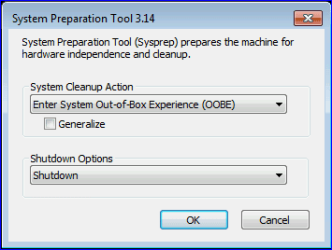
Sysprep, out of box experience

jguimond

New member
Local time
10:55 AM
Messages
4
A question, if I were to run this program, would it delete all my stuff and start up brand new without saving anything on my file? I see that my niece has it on her laptop and when I turn it on, it runs says it is preparing the laptop for first time use, every single use. Any help would be of great use.
 

My Computer

OS
windows 7 home premium 64bit
It leaves whatever you have on the machine data wise, but it removes the SID's, the unique identifiers, and resets the box taking you though a mini-setup, making you agree to licensing terms and making you activate the product.
 

My Computer

Computer Manufacturer/Model Number
Self-Built in July 2009
OS
Windows 7 Ultimate x64
CPU
Intel Q9550 2.83Ghz OC'd to 3.40Ghz
Motherboard
Gigabyte GA-EP45-UD3R rev. 1.1, F12 BIOS
Memory
8GB G.Skill PI DDR2-800, 4-4-4-12 timings
Graphics Card(s)
EVGA 1280MB Nvidia GeForce GTX570
Sound Card
Realtek ALC899A 8 channel onboard audio
Monitor(s) Displays
23" Acer x233H
Screen Resolution
1920x1080
Hard Drives
Intel X25-M 80GB Gen 2 SSD
Western Digital 1TB Caviar Black, 32MB cache. WD1001FALS
PSU
Corsair 620HX modular
Case
Antec P182
Cooling
stock
Keyboard
ABS M1 Mechanical
Mouse
Logitech G9 Laser Mouse
Internet Speed
15/2 cable modem
Other Info
Windows and Linux enthusiast. Logitech G35 Headset.
so it would be safe to use then? should I back anything up first?
 

My Computer

OS
windows 7 home premium 64bit
why do you want to run sysprep?
 

My Computer

Computer Manufacturer/Model Number
Self-Built in July 2009
OS
Windows 7 Ultimate x64
CPU
Intel Q9550 2.83Ghz OC'd to 3.40Ghz
Motherboard
Gigabyte GA-EP45-UD3R rev. 1.1, F12 BIOS
Memory
8GB G.Skill PI DDR2-800, 4-4-4-12 timings
Graphics Card(s)
EVGA 1280MB Nvidia GeForce GTX570
Sound Card
Realtek ALC899A 8 channel onboard audio
Monitor(s) Displays
23" Acer x233H
Screen Resolution
1920x1080
Hard Drives
Intel X25-M 80GB Gen 2 SSD
Western Digital 1TB Caviar Black, 32MB cache. WD1001FALS
PSU
Corsair 620HX modular
Case
Antec P182
Cooling
stock
Keyboard
ABS M1 Mechanical
Mouse
Logitech G9 Laser Mouse
Internet Speed
15/2 cable modem
Other Info
Windows and Linux enthusiast. Logitech G35 Headset.
so it would be safe to use then? should I back anything up first?
Do I understand you correctly? The computer shows this every time when booted:

Capture.PNG

This dialog means computer has been booted to Audit Mode. When in Audit Mode, every consecutive boot also starts in Audit Mode until user has chosen OOBE boot, and this dialog is shown.

If so, yes it is safe to click OK. When PC is then rebooted, it goes through the first boot routine (Out Of Box Experience or OOBE) and thereafter no longer shows this dialog.

Read more: Understanding Audit Mode

Kari
 

My Computer

Computer type
Laptop
Computer Manufacturer/Model Number
HP ENVY 17-1150eg
OS
Windows 10 Pro x64 EN-GB
CPU
1.6 GHz Intel Core i7-720QM Processor
Memory
6 GB
Graphics Card(s)
ATI Mobility Radeon HD 5850 Graphics
Sound Card
Beats sound system with integrated subwoofer
Monitor(s) Displays
17" laptop display, 22" LED and 32" Full HD TV through HDMI
Screen Resolution
1600*900 (1), 1920*1080 (2&3)
Hard Drives
Internal: 2 x 500 GB SATA Hard Disk Drive 7200 rpm
External: 2TB for backups, 3TB USB3 network drive for media
Cooling
As Envy runs a bit warm, I have it on a Cooler Master pad
Keyboard
Logitech diNovo Media Desktop Laser (bluetooth)
Mouse
Logitech Performance Mouse MX
Internet Speed
50/10 Mbps VDSL
Antivirus
Windows Defender 4.3.9431.0
Browser
Maxthon 3.5.2., IE11
ok,@ kari.

that dialog pops up everytime afterwards when the laptop that belongs to my niece is turned on. She says it happened after it died during the original recovery or w/e she used to start up her laptop anew.... don't know why she didn't have the charge cord in.

and @ pparks

I want to see if it would speed up my own laptop abit faster as if it were brand new out of the box without having the data I already have on it deleted. My laptop does run quite well as it is, so this is just a curiosity really. I won't go through with it unless I have an expert do it for me.
 

My Computer

OS
windows 7 home premium 64bit
a sysprep does not remove all of the cruft and garbage and get it back to running well. I was thinking that was what you were trying to do. Using sysprep is not appropriate for what you want to accomplish.
 

My Computer

Computer Manufacturer/Model Number
Self-Built in July 2009
OS
Windows 7 Ultimate x64
CPU
Intel Q9550 2.83Ghz OC'd to 3.40Ghz
Motherboard
Gigabyte GA-EP45-UD3R rev. 1.1, F12 BIOS
Memory
8GB G.Skill PI DDR2-800, 4-4-4-12 timings
Graphics Card(s)
EVGA 1280MB Nvidia GeForce GTX570
Sound Card
Realtek ALC899A 8 channel onboard audio
Monitor(s) Displays
23" Acer x233H
Screen Resolution
1920x1080
Hard Drives
Intel X25-M 80GB Gen 2 SSD
Western Digital 1TB Caviar Black, 32MB cache. WD1001FALS
PSU
Corsair 620HX modular
Case
Antec P182
Cooling
stock
Keyboard
ABS M1 Mechanical
Mouse
Logitech G9 Laser Mouse
Internet Speed
15/2 cable modem
Other Info
Windows and Linux enthusiast. Logitech G35 Headset.
Alright, thank you. I'll not do it at all. Going to stick with cleaning and maintenance as usual.
 

My Computer

OS
windows 7 home premium 64bit
a sysprep does not remove all of the cruft and garbage and get it back to running well. I was thinking that was what you were trying to do. Using sysprep is not appropriate for what you want to accomplish.

Listen to Pparks. Do not start experimenting with Sysprep if your only goal is to do some maintenance and cleaning.

Sysprep is used to prepare a Windows installation to be deployed as an image, or in some cases to modify internal Windows environment variables. It is not a cleaning tool, it does not do what you want to achieve.

Kari
 

My Computer

Computer type
Laptop
Computer Manufacturer/Model Number
HP ENVY 17-1150eg
OS
Windows 10 Pro x64 EN-GB
CPU
1.6 GHz Intel Core i7-720QM Processor
Memory
6 GB
Graphics Card(s)
ATI Mobility Radeon HD 5850 Graphics
Sound Card
Beats sound system with integrated subwoofer
Monitor(s) Displays
17" laptop display, 22" LED and 32" Full HD TV through HDMI
Screen Resolution
1600*900 (1), 1920*1080 (2&3)
Hard Drives
Internal: 2 x 500 GB SATA Hard Disk Drive 7200 rpm
External: 2TB for backups, 3TB USB3 network drive for media
Cooling
As Envy runs a bit warm, I have it on a Cooler Master pad
Keyboard
Logitech diNovo Media Desktop Laser (bluetooth)
Mouse
Logitech Performance Mouse MX
Internet Speed
50/10 Mbps VDSL
Antivirus
Windows Defender 4.3.9431.0
Browser
Maxthon 3.5.2., IE11
Back
Top