System Crash after major updates after system upgrade from Windows 7

thomasgm

New member
Local time
8:49 PM
Messages
10
My Desktop PC which was running the Windows 7 Ultimate OS crashed immediately after last years free upgrade to Windows 10. However after restarting it several times it restarted and very soon Microsoft had released a patch to help those who had experienced these crashes. After applying those needed updates my system once again started running fine and I had been using the same for a couple of months. Once again after another of those updates my system totally crashed and ever since I haven't been able to recover my PC and have tried all suggestions that I found on the net but have been unsuccessful in restoring my system back. Every time I switch my system on it tries to load the OS but eventually gives me this blue screen with the following message
":( Your PC ran into a problem and needs to restart. We'll restart for you.
For more information about this issue and possible fixes, visit
http://windows.com/stopcode
If you call a support person, give them this info:
Stop Code UNMOUNTABLE BOOT VOLUME"
Then after a few seconds it once again restarts and this cycle goes on an on. Ever since I haven't been able to use my system. Fearing that the HDD (Seagate 1TB 7200RPM Barracuda) would have been failing I have purchased another new HDD (Again Seagate 2TB 7200RPM Barracuda).
My PC is an assembled Core to Duo system with a Biostar G41D3+ Motherboard with 8GB RAM which was running a 32bit OS

Checking up the Stop code info at the Microsoft.com shows this code.
0x000000ED UNMOUNTABLE_BOOT_VOLUME

I have the following queries.
1. Since I had already upgraded from Windows 7 Ultimate to Windows 10 afterwhich the

system crashed, will the Windows 7 Ultimate Key be valid as no key was generated

during or after upgrade?
2. Can I install a fresh Windows 10 OS on the new Hard Disk that I have purchased.If so how do I do it using my legal Windows 7 Ultimate Key?
3. Will the Windows 7 Key still be valid for this new installation as I dont want to lose the legallity of the OS?
4. How do I transfer the data from my old HDD on to the new drive?
5. If the Hard Disk is failing how do I copy the data to my new hard drive?

I know I am a novice in this and have probably asked more questions than can be answered. However I would be grateful if someone could help guide me as to what to do so that I could set up my system using the new drive and the old windows 7 key.

Thanks is advance.
 
Last edited:

My Computer My Computer

At a glance

Windows Ultimate 32bitCore 2 Duo8GB
Computer type
PC/Desktop
Computer Manufacturer/Model Number
Assembled
OS
Windows Ultimate 32bit
CPU
Core 2 Duo
Motherboard
G
Memory
8GB
Hard Drives
1TB Seagate 7200RPM
Antivirus
AVG
Hi Thomasgm,

Regarding your keys
Your W7 is STILL valid, as is your W10 machine key.
W10 licencing is different when you upgraded to it, they (MS) created a machine specific key for you.

Up to you which OS you want,
W7 you can install from your discs or use the MCT tool for W10.
Either way you will need to change the Boot order in your bios, to perform a clean install
have a read of this to get to bios
Troubleshoot Windows 10 failure to boot using Recovery Environment General Tips Tutorials
Do the clean install on your NEW hdd once its up and running you can get your data from the old hdd

MS has been dropping support for older components wthin computers, which is more than likely causing your problem not your HDD
 

My Computer My Computer

At a glance

W7 home premium 32bit/W7HP 64bit/w10 tp insid...E5300 dual core3gbNvidia Geforce 7100 Nforce 630i
Computer type
PC/Desktop
Computer Manufacturer/Model Number
medionl/Aspire 6930G/acer x55a
OS
W7 home premium 32bit/W7HP 64bit/w10 tp insider ring
CPU
E5300 dual core
Motherboard
medion MS7366
Memory
3gb
Graphics Card(s)
Nvidia Geforce 7100 Nforce 630i
Monitor(s) Displays
avixc
Internet Speed
n (isp resticted to 72)
Antivirus
mse/pands
Browser
palemoon
Other Info
Belkin Fd7050 n USB using Railink RT2870 drivers, more upto date
Dear Torchwood,

Thanks for the response. However sorry for the delay. I have downloaded the Media Creation Tool for Windows10 as you asked me to do but my PC just refuses to boot from the USB even with the boot priority set to boot from the USB drive. I want to load Windows 10 on my new hard disk and then copy all the old data back to the new drive. However I am unable to load the files from my MCT on the USB drive inspite of trying it several times. Could you tell mw what could be wrong and why is the system not booting from the USB drive, Any inputs towards solving this problem will be much appreciated.

Thanks to all in advance.

Thomasgm
 

My Computer My Computer

At a glance

Windows Ultimate 32bitCore 2 Duo8GB
Computer type
PC/Desktop
Computer Manufacturer/Model Number
Assembled
OS
Windows Ultimate 32bit
CPU
Core 2 Duo
Motherboard
G
Memory
8GB
Hard Drives
1TB Seagate 7200RPM
Antivirus
AVG

My Computer My Computer

At a glance

W7 home premium 32bit/W7HP 64bit/w10 tp insid...E5300 dual core3gbNvidia Geforce 7100 Nforce 630i
Computer type
PC/Desktop
Computer Manufacturer/Model Number
medionl/Aspire 6930G/acer x55a
OS
W7 home premium 32bit/W7HP 64bit/w10 tp insider ring
CPU
E5300 dual core
Motherboard
medion MS7366
Memory
3gb
Graphics Card(s)
Nvidia Geforce 7100 Nforce 630i
Monitor(s) Displays
avixc
Internet Speed
n (isp resticted to 72)
Antivirus
mse/pands
Browser
palemoon
Other Info
Belkin Fd7050 n USB using Railink RT2870 drivers, more upto date
Dear Roy,

Thanks again for the prompt response. I have a quick query before I try out what you have suggested.
1. Since I have a 2TB HDD, whats your idea about partitioning the drive. Would 2 partitions of 1TB each do or should it be a single partition. I have seen some systems where there are number of logical partitions made which personally I do not prefer. But for best performance what is it you recommend? I shall do accordingly. BTW this link you have sent explains things more clearly and am excited to try it out soon at the end of the day when I would be free. I shall keep you updated. Another thing is going through the link that you sent it says that I need to enter the Win7 key if I am installing win10 for the first time. I remember you having said that Win10 OS is machine specific and that I wouldnt be needing the Win7 Key, as the digital key of the PC would be taken as the key. Is than right?

Thanks and I really appreciate guys like you who are willing to help. Thanks again
 

My Computer My Computer

At a glance

Windows Ultimate 32bitCore 2 Duo8GB
Computer type
PC/Desktop
Computer Manufacturer/Model Number
Assembled
OS
Windows Ultimate 32bit
CPU
Core 2 Duo
Motherboard
G
Memory
8GB
Hard Drives
1TB Seagate 7200RPM
Antivirus
AVG
Hi Thomas,

Re the keys, yes thats right, 10 only "needed" the key to perform the upgrade, then its ignored.

As for splitting the 2TB drive, as far as i know there is not a definate answer as to which is better.
In a lot of cases users split >> any << size drive usually 1 for the OS and 1 for data


Excellent tutorial by Kari
User Profiles - Create and Move During Windows 7 Installation - Windows 7 Help Forums
(see pdf link at the bottom)

Roy
 

My Computer My Computer

At a glance

W7 home premium 32bit/W7HP 64bit/w10 tp insid...E5300 dual core3gbNvidia Geforce 7100 Nforce 630i
Computer type
PC/Desktop
Computer Manufacturer/Model Number
medionl/Aspire 6930G/acer x55a
OS
W7 home premium 32bit/W7HP 64bit/w10 tp insider ring
CPU
E5300 dual core
Motherboard
medion MS7366
Memory
3gb
Graphics Card(s)
Nvidia Geforce 7100 Nforce 630i
Monitor(s) Displays
avixc
Internet Speed
n (isp resticted to 72)
Antivirus
mse/pands
Browser
palemoon
Other Info
Belkin Fd7050 n USB using Railink RT2870 drivers, more upto date
Hi Roy,

Thanks once again. I finally managed to clean install W10 and the system is finally running W10 on the new HDD. However I am now getting the message that I need to activate my copy of Windows before I can personalise etc. So I am in a fix as to what to do. Do I go ahead and activate windows with the Win7 key that I have or would it automatically digitally verify my system and then activate it on its own? I am not sure about this though. Also I did connect my old HDD as a secondary slave but the system refuses to accept it and keeps giving me the message that SMART Status of that HDD is set to BAD. So finally after doing a lot of study on the internet I managed to enter the BIOS and there disabled the option Enable SMART HDD Status and then after rebooting the system started and initially I was able to get into the drive and see all my files etc but on subsequent reboot it just refuses to allow me to access the old HDD all the while giving the message that the volume does not contain a recognised file system and asks me whether I would like to format the drive. Could you tell me what should be done next. I am sorry for asking too many questions but I just have no clue how to go about this latest status. Any suggestions?

Thanks

Thomas
 

My Computer My Computer

At a glance

Windows Ultimate 32bitCore 2 Duo8GB
Computer type
PC/Desktop
Computer Manufacturer/Model Number
Assembled
OS
Windows Ultimate 32bit
CPU
Core 2 Duo
Motherboard
G
Memory
8GB
Hard Drives
1TB Seagate 7200RPM
Antivirus
AVG
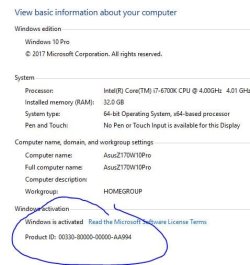
You don't have to activate it, it automatically activates itself. Check on the system page.

That is, if you already had W10 installed and activated on this particular PC, and if it`s connected to the internet.

Do you get any Permission pop ups when you try to access the other drive ?

Whatever you do, don't format it or you'll loose all your files. It`s very strange W10 is giving you that message.
 

Attachments

  • Capture.JPG
    Capture.JPG
    37.8 KB · Views: 12

My Computer My Computer

At a glance

Windows 10 Pro x64Intel Core i7 6700KGSkill TridentZ RGB 16GB 3600 16-16-16-36EVGA GTX 980 Ti SC x2
Computer type
PC/Desktop
Computer Manufacturer/Model Number
Skylake Special #666
OS
Windows 10 Pro x64
CPU
Intel Core i7 6700K
Motherboard
Asus Sabertooth Z170 Mark 1
Memory
GSkill TridentZ RGB 16GB 3600 16-16-16-36
Graphics Card(s)
EVGA GTX 980 Ti SC x2
Sound Card
Realtek High Definition
Monitor(s) Displays
AOC G2460PG
Screen Resolution
1920 x 1080 144Hz
Hard Drives
Samsung 860 Pro 256GB, Seagate Barracuda 4TB x2
PSU
EVGA 1000 P2, EVGA White Custom Braided Cables
Case
Corsair Vengeance C70 Gunmetal Black
Cooling
Corsair H100i v2, Corsair ML120 x2, Thermal Grizzly Kryonaut
Keyboard
Logitech G910 Orion Spectrum
Mouse
Logitech G700s
Internet Speed
Verizon Fios Quantum Gateway 75/75
Antivirus
Windows Defender, Malwarebytes Free 3.8.3
Browser
Chrome
Other Info
Corsair SP120 x4, LG Blu-ray Drive, Durabrand HT-395 100 Watt Dolby Digital Amp, Corsair H2100 Wireless 7.1 Headset
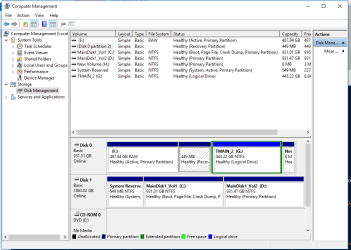
Post a full shot of Disk Management with both drives hooked up. Use paint or the snipping tool and save the picture to your desktop.

Then use the paperclip icon at the top of your reply to upload the picture.

Example:
 

Attachments

  • DM W10 Pro CU.JPG
    DM W10 Pro CU.JPG
    94.7 KB · Views: 1
Last edited:

My Computer My Computer

At a glance

Windows 10 Pro x64Intel Core i7 6700KGSkill TridentZ RGB 16GB 3600 16-16-16-36EVGA GTX 980 Ti SC x2
Computer type
PC/Desktop
Computer Manufacturer/Model Number
Skylake Special #666
OS
Windows 10 Pro x64
CPU
Intel Core i7 6700K
Motherboard
Asus Sabertooth Z170 Mark 1
Memory
GSkill TridentZ RGB 16GB 3600 16-16-16-36
Graphics Card(s)
EVGA GTX 980 Ti SC x2
Sound Card
Realtek High Definition
Monitor(s) Displays
AOC G2460PG
Screen Resolution
1920 x 1080 144Hz
Hard Drives
Samsung 860 Pro 256GB, Seagate Barracuda 4TB x2
PSU
EVGA 1000 P2, EVGA White Custom Braided Cables
Case
Corsair Vengeance C70 Gunmetal Black
Cooling
Corsair H100i v2, Corsair ML120 x2, Thermal Grizzly Kryonaut
Keyboard
Logitech G910 Orion Spectrum
Mouse
Logitech G700s
Internet Speed
Verizon Fios Quantum Gateway 75/75
Antivirus
Windows Defender, Malwarebytes Free 3.8.3
Browser
Chrome
Other Info
Corsair SP120 x4, LG Blu-ray Drive, Durabrand HT-395 100 Watt Dolby Digital Amp, Corsair H2100 Wireless 7.1 Headset
Hi AddRAM
Thanks for taking the trouble to help me out.
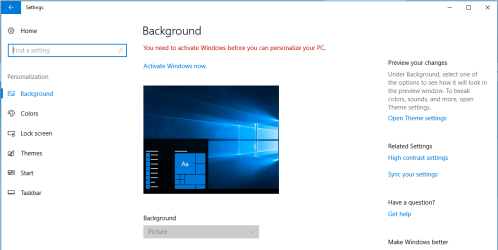
When I try to personalize the system I keep getting the message that I need to activate windows before I personalize. When I upgraded my system from Win7 Ultimate to WIn10 it upgraded the system automatically and there was no need for me to give the Win7 key at any time during or after the upgrade. It was a smooth transition. Thereafter when the patches were released immediately after updating the system my system crashed. Later after restarting it a number of times eventually got the system back on track. If worked very well for a couple of months thereafter once again during the patch updates my system crashed immediately afterwards and could not be revived afterwards. So I picked up a new HDD and then clean installed the Win10 via USB flash drive using MS Media Creation Tool. But now its asking for activation.
There are no permission popups when accessing the old HDD except that it takes ages to check it and then gives me the message that the media on that drive is not in a recognizable format and asks me whether I would like to format it which I have not done as I want the data on the old HDD. However I am uploading the screen capture of both the Disk Management Page and the Windows activation page. Please let me know what to do under this circumstance.
 

Attachments

  • Disk Management Capture.PNG
    Disk Management Capture.PNG
    26 KB · Views: 0
  • Activate Windows.PNG
    Activate Windows.PNG
    30.1 KB · Views: 0

My Computer My Computer

At a glance

Windows Ultimate 32bitCore 2 Duo8GB
Computer type
PC/Desktop
Computer Manufacturer/Model Number
Assembled
OS
Windows Ultimate 32bit
CPU
Core 2 Duo
Motherboard
G
Memory
8GB
Hard Drives
1TB Seagate 7200RPM
Antivirus
AVG
Hi AddRAM,
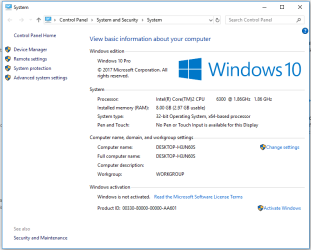
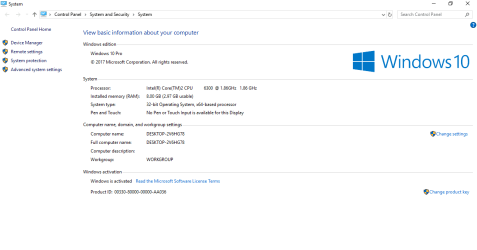
I forgot to upload the basic computer info screen shot, wherein it shows windows has not been activated.
 

Attachments

  • DM Capture.PNG
    DM Capture.PNG
    17.6 KB · Views: 0

My Computer My Computer

At a glance

Windows Ultimate 32bitCore 2 Duo8GB
Computer type
PC/Desktop
Computer Manufacturer/Model Number
Assembled
OS
Windows Ultimate 32bit
CPU
Core 2 Duo
Motherboard
G
Memory
8GB
Hard Drives
1TB Seagate 7200RPM
Antivirus
AVG
If same version of Win 10 is installed on same computer it will activate.
The new drive is on same computer and is the same version you had before (Pro)?
 

My Computers My Computers

  • At a glance

    Windows 7 HP 64i5 6600K - 800MHz to 4200MHz4+4G GSkill DDR4 3000IG - Intel 530
    Computer type
    PC/Desktop
    Computer Manufacturer/Model Number
    custom build
    OS
    Windows 7 HP 64
    CPU
    i5 6600K - 800MHz to 4200MHz
    Motherboard
    GA-Z170-HD3P
    Memory
    4+4G GSkill DDR4 3000
    Graphics Card(s)
    IG - Intel 530
    Monitor(s) Displays
    Samsung 226BW
    Screen Resolution
    1680x1050
    Hard Drives
    (1) -1 SM951 – 128GB M.2 AHCI PCIe SSD drive for Windows 7 and Lubuntu
    (2) -1 WD SATA 3 - 1T for Data
    (3) -1 WD SATA 3 - 1T for backup
    PSU
    Thermaltake 450W TR2 gold
    Keyboard
    Old and good Chicony mechanical keyboard
    Mouse
    Logitech mX performance - 9 buttons (had to disable some)
    Internet Speed
    500Mb/s
    Browser
    Firefox 64
    Other Info
    TinyWall firewall
  • At a glance

    Windows 7 Proi7-4500U 800MHz to 3.0GHz(4+4)G DDR3 1600IG intel 4400 + NVIDIA GeForce GT 745M
    Computer type
    Laptop
    System Manufacturer/Model Number
    Asus Q550LF
    OS
    Windows 7 Pro
    CPU
    i7-4500U 800MHz to 3.0GHz
    Motherboard
    Asus Q550LF
    Memory
    (4+4)G DDR3 1600
    Graphics Card(s)
    IG intel 4400 + NVIDIA GeForce GT 745M
    Sound Card
    Realtek
    Monitor(s) Displays
    LG Display LP156WF4-SPH1
    Screen Resolution
    1920 x 1080
    Hard Drives
    BX500 120G SSD for Windows and programs +
    1T HDD for data
    Internet Speed
    500 Mb/s
    Browser
    Firefox
    Other Info
    TinyWall firewall
Hi Megahertz07,
Nothing in the system has been changed except an addition of the new 2TB Drive. I assume that the version of windows 10 would have been the same as it had upgraded automatically and I hadn't opted for any specific version.Thanks for inquiring though. Could there be any other reason for this?

Thanks
Thomas
 

My Computer My Computer

At a glance

Windows Ultimate 32bitCore 2 Duo8GB
Computer type
PC/Desktop
Computer Manufacturer/Model Number
Assembled
OS
Windows Ultimate 32bit
CPU
Core 2 Duo
Motherboard
G
Memory
8GB
Hard Drives
1TB Seagate 7200RPM
Antivirus
AVG
Hi Thomas,

good and bad news

On your last screenshot W10 System, click on the Activate Windows line, follow the instructions.

now the bad.

Your running a 32bit version with 8GB ram IT CAN ONLY USE A MAX OF 3GB, also from your screenshot.
IF you have a specific program that only runs on 32bit then you might as well remove the extra RAM.
OR
CLEAN install a 64bit OS, key is valid for both.

Roy
 

My Computer My Computer

At a glance

W7 home premium 32bit/W7HP 64bit/w10 tp insid...E5300 dual core3gbNvidia Geforce 7100 Nforce 630i
Computer type
PC/Desktop
Computer Manufacturer/Model Number
medionl/Aspire 6930G/acer x55a
OS
W7 home premium 32bit/W7HP 64bit/w10 tp insider ring
CPU
E5300 dual core
Motherboard
medion MS7366
Memory
3gb
Graphics Card(s)
Nvidia Geforce 7100 Nforce 630i
Monitor(s) Displays
avixc
Internet Speed
n (isp resticted to 72)
Antivirus
mse/pands
Browser
palemoon
Other Info
Belkin Fd7050 n USB using Railink RT2870 drivers, more upto date
Hi Roy,

Thanks for the quick observation. In fact I had removed one 4GB RAM when I was running the Win7 OS earlier. However just before the recent clean install I added that 4GB RAM back not realising the fact that you pointed out. So yet again I clean installed Win10 after downloading the Win10 MCT this time with the 64bit version. However during the installation this time when it asked for the Win Key I keyed in the Win 7 Key that I had. After installation I find that the Windown this time has been activated but it still shows that the OS installed is a 32 bit OS. Why do you think the 64bit OS didnt get installed? Earlier when I had checked the basic requirements for installation my system had qualified. However it still shows that it is a 32bit OS that has been loaded. I am once again uploading the screen shot for your perusal. Hope this can help. Thanks for all the help.

Thomas
 

Attachments

  • Windows Configuration.PNG
    Windows Configuration.PNG
    16.6 KB · Views: 3

My Computer My Computer

At a glance

Windows Ultimate 32bitCore 2 Duo8GB
Computer type
PC/Desktop
Computer Manufacturer/Model Number
Assembled
OS
Windows Ultimate 32bit
CPU
Core 2 Duo
Motherboard
G
Memory
8GB
Hard Drives
1TB Seagate 7200RPM
Antivirus
AVG

My Computers My Computers

  • At a glance

    Windows 7 HP 64i5 6600K - 800MHz to 4200MHz4+4G GSkill DDR4 3000IG - Intel 530
    Computer type
    PC/Desktop
    Computer Manufacturer/Model Number
    custom build
    OS
    Windows 7 HP 64
    CPU
    i5 6600K - 800MHz to 4200MHz
    Motherboard
    GA-Z170-HD3P
    Memory
    4+4G GSkill DDR4 3000
    Graphics Card(s)
    IG - Intel 530
    Monitor(s) Displays
    Samsung 226BW
    Screen Resolution
    1680x1050
    Hard Drives
    (1) -1 SM951 – 128GB M.2 AHCI PCIe SSD drive for Windows 7 and Lubuntu
    (2) -1 WD SATA 3 - 1T for Data
    (3) -1 WD SATA 3 - 1T for backup
    PSU
    Thermaltake 450W TR2 gold
    Keyboard
    Old and good Chicony mechanical keyboard
    Mouse
    Logitech mX performance - 9 buttons (had to disable some)
    Internet Speed
    500Mb/s
    Browser
    Firefox 64
    Other Info
    TinyWall firewall
  • At a glance

    Windows 7 Proi7-4500U 800MHz to 3.0GHz(4+4)G DDR3 1600IG intel 4400 + NVIDIA GeForce GT 745M
    Computer type
    Laptop
    System Manufacturer/Model Number
    Asus Q550LF
    OS
    Windows 7 Pro
    CPU
    i7-4500U 800MHz to 3.0GHz
    Motherboard
    Asus Q550LF
    Memory
    (4+4)G DDR3 1600
    Graphics Card(s)
    IG intel 4400 + NVIDIA GeForce GT 745M
    Sound Card
    Realtek
    Monitor(s) Displays
    LG Display LP156WF4-SPH1
    Screen Resolution
    1920 x 1080
    Hard Drives
    BX500 120G SSD for Windows and programs +
    1T HDD for data
    Internet Speed
    500 Mb/s
    Browser
    Firefox
    Other Info
    TinyWall firewall
Thanks Roy,
I realised that I had not deleted the partition before clean installing the OS. Could that be the reason. I did download the Win10 64 bit version. Anyway I have started the download which seems to be an iso file. So should I first write the iso file onto a DVD or on to a USB flash drive? Do I delete the partition while clean installing the OS during the installation when the partition details are displayed at the start of the installation? Sorry for being so ignorant. Thanks again.

Thomas
 

My Computer My Computer

At a glance

Windows Ultimate 32bitCore 2 Duo8GB
Computer type
PC/Desktop
Computer Manufacturer/Model Number
Assembled
OS
Windows Ultimate 32bit
CPU
Core 2 Duo
Motherboard
G
Memory
8GB
Hard Drives
1TB Seagate 7200RPM
Antivirus
AVG
Last edited:

My Computers My Computers

  • At a glance

    Windows 7 HP 64i5 6600K - 800MHz to 4200MHz4+4G GSkill DDR4 3000IG - Intel 530
    Computer type
    PC/Desktop
    Computer Manufacturer/Model Number
    custom build
    OS
    Windows 7 HP 64
    CPU
    i5 6600K - 800MHz to 4200MHz
    Motherboard
    GA-Z170-HD3P
    Memory
    4+4G GSkill DDR4 3000
    Graphics Card(s)
    IG - Intel 530
    Monitor(s) Displays
    Samsung 226BW
    Screen Resolution
    1680x1050
    Hard Drives
    (1) -1 SM951 – 128GB M.2 AHCI PCIe SSD drive for Windows 7 and Lubuntu
    (2) -1 WD SATA 3 - 1T for Data
    (3) -1 WD SATA 3 - 1T for backup
    PSU
    Thermaltake 450W TR2 gold
    Keyboard
    Old and good Chicony mechanical keyboard
    Mouse
    Logitech mX performance - 9 buttons (had to disable some)
    Internet Speed
    500Mb/s
    Browser
    Firefox 64
    Other Info
    TinyWall firewall
  • At a glance

    Windows 7 Proi7-4500U 800MHz to 3.0GHz(4+4)G DDR3 1600IG intel 4400 + NVIDIA GeForce GT 745M
    Computer type
    Laptop
    System Manufacturer/Model Number
    Asus Q550LF
    OS
    Windows 7 Pro
    CPU
    i7-4500U 800MHz to 3.0GHz
    Motherboard
    Asus Q550LF
    Memory
    (4+4)G DDR3 1600
    Graphics Card(s)
    IG intel 4400 + NVIDIA GeForce GT 745M
    Sound Card
    Realtek
    Monitor(s) Displays
    LG Display LP156WF4-SPH1
    Screen Resolution
    1920 x 1080
    Hard Drives
    BX500 120G SSD for Windows and programs +
    1T HDD for data
    Internet Speed
    500 Mb/s
    Browser
    Firefox
    Other Info
    TinyWall firewall
Hi Roy,

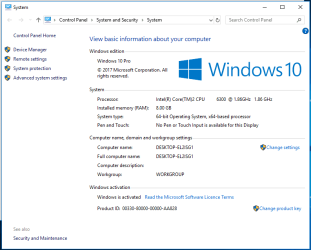
Thanks for asking me to clean install Win10 again. This time though I have been successful in installing the 64bit version. I wrote the ISO on to a DVD and then installed the OS after deleting all the partitions just as you asked me to and was very happy to find that this installation was successful. Had it not been for you asking me to reinstall it once more I would have settled with the 32bit version. Thanks for that. After that I tried connecting my old HDD and then restart the system but it is not allowing the system to boot. It gives the message that the SMART status of the disk is BAD and has been asking me to replace the disk and even though it asks to press 'del' to resume I am not able to go forward as the del key seems unresponsive. The old HDD earlier when hooked up showed the status of the HDD as healthy. SO now the problem is how do I boot the system with the old HDD hooked up? Is there something else that I need to try?
Thanks again for the patience in helping me. I have attached the screen print of the system properties for you to take a look at.
 

Attachments

  • Win 10 64Bit.PNG
    Win 10 64Bit.PNG
    17.6 KB · Views: 0

My Computer My Computer

At a glance

Windows Ultimate 32bitCore 2 Duo8GB
Computer type
PC/Desktop
Computer Manufacturer/Model Number
Assembled
OS
Windows Ultimate 32bit
CPU
Core 2 Duo
Motherboard
G
Memory
8GB
Hard Drives
1TB Seagate 7200RPM
Antivirus
AVG
Back
Top