System-Data separation strategies

milindsmart

New member
Member
Local time
7:53 PM
Messages
72
There are now many different ways of separating Users' data from the rest of the system data usually to another drive. Sevenforums has excellent tutorials on each, so let's put together some data about the pros and cons of them all....


In no particular order :
  1. http://www.sevenforums.com/tutorial...reate-move-during-windows-7-installation.html - By Kari - This one moves the ENTIRE users folder using sysprep. Complete and supported, but blocks upgrades and refresh (windows 8)
  2. http://www.sevenforums.com/tutorials/18629-user-folders-change-default-location.html - By Brink - This one moves those user's folders (C:\Users\{username}) created AFTER the edit to another location. Less drastic, not supported (involves registry editing), and still blocks upgrades and refresh. Corollary : http://www.sevenforums.com/tutorials/117308-user-folders-moving-user-folders-modular-script.html - By Alain Quarré - Also changes the symlinked shortcuts, and sets permissions, and lots of other small things that can make it perfect.
  3. http://www.sevenforums.com/tutorials/18629-user-folders-change-default-location.html - By Brink - Moves all the folders inside the profile (Documents, Desktop, etc.) to a different location. Supported, no system-level downsides (need to test this), but labour intensive... Also, AppData continues to grow.
  4. Funnily, you CAN move AppData folders, properties applet of Local, LocalLow, and Roaming have a Location tab, where you can choose a different place, and move it. Supported, no system-level downsides (? need to test this), but labour intensive... Also, not sure if it's a good idea... Is AppData user data or system data?
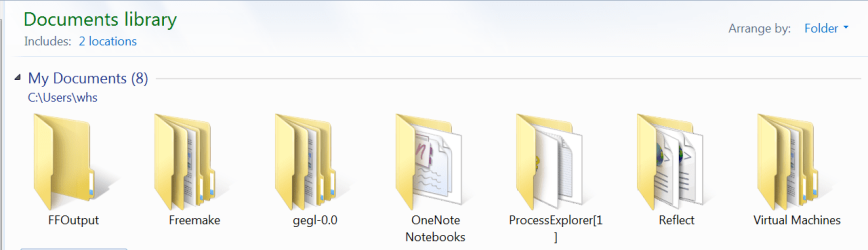
  5. The Library approach (thanks to whs for reminding me) - Keeping all user-generated data in other folders and including them in Libraries. But it's easy to keep saving/putting stuff in the default folders. The save-to locations can be changed to remedy this. However, applications may not go through libraries. Eg. Outlook, which would have to be manually configured.
  6. http://lifehacker.com/5467758/move-the-users-directory-in-windows-7 - Anon? - Basically using an NTFS junction point link, This one achieves a similar effect to method (1) , but seems to give mysterious error _sometimes_ . Other times it works better than the sysprep idea. It fools virtually all programs, with only windows updates occasionally finding something out of the ordinary.
Also note that (1) and (2) are very similar, in that (1) is (2) plus actually moving the Users folder.

Let's make this an authoritative thread on the tradeoffs involved.
 
Last edited:

My Computer

Computer type
PC/Desktop
Computer Manufacturer/Model Number
Custom
OS
Windows 7 Home Premium x64
CPU
Intel Core 2 Quad Q6600 G0
Motherboard
MSI P45 Platinum MS-7512
Memory
Transcend JM800QLU-2G x 2 (2x2GB)
Graphics Card(s)
Sapphire Radeon HD6850 1GB
Hard Drives
Seagate ST3360320AS in Transcend Storejet Ultra35 eSATA
Seagate ST31000524AS
PSU
Corsair GS600
Cooling
Stock
Mouse
Logitech Wired M500 USB
Internet Speed
15Mbps
Antivirus
Microsoft Security Essentials
Browser
Google Chrome
Well I didn't pay attention and now it's a problem resolution thread, rather than a discussion thread... Mods, can you do something about it? I can't seem to change it from my end.
 

My Computer

Computer type
PC/Desktop
Computer Manufacturer/Model Number
Custom
OS
Windows 7 Home Premium x64
CPU
Intel Core 2 Quad Q6600 G0
Motherboard
MSI P45 Platinum MS-7512
Memory
Transcend JM800QLU-2G x 2 (2x2GB)
Graphics Card(s)
Sapphire Radeon HD6850 1GB
Hard Drives
Seagate ST3360320AS in Transcend Storejet Ultra35 eSATA
Seagate ST31000524AS
PSU
Corsair GS600
Cooling
Stock
Mouse
Logitech Wired M500 USB
Internet Speed
15Mbps
Antivirus
Microsoft Security Essentials
Browser
Google Chrome
Bump.... No one?
 

My Computer

Computer type
PC/Desktop
Computer Manufacturer/Model Number
Custom
OS
Windows 7 Home Premium x64
CPU
Intel Core 2 Quad Q6600 G0
Motherboard
MSI P45 Platinum MS-7512
Memory
Transcend JM800QLU-2G x 2 (2x2GB)
Graphics Card(s)
Sapphire Radeon HD6850 1GB
Hard Drives
Seagate ST3360320AS in Transcend Storejet Ultra35 eSATA
Seagate ST31000524AS
PSU
Corsair GS600
Cooling
Stock
Mouse
Logitech Wired M500 USB
Internet Speed
15Mbps
Antivirus
Microsoft Security Essentials
Browser
Google Chrome

My Computer

Computer type
Laptop
Computer Manufacturer/Model Number
HP ENVY 17-1150eg
OS
Windows 10 Pro x64 EN-GB
CPU
1.6 GHz Intel Core i7-720QM Processor
Memory
6 GB
Graphics Card(s)
ATI Mobility Radeon HD 5850 Graphics
Sound Card
Beats sound system with integrated subwoofer
Monitor(s) Displays
17" laptop display, 22" LED and 32" Full HD TV through HDMI
Screen Resolution
1600*900 (1), 1920*1080 (2&3)
Hard Drives
Internal: 2 x 500 GB SATA Hard Disk Drive 7200 rpm
External: 2TB for backups, 3TB USB3 network drive for media
Cooling
As Envy runs a bit warm, I have it on a Cooler Master pad
Keyboard
Logitech diNovo Media Desktop Laser (bluetooth)
Mouse
Logitech Performance Mouse MX
Internet Speed
50/10 Mbps VDSL
Antivirus
Windows Defender 4.3.9431.0
Browser
Maxthon 3.5.2., IE11
I prefer a different approach. I define an empty data partition and in there I make 4 new folders - XYZ Documents, XYZ Pictures, XYZ Videos and XYZ Music . (in my case I use WHS Documents, WHS Pictures, etc.). The "XYZ" or the "WHS" are only there to distinguish the folders from the original folders. You can use any appendix though.

Then I right click on each of the 4 folders and INCLUDE it into the appropriate library. Then I move my data folders from the original default folders to these folders in the data partition.

The advantage of this approach is that the default folders stay intact and the system and program generated folders stay clearly seperated from my user folders. Example of system generated folders:

2014-09-04_1359.png

My library structure looks like this:

2014-09-04_1356.png
 

My Computer

Computer Manufacturer/Model Number
HP, Dell, Gateway, Toshiba - 4 laptops and 2 desktops
OS
Vista, Windows7, Mint Mate, Zorin, Windows 8
CPU
from 1.6GHz Duo to i7
Monitor(s) Displays
2x HP w2207
Hard Drives
5x HDD, 7x SSD, 12x Externals
Keyboard
with trackball - no mices
Mouse
Trackball mice
Internet Speed
DSL 6000
@whs and @kari : updated :) Thanks.
 

My Computer

Computer type
PC/Desktop
Computer Manufacturer/Model Number
Custom
OS
Windows 7 Home Premium x64
CPU
Intel Core 2 Quad Q6600 G0
Motherboard
MSI P45 Platinum MS-7512
Memory
Transcend JM800QLU-2G x 2 (2x2GB)
Graphics Card(s)
Sapphire Radeon HD6850 1GB
Hard Drives
Seagate ST3360320AS in Transcend Storejet Ultra35 eSATA
Seagate ST31000524AS
PSU
Corsair GS600
Cooling
Stock
Mouse
Logitech Wired M500 USB
Internet Speed
15Mbps
Antivirus
Microsoft Security Essentials
Browser
Google Chrome
I took an even simpler approach. I just dragged the My Documents, My Music, and My Pictures folders from my C: drive to my E: drive and the My Videos folder to my F: drive.
 

My Computer

Computer type
PC/Desktop
Computer Manufacturer/Model Number
Custom Build
OS
Win 7 Ultimate 64 bit
CPU
Intel i7-3930K
Motherboard
ASUS P9X79 WS
Memory
Kingston HyperX Genesis 32GB Kit (8x4GB Modules) 1600MHz DDR
Graphics Card(s)
MSI R7850 Twin Frozr 2GD5/OC Radeon HD 7850 2GB 256-bit GDDR
Sound Card
Asus Xonar Essence STX
Monitor(s) Displays
3x Asus VG248QE 24", Vizio 32" TV
Screen Resolution
1920 x 1080, ?
Hard Drives
Samsung 128GB 840 Pro SSD (1),
Samsung 4TB 850 EVO SSDs (4)
Samsung 4TB 850 EVO SSDs (16) external backup drives used in 2.5" hot swap bays in the computer.
PSU
Corsair HX750w
Case
Antec Two Hundred v2 (modified)
Cooling
Cooler Master GeminII S524 120mm (fan replaced with a 140mm)
Keyboard
Logitech G510s
Mouse
Logitech M525 (two in use)
Internet Speed
=< 32Mbps down, 8Mbps up
Antivirus
AVAST!, MBAM, SAS, Spybot S&D (all but MBAM free) Glary Util
Browser
IE11
Other Info
LSI 9211-8i HBA card (8 SATA III ports), 2.5" & 3.5" Hot Swap Bays, HooToo HT-CR001 PCI-E to USB 3.0 Internal Hub + 6 Slot Card Reader, and LG Model CH12LS28 BD-ROM Optical Drive. Also, ScanSnap S1500 ADF duplexing scanner, Canon 9000F flat bed scanner, Corsair SP2500 2.1 speakers, Samsung CLP 415nw laser color printer, Cyberpower PP2200SW UPS
What do you mean drag? Where are they actually stored?
 

My Computer

Computer type
PC/Desktop
Computer Manufacturer/Model Number
Custom
OS
Windows 7 Home Premium x64
CPU
Intel Core 2 Quad Q6600 G0
Motherboard
MSI P45 Platinum MS-7512
Memory
Transcend JM800QLU-2G x 2 (2x2GB)
Graphics Card(s)
Sapphire Radeon HD6850 1GB
Hard Drives
Seagate ST3360320AS in Transcend Storejet Ultra35 eSATA
Seagate ST31000524AS
PSU
Corsair GS600
Cooling
Stock
Mouse
Logitech Wired M500 USB
Internet Speed
15Mbps
Antivirus
Microsoft Security Essentials
Browser
Google Chrome
Example: For My Documents, I opened a window for the C: drive and another one for the E: drive. I left clicked on the My Documents folder and, while still holding the left click button down, used the mouse to literally drag the folder from the C: drive to the E: drive. Data in My Documents stays in the folder which is now on the E: drive.
 

My Computer

Computer type
PC/Desktop
Computer Manufacturer/Model Number
Custom Build
OS
Win 7 Ultimate 64 bit
CPU
Intel i7-3930K
Motherboard
ASUS P9X79 WS
Memory
Kingston HyperX Genesis 32GB Kit (8x4GB Modules) 1600MHz DDR
Graphics Card(s)
MSI R7850 Twin Frozr 2GD5/OC Radeon HD 7850 2GB 256-bit GDDR
Sound Card
Asus Xonar Essence STX
Monitor(s) Displays
3x Asus VG248QE 24", Vizio 32" TV
Screen Resolution
1920 x 1080, ?
Hard Drives
Samsung 128GB 840 Pro SSD (1),
Samsung 4TB 850 EVO SSDs (4)
Samsung 4TB 850 EVO SSDs (16) external backup drives used in 2.5" hot swap bays in the computer.
PSU
Corsair HX750w
Case
Antec Two Hundred v2 (modified)
Cooling
Cooler Master GeminII S524 120mm (fan replaced with a 140mm)
Keyboard
Logitech G510s
Mouse
Logitech M525 (two in use)
Internet Speed
=< 32Mbps down, 8Mbps up
Antivirus
AVAST!, MBAM, SAS, Spybot S&D (all but MBAM free) Glary Util
Browser
IE11
Other Info
LSI 9211-8i HBA card (8 SATA III ports), 2.5" & 3.5" Hot Swap Bays, HooToo HT-CR001 PCI-E to USB 3.0 Internal Hub + 6 Slot Card Reader, and LG Model CH12LS28 BD-ROM Optical Drive. Also, ScanSnap S1500 ADF duplexing scanner, Canon 9000F flat bed scanner, Corsair SP2500 2.1 speakers, Samsung CLP 415nw laser color printer, Cyberpower PP2200SW UPS
Holding Shift? Else dragging it would have just copied it to another drive, not moved it.

And yeah nice way of doing it :) It's the same as option 3 in my post above, but I did not know it can be done so easily and elegantly :)
 

My Computer

Computer type
PC/Desktop
Computer Manufacturer/Model Number
Custom
OS
Windows 7 Home Premium x64
CPU
Intel Core 2 Quad Q6600 G0
Motherboard
MSI P45 Platinum MS-7512
Memory
Transcend JM800QLU-2G x 2 (2x2GB)
Graphics Card(s)
Sapphire Radeon HD6850 1GB
Hard Drives
Seagate ST3360320AS in Transcend Storejet Ultra35 eSATA
Seagate ST31000524AS
PSU
Corsair GS600
Cooling
Stock
Mouse
Logitech Wired M500 USB
Internet Speed
15Mbps
Antivirus
Microsoft Security Essentials
Browser
Google Chrome
I prefer a different approach. I define an empty data partition and in there I make 4 new folders - XYZ Documents, XYZ Pictures, XYZ Videos and XYZ Music . (in my case I use WHS Documents, WHS Pictures, etc.). The "XYZ" or the "WHS" are only there to distinguish the folders from the original folders. You can use any appendix though.
...
...

I use mulitlingual Windows, setting the display language individually for each user profile. Until quite recently, I needed on each Windows computer three main user accounts for admin (in English), me (in English) and my now estranged wife (in German) plus for work purposes separate user accounts for me in Finnish, Swedish and German. This screenshot of a Windows 8 logon screen shows what I mean:

Logon_win8_2_zps5c12d8f4.png

In other words my normal setup has 6 or 7 user profiles (accounts) not counting the built-in administrator, in 4 different languages. Each of these profiles contains by default only a handful of first level subfolders like Favorites, Downloads, Documents, Pictures, Videos, Music and so on but quite a lot of programs, services and devices add a first level subfolder to individual profile folders as for example in my case the the printer / scanner has added a Scans subfolder, OneDrive added a subfolder for itself, Origin / Electronic Arts game launcher as well etc.. In addition I myself add subfolders as I go for all possible purposes ranging from tutorial drafts to account statements.

At the moment my personal user profile folder Users\Kari contains over 40 first level subfolders, other accounts a bit less but each at least 15 first level subfolders. Because I want to separate the system files and folders (including installed applications) from user data, using this method I would need to go through an incredible number of folders to manually take care of that they are stored on another than system drive. Also always when creating a new user account I would need to repeat the procedure, as well as when for instance installing OneDrive desktop app to a new account I would need manually move the folder away from C:\Users\NewUser. I also have multiple computers so I would need to fo this separately on each computer.

For my purposes the Sysprep method is more elegant, easy to do and what's the best is that when I do it one time, needing two or three minutes for it, the whole Users folder is relocated on another drive with everything it contains, AppData folders included meaning all user specific data saved by user him/herself or any program / application will automatically be stored away from system drive. Everything is thereafter automatic, I do not have to even think where the Users is located because Windows treats the new location as default location.

A new subfolder I create will be automatically created on new location, any new subfolder created on any user profile folder by an application or service will be created on the new location for instance when you install the Origin Game Launcher it creates its Electronic Arts save game subfolder on this new location. Any new additional user account's profile folder will automatically be created on the new location.

For this I need to compose an XML file containg a few lines of instructions for Sysprep, run the Sysprep command once and now I can forget the whole thing. No manual moving of folders every time a new folder or user is created. A one time "do it and forget it" procedure taking a couple of minutes of my time, thereafter everything is moved, every last bit of any user data. I install both Seven and Eight from my own premade images created in Audit Mode where the Sysprep process has already been done, so all my reinstalls / new installations start from scratch (no user profiles, a normal OOBE first run boot) but have the Users main profile folder relocated on another drive by default. Any user profiles created will be created on the new location.

Kari
 

My Computer

Computer type
Laptop
Computer Manufacturer/Model Number
HP ENVY 17-1150eg
OS
Windows 10 Pro x64 EN-GB
CPU
1.6 GHz Intel Core i7-720QM Processor
Memory
6 GB
Graphics Card(s)
ATI Mobility Radeon HD 5850 Graphics
Sound Card
Beats sound system with integrated subwoofer
Monitor(s) Displays
17" laptop display, 22" LED and 32" Full HD TV through HDMI
Screen Resolution
1600*900 (1), 1920*1080 (2&3)
Hard Drives
Internal: 2 x 500 GB SATA Hard Disk Drive 7200 rpm
External: 2TB for backups, 3TB USB3 network drive for media
Cooling
As Envy runs a bit warm, I have it on a Cooler Master pad
Keyboard
Logitech diNovo Media Desktop Laser (bluetooth)
Mouse
Logitech Performance Mouse MX
Internet Speed
50/10 Mbps VDSL
Antivirus
Windows Defender 4.3.9431.0
Browser
Maxthon 3.5.2., IE11
  • Like
Reactions: whs
Holding Shift? Else dragging it would have just copied it to another drive, not moved it.

And yeah nice way of doing it :) It's the same as option 3 in my post above, but I did not know it can be done so easily and elegantly :)

Yes, while also holding the SHIFT key down. Sorry, forgot to mention that.
 

My Computer

Computer type
PC/Desktop
Computer Manufacturer/Model Number
Custom Build
OS
Win 7 Ultimate 64 bit
CPU
Intel i7-3930K
Motherboard
ASUS P9X79 WS
Memory
Kingston HyperX Genesis 32GB Kit (8x4GB Modules) 1600MHz DDR
Graphics Card(s)
MSI R7850 Twin Frozr 2GD5/OC Radeon HD 7850 2GB 256-bit GDDR
Sound Card
Asus Xonar Essence STX
Monitor(s) Displays
3x Asus VG248QE 24", Vizio 32" TV
Screen Resolution
1920 x 1080, ?
Hard Drives
Samsung 128GB 840 Pro SSD (1),
Samsung 4TB 850 EVO SSDs (4)
Samsung 4TB 850 EVO SSDs (16) external backup drives used in 2.5" hot swap bays in the computer.
PSU
Corsair HX750w
Case
Antec Two Hundred v2 (modified)
Cooling
Cooler Master GeminII S524 120mm (fan replaced with a 140mm)
Keyboard
Logitech G510s
Mouse
Logitech M525 (two in use)
Internet Speed
=< 32Mbps down, 8Mbps up
Antivirus
AVAST!, MBAM, SAS, Spybot S&D (all but MBAM free) Glary Util
Browser
IE11
Other Info
LSI 9211-8i HBA card (8 SATA III ports), 2.5" & 3.5" Hot Swap Bays, HooToo HT-CR001 PCI-E to USB 3.0 Internal Hub + 6 Slot Card Reader, and LG Model CH12LS28 BD-ROM Optical Drive. Also, ScanSnap S1500 ADF duplexing scanner, Canon 9000F flat bed scanner, Corsair SP2500 2.1 speakers, Samsung CLP 415nw laser color printer, Cyberpower PP2200SW UPS
@Kari :

Whoa that's a lot of folders there... I guess you're right, moving \Users is the easiest way _currently_ .

But conceptually, if we had a script that did all this seamlessly, would you not prefer moving the folders? Then upgrading and refresh and reset will work. Right?

Also, what do you think about using an NTFS Junction Point for \Users?
 

My Computer

Computer type
PC/Desktop
Computer Manufacturer/Model Number
Custom
OS
Windows 7 Home Premium x64
CPU
Intel Core 2 Quad Q6600 G0
Motherboard
MSI P45 Platinum MS-7512
Memory
Transcend JM800QLU-2G x 2 (2x2GB)
Graphics Card(s)
Sapphire Radeon HD6850 1GB
Hard Drives
Seagate ST3360320AS in Transcend Storejet Ultra35 eSATA
Seagate ST31000524AS
PSU
Corsair GS600
Cooling
Stock
Mouse
Logitech Wired M500 USB
Internet Speed
15Mbps
Antivirus
Microsoft Security Essentials
Browser
Google Chrome
Back
Top